UAE E-Invoicing: Preventing Invoice Rejection from ERP Data Errors
Quick Answer: Why Can ERP Data Errors Lead to E-Invoice Rejection?
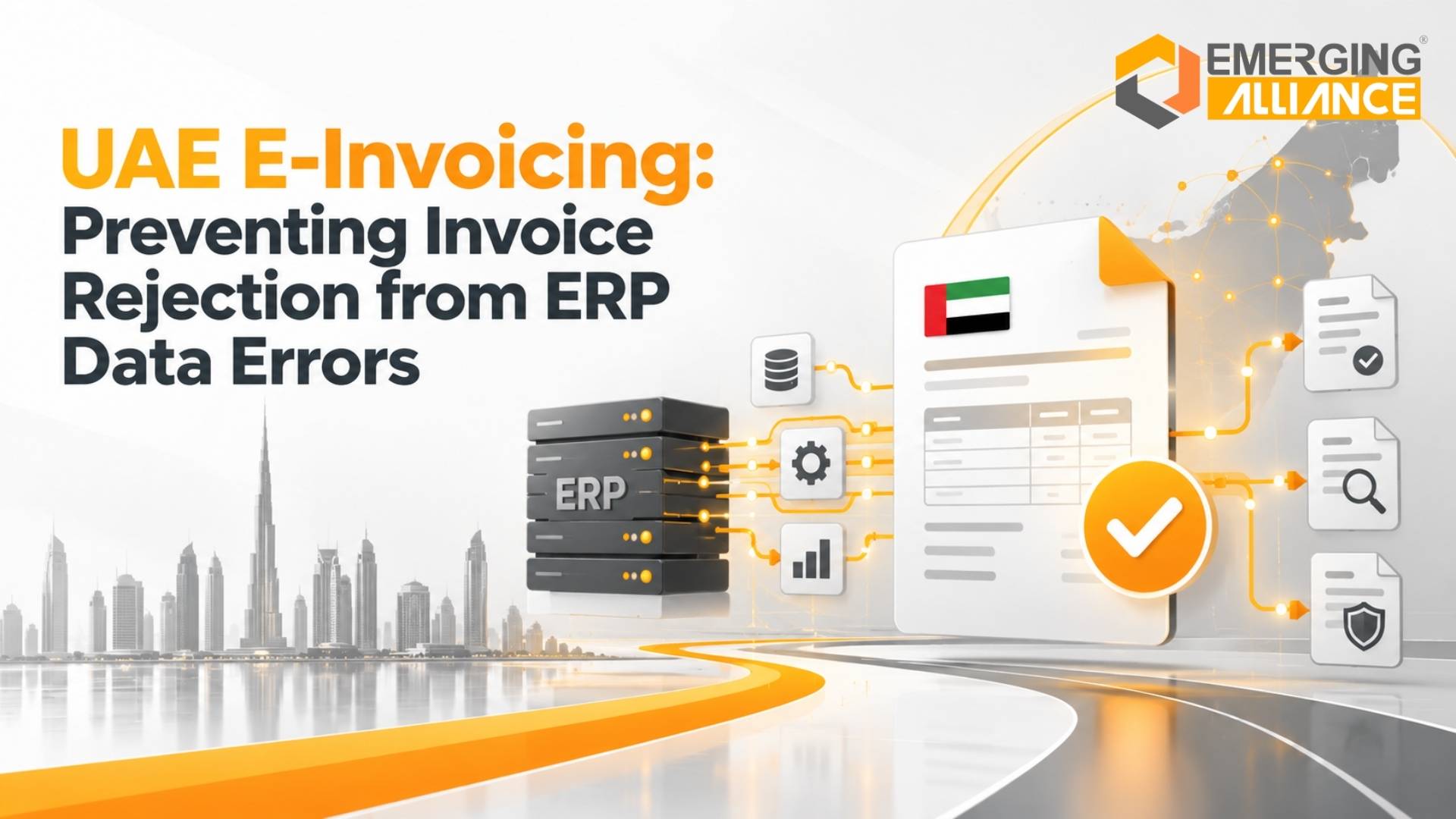
UAE E-Invoicing accuracy starts inside the ERP. Customer details, tax information, product data, prices, transaction values, and invoice fields are typically created or maintained before the electronic invoice reaches an e-invoicing platform.
If that underlying information is incomplete, inconsistent, incorrectly configured, or transferred incorrectly between systems, the resulting electronic invoice may fail a validation rule, require correction, create an integration exception, or be unable to proceed through the intended processing flow.
The risk can be understood as a simple chain:
The stronger the controls at the beginning of this chain, the lower the likelihood that finance teams will need to investigate problems after an invoice has already been generated.
For UAE businesses preparing their systems for electronic invoicing, the objective should therefore be broader than connecting an ERP to an e-invoicing service.
The real objective is to make sure the ERP consistently produces clean, complete, structured, and reliable invoice data.
The Risk Behind a Rejected E-Invoice
Consider a common business scenario.
The problem may appear to be an invoicing issue.
But the actual error may have originated much earlier.
A customer record may have been entered incorrectly months ago. A tax configuration may have changed without proper testing. A product master may contain inconsistent classification or description data. A discount may have been manually overridden. Or two integrated systems may contain different versions of the same information.
This is why e-invoicing should not be treated purely as a document-transmission project.
It is also a data-governance and ERP-control project.
The UAE Ministry of Finance defines an eInvoice as structured invoice data exchanged electronically between supplier and buyer and reported electronically to the Federal Tax Authority. It also maintains specific mandatory-field requirements for the UAE eInvoicing programme. That makes structured, controlled source data increasingly important to the end-to-end process.
A small ERP data problem can consequently create a much larger operational chain:
At low invoice volumes, companies may absorb this manually.
At hundreds or thousands of transactions, the same weakness becomes a scalability problem.
The ERP Data Chain Behind Every E-Invoice
Before an electronic invoice reaches its external processing environment, several layers of ERP data may already have influenced it.
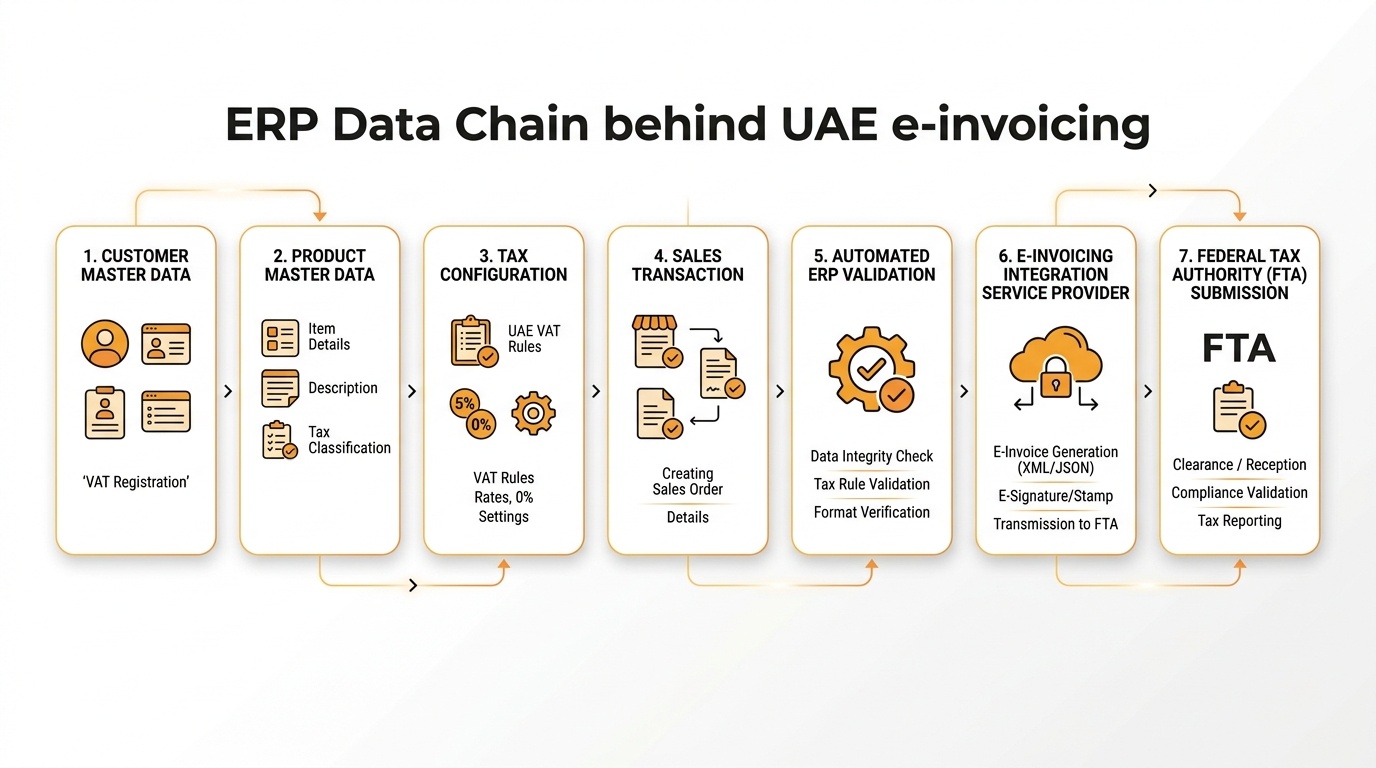
ERP Data Chain Behind UAE E-Invoicing: Systematic flow from customer and product master data to automated validation, accredited integration, and FTA submission.
Customer Master Data
Data involved
Customer name, business information, billing details, tax-related information, addresses, payment terms, currencies, and other customer attributes.
What can go wrong
Records can be incomplete, duplicated, outdated, entered differently across systems, or manually altered without appropriate governance.
Effect on invoice processing
Incorrect source information can flow directly into invoices or create inconsistencies during downstream validation and processing.
How to reduce the risk
Establish master-data ownership, mandatory fields, duplication controls, controlled modifications, and periodic customer-data cleansing.
Product and Service Data
Data involved
Item or service codes, descriptions, units of measure, pricing references, tax-related attributes, and transaction classifications used by the business.
What can go wrong
Different departments may use different codes or descriptions, old items may remain active, fields may be incomplete, or master records may not be standardized.
Effect on invoice processing
Inconsistent product data can create transaction discrepancies, calculation problems, integration exceptions, or additional manual review.
How to reduce the risk
Standardize item and service masters and establish ownership over additions, changes, and deactivation.
Tax Configuration
Data involved
Tax codes, tax rates, transaction treatment, customer or item tax settings, and calculation logic configured within the ERP.
What can go wrong
The wrong tax code can be assigned, configuration may not reflect the intended transaction treatment, or users may manually override system calculations.
Effect on invoice processing
Incorrect tax information may create invoice discrepancies and potential VAT or compliance issues.
How to reduce the risk
Review tax configuration with qualified finance and tax specialists, restrict unnecessary overrides, and test relevant transaction scenarios before deployment.
Pricing and Discounts
Data involved
Price lists, customer-specific pricing, contractual rates, discounts, quantities, rounding rules, currencies, and other calculation inputs.
What can go wrong
Outdated price lists, manual discounts, unauthorized changes, or inconsistent calculation logic can alter the final invoice value.
Effect on invoice processing
Invoice totals may not reconcile with orders, contracts, customer expectations, or downstream system calculations.
How to reduce the risk
Automate pricing where possible and apply approval controls to exceptions and manual adjustments.
Sales Transaction
Data involved
Customer, item, quantity, delivery information, commercial terms, tax treatment, pricing, references, and other transaction-level information.
What can go wrong
Users may choose the wrong customer, item, tax code, quantity, or reference information.
Effect on invoice processing
An otherwise correctly configured ERP can still produce problematic invoice data when the source transaction is wrong.
How to reduce the risk
Validate transactions at entry rather than relying entirely on finance teams to detect problems after invoicing.
Invoice Generation
Data involved
All relevant master and transaction data brought together into the final invoice record.
What can go wrong
Manual adjustments, missing information, incorrect document relationships, or inconsistent data inherited from upstream processes can enter the invoice.
Effect on invoice processing
The document may require additional correction or fail internal or downstream processing checks.
How to reduce the risk
Minimize uncontrolled invoice editing and establish automated checks before final invoice creation.
Data Validation
Data involved
Fields, formats, calculations, tax information, document relationships, and other business or system rules.
What can go wrong
Organizations may have few internal validation controls and rely on downstream systems to discover errors.
Effect on invoice processing
Errors are discovered later, when correction becomes slower and more expensive.
How to reduce the risk
Move validation upstream into the ERP and transaction workflow.
E-Invoicing Integration
Data involved
Invoice information mapped from the ERP into the required integration structure.
What can go wrong
Field mappings can be incorrect, mandatory information can be lost, formats can differ, data transformations can fail, or integrations can use outdated source records.
Effect on invoice processing
An invoice that looks correct inside the ERP can still encounter an integration or validation issue after transmission.
How to reduce the risk
Test mappings, transformation rules, error responses, reconciliation, and exception scenarios—not only successful transactions.
Submission
The final electronic invoice depends on everything that happened before submission.
This creates an important control principle:
Do not use the submission stage as the primary place to discover ERP data errors.
The more problems prevented inside the ERP, the cleaner and more scalable the downstream e-invoicing process becomes.
7 ERP Data Errors That Can Create Invoice-Processing Problems
Not every ERP error automatically results in regulatory rejection. Some create internal processing exceptions, integration errors, customer disputes, tax risks, or manual correction rather than formal rejection.
Businesses should distinguish between specific UAE e-invoicing validation requirements and broader ERP data-quality risks.
1. Incorrect Customer Master Data
Problem → Customer information used for invoicing is incomplete or inconsistent.
Cause → Manual entry, duplicate records, outdated information, inconsistent naming conventions, or weak master-data governance.
Business impact → Incorrect customer information can flow into invoice records, create validation or reconciliation issues, and require finance teams to investigate and amend transactions.
Preventive action → Introduce mandatory fields, duplicate detection, master-data approval processes, periodic cleansing, and clearly assigned ownership.
2. Missing or Inaccurate Tax Information
Problem → Required tax-related information is absent, outdated, or associated with the wrong business record.
Cause → Incomplete onboarding, poor record maintenance, manual entry, or disconnected customer databases.
Business impact → The resulting invoice may contain inaccurate tax information or require additional checking and correction.
Preventive action → Validate relevant tax data when records are created and establish periodic verification processes.
3. Incorrect VAT or Tax Configuration
Problem → ERP tax logic does not correctly support the transaction being processed.
Cause → Incorrect tax codes, configuration mistakes, uncontrolled changes, manual overrides, or insufficient testing.
Business impact → VAT invoice errors can affect calculations, financial reporting, invoice processing, and potentially compliance.
Preventive action → Conduct structured tax-configuration reviews and test relevant business scenarios with appropriate finance and tax expertise.
4. Product or Service Master-Data Inconsistencies
Problem → Product and service records are incomplete or inconsistent.
Cause → Different naming conventions, duplicate items, incomplete master fields, legacy data, or separate departmental records.
Business impact → Transaction information can become inconsistent across sales, finance, inventory, and external invoice processes.
Preventive action → Standardize master-data structures and control who can create or modify records.
5. Incorrect Pricing, Discounts, or Calculations
Problem → The invoice amount differs from the intended commercial transaction.
Cause → Outdated price lists, manual discounts, incorrect quantities, currency errors, unauthorized overrides, or inconsistent calculation rules.
Business impact → Incorrect totals can result in reconciliation work, customer disputes, credit notes, corrections, and delayed collections.
Preventive action → Automate approved pricing structures and route pricing exceptions through controlled approval workflows.
6. Missing or Inconsistent Invoice Information
Problem → Information needed for the transaction or applicable processing rules is missing or inconsistent.
Cause → Manual invoice creation, incomplete source transactions, poorly configured templates, weak ERP controls, or insufficient validation.
Business impact → Invoices may require additional review, correction, or processing before they can proceed.
Preventive action → Build mandatory-field validation and document-level checks into the ERP process.
The UAE Ministry of Finance maintains official mandatory-field requirements for its electronic invoicing programme. Businesses should therefore validate their specific data requirements against current official guidance rather than relying on assumptions or generic invoice templates.
7. ERP Integration and Data-Synchronization Issues
Problem → Correct ERP information becomes incorrect, incomplete, duplicated, or outdated during transfer.
Cause → Poor field mapping, synchronization delays, incompatible data structures, transformation errors, or weak exception handling.
Business impact → Finance teams may see one value in the ERP while an external system receives another.
Preventive action → Conduct end-to-end integration testing and monitor both successful transactions and exceptions.
The Hidden Cost of Invoice Rejection
An invoice-processing problem rarely costs only the few minutes required to edit a field.
Its effects can spread across several business processes.
Finance-Team Rework
Finance employees must identify the failed transaction, determine its source, coordinate with other departments, correct the record, and process the document again.
Repeated across hundreds of invoices, this becomes significant non-value-added work.
Processing Delays
Each exception interrupts straight-through processing.
The invoice remains unresolved while employees investigate the problem.
Collection Delays
When invoice processing is delayed, the receivables cycle may also be delayed.
A preventable data error can therefore become a working-capital issue.
Customer Disputes
Incorrect prices, customer information, quantities, tax treatment, or transaction references can trigger customer questions and disputes.
Increased Administrative Workload
A single issue may involve sales, finance, IT, tax teams, customer service, and ERP support.
Tax and Compliance Exposure
Errors involving tax information can create risks beyond operational inconvenience and may require specialist review.
Poor Financial Visibility
If invoices remain unresolved or require repeated correction, finance teams may have less reliable visibility over billing and receivables.
Cash-Flow Pressure
The sequence is straightforward:
Difficulty Scaling Finance Operations
Manual correction may appear manageable at 100 invoices per month.
At 10,000 transactions, the same exception rate can become a major operating problem.
The strategic question is therefore not:
“Can our team correct invoice errors?”
It is:
“Can our system prevent most of these errors before the invoice is created?”
Where Businesses Lose Control of Invoice Data
Invoice problems often originate in a series of small control gaps rather than one major system failure.
Manual Customer-Data Entry
Free-text entry creates variations in names, addresses, identifiers, and other business information.
Risk: inconsistent source data.
Duplicate Master Records
Multiple records may represent the same customer or item.
Risk: employees use different information for similar transactions.
Spreadsheet-Based Processes
Critical invoice data may be maintained outside the ERP.
Risk: no single source of truth and weak change control.
Multiple Systems Storing Different Data
CRM, ERP, billing, tax, e-commerce, and finance platforms may maintain overlapping information.
Risk: synchronization failures and conflicting records.
Incorrect Tax Configuration
Tax logic may be configured incorrectly or changed without sufficient testing.
Risk: incorrect invoice calculations or transaction treatment.
Uncontrolled Master-Data Changes
Users may update customer, product, or financial information without approval.
Risk: previously stable processes suddenly generate inconsistent outputs.
Manual Invoice Adjustments
Finance users may routinely alter values after invoice generation.
Risk: system controls are bypassed and auditability declines.
Lack of Validation Before Invoice Generation
Problems are checked only after an invoice exists.
Risk: every error requires additional processing.
Weak ERP Integrations
Interfaces may transmit incomplete or incorrectly mapped information.
Risk: the source ERP and downstream e-invoicing environment disagree.
Poor Exception Management
Errors appear but there is no clear workflow explaining who owns them or how they should be resolved.
Risk: invoices remain unresolved longer than necessary and recurring causes remain unfixed.
The Cost of Fixing Errors After Invoice Generation
There are two fundamentally different approaches to invoice-data quality.
Late Detection
Every additional stage consumes time.
Worse, the finance team is treating the symptom rather than preventing the cause.
Early Detection
The difference is significant.
In the second model, incorrect information is stopped before it becomes an invoice problem.
That reduces downstream exceptions, protects processing efficiency, and makes high transaction volumes easier to manage.
For UAE e-invoicing readiness, businesses should therefore shift their control philosophy from:
to:
From Manual Correction to Automated Control
Traditional invoice environments frequently operate like this:
A controlled ERP environment moves validation earlier:
Automation does not mean that errors can never occur.
It means the business systematically reduces the number of opportunities for those errors to enter the process.
Three capabilities are particularly important.
Standardization
Users follow controlled structures instead of creating data differently every time.
Validation
The ERP checks critical information before allowing the process to continue.
Automation
Calculations, workflows, approvals, and data transfers happen consistently instead of depending entirely on human intervention.
Together, these controls support more reliable electronic invoicing at scale.
How to Prevent ERP Data Errors Before Invoice Submission
Clean Existing Master Data
Start by identifying duplicate, outdated, incomplete, and inconsistent customer, item, service, and financial records.
Do not automate poor-quality data.
Standardize Data Structures
Establish consistent formats and governance rules for master records.
Users should know which fields are required, how values should be entered, and who owns each data domain.
Introduce Mandatory-Field Controls
Critical information should not remain optional where the business process requires it.
Validation should happen as close as possible to data entry.
Review Tax Configuration
Test tax codes, calculation logic, transaction scenarios, and relevant exceptions with appropriate tax and finance specialists.
Automate Calculations
Where possible, pricing, discounts, taxes, totals, and other calculations should come from controlled ERP logic rather than manual spreadsheets.
Create ERP Data Validation Rules
Identify the errors that occur most often and determine whether the ERP can detect them automatically.
Use Approval Workflows
High-risk changes such as pricing overrides or selected master-data modifications should follow defined approval rules.
Test Integrations End to End
Do not test only whether an invoice can be transmitted successfully.
Test:
- incomplete data,
- incorrect mappings,
- duplicate transactions,
- unavailable interfaces,
- changed master records,
- error responses,
- corrected transactions,
- and reconciliation.
Establish Exception Handling
Every error should have a clear owner and resolution process.
Maintain Audit Trails
Businesses should be able to determine what changed, when it changed, and where appropriate, who changed it.
Continuously Monitor Data Quality
Track recurring invoice corrections and exceptions.
Repeated errors are valuable diagnostic signals.
If one field causes 30% of invoice problems, fixing that source process may produce a much higher return than simply adding more people to finance operations.
Find the Weak Points Before They Become Invoice Problems
An effective ERP readiness assessment should not begin with a generic yes/no checklist.
It should determine where invoice-data control is weakest.
A. Master Data
Ask:
- Is customer information complete and consistently maintained?
- Are product and service records standardized?
- Do duplicate customer or item records exist?
- Is relevant tax information maintained correctly?
- Who is allowed to create or modify critical records?
- Are old records regularly reviewed?
If the answers vary between departments, the organization may already have a master-data governance problem.
B. Invoice Creation
Ask:
- How much invoice information is entered manually?
- Are tax calculations automated?
- Are pricing and discounts controlled consistently?
- How often does finance manually modify invoices?
- Do invoice values consistently originate from approved sales transactions?
- Are users able to bypass normal controls?
Frequent manual modifications suggest that the ERP process may not adequately reflect the underlying business workflow.
C. Data Validation
Ask:
- Are errors detected before invoice generation?
- Is required information validated automatically?
- Must finance manually inspect invoice information?
- Are exceptions clearly identified?
- Can users continue processing despite missing critical information?
If the primary validation layer is a finance employee reviewing documents one by one, transaction growth will increase workload almost linearly.
D. Integration
Ask:
- Does ERP data flow consistently into the e-invoicing environment?
- How many systems exchange invoice-related information?
- Are synchronization problems common?
- Have integration mappings been validated?
- Have error scenarios been tested?
- Can finance reconcile ERP invoices with downstream processing results?
Integration should be tested as a complete business process, not merely as a technical connection.
The UAE framework uses Ministry of Finance-accredited service providers for electronic invoicing, making the interface between a company’s source systems and its selected e-invoicing environment an important readiness consideration.
E. Ongoing Control
Ask:
- Are data-quality issues actively monitored?
- Is there an audit trail?
- Are master-data changes controlled?
- Are recurring invoice errors analyzed?
- Does management know the primary causes of invoice corrections?
- Are preventive actions assigned and tracked?
Without ongoing monitoring, organizations may repeatedly correct the same underlying error.
If several of these areas depend heavily on manual intervention, disconnected systems, or inconsistent data, the business may have an ERP readiness gap that should be addressed before invoice-processing problems increase.
That gap—not the invoice itself—is where management attention should begin.
Where SAP Business One Can Help
Once the data-control problem has been identified, the ERP becomes part of the solution.
For suitable small and midsize organizations, SAP Business One can provide an integrated environment for core business and financial processes.
Its potential value in an e-invoicing readiness strategy comes from strengthening the processes that generate invoice data in the first place.
Centralized Business Data
Customer, sales, inventory, purchasing, and financial information can operate within a more integrated business environment.
This reduces dependence on disconnected files and isolated departmental records.
Master-Data Consistency
Controlled master records create a stronger foundation for reliable downstream transactions.
Financial Process Control
Structured financial processes can reduce unnecessary manual intervention.
Automated Calculations
System-driven calculations can improve consistency compared with manually maintained spreadsheets and disconnected processes.
Workflow Management
Approval and process controls can help businesses manage exceptions more systematically.
Data Visibility
Management can gain greater visibility into the transactions and processes behind invoicing.
Integration Capabilities
SAP Business One can form part of an integrated architecture connecting business processes with external platforms and services, subject to the required solution design, interfaces, and testing.
Reporting
Integrated reporting can help finance and operational teams identify inconsistencies and recurring issues more quickly.
Reduced Manual Intervention
When business rules, calculations, and data flows are properly designed, employees spend less time repeatedly entering or correcting the same information.
However, SAP Business One should not be interpreted as automatically guaranteeing UAE e-invoicing compliance.
Compliance depends on the applicable regulatory requirements, configuration, business processes, solution architecture, required integrations, relevant service providers, data quality, implementation, and continuing governance.
SAP Business One should therefore be evaluated as one component of a broader ERP and UAE E-Invoicing readiness strategy.
When Should a Business Review Its ERP?
Several warning signs indicate that invoice problems may have become an ERP or process issue.
A business should investigate further when it experiences:
- frequent invoice corrections,
- repeated data-entry mistakes,
- highly manual invoice processing,
- inconsistent tax calculations,
- duplicate customer or item masters,
- multiple disconnected systems,
- recurring integration failures,
- poor visibility into invoice status,
- increasing transaction volumes,
- frequent spreadsheet dependencies,
- repeated customer disputes over invoice information,
- or finance teams spending significant time correcting documents.
One isolated error may simply be an exception.
Repeated errors represent something different.
They suggest the process itself may be producing unreliable information.
As transaction volumes grow, adding finance employees to correct these errors treats the consequence rather than the cause.
The sustainable solution is to improve data quality, process design, ERP controls, and integration.
A 5-Step ERP Improvement Plan for UAE E-Invoicing Readiness
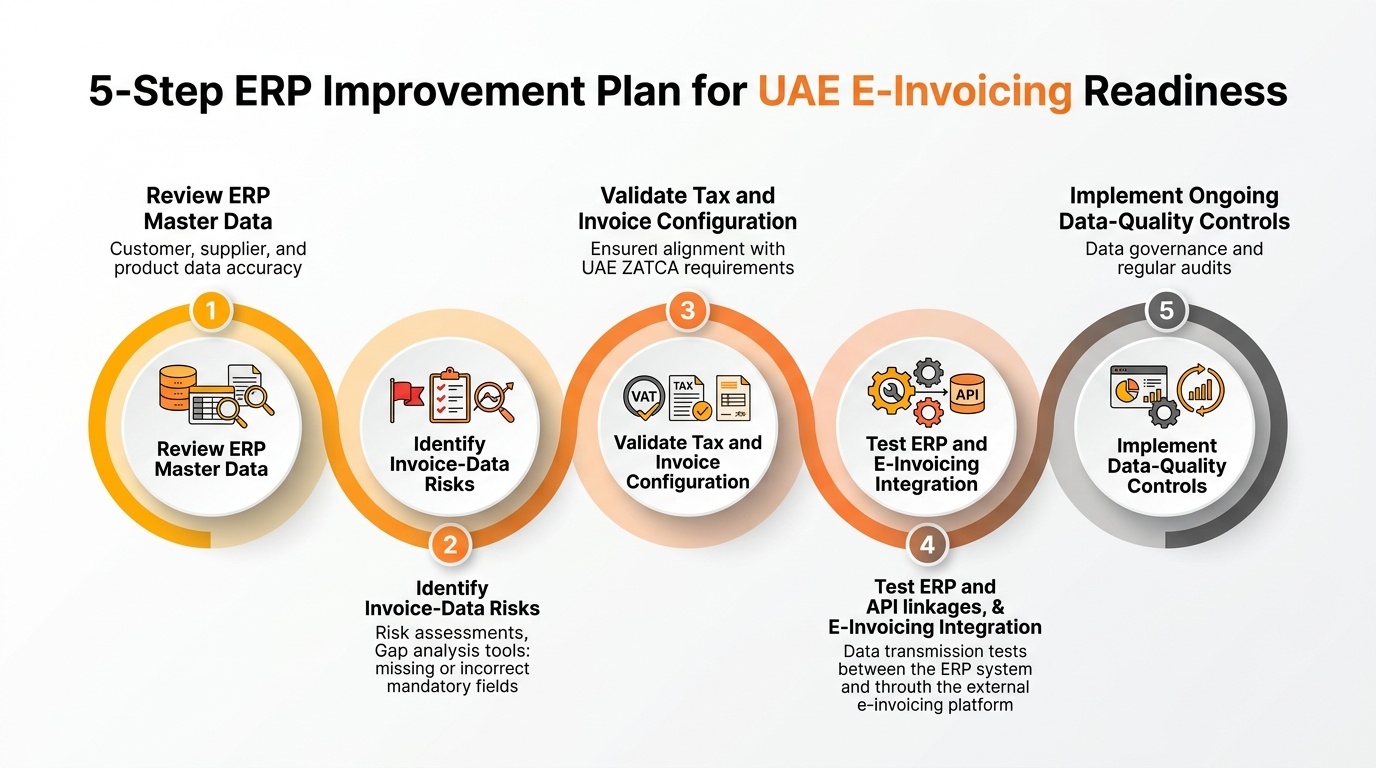
5-Step ERP Improvement Plan for UAE E-Invoicing Readiness: A practical framework to transition from reactive correction to upstream automated control.
Step 1: Review ERP Master Data
Analyze customer, item, service, tax-related, and other relevant master records for duplicates, missing information, and inconsistent formats.
Prioritize the data fields that directly influence invoicing.
Step 2: Identify Invoice-Data Risks
Map the complete invoice process from transaction creation to submission.
Determine where information is manually entered, changed, transformed, or transferred.
Step 3: Validate Tax and Invoice Configuration
Review relevant tax codes, calculations, transaction logic, mandatory information, pricing rules, and invoice controls with the appropriate business and tax stakeholders.
Step 4: Test ERP and E-Invoicing Integration
Validate field mappings and end-to-end transaction flows.
Test both successful invoices and failure scenarios.
Step 5: Implement Ongoing Data-Quality Controls
Establish validation rules, monitoring, audit trails, exception management, change controls, and periodic master-data reviews.
ERP readiness is not a one-time cleanup project.
It is an ongoing control discipline.
Is Your ERP Generating Clean, Consistent, and Reliable Invoice Data?
Preparing for UAE E-Invoicing should not begin only at the point where invoices leave your ERP.
It should begin with the data that creates those invoices.
If your finance team regularly corrects customer information, changes tax data, adjusts invoices manually, reconciles inconsistent systems, or investigates integration errors, the organization may have an upstream ERP-control problem.
Emerging Alliance helps UAE businesses assess the processes and systems behind invoicing, including:
- ERP environment assessment,
- master-data and data-quality gap identification,
- invoicing-process reviews,
- integration-gap analysis,
- financial workflow improvement,
- SAP Business One requirement evaluation,
- SAP Business One implementation and integration planning,
- and ERP/e-invoicing readiness assessment.
The objective is not simply to move invoice data from one system to another.
It is to establish a more reliable foundation for generating that data correctly in the first place.
Frequently Asked Questions
Prevent UAE E-Invoicing Rejections
Concerned about data errors affecting your UAE e-invoicing compliance?
Fill out the form below to connect with Emerging Alliance and explore how the right ERP processes and integrations can improve invoice data accuracy, reduce rejection risks, and support UAE e-invoicing requirements.