SAP Business One Add-ons: Costly Selection Mistakes to Avoid
Quick Answer
Choosing the wrong SAP Business One add-on can create costs far beyond the initial license. Integration, customization, implementation, support, upgrade compatibility, training, and scalability can significantly affect total ownership cost. Businesses should therefore evaluate add-ons based on process fit, measurable value, technical compatibility, vendor capability, and long-term scalability, not purchase price alone.
Why SAP Business One Add-on Selection Requires More Than Feature Comparison
SAP Business One add-ons extend ERP functionality where standard capabilities do not fully meet operational, industry, or integration requirements. However, an add-on rarely affects only one department.
A warehouse solution may influence inventory, purchasing, sales fulfillment, finance, reporting, and customer service. A manufacturing extension may affect production planning, material consumption, costing, quality processes, and operational visibility.
That changes the decision from a simple feature question into a broader business and architecture evaluation.
Decision-makers should ask whether the add-on solves a real process problem, integrates reliably with SAP Business One, scales with future growth, minimizes unnecessary customization, remains supportable through upgrades, and delivers measurable operational value.
The objective is not to add more technology. It is to extend SAP Business One only where additional capability creates meaningful business value without introducing avoidable complexity.
Do You Need an SAP Business One Add-on at All?
Before evaluating third-party products, organizations should determine whether the requirement can already be addressed through standard SAP Business One functionality, existing modules, configuration changes, workflow redesign, standard reporting, current integrations, or functionality already available in another deployed solution.
Some apparent software gaps are actually configuration or process-adoption gaps.
Introducing another application when SAP Business One already supports the requirement can create unnecessary licensing, integration, training, maintenance, support, and upgrade obligations.
Standard functionality may be sufficient when the requirement involves established financial, purchasing, sales, inventory, reporting, or approval processes that can be handled through supported configuration.
An add-on becomes more appropriate when there is a genuine functional gap with measurable business impact.
Examples may include specialized warehouse automation, advanced manufacturing requirements, barcode operations, regulatory workflows, industry-specific functionality, high-volume transaction automation, mobile operations, e-commerce integration, complex reporting, or specialized approvals.
The requirement should be important enough to justify introducing and maintaining another technology component.
The Real Cost of SAP Business One Add-ons
The purchase price is only one element of SAP B1 add-on cost. A more accurate evaluation looks at the entire lifecycle.
The first stage includes licensing, implementation, consulting, configuration, integration, data migration, testing, training, and custom development.
After go-live, organizations may incur support fees, annual maintenance, subscription renewals, infrastructure expenses, internal administration, integration monitoring, and additional employee training.
Growth can create another cost layer. More users, warehouses, branches, entities, transactions, or integrations may change both licensing and implementation requirements.
Upgrade requirements also matter. Changes to SAP Business One, databases, APIs, infrastructure, or connected applications can require compatibility testing, configuration changes, or redevelopment.
Exit cost should not be ignored either. If the add-on eventually needs to be replaced, the organization may face data migration, integration redevelopment, user retraining, workflow redesign, and another implementation cycle.
This is why a low-priced add-on can generate a higher five-year ownership cost than a more expensive solution with stronger process fit and lower lifecycle complexity.
8 Costly SAP Business One Add-on Selection Mistakes

Avoid key pitfalls when selecting ERP add-ons by aligning business outcomes before pricing and checking support dependencies.
1. Choosing Price Before Business Fit
License price is easy to compare, but it should not drive the first stage of evaluation.
A low-cost product becomes expensive when employees need manual workarounds, spreadsheet controls, extra integrations, or custom development to compensate for missing functionality.
Define the business outcome first. Identify what process must improve, which users are affected, what operational limitation must disappear, and how success will be measured.
Commercial comparison should begin only after shortlisted add-ons demonstrate suitable business-process fit.
2. Evaluating Features Instead of Real Workflows
A long feature list does not automatically create business value.
The more important question is whether the product supports the way work actually moves through the organization.
Map the process from trigger to user action, approval, SAP transaction, downstream activity, and reporting outcome.
Then test the add-on using representative scenarios.
For example, instead of asking whether a warehouse add-on supports picking, demonstrate an actual flow from sales order through allocation, picking, stock update, dispatch, invoicing, and reporting.
Workflow-led demonstrations expose usability, control, integration, and process gaps that feature-led demonstrations often hide.
3. Assuming Integration Means It Connects
An add-on can integrate technically and still create operational problems.
Decision-makers should validate which system owns master data, how transactions synchronize, whether integration is real time or scheduled, how failed transactions are identified, how duplicates are prevented, and how errors are reprocessed.
They should also review APIs, authentication, reporting dependencies, logging, monitoring, and support ownership.
Weak SAP Business One integration can create duplicate entry, inconsistent records, reconciliation work, and delayed reporting.
Technical validation should therefore go beyond a vendor statement that two products integrate.
4. Evaluating Today’s Scale Instead of Tomorrow’s Operation
A solution can work successfully for current users and transaction volumes while becoming unsuitable after expansion.
Evaluate future growth in users, warehouses, branches, legal entities, products, transactions, integrations, and reporting requirements.
Scalability also includes the commercial model.
Ask whether additional users, locations, or transaction volumes significantly change licensing costs, implementation effort, administrative workload, or support requirements.
A solution that requires major redevelopment during expansion can become a long-term constraint.
5. Using Customization to Compensate for Poor Product Fit
Configuration and customization are different.
Configuration adapts the solution through supported settings. Customization introduces additional development or modified behavior.
Customization may be justified for genuine differentiating requirements, but excessive development increases testing, maintenance, upgrade complexity, technical debt, and vendor dependency.
Before approving custom development, determine whether the requirement can be handled through standard functionality, supported configuration, process redesign, or an existing capability.
Every customization should have a documented business reason and a clear understanding of its lifecycle impact.
6. Ignoring Vendor Support Until After Go-Live
Product capability matters before implementation. Support capability matters for the rest of the product lifecycle.
Organizations should review support coverage, escalation procedures, documentation quality, technical expertise, release management, patch compatibility, product roadmap, and long-term vendor commitment.
A capable add-on with a weak support model can create substantial operational risk.
Support responsibilities should be understood before contract approval rather than discovered during a critical incident.
7. Failing to Test Upgrade Compatibility
SAP Business One environments change over time.
Versions, feature packages, databases, infrastructure, APIs, operating systems, and connected applications can all evolve.
Before selecting an add-on, determine which SAP Business One releases are supported, how quickly new versions are supported, what testing is required, and who is responsible for resolving compatibility problems.
Upgrade compatibility should be treated as a procurement requirement, not a future technical concern.
8. Building an Add-on Portfolio Without Governance
Adding a separate extension whenever a new requirement appears can gradually fragment the ERP landscape.
The consequences may include overlapping functionality, multiple license contracts, additional integration points, separate support contacts, inconsistent user experiences, more upgrade testing, and unclear ownership.
Before purchasing another extension, determine whether the requirement can be handled through standard SAP Business One, an installed add-on, configuration, an existing integration, or a broader solution already planned.
The goal should be coherent functionality, not maximum functionality.
How to Compare SAP Business One Add-ons Before Making a Decision
A structured comparison prevents product demonstrations and pricing from dominating the decision too early.
Start with business-process alignment. The add-on should support actual workflows rather than forcing employees to change sound processes simply to fit the software.
Next, examine integration quality. The solution should exchange information with SAP Business One reliably, with clear master-data ownership, transaction synchronization, failure handling, reporting flow, and monitoring.
Scalability should then be tested against the future operating model. Consider additional users, warehouses, entities, transactions, reports, and integrations.
Customization requirements deserve separate attention. A solution requiring extensive custom development from the beginning may indicate poor process fit.
Vendor capability is equally important. Review support ownership, documentation, upgrade policies, release practices, escalation routes, technical resources, and roadmap stability.
The final decision should favor the solution that provides the strongest combination of business fit, integration reliability, scalability, maintainability, supportability, and measurable value.
Understanding the Full Investment Behind an SAP Business One Add-on
SAP Business One add-on investment should be evaluated across the entire solution lifecycle rather than through the initial license price.
Initial investment can include licenses, subscriptions, consulting, implementation, configuration, integration, migration, testing, training, and custom development.
Operating cost begins after go-live and may include support contracts, annual maintenance, internal administration, infrastructure, user onboarding, integration monitoring, and recurring subscriptions.
Growth cost appears as the organization adds users, locations, warehouses, entities, products, transactions, and new systems.
Upgrade cost emerges when SAP Business One, the database, APIs, infrastructure, or connected applications change.
Replacement risk also has financial consequences. Moving away from an unsuitable add-on may require data migration, new integrations, workflow redesign, user retraining, implementation services, and change management.
This makes total cost of ownership more useful than purchase price alone.
Executives should evaluate the sequence:
The strongest commercial choice is the one that continues to deliver business value without creating disproportionate integration, customization, support, or replacement costs over time.
Business Case Before Add-on Investment
An SAP Business One add-on should begin with a validated business problem, not with a product demonstration.
Start by identifying where the current process creates delays, excessive manual work, errors, weak traceability, poor reporting, compliance risk, inventory inaccuracies, customer-service issues, or limited management visibility.
Next, measure the business impact using reliable internal information.
This may include employee hours spent on manual activity, reconciliation workload, transaction delays, order-processing time, inventory discrepancies, reporting delays, production bottlenecks, or compliance effort.
Then define the expected outcome.
The organization may be seeking faster warehouse execution, reduced manual reconciliation, better production visibility, stronger traceability, improved control, more reliable reporting, or faster access to operational information.
Success metrics should be agreed before implementation.
Otherwise, leaders can approve expenditure without a practical way to determine whether the add-on delivered value.
The central executive question should be simple:
What measurable business problem will this investment solve?
If stakeholders cannot answer that clearly, the organization may not yet be ready to purchase.
Technical Validation Before Selection
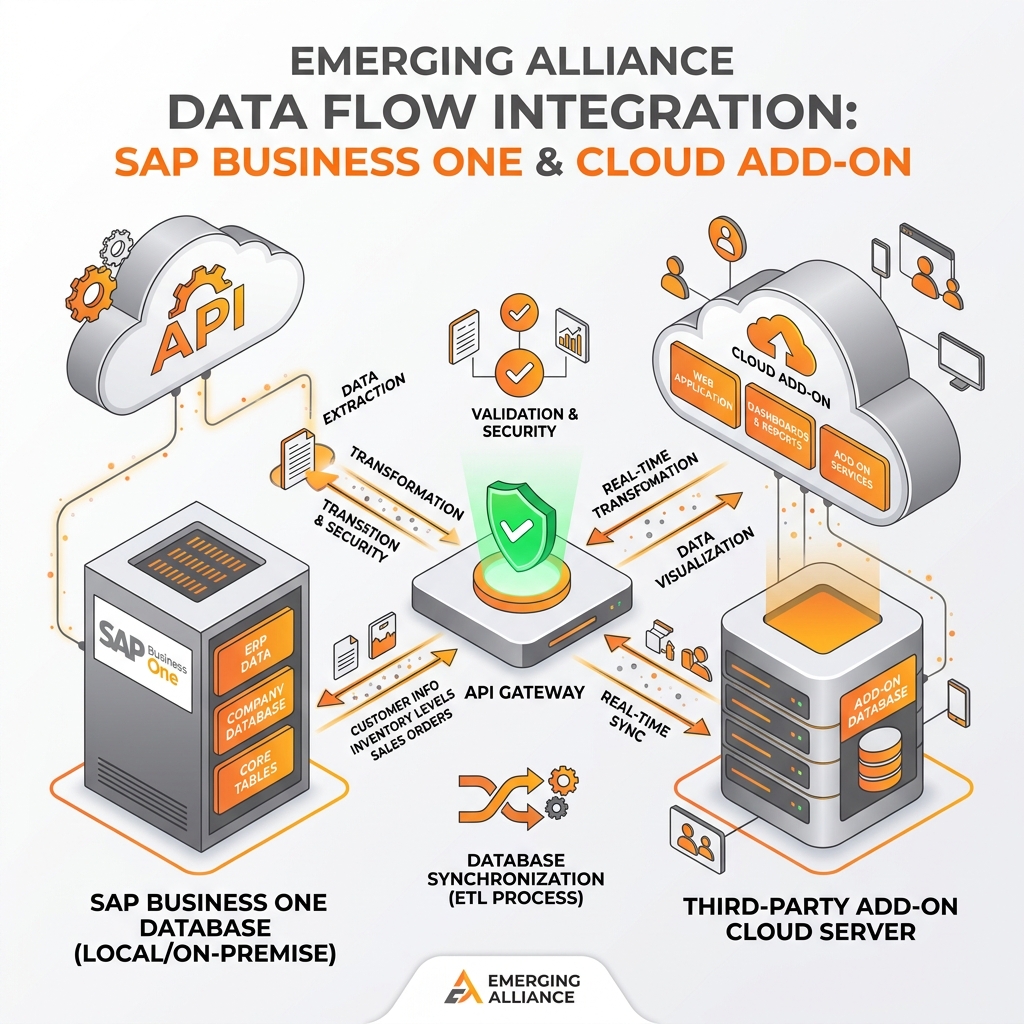
Technical architectural checks ensure secure, supportable, and stable ERP integrations.
Integration should be assessed as part of an architecture rather than as an isolated software connection.
A typical environment may include the add-on, SAP Business One, external applications, reporting platforms, and management dashboards.
Each layer introduces dependencies.
Data ownership must be clear. Organizations should determine which application controls customers, vendors, items, warehouses, pricing, employees, and other master records.
Transaction synchronization also requires defined rules. Teams need to know how often information moves, how failures are detected, how duplicates are prevented, how records are reprocessed, and where logs are maintained.
Reporting dependencies should be tested as well. A dashboard may be technically accurate within one system while still showing incomplete information because upstream data has not synchronized.
API and security requirements must also be reviewed.
Authentication, permissions, encryption, throughput, error handling, logging, interface changes, and ongoing maintenance can all affect reliability.
The strongest architecture is not simply connected. It is observable, secure, supportable, and maintainable.
Implementation Governance After Selection
Selecting the right add-on is only the beginning. Implementation requires clear governance, controlled testing, and defined ownership.
The business team should own process requirements, user acceptance, operating outcomes, and adoption.
The SAP partner should coordinate SAP Business One configuration, ERP dependencies, integration design, testing, and overall solution alignment.
The add-on vendor should own product-specific capability, defects, technical updates, documentation, and specialized support.
Internal IT should govern infrastructure, security, access, architecture, monitoring, and broader technology standards.
Responsibilities should be documented before go-live.
Testing should include configuration validation, integration testing, user acceptance testing, data validation, security checks, and representative end-to-end scenarios.
Training should focus on real workflows rather than generic product navigation.
A post-go-live support model is equally important. Users need to know where to report incidents, who owns first-line diagnosis, how issues are escalated, and how recurring problems are tracked.
Good governance turns software deployment into managed operational change.
Leadership should schedule a formal post-implementation review to compare adoption, process performance, support demand, integration stability, and operating cost against the original business case. This creates evidence for future decisions about renewal, expansion, optimization, consolidation, or replacement and prevents unnecessary lifecycle cost from accumulating unnoticed.
The Long-Term Cost of the Wrong Add-on
The financial consequences of a poor add-on decision often become clearer after implementation.
Recurring licenses continue even when adoption is weak.
Support costs increase when highly customized processes require specialist intervention.
Integration maintenance expands as connected systems change.
Upgrades become more complicated when compatibility depends on custom code or vendor release schedules.
Technology dependency can also reduce future flexibility.
If the business eventually decides that the product no longer meets requirements, replacement creates another investment cycle.
Data may need migration. Integrations may need redevelopment. Employees need retraining. Workflows need redesign. Operations may face transition risk.
This creates an important total cost principle.
The most expensive add-on is not always the product with the highest purchase price.
It may be the product the organization has to replace prematurely.
Why Expert SAP Business One Guidance Matters
SAP Business One add-on decisions combine process design, ERP architecture, integration, commercial analysis, implementation, support, and lifecycle planning.
An experienced SAP Business One partner can help organizations define the actual business requirement, distinguish configuration gaps from genuine functional gaps, compare available extensions, assess integration dependencies, challenge unnecessary customization, estimate lifecycle costs, evaluate scalability, and establish implementation governance.
The partner should also consider how the proposed solution fits the wider ERP roadmap rather than treating the add-on as an isolated purchase.
Emerging Alliance approaches SAP Business One add-on requirements from this consultative perspective.
The objective is not simply to introduce another product into the ERP environment. It is to determine whether the extension is justified, sustainable, technically supportable, and capable of producing measurable business value.
Conclusion
Before investing in SAP Business One add-ons, evaluate more than functionality and license price.
Review the business requirement, integration model, customization effort, implementation cost, scalability, vendor capability, upgrade compatibility, support structure, and total ownership implications.
If you are comparing add-ons, experiencing limitations in your current SAP Business One environment, or questioning whether another solution is necessary, Emerging Alliance can help assess the available approach.
Frequently Asked Questions
Make the Right SAP Business One Add-on Decision
Avoid costly integrations, unnecessary customization, and long-term ERP complexity. Talk to Emerging Alliance to evaluate the right SAP Business One add-on for your business requirements and future growth.