SAP Business One Modules: Choosing the Right Fit Without Overpaying
Quick Answer: Which SAP Business One Modules Does Your Business Need?
SAP Business One includes core functional areas for financial management, sales, purchasing, inventory, production, banking, service management, reporting, and analytics.
However, most businesses do not need every available functionality from the beginning.
The right SAP Business One modules depend on your:
- Business model
- Industry
- Operational complexity
- Departments and users
- Inventory and warehouse requirements
- Manufacturing processes
- Integration requirements
- Reporting needs
- Future growth plans
For example, a trading company may mainly require finance, sales, purchasing, inventory, warehouse management, and reporting, while a manufacturer may also need production, Bill of Materials, and MRP.
The best approach is:
Business Process → Current Problem → Required Functionality → Users → Integration → Future Growth → Total Cost
The objective is not to implement the maximum amount of SAP Business One functionality. It is to implement the functionality that solves real operational problems without adding unnecessary cost, customization, or complexity.
Why Choosing the Right SAP Business One Modules Matters
Choosing SAP Business One functionality should be treated as a business process decision, not simply an ERP purchasing decision.
Every organization operates differently.
A manufacturing company managing raw materials, production orders, Bills of Materials, and production planning has very different ERP requirements from a service company focused primarily on customers, billing, service delivery, and financial reporting.
Selecting too little functionality can leave employees dependent on:
- Spreadsheets
- Manual data entry
- Disconnected applications
- Duplicate processes
- Delayed reporting
- Department-level data silos
But selecting too much functionality can create the opposite problem.
It can increase:
- Implementation effort
- Configuration complexity
- User training requirements
- Integration requirements
- Support needs
- Overall ERP cost
The objective should therefore be a best-fit ERP scope: enough functionality to connect and control important business processes without implementing capabilities that deliver little immediate value.
Core SAP Business One Modules Every Business Should Evaluate
SAP Business One combines several functional areas within one ERP environment.
The important question is not simply what each area does, but which business problem it solves.
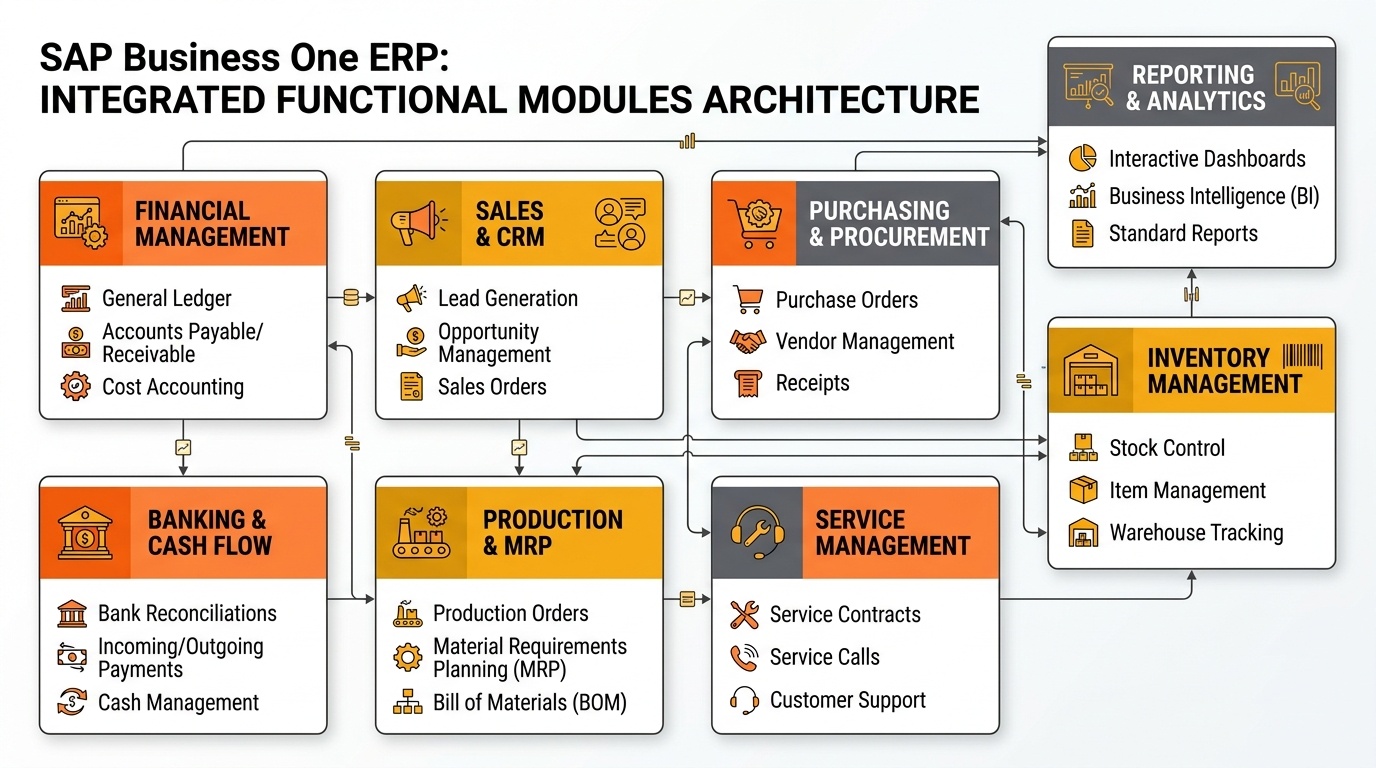
SAP Business One integrated functional modules architecture: Connecting core enterprise processes.
Financial Management
Financial Management provides the accounting foundation for SAP Business One.
It supports areas such as:
- General ledger
- Journal entries
- Accounts receivable
- Accounts payable
- Cost accounting
- Financial transactions
- Budgeting
- Financial reporting
For management teams, the larger benefit is financial visibility.
Instead of consolidating information from different applications or spreadsheets, transactions across purchasing, inventory, sales, and operations can flow into the financial system.
This helps finance leaders understand profitability, costs, liabilities, receivables, and overall financial performance.
Sales and Customer Management
Sales functionality helps businesses manage the commercial process from opportunity through order fulfillment.
Typical capabilities include:
- Leads and opportunities
- Sales quotations
- Sales orders
- Customer information
- Deliveries
- Customer invoices
- Sales reporting
The primary business problem it addresses is fragmented sales information.
Sales teams and management can gain better visibility into customer activity, open orders, sales pipelines, and commercial performance.
Purchasing Management
Purchasing functionality supports supplier-related procurement processes.
Typical activities include:
- Purchase requests
- Purchase quotations
- Purchase orders
- Goods receipts
- Supplier invoices
- Supplier information
Its value becomes especially important when procurement decisions affect inventory availability, cash flow, production, or customer delivery commitments.
Inventory Management
Inventory Management helps businesses understand what stock they have, where it is located, and how it is moving.
Typical functionality includes:
- Item management
- Inventory transactions
- Batch or serial tracking
- Warehouse visibility
- Goods movements
- Stock transfers
- Inventory valuation
For inventory-intensive businesses, accurate stock visibility directly affects purchasing, sales commitments, production planning, and working capital.
Banking and Cash Flow
Banking functionality supports payment-related financial processes.
It can help manage:
- Incoming payments
- Outgoing payments
- Bank transactions
- Payment processing
- Bank reconciliation
- Cash-flow-related information
The objective is stronger visibility between operational transactions and actual financial movement.
Production and Planning
Manufacturing organizations often require functionality that connects material demand with production activity.
Relevant SAP Business One capabilities can include:
- Bills of Materials
- Production orders
- Material requirements planning
- Production-related inventory movements
- Resource planning
These capabilities help manufacturers understand what needs to be produced, which materials are required, and whether inventory can support planned production.
Service Management
Businesses responsible for post-sale service, warranties, maintenance, or customer support may require Service Management.
Typical functionality can support:
- Service calls
- Customer equipment
- Service contracts
- Warranty-related information
- Service history
- Follow-up activities
This becomes valuable when customer service is an ongoing operational process rather than an occasional activity.
Reporting and Analytics
Reporting connects operational activity with management decision-making.
SAP Business One can provide visibility into areas such as:
- Finance
- Sales
- Purchasing
- Inventory
- Production
- Customer activity
Dashboards and reporting tools help decision-makers move from individual transactions to business-level performance visibility.
SAP Business One Modules by Business Function
ERP functionality becomes easier to understand when it is mapped to departments rather than viewed as separate software components.
Finance and Accounting
Finance teams may work with:
- Financial Management
- Banking
- Fixed Assets
- Cost Accounting
- Financial Reporting
These capabilities help finance teams understand both transaction-level activity and wider financial performance.
Sales and Customer Operations
Commercial teams may depend on:
- Sales Opportunities
- Sales Management
- Customer Management
- Service Management
Together, these capabilities create visibility from initial sales activity through customer servicing.
Procurement and Inventory
Supply-chain teams may use:
- Purchasing
- Inventory Management
- Warehouse-related functionality
- Supplier Management
The objective is to connect purchasing decisions with actual inventory availability and operational demand.
Manufacturing and Planning
Production organizations may require:
- Production Management
- Bills of Materials
- MRP
- Resource-related planning
- Inventory Management
These capabilities connect demand, material availability, and production execution.
Management and Decision Support
Business leaders typically depend on data generated by every department. Management-oriented functionality can include:
- Operational reports
- Financial reports
- Dashboards
- Analytics
- KPI visibility
The real value comes from having decision-making data connected to the same transaction environment used by the business.
How SAP Business One Modules Support End-to-End Operations
SAP Business One modules deliver the greatest value when they operate as connected business processes.
A business should therefore evaluate workflows, not isolated ERP functions.
Procure-to-Pay
Purchasing → Inventory → Goods Receipt → Supplier Invoice → Finance
A procurement transaction can begin with the need to purchase materials or products.
Once goods arrive, inventory records are updated.
Supplier invoices then affect accounts payable and financial reporting.
Instead of finance, purchasing, and inventory maintaining separate information, the workflow becomes connected.
Order-to-Cash
Sales → Inventory → Delivery → Customer Invoice → Payment → Finance
A customer order can influence:
- Available inventory
- Delivery planning
- Revenue
- Accounts receivable
- Cash collection
Connecting these processes provides management with stronger visibility into the complete commercial cycle.
Plan-to-Produce
Demand → MRP → Material Planning → BOM → Production → Inventory
Manufacturing begins with demand.
MRP can help determine which materials may be required based on planned production and available inventory.
Production activity then affects raw material consumption and finished-goods stock.
The result is a connected relationship between planning, procurement, production, and inventory.
Customer-to-Service
Customer → Sales → Service Request → Service Management → Follow-Up
Customer information should not disappear once a sale is complete. Service teams may need visibility into:
- Products purchased
- Service history
- Warranty status
- Open service calls
- Customer information
Connecting sales and service information can improve both customer experience and operational control.
Management Reporting
Operational Data → Financial Data → Reporting → Management Decisions
Every operational process generates data.
The real value of ERP appears when that data is transformed into information that management can use.
Instead of asking individual departments for separate reports, leaders can gain visibility from a connected data environment.
When You Should Not Add Another SAP Business One Module
More functionality does not automatically create more ERP value. Adding another SAP Business One module can increase implementation costs, user training requirements, support needs, integration effort, and long-term system complexity.
A business should reconsider additional functionality when:
- Existing SAP Business One functionality already solves the requirement
- The process occurs rarely
- The business requirement is not clearly defined
- Configuration can solve the problem
- The proposed functionality duplicates an existing process
- Very few users will receive meaningful value
- The expected business value is too low
- The additional complexity outweighs the operational benefit
Before adding another module, feature, customization, or extension, ask:
What business problem will this solve?
Then consider:
- How often does the problem occur?
- Which users or departments are affected?
- What is the current cost of the problem?
- Can standard SAP Business One functionality address it?
- Can configuration solve it without adding another module?
- What will implementation, training, integration, and support cost?
- Will the expected benefit justify the additional complexity?
If the requirement is unclear, occurs infrequently, or can be handled through existing functionality, adding another module may create more cost than value.
The key principle is simple:
Do not select functionality simply because it is available. Select it because the business needs it.
ERP scope should be driven by business value, not by the number of functions available.
How to Choose SAP Business One Modules Without Overpaying
A practical selection framework helps prevent ERP scope from expanding unnecessarily.
Use the following sequence:
Business Process → Current Problem → Required Functionality → Users → Integration → Future Growth → Total Cost
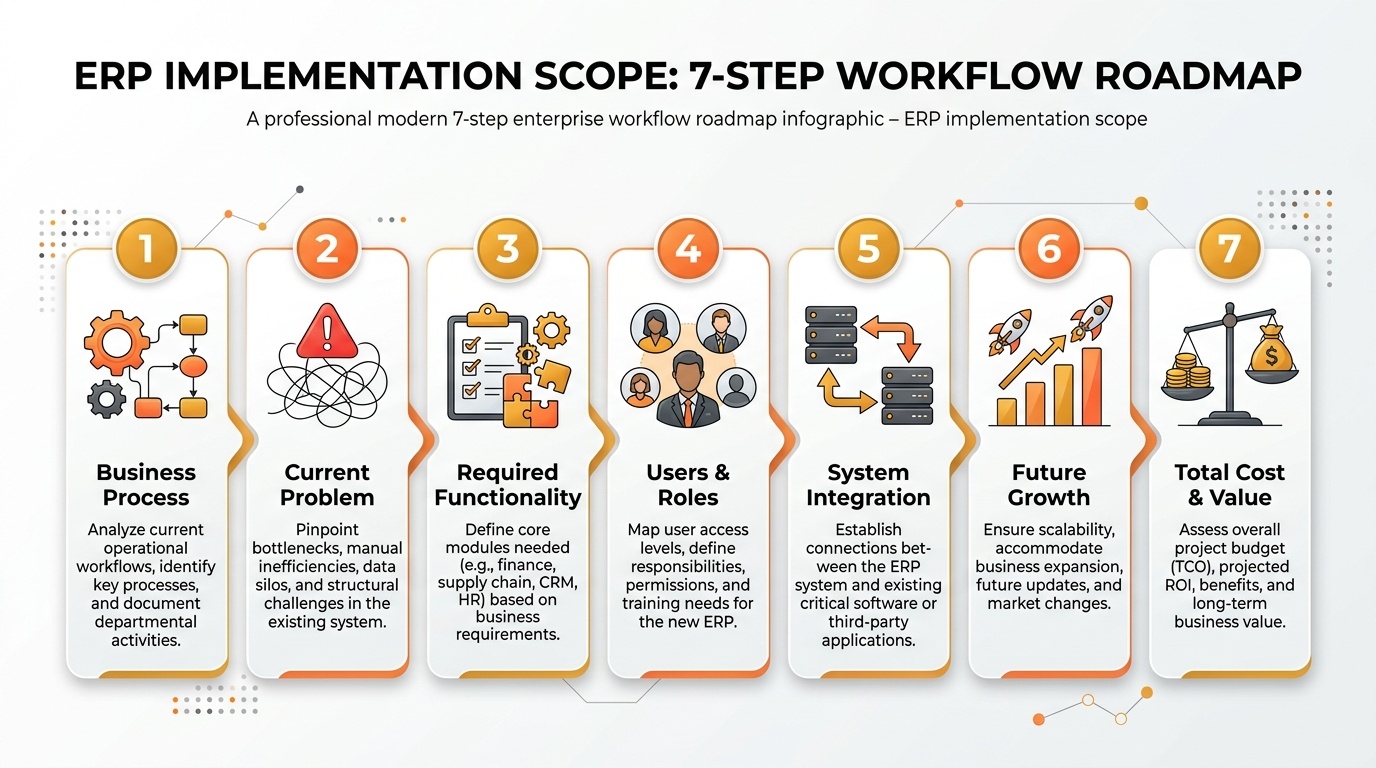
ERP implementation scope roadmap: Seven-step workflow to select the right SAP Business One modules.
Step 1: Identify the Business Process
Start with the process rather than the software.
Examples might include:
- Order processing
- Procurement
- Inventory control
- Production planning
- Customer service
- Financial reporting
Determine exactly which process requires improvement.
Step 2: Identify the Current Problem
Ask what is currently creating operational friction.
Common problems include:
- Spreadsheet dependence
- Duplicate data entry
- Delayed approvals
- Inventory inaccuracies
- Poor financial visibility
- Manual reporting
- Disconnected departments
- Limited process accountability
The ERP requirement should be tied directly to one or more measurable business problems.
Step 3: Define the Required Functionality
Identify the minimum capability required to solve the problem.
Do not begin by asking which module you want.
Ask which functionality the process requires.
Only then map that capability to SAP Business One.
Step 4: Identify Users and Departments
Determine who actually needs the functionality.
Consider:
- Number of users
- Departments involved
- Approval responsibilities
- Transaction volumes
- Reporting requirements
ERP scope should reflect actual user requirements rather than assumptions.
Step 5: Review Integration Requirements
Some processes may depend on systems outside SAP Business One.
Examples include:
- CRM platforms
- E-commerce systems
- Payroll systems
- Banking platforms
- Warehouse applications
- Manufacturing applications
- Business intelligence tools
Integration can significantly influence implementation complexity and long-term cost.
Step 6: Consider Future Growth
Current requirements matter, but ERP decisions should not create future limitations.
Consider whether the business expects:
- Higher transaction volumes
- Additional employees
- More warehouses
- New locations
- Manufacturing expansion
- International operations
- New sales channels
- Additional reporting requirements
Design for growth without paying for premature complexity.
Step 7: Evaluate Total Cost
The cost of an ERP decision is larger than the initial software price.
Evaluate:
- Licensing
- Implementation
- Configuration
- Customization
- Integration
- Data migration
- Training
- Support
- Maintenance
- Future expansion
A lower initial implementation cost can become expensive later if the solution requires extensive rework.
Likewise, an oversized implementation can create unnecessary cost from day one.
The objective should be lowest sustainable total cost, not simply lowest starting price.
SAP Business One Module Selection Based on Business Growth
ERP requirements naturally change as an organization grows.
A phased approach can keep the SAP Business One environment aligned with actual business complexity.
Stage 1: Initial ERP Setup
Begin with critical processes such as:
- Finance
- Sales
- Purchasing
- Inventory
The priority is establishing a reliable transactional foundation.
Stage 2: Process Expansion
As operations mature, businesses may introduce additional functionality for:
- Production
- Service operations
- Additional approval processes
- More sophisticated inventory management
Expansion should follow genuine business requirements.
Stage 3: Additional Users and Departments
As ERP adoption grows, more teams may need access. At this stage, businesses should review:
- Roles
- Authorizations
- User responsibilities
- Approval structures
- Reporting access
ERP growth must remain controlled.
Stage 4: New Locations and Warehouses
Expansion into new branches, warehouses, or operating locations can create additional requirements around:
- Inventory visibility
- Warehouse transfers
- Procurement
- Sales fulfilment
- Reporting
The ERP architecture should support these changes without creating disconnected systems.
Stage 5: Advanced Reporting and Analytics
As data volumes increase, management may require more sophisticated visibility. This can include:
- KPI dashboards
- Profitability reporting
- Operational trends
- Sales analysis
- Inventory performance
- Financial analysis
At this stage, ERP data becomes increasingly important for executive decision-making.
Stage 6: Industry-Specific Requirements
Some organizations eventually require functionality beyond standard ERP capabilities. Examples might include specialized requirements around:
- Manufacturing
- Quality management
- Regulatory compliance
- Warehouse automation
- Industry-specific workflows
These requirements should be introduced only after confirming that standard SAP Business One functionality cannot adequately address the business need.
Common SAP Business One Module Selection Mistakes
Poor SAP Business One scope decisions usually begin before implementation starts.
Selecting Functionality Without Mapping Processes
A module list does not explain how the business actually works.
Map business processes first.
Buying Too Much Functionality Upfront
Implementing everything immediately can increase cost and reduce user adoption.
Start with what provides measurable operational value.
Focusing Only on Licensing Cost
Licensing represents only one part of ERP cost.
Implementation, integration, customization, support, and future changes can be equally important.
Ignoring Standard SAP Business One Capabilities
Businesses sometimes request custom development before understanding what standard functionality can already provide.
Evaluate configuration and standard processes first.
Adding Functionality Without Prioritization
Every department may consider its requirements urgent. Classify requirements as:
- Critical
- Important
- Future
- Optional
This keeps ERP scope commercially realistic.
Ignoring User Adoption
Functionality delivers little value if users do not understand or adopt it.
Training and process ownership should be included in the ERP strategy.
Ignoring Future Scalability
An implementation designed only for today’s organization may become restrictive as the company grows.
ERP planning should consider both current needs and realistic future scenarios.
Never Reviewing the ERP Scope Again
Businesses change.
SAP Business One requirements should therefore be reviewed periodically as processes, locations, transaction volumes, and management requirements evolve.
Conclusion
Choosing the right SAP Business One modules is not about implementing every available capability. It is about selecting the functionality that supports your business processes, solves current operational problems, and provides a practical foundation for growth.
The best approach is to:
- Understand your business processes
- Identify operational challenges
- Define the required capabilities
- Evaluate standard SAP Business One functionality
- Consider users, integrations, and reporting needs
- Plan for realistic growth
- Calculate the total cost of ownership
A well-planned SAP Business One implementation connects the processes that matter most while avoiding unnecessary customization, duplicated functionality, and premature complexity.
By building the system around your actual business requirements, you can create an ERP environment that improves visibility, supports better decision-making, and delivers long-term value without overpaying for functionality you do not need.
FAQs About SAP Business One Modules
Not sure which SAP Business One modules your business actually needs?
Fill out the form below to connect with Emerging Alliance and identify the right modules for your business processes, avoid unnecessary functionality, and get the most value from SAP Business One.