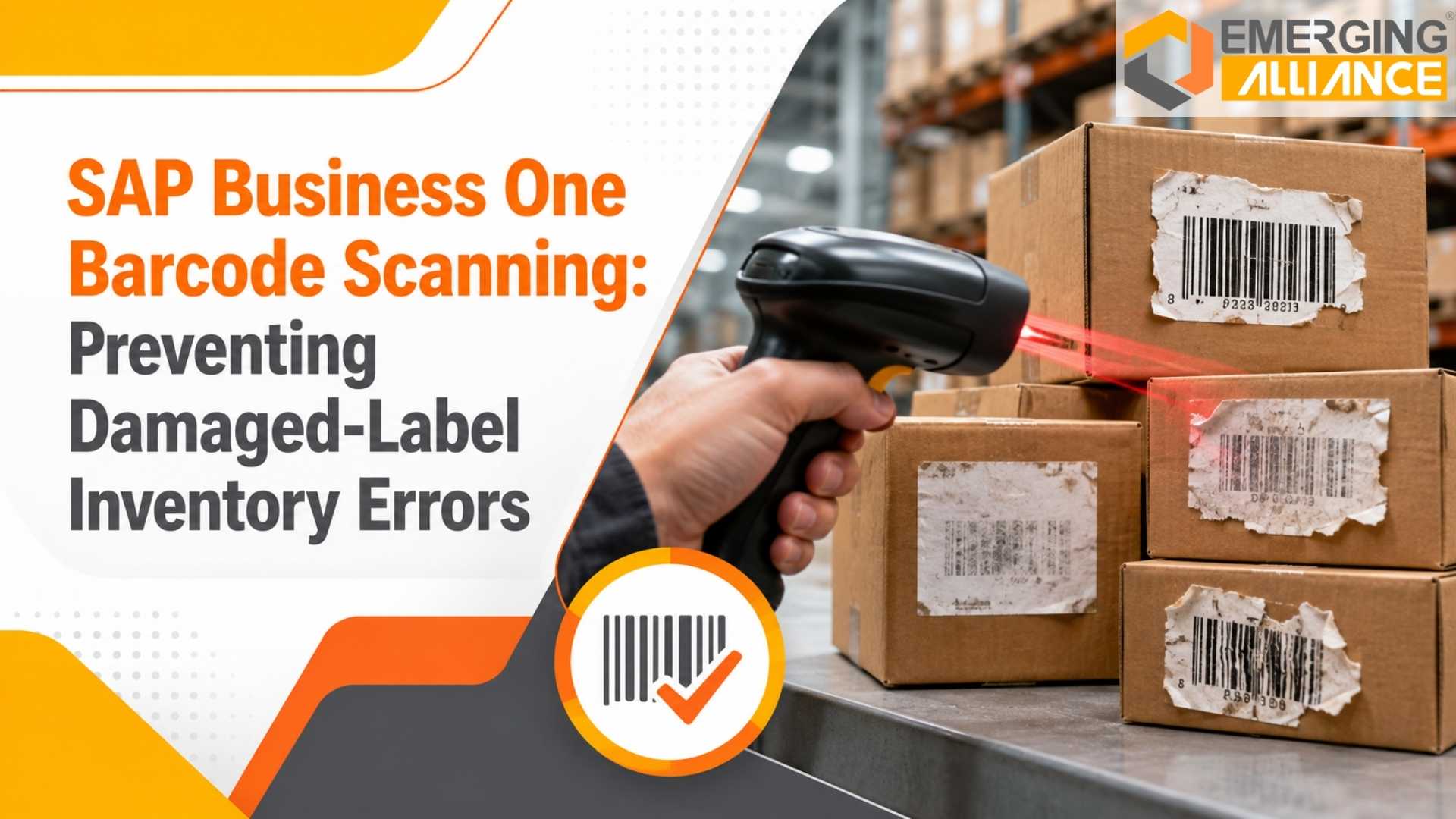
SAP Business One Barcode Scanning: Preventing Damaged-Label Inventory Errors
Quick Answer: How SAP Business One Barcode Scanning Reduces Damaged-Label Inventory Errors
SAP Business One barcode scanning can reduce inventory errors by replacing repeated manual item-code entry with controlled scanning, validation, quantity confirmation, batch or serial capture, and real-time transaction updates.
However, barcode technology alone does not prevent every inventory discrepancy. Businesses also need reliable label-printing standards, barcode validation rules, replacement procedures, scanner compatibility, and clear exception workflows for damaged or unreadable labels.
When these controls work together, warehouse and production teams can process goods receipts, picking, stock transfers, production issues, cycle counts, and dispatch transactions with better accuracy while maintaining synchronization with SAP Business One inventory management.
The business objective is not simply to scan faster. It is to ensure that every physical inventory movement is recorded against the correct item, warehouse, quantity, batch, serial number, or production transaction before inaccurate data enters the ERP.
Damaged Barcodes Are More Than a Warehouse Inconvenience
A torn barcode label may appear to be a small operational problem.
For an inventory-intensive organization, however, one unreadable label can trigger a chain of incorrect transactions.
A warehouse operator attempts to scan an item. The scanner fails to read the label. After several attempts, the employee manually types an item code.
A similar-looking code is selected.
The wrong quantity is entered.
The batch number is missed.
The physical material is moved, but SAP Business One records a different transaction.
The warehouse operation continues, yet the ERP inventory is already becoming less reliable.
The problem becomes more serious when hundreds or thousands of inventory movements take place every day.
Manufacturers, pharmaceutical companies, food businesses, chemicals companies, medical-equipment suppliers, automotive component manufacturers, electronics businesses, FMCG organizations, wholesalers, and distributors often depend on accurate inventory transactions for production planning, order fulfillment, traceability, compliance, and working-capital control.
For these organizations, damaged-label management should be treated as part of inventory-control design—not merely as a scanner issue.
Why Barcode Scanning Failures Create Inventory Errors
A barcode scanning failure does not automatically create an inventory error.
The risk usually begins with what happens after the scan fails.
Common causes include:
- Faded thermal printing
- Torn or scratched barcode labels
- Labels damaged by moisture, chemicals, oil, dust, or heat
- Poor-quality printing
- Incorrect barcode size or contrast
- Labels placed across curves, seams, or damaged packaging
- Duplicate barcode labels
- Incorrect item-to-barcode mapping
- Scanner incompatibility
- Labels covered by shrink wrap or reflective material
- Improperly generated replacement labels
When warehouse teams do not have a controlled exception process, employees naturally look for ways to continue the transaction.
That can mean searching manually for the item, typing a code, selecting a similar description, reusing an old label, or postponing the system transaction until later.
Those workarounds increase the possibility of inventory inaccuracies.
Where Damaged-Label Errors Affect SAP Business One Inventory
Barcode-related errors can enter the inventory process at multiple transaction points.
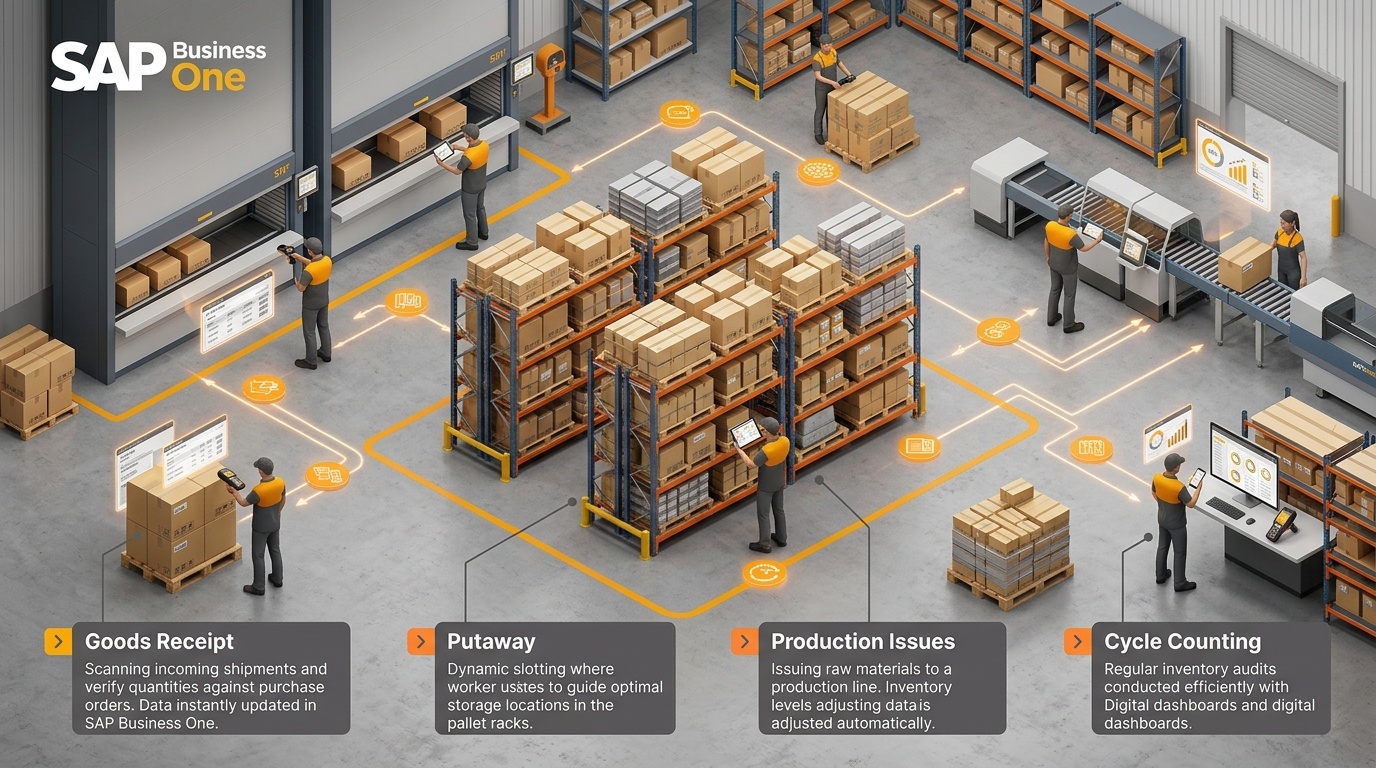
SAP Business One inventory touchpoints vulnerable to damaged barcode errors: Goods receipt, putaway, production issues, picking, and cycle counting.
Goods Receipt
During inbound receiving, warehouse staff must confirm that the physical material being received corresponds to the expected item.
When labels cannot be scanned, operators may manually identify products.
A wrong selection can create inaccurate stock from the moment material enters the warehouse.
For batch-managed or serial-managed products, receiving errors can also compromise traceability.
Putaway and Stock Transfers
An item may be received correctly but transferred to the wrong warehouse or bin because location verification was bypassed.
This creates situations where SAP indicates inventory exists in one location while the material is physically stored somewhere else.
Production Material Issue
Manufacturing operations depend on the correct raw materials being issued against production requirements.
If the wrong barcode is scanned—or manual entry is used incorrectly—a component may be physically consumed while another material is posted in the system.
That can distort:
- Production consumption
- Material availability
- Inventory valuation
- Bill-of-material analysis
- Production costing
Finished-Goods Receipt
Finished goods must also be recorded correctly.
Incorrect item codes, batch numbers, serial numbers, or quantities during finished-goods receipt can create downstream problems during picking and dispatch.
Picking and Dispatch
A picking error can directly affect customer fulfillment.
The warehouse may select the wrong SKU, quantity, batch, or serial number.
In regulated or traceability-sensitive industries, the consequences can extend beyond a simple shipping correction.
Cycle Counting
If warehouse teams rely heavily on manual reconciliation because labels are frequently unreadable, cycle counting becomes slower and less dependable.
Teams may spend more time investigating mismatches instead of preventing them.
How SAP Business One Barcode Scanning Improves Inventory Control
An effective SAP Business One barcode scanning solution should do more than translate a barcode into an item code.
It should create a controlled inventory transaction.
Depending on the implementation, workflow, add-on, device, and warehouse requirements, barcode processes can support several important controls.
1. Barcode Validation
Before a transaction proceeds, the scanned value can be checked against configured SAP Business One master data and transaction requirements.
Validation helps reduce the risk of processing:
- Invalid item codes
- Incorrect barcode mappings
- Wrong products
- Duplicate or unexpected entries
2. Mobile and Handheld Scanning
Warehouse operators can perform inventory transactions closer to the physical movement of goods rather than recording them later from paper notes.
This reduces the time gap between warehouse activity and ERP updates.
3. Item and Warehouse Verification
Scanning workflows can require operators to confirm the correct item and warehouse or storage location before completing a transaction.
This is particularly valuable for organizations operating multiple warehouses or high-SKU environments.
4. Quantity Confirmation
A barcode may identify the item correctly, but the transaction can still be inaccurate if the quantity is wrong.
Well-designed workflows therefore combine item identification with quantity verification.
5. Batch and Serial Number Capture
For businesses dependent on batch tracking or serial number tracking, barcode scanning can support controlled identification of traceability information.
This is especially important in pharmaceuticals, food, chemicals, medical equipment, automotive components, and electronics.
6. Goods Receipt and Goods Issue Scanning
Warehouse barcode scanning can be used to strengthen inbound and outbound inventory processes by ensuring that material movement is recorded against the correct SAP Business One transaction.
7. Production and Inventory Transaction Scanning
Barcode workflows can support production material issues, finished-goods receipts, stock transfers, inventory movements, and related operational transactions.
8. Real-Time SAP Business One Synchronization
A key objective should be reducing disconnected warehouse records.
When transactions synchronize with SAP Business One as they occur, decision-makers gain more dependable inventory visibility.
9. Exception Handling
This becomes critical when labels are damaged.
The system and operating process should define what happens when normal scanning cannot continue.
That is significantly safer than allowing each employee to decide individually how to handle an unreadable barcode.
What Happens When a Barcode Cannot Be Scanned?
An unreadable barcode should not automatically become permission for unrestricted manual entry.
That approach may keep the warehouse moving temporarily, but it weakens inventory control.
A better workflow is to treat unreadable labels as controlled exceptions.
A typical process may follow these stages:

Standardized 7-stage exception handling procedure for resolving damaged or unreadable barcode labels in SAP Business One.
1. Retry using an approved scanning method
The operator verifies whether the issue comes from scanner positioning, packaging, lighting, label obstruction, or contamination.
2. Confirm the physical item
The product is identified using approved information such as item description, manufacturer reference, packaging details, batch information, purchase documentation, or other controlled identifiers.
3. Validate the expected SAP Business One transaction
The employee confirms that the item is expected for the goods receipt, production order, picking document, transfer, or other transaction.
4. Escalate the damaged label
If the barcode remains unreadable, the item follows the organization’s exception process rather than moving directly into unrestricted manual entry.
5. Reprint or replace the barcode label
Once item identity has been verified, an authorized replacement label can be generated using the approved barcode-to-item mapping.
6. Scan and validate the replacement label
The new barcode is scanned before the transaction is finalized.
7. Record the exception where appropriate
Repeated failures can be analyzed by supplier, material, printer, warehouse zone, label type, or operational process.
This creates an important management advantage: barcode failures become measurable operational events rather than invisible warehouse workarounds.
Some environments may legitimately permit controlled manual entry under specific authorization rules. The important point is that manual entry should be an exception governed by validation, not the default response whenever scanning becomes inconvenient.
Manual Inventory Entry vs. SAP Business One Barcode Scanning
| Area | Manual Inventory Entry | SAP Business One Barcode Scanning |
|---|---|---|
| Data accuracy | Depends heavily on operator accuracy | Supports item and transaction validation before posting |
| Processing speed | Slower for frequent inventory movements | Faster for repetitive receiving, picking and movement transactions |
| Human error | Higher risk of typing and item-selection mistakes | Reduces repeated manual code entry |
| Inventory visibility | Often delayed if transactions are entered later | Can update SAP Business One closer to the physical transaction |
| Batch/serial tracking | Manual capture creates additional error points | Supports structured batch and serial capture |
| Warehouse productivity | More typing, searching and verification | Streamlines repetitive transaction execution |
| Traceability | More dependent on manual discipline | Creates more consistent transaction identification |
| Scalability | Becomes difficult as transaction volume and SKU count grow | Better suited to high-volume and multi-warehouse processes |
Barcode technology still requires strong process design. Incorrect barcode master data, poor label quality, weak validation, or poorly designed workflows can still produce mistakes.
The advantage comes from combining automation with transaction controls.
How to Prevent Damaged-Label Barcode Errors Before They Affect Inventory
Companies often focus on scanners after barcode failures increase.
Prevention should begin much earlier.
Establish Label-Quality Standards
Define requirements for:
- Barcode dimensions
- Print clarity
- Contrast
- Label material
- Adhesive quality
- Human-readable information
- Environmental durability
A label used in an air-conditioned distribution center may require different material from one exposed to refrigeration, chemicals, dust, heat, moisture, or outdoor conditions.
Standardize Barcode Placement
Barcode placement affects scanner performance.
Labels should not be routinely placed:
- Across packaging seams
- On highly reflective surfaces
- Over curves that distort the barcode
- Where handling frequently damages the label
- Under packaging that reduces readability
Maintain Printer Quality
Barcode errors can originate at the printer.
Organizations should monitor:
- Print-head condition
- Ribbon or thermal-media quality
- Printer calibration
- Label alignment
- Darkness and contrast settings
Poor printing can create labels that appear acceptable visually but fail repeatedly during scanning.
Inspect Labels Periodically
Frequently stored or slow-moving inventory may remain in warehouses for extended periods.
Labels can deteriorate.
Periodic label inspection is particularly useful where traceability requirements are strict or where materials are stored in demanding conditions.
Define Replacement Procedures
Employees should know exactly:
- Who can approve a replacement
- How the item is verified
- Where replacement labels are generated
- Whether the original label must be retained
- How duplicates are prevented
- How exceptions are documented
Verify Scanner Compatibility
Hardware should be matched to the barcode format, label characteristics, scanning distance, warehouse environment, and mobile workflow.
Organizations should evaluate device compatibility rather than assuming every barcode scanner will behave identically.
Build Exception Workflows
Management should define what happens when:
- A barcode cannot be read
- A barcode maps to an unexpected item
- Two labels appear on the same product
- Batch information does not match
- A serial number has already been used
- The physical quantity differs from the system quantity
- The scanned warehouse or location is incorrect
Exception workflows protect inventory accuracy when normal processing breaks down.
CEO Perspective: Why Barcode Accuracy Becomes a Working-Capital Issue
CEOs and business owners should not view barcode accuracy as an isolated warehouse KPI.
Inventory data influences working capital.
When SAP Business One shows inaccurate quantities, management decisions may be based on incorrect assumptions.
The business may:
- Purchase inventory that already exists
- Delay purchasing stock that is actually unavailable
- Promise products that cannot be fulfilled
- Carry unnecessary safety stock
- Lose inventory through poor traceability
- Spend additional labor reconciling discrepancies
- Delay production because system inventory cannot be trusted
Inventory discrepancies can also affect customer satisfaction.
A sales order may appear fulfillable until the warehouse discovers that the recorded stock cannot actually be found.
Therefore, the management value of barcode inventory management extends beyond warehouse productivity.
The objective is to improve confidence in the inventory information used for purchasing, production, fulfillment, and financial planning.
CTO/CIO Perspective: Barcode Scanning as Part of ERP Architecture
For CTOs, CIOs, and IT managers, the main question is not simply whether a handheld scanner can read a barcode.
The more important question is how warehouse transactions integrate with the ERP architecture.
A SAP Business One barcode add-on or scanning solution should be evaluated around factors such as:
- SAP Business One integration
- Transaction synchronization
- Master-data consistency
- Device compatibility
- User authentication
- Warehouse and item validation
- Batch and serial processing
- Network availability
- Exception handling
- Scalability
- Supportability
- Security and access control
Disconnected warehouse applications can create another source of reconciliation.
For example, if scanning occurs in one platform and SAP Business One updates only through periodic imports, operational teams may still experience differences between warehouse reality and ERP inventory.
IT leaders should therefore consider real-time or appropriately synchronized transaction processing as part of solution architecture.
The goal is one controlled operational data flow rather than multiple independent warehouse records.
Operations and Warehouse Perspective: Faster Transactions With Better Control
Warehouse leaders typically experience barcode problems before senior management sees them.
They see operators repeatedly attempting scans.
They see handwritten corrections.
They see labels being replaced inconsistently.
They investigate stock that exists in SAP but cannot be physically located.
Effective SAP B1 barcode scanning can strengthen several warehouse activities.
Receiving
Verify items and quantities during goods receipt before inventory is accepted.
Putaway
Confirm that stock moves into the intended warehouse or storage location.
Picking
Validate the SKU being picked against the expected transaction.
Stock Transfers
Record inventory movement between warehouses or locations with less manual entry.
Production Issues
Confirm raw materials or components being issued to production.
Cycle Counting
Scan physical inventory during count activities and investigate mismatches more systematically.
Dispatch
Verify products, quantities, batches, or serial numbers before outbound processing.
For operations leaders, the improvement is not simply faster scanning.
It is greater process consistency across warehouse transactions.
Improving Batch, Serial Number, and Lot Traceability
Traceability-sensitive inventory introduces additional risk when barcode labels fail.
Consider a pharmaceutical distributor receiving two batches of the same product.
The item itself may be correct, but if the wrong batch is captured in SAP Business One, the business can lose confidence in traceability records.
Similar challenges exist with serial-managed products such as:
- Medical devices
- Electronics
- Industrial equipment
- Automotive components
A barcode scanning workflow can capture or validate batch and serial information as part of the transaction rather than requiring employees to repeatedly type identifiers.
That does not remove the need for procedural controls.
But it reduces the number of manual touchpoints where traceability information can be incorrectly recorded.
Finding the Source of Barcode-Related Inventory Errors
One of the biggest operational problems with uncontrolled barcode exceptions is that management cannot identify where the error originated.
A stock discrepancy discovered during month-end reconciliation may have started weeks earlier.
Was the problem caused during:
- Receiving?
- Putaway?
- Production issue?
- Stock transfer?
- Picking?
- Dispatch?
- Cycle counting?
- Label replacement?
Structured barcode processes can improve transaction traceability by associating inventory movements with defined workflow steps and ERP transactions.
Organizations can also monitor patterns such as:
- Frequent scan failures for a specific supplier
- Repeated damaged labels in one warehouse zone
- Certain printers creating low-quality labels
- Particular barcode formats causing device failures
- Frequent manual-entry exceptions
- Recurrent mismatches for particular SKUs
This transforms barcode reliability into an operational improvement opportunity.
When Should a Business Implement SAP Business One Barcode Scanning?
Organizations should consider implementing or improving SAP Business One barcode scanning when one or more of the following conditions appear.
Frequent Stock Discrepancies
Physical inventory regularly differs from SAP Business One balances.
Increasing Warehouse Transaction Volume
Receiving, picking, transfers, production movements, or dispatch activity is growing faster than manual processes can reliably support.
Heavy Manual Inventory Updates
Employees routinely type item codes, warehouse codes, quantities, batches, or serial numbers.
Repeated Scanning Failures
Barcode labels are frequently unreadable, forcing operators to use workarounds.
Growing SKU Count
Manual item selection becomes increasingly risky as similar products and item codes increase.
Batch or Serial Tracking Requirements
Traceability accuracy becomes operationally or commercially important.
Multiple Warehouses
The organization needs more consistent inventory movement controls across locations.
Production-Inventory Integration
Manufacturing teams need accurate material issues and finished-goods receipts reflected in SAP Business One.
Warehouse Expansion
The company is adding transaction volume, users, devices, warehouses, production facilities, or distribution locations.
These are indications that warehouse execution is becoming too dependent on manual identification and individual employee knowledge.
Designing the Right SAP Business One Barcode Scanning Solution
A successful implementation should begin with process analysis, not scanner selection.
Businesses should first map:
- Current goods-receipt workflows
- Label-generation points
- Item barcode master data
- Warehouse movement processes
- Picking and dispatch workflows
- Production transactions
- Batch and serial requirements
- Existing manual-entry points
- Barcode failure scenarios
- Replacement-label procedures
- ERP synchronization requirements
The solution can then be designed around actual operational risks.
For example, a pharmaceutical warehouse may prioritize batch validation and traceability.
An automotive-components manufacturer may focus heavily on production issues and component identification.
A wholesale distributor may prioritize receiving, picking speed, stock transfers, and multi-warehouse inventory visibility.
An effective implementation should therefore fit the business process instead of forcing every organization into the same scanning workflow.
Emerging Alliance works with organizations evaluating SAP Business One inventory, warehouse, and barcode requirements to identify where scanning, transaction validation, integration, and process improvements can reduce operational friction.
The right starting point is usually an assessment of how inventory currently moves from physical handling into SAP Business One.
From Barcode Scanning to More Reliable Inventory Decisions
Barcode scanning should not be evaluated only as a warehouse automation project.
The stronger business case is inventory data reliability.
When warehouse transactions are captured more consistently, management can make better decisions using SAP Business One data.
Operations gains clearer visibility into inventory movement.
Production teams gain more confidence in material availability.
Warehouse managers spend less time correcting preventable identification errors.
Finance receives more dependable inventory records.
Sales and customer-service teams gain better visibility into stock available for fulfillment.
The result is not a claim that barcode scanning completely eliminates inventory errors.
It creates a stronger control environment in which physical inventory activity and SAP Business One transactions are more closely aligned.
Conclusion: Reducing Damaged-Label Risk With SAP Business One Barcode Scanning
Damaged, faded, duplicated, poorly printed, or unreadable barcode labels can become serious inventory-control problems when warehouse teams rely on uncontrolled manual workarounds.
SAP Business One barcode scanning can help businesses reduce those risks through barcode validation, mobile scanning, item verification, quantity confirmation, batch and serial capture, warehouse controls, real-time transaction synchronization, and structured exception handling.
The most effective approach combines technology with strong operational controls—including label-quality standards, replacement procedures, scanner compatibility, periodic inspection, and clearly defined workflows when a barcode cannot be read.
For inventory-intensive businesses, the objective is not merely to scan more products.
It is to create more dependable inventory data for production, fulfillment, purchasing, financial control, and management decision-making.
Frequently Asked Questions
Is Damaged Barcode Labeling Affecting Your Inventory Accuracy?
Talk to Emerging Alliance about improving barcode scanning and inventory control with SAP Business One.
Evaluate where barcode failures, manual inventory entry, stock discrepancies, batch or serial errors, or disconnected warehouse processes may be affecting your operations—and determine whether a properly designed SAP Business One barcode scanning solution can strengthen inventory accuracy and traceability.