How to Select SAP Business One Modules That Fit Your Business Goals
Quick Answer
Select SAP Business One modules by identifying the business outcomes your organization needs to achieve first. Most businesses begin with Financial Management, Sales, Purchasing, and Inventory, then add CRM, Production, MRP, Service, Project Management, Fixed Assets, or advanced warehouse capabilities as operational needs grow.
A phased implementation helps control costs, reduce complexity, improve user adoption, and create an ERP foundation that scales with the business.
What Are SAP Business One Modules?
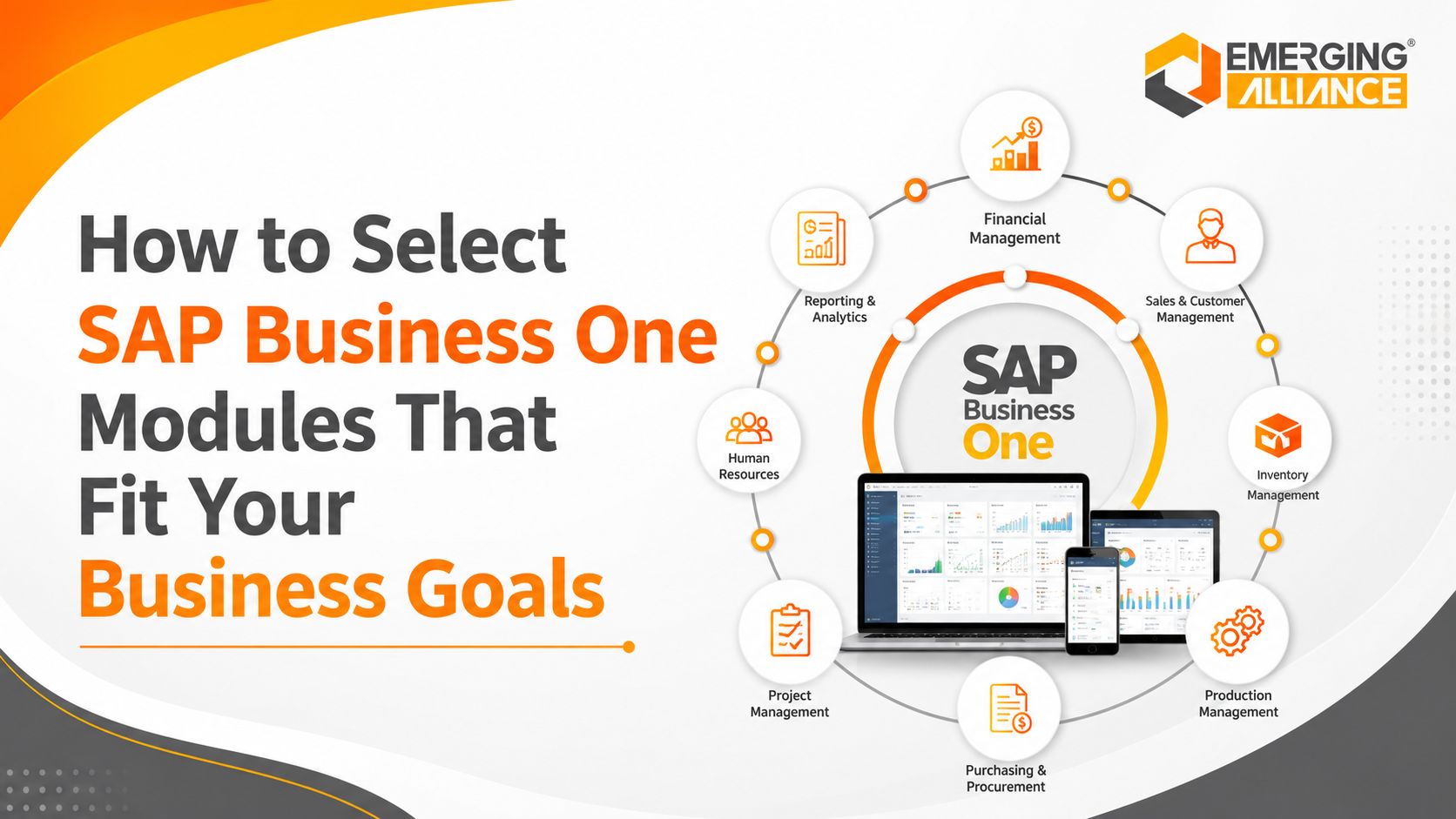
SAP Business One is an integrated ERP application for small and midsize businesses. It connects financial management, sales, purchasing, inventory, customer relationships, production, service, projects, and reporting within one system.
The term “SAP Business One modules” commonly refers to these major functional areas. However, their greatest value comes from integration.
For example, a sales order can update inventory demand, customer balances, revenue reporting, purchasing requirements, and production planning. Businesses should therefore select modules based on complete workflows rather than evaluating each function separately.
Why SAP Business One Module Selection Matters
Implementing every available function at once does not guarantee better results. An oversized initial scope can increase project costs, data requirements, training effort, and implementation risk.
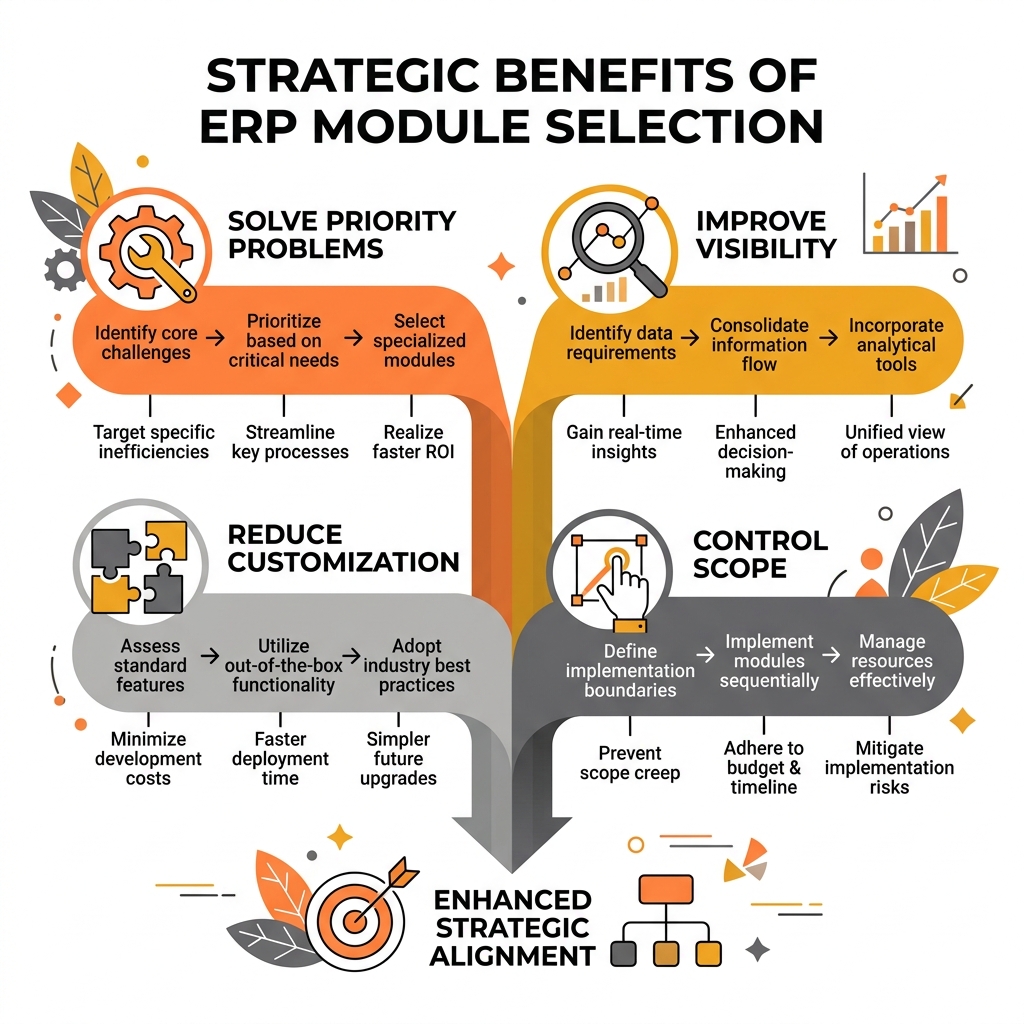
Selecting the right SAP Business One modules is critical to solve priority operational problems, improve cross-department visibility, and control implementation scope.
Selecting the right capabilities helps businesses:
- Solve priority operational problems
- Improve cross-department visibility
- Reduce unnecessary customization
- Accelerate user adoption
- Control implementation scope
- Create a scalable ERP roadmap
The objective is to implement the functions that deliver measurable business value at the right stage of growth.
SAP Business One Modules by Business Goal
Improve Financial Visibility
Businesses experiencing delayed reporting, manual reconciliation, inconsistent financial data, or limited profitability insight should prioritize Financial Management.
- Financial Management
- Banking and Reconciliation
- Fixed Assets
- Reporting and Analytics
- Faster financial reporting
- Better cash-flow visibility
- Improved budgeting
- More accurate profitability analysis
Financial Management usually forms the foundation of an SAP Business One implementation because operational transactions ultimately affect the general ledger.
Increase Inventory Accuracy
Inventory-intensive companies need accurate information about stock quantities, warehouses, batches, serial numbers, valuation, and movement history.
- Inventory Management
- Warehouse and Bin Location Management
- Purchasing
- Sales
- MRP, where planning is required
- Fewer stock discrepancies
- Reduced shortages
- Lower excess inventory
- Better fulfilment accuracy
- Improved traceability
Reliable inventory management also depends on accurate item master data, warehouse structures, valuation rules, and transaction discipline.
Automate Purchasing
Manual procurement processes can create approval delays, duplicate orders, inconsistent supplier selection, and poor spend visibility.
- Purchasing
- Inventory Management
- Approval Procedures
- Financial Management
- MRP for demand-driven procurement
- Faster purchasing cycles
- Better supplier visibility
- Improved spend control
- Reduced manual processing
- Stronger procurement governance
Purchasing should be integrated with inventory and finance to create a controlled procure-to-pay process.
Improve Sales and Customer Management
Businesses seeking faster quotations, more consistent pricing, stronger follow-up, and better pipeline visibility should prioritize Sales and CRM.
- Sales Management
- CRM
- Inventory Management
- Financial Management
- Reporting and Analytics
- Faster quotation-to-order cycles
- Better opportunity tracking
- Improved forecasting
- More consistent customer communication
- Reduced order-processing effort
The value of CRM increases when customer interactions are connected with sales history, inventory, balances, service activity, and financial data.
Improve Production and Material Planning
Manufacturers need coordinated information about demand, bills of materials, inventory, purchasing, production orders, and costs.
- Production
- Inventory Management
- Purchasing
- MRP
- Sales
- Financial Management
- Better material planning
- Fewer production delays
- Improved production visibility
- More reliable costing
- Stronger delivery performance
Production and MRP should be introduced only after item data, bills of materials, inventory balances, lead times, and planning parameters are accurate.
Improve Warehouse Operations
Companies managing multiple warehouses, bins, high transaction volumes, or complex picking requirements may require stronger warehouse controls.
- Inventory Management
- Bin Location Management
- Batch and Serial Number Management
- Picking and Packing
- Purchasing and Sales Integration
- Better location accuracy
- Faster receiving and dispatch
- Fewer picking errors
- Improved stock traceability
- More efficient warehouse workflows
Advanced warehouse requirements such as radio-frequency scanning, wave picking, warehouse automation, or third-party logistics may require an add-on.
Improve Service Management
Businesses providing installation, warranty, repairs, maintenance, or after-sales support need structured service processes.
- Service Management
- CRM
- Sales
- Inventory
- Financial Management
- Faster service response
- Better service-call visibility
- Improved warranty control
- Stronger customer retention
- Greater recurring-service potential
Service Management is especially relevant for equipment, machinery, technology, engineering, and medical-device businesses.
Improve Project Profitability
Project-based organizations require visibility into budgets, purchasing, costs, revenue, and profitability.
- Project Management
- Financial Management
- Purchasing
- Sales
- Reporting and Analytics
- Better budget control
- Improved project visibility
- More accurate profitability analysis
- Stronger financial governance
- Better management reporting
Project structures and financial dimensions should be defined before implementation to ensure consistent transaction reporting.
Strengthen Governance and Reporting
Growing businesses often require standardized approval rules and reliable management information.
- Approval Procedures
- Alerts
- Authorizations
- Reporting and Analytics
- Financial Management
- Reduced unauthorized activity
- Faster escalation
- Consistent business controls
- Better KPI visibility
- More informed decisions
Approval workflows should remain practical. Overly complex rules can create delays rather than improve governance.
SAP Business One Modules by Industry
Businesses should also determine whether their industry requirements can be supported through standard SAP Business One functionality or require add-ons, integrations, or specialized configuration.
SAP Business One Module Selection Framework
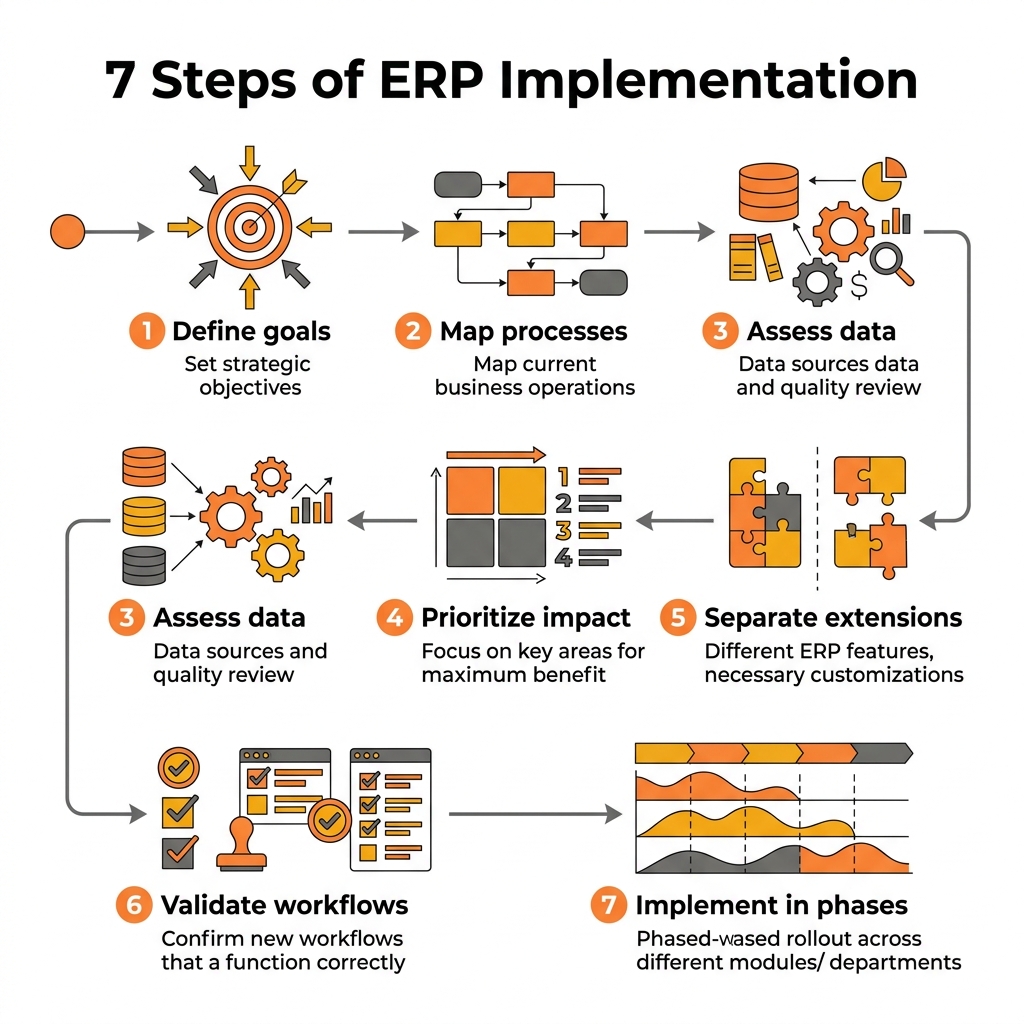
A structured roadmap helps businesses map core processes, prioritize modules by business impact, and implement standard ERP capabilities in manageable phases.
1. Define Measurable Business Goals
Document the outcomes the ERP must support.
Examples include:
- Reducing inventory discrepancies
- Shortening the financial close
- Improving on-time delivery
- Increasing sales conversion
- Controlling project margins
Each proposed module should support a measurable outcome.
2. Map Core Business Processes
Document how transactions move through finance, sales, purchasing, inventory, production, service, and projects.
Identify:
- Manual handoffs
- Duplicate data entry
- Delayed approvals
- Spreadsheet dependency
- Reporting gaps
- Process exceptions
This reveals which functions are essential and where processes must be redesigned.
3. Assess Master Data Readiness
Review the quality of:
- Customer and supplier records
- Item master data
- Bills of materials
- Warehouses and bins
- Price lists
- Tax structures
- Chart of accounts
- Batch and serial information
Poor data quality can undermine inventory, production, MRP, reporting, and financial control.
4. Prioritize by Business Impact
Evaluate proposed capabilities based on:
- Financial impact
- Operational urgency
- Customer impact
- Process dependency
- Implementation effort
- User readiness
Functions with the highest value and strongest dependencies should receive priority.
5. Separate Standard Functionality From Extensions
Classify each requirement as:
- Standard
- Configured
- Reported
- Integrated
- Customized
- Add-on dependent
- Deferred
This distinction helps prevent inaccurate budgets and unrealistic implementation expectations.
6. Validate End-to-End Workflows
Review complete processes such as:
- Lead to cash
- Order to cash
- Procure to pay
- Plan to produce
- Inventory to fulfilment
- Service call to invoice
- Project cost to profitability
A module may appear suitable independently but create gaps when connected to other processes.
7. Implement in Phases
A practical roadmap may include:
- Phase 1: Financial Management, Sales, Purchasing, Inventory, and essential reporting
- Phase 2: CRM, Production, MRP, Service, Project Management, Fixed Assets, or enhanced warehouse processes
- Phase 3: Add-ons, mobile applications, automation, advanced analytics, e-commerce, and external integrations
Phased implementation helps control scope, improve adoption, and reduce operational disruption.
Common SAP Business One Module Selection Mistakes
Implementing Too Much at Once
A large first phase increases complexity, data requirements, training effort, and implementation risk.
Better approach: Begin with the minimum integrated scope required to solve priority business problems.
Selecting Features Instead of Business Outcomes
Feature-led selection may result in impressive functionality that delivers limited operational value.
Better approach: Evaluate every capability based on the business problem it solves and the outcome it supports.
Ignoring Process and Data Readiness
ERP cannot correct inconsistent workflows or unreliable master data automatically.
Better approach: Standardize critical processes and clean essential data before configuration and migration.
Assuming Every Requirement Is Standard
Advanced manufacturing, warehouse, quality, payroll, field-service, or industry requirements may need add-ons or integrations.
Better approach: Ask the implementation partner to classify every requirement before scope and budget approval.
Excluding Users and Reporting Requirements
Decisions made only by management or IT may overlook practical requirements from finance, sales, purchasing, warehouse, production, and service teams.
Better approach: Involve process owners and define KPIs, dashboards, and operational reports during discovery.
Why Choose Emerging Alliance?
Selecting SAP Business One modules requires more than reviewing a feature list. It requires an understanding of business processes, operational dependencies, reporting needs, data quality, industry requirements, and future growth plans.
Emerging Alliance uses a consulting-led approach that includes:
- ✓ Business process discovery
- ✓ Module and capability assessment
- ✓ Gap and integration analysis
- ✓ Phased implementation planning
- ✓ User training
- ✓ Post-go-live support
This helps businesses create an SAP Business One roadmap based on measurable priorities rather than unnecessary functionality.
Conclusion
The right SAP Business One modules are the ones that support defined business goals, integrate critical processes, and deliver measurable operational value.
Financial Management, Sales, Purchasing, and Inventory usually form the ERP foundation. CRM, Production, MRP, Service, Project Management, Fixed Assets, warehouse extensions, and industry-specific solutions can then be introduced according to business complexity and growth priorities.
A phased strategy reduces implementation risk, controls scope, improves user adoption, and creates an ERP environment that can evolve with the business.
Frequently Asked Questions
Book a Personalized SAP Business One Demo
See how SAP Business One can support your financial, sales, purchasing, inventory, production, service, project, and reporting requirements.
Emerging Alliance will assess your current processes, identify the most relevant SAP Business One capabilities, and demonstrate how an integrated ERP roadmap can improve operational visibility and business performance.
Book your personalized SAP Business One demo today.