
SAP Business One License Types: Professional vs Limited Users
Quick Answer: Which SAP Business One License Do You Need?
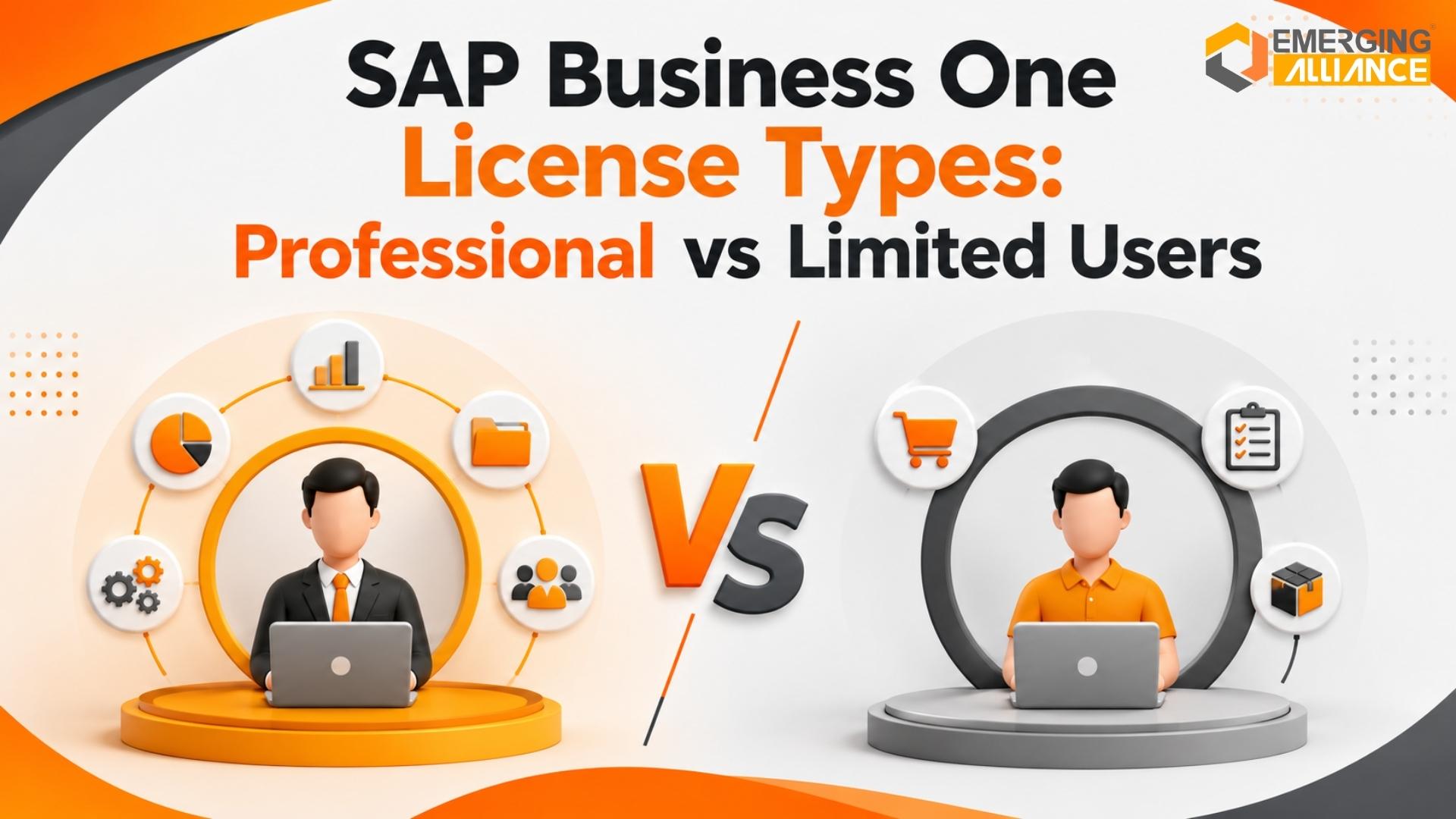
Choosing the right SAP Business One license depends entirely on what each employee actually does inside the ERP system. A Professional User license provides broad, unrestricted access to all modules, including system configuration, production, Material Requirements Planning (MRP), and SDK development. A Limited User license is designed to be highly cost-effective for employees focused on a single business area: Financial, Logistics, or CRM. To optimize your ERP costs, map user workflows to specific transaction limits and review them periodically rather than assigning Professional licenses to everyone.
How SAP Business One Licensing Works
SAP Business One uses a named-user licensing model. This means a license is assigned to an individual user rather than being shared across multiple employees. If 25 employees need direct access to SAP Business One, the organization must evaluate the licensing requirements of those individual users based on what they need to perform inside the system.
However, not every user necessarily requires the same license type. That is where Professional and Limited User licenses become important. A finance user performing specific accounting activities may have very different requirements from a production planner running MRP or an administrator configuring SAP Business One.
The objective is therefore to match:
User responsibility ➔ Required SAP functionality ➔ Appropriate license type
This structured approach improves license governance while helping organizations avoid unnecessary SAP Business One licensing costs.
Named User Model
Assigned to specific individuals; credentials cannot be shared.
Limited Licenses
Role-specific access for Financial, Logistics, or CRM tasks.
Cost Savings
Achieved by optimizing user mix and avoiding over-licensing.
Starter Package
A maximum user limit applicable for smaller operations.
SAP Business One License Types at a Glance
The core SAP Business One user-license categories commonly evaluated by organizations include:
- Professional User
- Limited Financial User
- Limited Logistics User
- Limited CRM User
- Starter Package User, where applicable
Each license is designed for a different level of system functionality.
The mistake many organizations make is assuming that employee seniority determines licensing. It does not. A manager does not automatically require a Professional license simply because they are senior. Similarly, an operational employee may require Professional rights if their responsibilities involve functionality that is not covered by the applicable Limited User entitlement. License selection should therefore be based on actual business processes rather than job titles.
What Is an SAP Business One Professional User?
An SAP Business One Professional User provides broader access to SAP Business One functionality than a Limited User license. SAP’s published Software Use Rights specifically identify Professional licensing for areas including:
- SAP Business One administration
- Production
- Material Requirements Planning (MRP)
- SAP Business One Software Development Kit (SDK)
Professional User rights also incorporate functionality available under the corresponding Limited User categories. This makes the Professional User license appropriate for users whose responsibilities span multiple business processes or involve advanced system functionality.
Typical Professional User Scenarios
A Professional User may be appropriate for:
- SAP Business One administrators
- Production planners
- MRP users
- Key users working across several departments
- Employees responsible for broad operational processes
- Technical users working with SAP Business One SDK functionality
- Users whose responsibilities exceed the entitlement of a Limited User type
The important point is that a Professional license should be assigned because the user requires Professional-level functionality—not simply because they are a manager or senior employee.
What Is an SAP Business One Limited User?
An SAP Business One Limited User is designed for employees whose SAP responsibilities are primarily focused on a particular functional role. The main Limited User categories are:
- Limited Financial User
- Limited Logistics User
- Limited CRM User
These users receive role-specific functionality rather than the broader rights available to Professional Users. A Limited User can therefore be useful when an employee performs clearly defined activities inside SAP Business One without requiring broad cross-functional capabilities.
Limited Financial User
Intended for finance staff, accounting assistants, and AR/AP executives. Focuses on general ledger, financial transactions, reporting, and banking-related tasks.
Limited Logistics User
Designed for warehouse, procurement, inventory, and logistics teams. Handles inventory movements, purchasing, goods receipts, and sales dispatch.
Limited CRM User
Best for sales reps, business development teams, and customer service. Manages customer data, sales opportunities, quotes, and CRM reporting.
SAP Business One Limited Financial User
The Limited Financial User is intended for users whose responsibilities primarily involve financial processes.
Potential users may include:
- Accounts payable staff
- Accounts receivable staff
- Accounting assistants
- Finance operations users
- Employees performing defined financial transactions
Depending on the applicable SAP Business One version and license entitlement, relevant responsibilities may include financial processing, reporting, banking-related tasks, or accounting transactions. However, organizations should validate exact transactional rights against the current SAP Business One license matrix before finalizing user assignments.
When Limited Financial May Be Appropriate:
- The employee mainly works within finance processes.
- They do not require production or MRP.
- They do not administer SAP Business One.
- Their responsibilities remain within the relevant financial license entitlement.
- They do not require broad cross-functional ERP access.
SAP Business One Limited Logistics User
The Limited Logistics User is designed for users primarily involved in logistics-related business processes.
Typical operational responsibilities may include:
- Inventory activities
- Procurement-related processes
- Warehouse transactions
- Goods movements
- Sales logistics
- Purchasing logistics
Potential users include warehouse teams, procurement personnel, stores employees, and logistics coordinators. However, job title alone should not determine the license. For example, a warehouse employee who performs only specific logistics transactions may be suitable for Limited Logistics. A production user who also needs MRP functionality may instead require a Professional license.
When Limited Logistics May Be Appropriate:
- The employee mainly handles inventory, procurement, warehouse, or logistics transactions.
- Their processes remain within the Limited Logistics entitlement.
- They do not require MRP.
- They do not perform SAP Business One administration.
- They do not require broader functionality across multiple business areas.
SAP Business One Limited CRM User
The Limited CRM User is intended for employees primarily working with customer relationship and sales-related activities.
Potential users include:
- Sales representatives
- Business development teams
- Customer relationship teams
- Sales coordinators
- Customer service personnel
Depending on the applicable license entitlement, CRM-oriented activities may include customer management, opportunities, sales-related processes, or associated reporting.
When Limited CRM May Be Appropriate:
- The employee mainly manages customers or sales opportunities.
- Their responsibilities are primarily CRM-focused.
- They do not require broader finance, production, MRP, or system-administration capabilities.
- Their required transactions fall within the current Limited CRM entitlement.
SAP Business One Professional vs Limited User
The following comparison provides a practical overview of how Professional and Limited User licenses differ across key areas of system functionality.
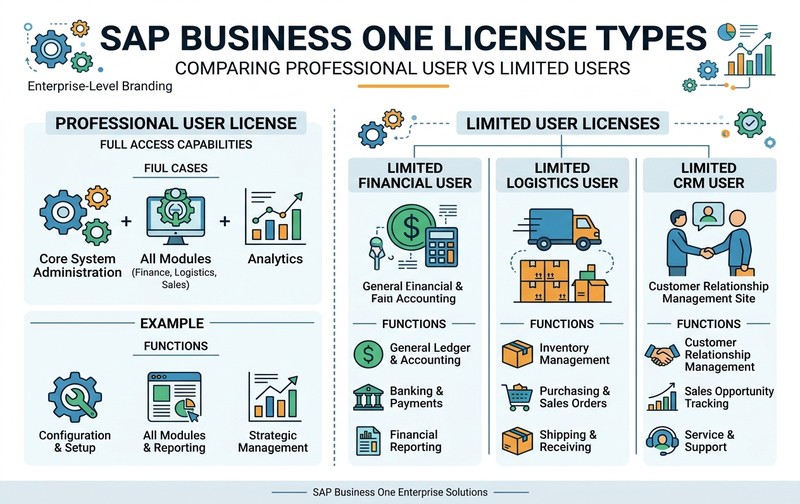
The goal should not be to maximize the number of Limited Users at any cost. The goal is to assign the lowest appropriate license type that still legally and operationally supports the user’s responsibilities.
Licensing Insight
Before assigning licenses, conduct a workflow audit to map user requirements. Over-licensing is the most common cause of high ERP maintenance costs.
Need Assistance?
Let our SAP consultants help you optimize your user license mix.
Get Free ConsultationProfessional User vs Limited User: A Simple Decision Example
Consider a manufacturing business using SAP Business One. The examples below demonstrate why license mapping should be based on tasks rather than designations.
-
User 1: SAP Administrator
Responsibilities: Configure users, manage system settings, support SAP administration.
Recommended direction: Professional User -
User 2: Production Planner
Responsibilities: Review production requirements, run MRP, plan material availability.
Recommended direction: Professional User (MRP is one of the important areas associated with Professional User rights). -
User 3: Accounts Payable Executive
Responsibilities: Process supplier-related finance activities, work primarily within defined accounting processes.
Recommended direction: Evaluate Limited Financial (The final decision should be confirmed against the current SAP entitlement matrix). -
User 4: Warehouse Executive
Responsibilities: Record inventory movements, perform warehouse-related transactions, work mainly within logistics processes.
Recommended direction: Evaluate Limited Logistics -
User 5: Sales Executive
Responsibilities: Manage customers, track opportunities, perform defined sales and CRM activities.
Recommended direction: Evaluate Limited CRM
License Type vs SAP Business One Authorization
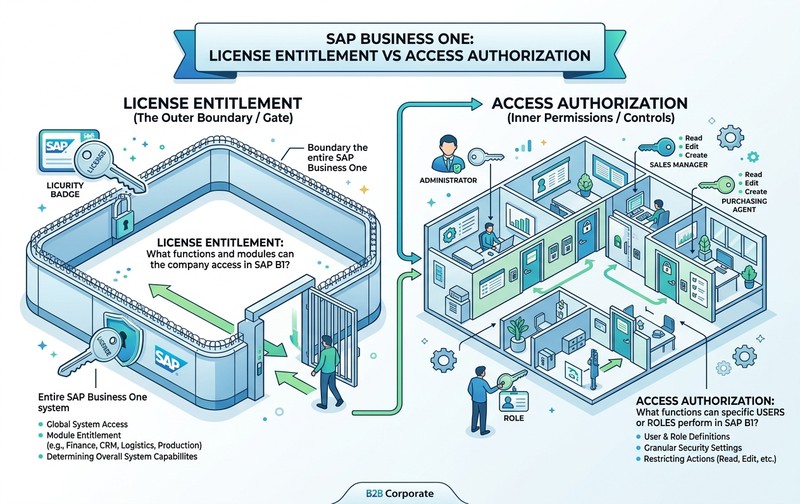
One of the most important licensing concepts is the difference between a license type and a user authorization. They are related, but they are not the same thing.
License Type
The user’s SAP Business One license determines the functional rights available under the purchased license. Examples include: Professional, Limited Financial, Limited Logistics, and Limited CRM.
Authorization
Authorizations determine what the user is allowed to access or perform within the limits of the applicable license. In simple terms: License entitlement defines the boundary. Authorization determines access inside that boundary.
Granting additional authorization does not automatically convert a Limited User into a Professional User. This distinction is important when designing SAP Business One access roles.
Who Really Needs an SAP Business One Professional License?
A Professional User should be considered when the user’s actual responsibilities require Professional functionality. Typical situations include:
-
SAP Business One Administration
Users responsible for SAP Business One administration generally require Professional rights. -
Production
Production functionality is an important Professional User consideration. Manufacturing businesses should pay particular attention to this requirement when mapping production-related employees. -
MRP
Material Requirements Planning is a key example where Professional licensing becomes relevant. Employees responsible for planning material demand and running MRP should therefore not be classified purely based on department. -
SDK-Related Responsibilities
Users working with SAP Business One SDK functionality may require Professional licensing. -
Cross-Functional Responsibilities
Some employees work across finance, sales, purchasing, inventory, and operations. If their required functionality exceeds the rights available within one Limited User category, Professional licensing may be appropriate.
When Is an SAP Business One Limited User Enough?
A Limited User may be sufficient when three conditions are met:
- The user’s responsibilities are clearly defined.
- Their activities primarily fit within Financial, Logistics, or CRM functionality.
- They do not require Professional-only functionality.
Limited licenses can therefore play an important role in controlling SAP B1 cost without restricting employees unnecessarily. The key is accurate role mapping.
Common SAP Business One License Allocation Mistakes
Poor licensing decisions often happen gradually rather than during the original implementation. The following mistakes can increase cost and create access-management problems:
-
Mistake 1: Giving Every User a Professional License
Professional licenses provide broad capabilities, but that does not mean every employee requires one. Assigning Professional licenses automatically can create unnecessary recurring or upfront licensing expenditure.
Better approach: Evaluate what each user actually does before selecting the license. -
Mistake 2: Assigning Licenses Based on Job Title
A CFO, manager, warehouse employee, or sales executive cannot be mapped correctly based on title alone. Two employees with identical titles may perform very different SAP transactions.
Better approach: Map the business process and transaction requirements. -
Mistake 3: Assuming Authorization Determines Licensing
Adding or removing authorization does not replace proper license allocation. A user must still have an appropriate underlying license entitlement. -
Mistake 4: Ignoring MRP and Production Requirements
Manufacturing businesses may incorrectly categorize production-related users as Limited Logistics users without evaluating whether those users require Professional functionality. This can create licensing and operational problems. -
Mistake 5: Keeping Licenses Assigned to Inactive Employees
Employees leave organizations. Roles change. Departments change. But SAP licenses are often left untouched. The result can be unnecessary license allocation. A periodic user review helps identify inactive or incorrectly assigned users. -
Mistake 6: Never Reviewing License Assignment After Go-Live
The license mix selected during implementation may not remain optimal three years later. Organizations may have added departments, changed responsibilities, hired new employees, automated processes, implemented add-ons, added integrations, or expanded production. Each of these changes can affect licensing requirements.
How to Build the Right SAP Business One License Mix
A structured license review can help organizations determine the right Professional and Limited User combination. Follow these steps to optimize your licensing structure:
Optimization Step-by-Step Workflow
- Step 1: Create a Complete User List – Document every employee or user requiring SAP Business One access. Include name, department, responsibility, current license type, and active/inactive status.
- Step 2: Document Actual SAP Activities – Do not use job descriptions alone. Identify what users actually do in SAP Business One (e.g., create purchase orders, post finance transactions, manage opportunities, perform inventory movements, run MRP, manage production, administer SAP, or access multiple operational areas).
- Step 3: Identify Professional-Level Requirements – Check whether the user requires administration, production, MRP, SDK-related functionality, or broad cross-functional access. If yes, Professional licensing may be necessary.
- Step 4: Evaluate Limited User Eligibility – For remaining users, determine whether responsibilities align mainly with Financial, Logistics, or CRM. Then verify exact rights against current SAP licensing documentation.
- Step 5: Review User Authorizations – Once the license type is appropriate, configure authorizations according to role, security requirements, segregation of duties, and business responsibility. Avoid giving users unnecessary permissions simply because their license technically supports them.
- Step 6: Review Inactive Users – Check for former employees, duplicate accounts, users who no longer access SAP, employees who changed departments, or temporary users. Inactive accounts can contribute to unnecessary licensing complexity.
- Step 7: Validate Integration and Indirect Access Requirements – Businesses increasingly connect SAP Business One with CRM platforms, e-commerce systems, warehouse systems, mobile applications, reporting tools, third-party applications, and custom integrations. These scenarios should also be reviewed from a licensing perspective rather than assuming that only direct SAP GUI users matter.
- Step 8: Review the License Mix Regularly – License optimization should not be a one-time implementation task. Useful review points include before renewal, after restructuring, after employee turnover, after major process changes, after automation projects, before buying additional licenses, or during SAP optimization projects.
SAP Business One License Cost: Why the License Mix Matters
SAP Business One licensing cost is affected by the number and type of users required. Professional Users generally represent a higher licensing level than Limited Users because they support broader functionality. This creates an opportunity for optimization.
Consider two organizations with the same number of employees:
- Company A – Assigns Professional licenses to almost every SAP user.
- Company B – Maps each employee’s responsibilities and uses a balanced combination of Professional Users, Limited Financial Users, Limited Logistics Users, and Limited CRM Users.
If Company B’s allocations accurately match actual requirements, it can maintain the required ERP functionality while avoiding unnecessary Professional license assignments. This is why the right question is not “How many SAP B1 users do we have?” but rather “What does each SAP B1 user actually need to do?”
License Cost vs Total SAP Business One Cost
Another common mistake is treating all SAP Business One costs as license costs. They should be separated.
SAP Business One License Cost Factors:
- Number of named users
- Selected license types
- Commercial agreement
- Deployment or commercial model
- Applicable regional terms
Total ERP Cost Factors:
- Implementation
- Customization
- Integration
- Infrastructure
- Database requirements
- Support
- Training
- Add-ons
- Upgrades
A customization project may increase total ERP cost without directly changing the unit price of a Professional or Limited User license. This distinction helps finance teams evaluate SAP Business One total cost of ownership more accurately.
SAP Business One Starter Package: Where Does It Fit?
SAP Business One Starter Package is designed for smaller organizations with limited initial requirements. It offers a more focused entry point into SAP Business One. However, businesses should carefully evaluate:
- Current employee count
- Planned ERP user growth
- Functionality requirements
- Future expansion
- Applicable Starter Package user restrictions
Published SAP commercial terms have historically included a maximum of five Starter Package users under applicable conditions. Businesses expecting rapid growth should therefore assess whether a Starter Package model is suitable for their longer-term requirements rather than evaluating only the initial entry cost. Always confirm current commercial and licensing terms with the applicable SAP partner or current SAP documentation before purchasing.
Business Risks of Choosing the Wrong SAP B1 License
Licensing is not only a cost issue. Incorrect allocation can affect operations, governance, and ERP usability.
-
Over-Licensing: A user receives a more expensive license than required.
Potential impact: Unnecessary SAP spend, poor utilization, and higher renewal costs. -
Under-Licensing: A user requires functionality that their assigned license does not appropriately cover.
Potential impact: Process restrictions, productivity issues, licensing/compliance concerns, and additional license changes later. -
Excessive Authorization: A correctly licensed user receives more system access than their responsibilities require.
Potential impact: Weaker internal controls, segregation-of-duties concerns, and unnecessary operational risks.
Good SAP Business One governance requires all three areas to be aligned: License type + authorization + actual job responsibility.
How Often Should SAP Business One Licenses Be Reviewed?
Organizations should review SAP Business One user licensing periodically rather than waiting until a problem appears. A review is particularly useful:
- Before purchasing additional users
- Before contract or subscription renewal
- After major employee turnover
- After organizational restructuring
- After expanding into new locations
- After introducing manufacturing or MRP processes
- After implementing new integrations
- After changing employee responsibilities
A simple annual review can also help identify licenses that no longer match actual usage.
Choose SAP B1 Licenses Based on Work, Not Titles
The difference between an SAP Business One Professional User and Limited User is not simply “more access versus less access.” The real question is which functional rights each employee requires to perform their responsibilities.
Professional Users are appropriate where broader SAP Business One functionality is required, including important areas such as administration, production, MRP, and SDK-related use. Limited Financial, Logistics, and CRM Users can provide a more focused licensing model for employees whose responsibilities remain within defined functional areas.
For decision-makers, the most effective strategy is to:
- Map actual employee activities.
- Match those activities to the correct license entitlement.
- Review user authorizations separately.
- Remove unnecessary or outdated allocations.
- Reassess the license mix as the business changes.
A well-designed SAP B1 license mix can improve governance, support employees with the functionality they need, and reduce unnecessary ERP expenditure.
FAQs: SAP Business One Licenses
Here are answers to the most frequently asked questions regarding SAP B1 licensing models, differences, and costs.
Not Sure Which SAP B1 Users Really Need Professional Licenses?
Before purchasing additional SAP Business One licenses, review whether your existing users are mapped to the right license types. Emerging Alliance can demonstrate how to evaluate your SAP Business One license mix, identify potential Professional vs Limited User optimization opportunities, and align licenses with actual business responsibilities.
Request a SAP B1 License Optimization Demo