
SAP Business One Barcode Scanning: Reducing Warehouse Delays and Improving Inventory Accuracy
Quick Answer:
SAP Business One barcode scanning helps businesses reduce manual item-entry errors, improve stock identification, and accelerate warehouse transactions. By connecting barcode-enabled workflows with SAP Business One, companies can support goods receipt, inventory transfers, stock counting, order picking, and dispatch verification.
The greatest advantage is not simply scanning products faster. It is recording warehouse activity more accurately and closer to the point of physical movement.
For growing businesses managing multiple warehouses, high inventory volumes, or frequent order fulfilment, barcode integration can improve stock reliability, reduce reconciliation work, and strengthen operational visibility.
However, barcode functionality and transaction automation depend on the scanning application, SAP Business One configuration, and integration design. A barcode scan alone does not guarantee that an inventory transaction has been posted.
Why Warehouse Delays Continue Despite Using ERP
An ERP system can maintain accurate inventory records only when warehouse transactions are entered correctly and on time.
Consider a warehouse receiving 200 cartons during a busy shift.
Employees unload the materials, manually verify item codes, record quantities on paper, and move the goods into storage. The actual goods receipt is entered into SAP Business One several hours later.
During that gap, different departments may work with incomplete information.
- Purchasing: Cannot confirm whether the expected materials have been received.
- Production: May delay scheduling because stock availability is uncertain.
- Sales: Cannot confidently confirm available quantities.
- Finance: Must investigate inventory differences or delayed postings.
The underlying issue is the disconnect between physical warehouse movement and the corresponding ERP transaction.
Barcode-enabled processes can reduce this delay by capturing item details at the point of activity and guiding employees through the required confirmations.
Manual Inventory vs Barcode-Enabled Warehouse Processes
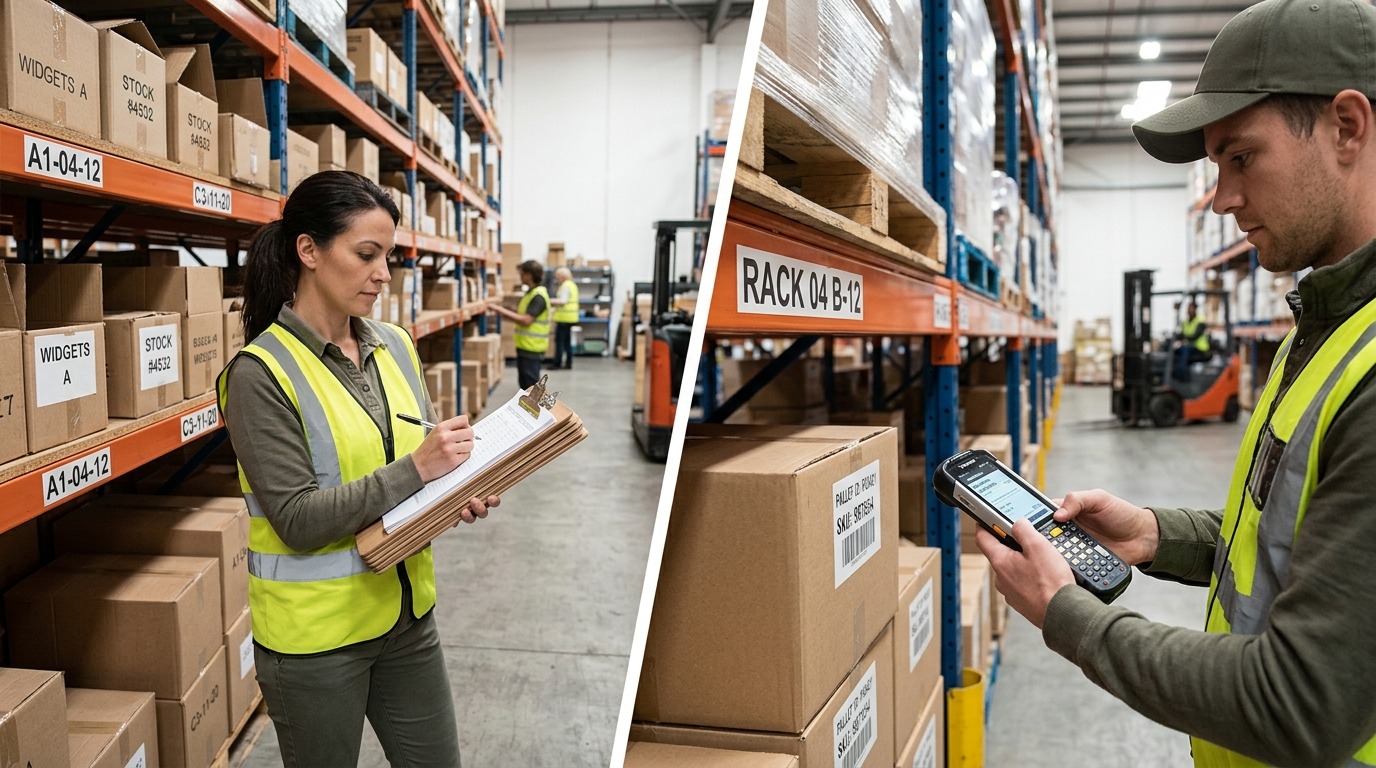
Manual inventory vs barcode-enabled warehouse operations: Transitioning from paper checklists to point-of-activity barcode scanning reduces data latency and item-entry errors across warehouse workflows.
Barcode scanning is most valuable when it improves the complete warehouse workflow rather than replacing only manual item-code entry.
| Warehouse activity | Manual process | Barcode-enabled process |
|---|---|---|
| Goods receiving | Item codes and quantities entered manually | Scanned items matched to receipt requirements |
| Inventory transfers | Paper records or delayed ERP updates | Guided source and destination confirmation |
| Stock counting | Manual identification and count sheets | Scanned identification with recorded count quantities |
| Order picking | Printed pick lists and visual checks | Item verification against assigned order lines |
| Packing and dispatch | Manual shipment verification | Scan-supported packing and dispatch checks |
| Inventory reporting | Dependence on delayed transaction entry | More timely visibility after successful ERP posting |
These capabilities depend on the selected barcode or warehouse management solution.
The business objective is to eliminate unnecessary administrative work while maintaining control over what enters and leaves each warehouse.
How SAP Business One Barcode Scanning Works
A typical barcode workflow connects a physical product to its corresponding SAP Business One item record and business transaction.
Actual validation and posting steps depend on the implemented solution.
For example, a warehouse employee scans a product during receiving. The application identifies the item and may request additional information such as quantity, unit of measure, warehouse, bin location, batch number, or serial number.
Once the necessary details are validated, the transaction can be submitted through the configured SAP Business One integration.
SAP Business One supports barcode assignments for items, including multiple barcodes associated with units of measure. A complete mobile scanning workflow may require additional software or integration.
The distinction matters: scanning identifies data; validated ERP posting establishes the inventory transaction.
Five Warehouse Operations That Benefit from Barcode Integration
1. Goods Receipt: Faster Verification of Incoming Materials
Receiving errors can affect inventory reliability before materials even reach their storage locations.
Common problems include incorrectly entered item codes, differences between ordered and received quantities, and delayed goods receipt posting.
A barcode-enabled receiving workflow can help employees identify the relevant item, compare received quantities with expected purchasing information, and capture required traceability details.
For example, a supplier delivers 95 units against an expected quantity of 100.
Instead of automatically accepting the original quantity, the configured workflow can flag the difference for appropriate handling.
This supports more reliable receiving records and reduces unnecessary follow-up between warehouse and purchasing teams.
2. Inventory Transfers: Better Control Across Warehouses and Bins
Material movement becomes harder to track when companies operate multiple warehouses or storage locations.
An item might be physically transferred to another warehouse while the ERP record still indicates its previous location.
Barcode verification can help confirm the item, source location, destination location, and transfer quantity.
When the associated SAP Business One transaction is correctly posted, authorized teams can work with more dependable stock-location information.
This is particularly useful for businesses operating multiple branches, production storage areas, or distribution facilities.
3. Stock Counting: Less Manual Identification and Reconciliation
Physical inventory counting often consumes significant warehouse time.
Employees must identify stock, verify quantities, record differences, and reconcile their findings with system balances.
Barcode-assisted counting can simplify item identification and connect counted quantities with the correct inventory records.
However, scanning does not replace the need to enter or verify physical quantities, investigate discrepancies, and authorize inventory adjustments.
The main benefit is a more consistent counting process with fewer opportunities for incorrect item selection.
4. Order Picking: Lower Risk of Incorrect Items
Picking errors become more likely when products have similar names, packaging, or nearby storage locations.
A warehouse employee may select the wrong variant even when the order itself contains the correct information.
A configured barcode picking workflow can compare scanned products with the assigned order requirements.
When an unexpected item is scanned, the application may warn the employee or prevent the picking step from being completed.
This is especially relevant for high-volume distribution, spare parts, electronics, and other industries managing many product variations.
5. Packing and Dispatch: Stronger Shipment Verification
Picking the correct goods is only one part of successful order fulfilment.
Errors can still occur during packing, shipment consolidation, and final dispatch.
A barcode-enabled packing process can verify that the items assembled for shipment correspond to the intended delivery requirements.
Depending on the workflow, employees can confirm quantities and required batch or serial information before completing the shipment process.
The business benefits extend beyond the warehouse: fewer avoidable corrections can reduce customer complaints, returns handling, and additional transport effort.
The Real Impact of Barcode Scanning on Inventory Accuracy

Strengthening warehouse inventory accuracy: Combining mobile barcode data capture with strict ERP transaction validation delivers trusted stock visibility across all operational departments.
Inventory accuracy affects purchasing decisions, production continuity, order fulfilment, and working capital.
A small transaction error can create consequences across multiple departments.
For example, if SAP Business One shows 500 units in stock but only 430 are physically available, sales and production teams may make decisions using an overstated balance.
Barcode scanning can reduce certain errors through better item identification and guided transaction capture.
It does not automatically prevent every discrepancy.
Three controls remain essential:
- Accurate master data: Item codes, barcode assignments, units of measure, and warehouse configurations must be maintained correctly.
- Transaction validation: The workflow should verify relevant quantities, locations, and authorization requirements.
- Exception management: Failed postings, damaged labels, shortages, and unexpected items need clearly defined resolution procedures.
Without these controls, organizations risk replacing manual entry mistakes with automated processing mistakes.
What Inventory Visibility Actually Means
Faster data capture can improve visibility, but only if successfully processed transactions reach SAP Business One.
Warehouse dashboards should distinguish between a scan that has been captured and a document that has been posted.
For management reporting, unresolved synchronization failures or pending transactions should not be treated as completed stock movements.
This distinction protects purchasing, production, and dispatch decisions.
Does SAP Business One Include Barcode Scanning by Default?
SAP Business One provides barcode-related item master functionality, inventory documents, warehouse management capabilities, and integration options.
However, businesses should not assume that all handheld warehouse operations are included in a standard installation.
There are three broad approaches to consider.
| Approach | Suitable requirement | What to verify |
|---|---|---|
| Native configuration and supported input | Basic item identification and limited scanning use cases | Supported screens, scanner behavior, and transaction handling |
| Compatible barcode or warehouse add-on | Guided receiving, transfers, picking, or counting | Product compatibility, feature scope, and support |
| Customized integrated application | Specialized workflow, validation, or business requirements | Development effort, security, testing, and maintenance |
The most suitable approach depends on transaction complexity, warehouse configuration, existing customizations, and operational scale.
SAP Business One’s documented integration framework supports scenarios involving third-party software and mobile devices, but the specific barcode solution must still be evaluated.
A demonstration should reproduce actual warehouse processes rather than show only a successful barcode scan.
Barcode Scanning vs Warehouse Management System: What Does Your Business Need?
Barcode scanning and a warehouse management system are related but not identical.
Barcode scanning is a method of identifying or capturing information.
A warehouse management system, or WMS, coordinates broader warehouse execution activities. Depending on its capabilities, it may provide task allocation, location-directed picking, put-away processes, replenishment rules, and operational monitoring.
A business with relatively simple stock movements may need only targeted barcode-supported transactions.
An organization managing complex picking routes, multiple fulfilment stages, or large warehouse teams may need broader WMS capabilities.
The selection should be based on the workflow complexity rather than the number of barcode scanners required.
A clear process assessment helps avoid both underinvestment in essential controls and unnecessary expenditure on functionality the business will not use.
SAP Business One Barcode Integration: An Implementation Roadmap
A barcode project should begin with operational requirements rather than device selection.
The pilot should establish what the proposed solution actually supports, where additional configuration is necessary, and whether warehouse employees can use the workflow consistently.
How to Measure ROI from Barcode-Enabled Warehouse Operations
The business case should focus on measurable operational improvements rather than assumed productivity percentages.
| KPI | What it measures | Expected improvement |
|---|---|---|
| Goods receipt posting time | Time from physical receipt to ERP posting | Shorter delays |
| Inventory discrepancy rate | Differences identified during physical counting | Fewer discrepancies |
| Picking accuracy | Order lines picked without item or quantity errors | Higher accuracy |
| Dispatch processing time | Time required to verify and complete outgoing shipments | Reduced processing time |
| Manual correction workload | Effort spent resolving incorrect transactions | Lower administrative effort |
| Integration failure rate | Transactions that fail to reach the intended ERP state | More reliable processing |
Example ROI calculation
Suppose a warehouse spends 30 employee-hours per week on manual entry, correction, and investigation activities.
After a barcode implementation, the same activities require 18 hours per week.
That represents 12 hours of operational capacity recovered each week, before considering other benefits or costs.
This is an illustrative calculation, not an industry benchmark or a guaranteed outcome.
For a complete investment evaluation, management should also consider software licensing, scanning devices, configuration, integration, training, ongoing maintenance, and support.
The relevant question is whether the solution creates sustained operational value at a reasonable total cost.
When Should a Growing Business Prioritize Barcode Automation?
Not every warehouse needs an extensive scanning system.
A smaller business with limited product variety and low transaction volume may achieve meaningful improvements through stronger master-data maintenance and more disciplined ERP posting.
Barcode integration becomes more relevant when transaction volume and operational complexity make those manual controls difficult to sustain.
Typical warning signs include frequent stock discrepancies, repeated physical stock checks before confirming sales orders, growing picking errors, and delays between warehouse activity and SAP Business One updates.
The need becomes stronger when multiple warehouses, shifts, or branches depend on consistent inventory information.
For CEOs, COOs, and finance leaders, the decision is ultimately about protecting operational reliability while the business grows.
Investing at the right stage can help prevent current warehouse weaknesses from becoming larger control problems.
From Barcode Scanning to Better Warehouse Decisions
Successful warehouse automation is not measured by how many products employees scan each day.
It is measured by whether the business can trust the records generated by warehouse activity.
When items are correctly identified, movements are validated, exceptions are resolved, and transactions are successfully posted, different departments can make decisions using more dependable inventory information.
This supports better coordination between warehouse operations, procurement, production, sales, and finance.
The goal is a warehouse process that remains accurate and manageable as transaction volumes increase.
For businesses already using SAP Business One, the next step is to identify where the existing inventory process loses time or accuracy and determine which barcode-enabled workflows would address those gaps.
Frequently Asked Questions
Improve Warehouse Accuracy with SAP Business One — Book a Demo
Warehouse delays, stock discrepancies, and manual entries can make inventory difficult to control.
Emerging Alliance can evaluate your SAP Business One warehouse workflows and barcode integration needs.
Book an SAP Business One Warehouse Demo to discuss your challenges and practical next steps toward better inventory accuracy.