UAE E-Invoicing: Reducing Manual Data Entry Risks in SAP Business One
Quick Answer
Manual invoice handling in SAP Business One can create customer-data inconsistencies, tax-field errors, approval delays, reconciliation effort, and unnecessary finance rework.
As UAE e-invoicing moves toward mandatory implementation, businesses need more than an external connector. Reliable SAP Business One master data, validation rules, automated data transfer, controlled workflows, status monitoring, and structured exception handling are essential for building a scalable e-invoicing process.
The first step is therefore to assess how invoice data is created, validated, approved, transferred, and corrected inside SAP Business One before connecting it to the UAE e-invoicing ecosystem.
Why Manual Invoice Data Entry Becomes a UAE E-Invoicing Risk
Manual data entry does not always mean an entire invoice is created manually.
The risk usually appears when invoice information moves repeatedly between:
- SAP Business One
- customer and item master records
- spreadsheets
- external applications
- approval processes
- email-based workflows
- finance systems
- integration platforms
Every additional manual touchpoint creates another opportunity for inconsistency.
A user may select an outdated customer record, enter the wrong tax-related value, copy information into an incorrect field, or change a transaction without updating the original source.
A single error may be manageable.
The bigger operational problem begins when the same process is repeated across hundreds or thousands of invoices.
As transaction volumes increase, a finance process built around manual verification becomes difficult to scale.
The goal should not be to remove every human action. Instead, businesses should identify where human judgment adds value and where repetitive invoice handling can be controlled, validated, or automated.
UAE E-Invoicing in 2026–2027: What SAP Business One Users Should Know
UAE e-invoicing is based on the electronic exchange of structured invoice data.
A PDF, scanned invoice, image, Word document, or invoice sent by email does not by itself qualify as an electronic invoice under the UAE framework.
The rollout is already progressing.
Mandatory implementation begins in phases:
| Business Category | Mandatory Implementation |
|---|---|
| Annual revenue of AED 50 million or more | 1 January 2027 |
| Annual revenue below AED 50 million | 1 July 2027 |
| In-scope government entities | 1 October 2027 |
For businesses using SAP Business One, this means e-invoicing readiness should now move from general awareness to practical ERP and integration planning.
The key question is no longer:
“Do we need UAE e-invoicing?”
It is:
“Can our SAP Business One environment consistently produce, validate, transfer, and monitor the invoice data the new process depends on?”
Where SAP Business One Invoice Data Errors Usually Begin
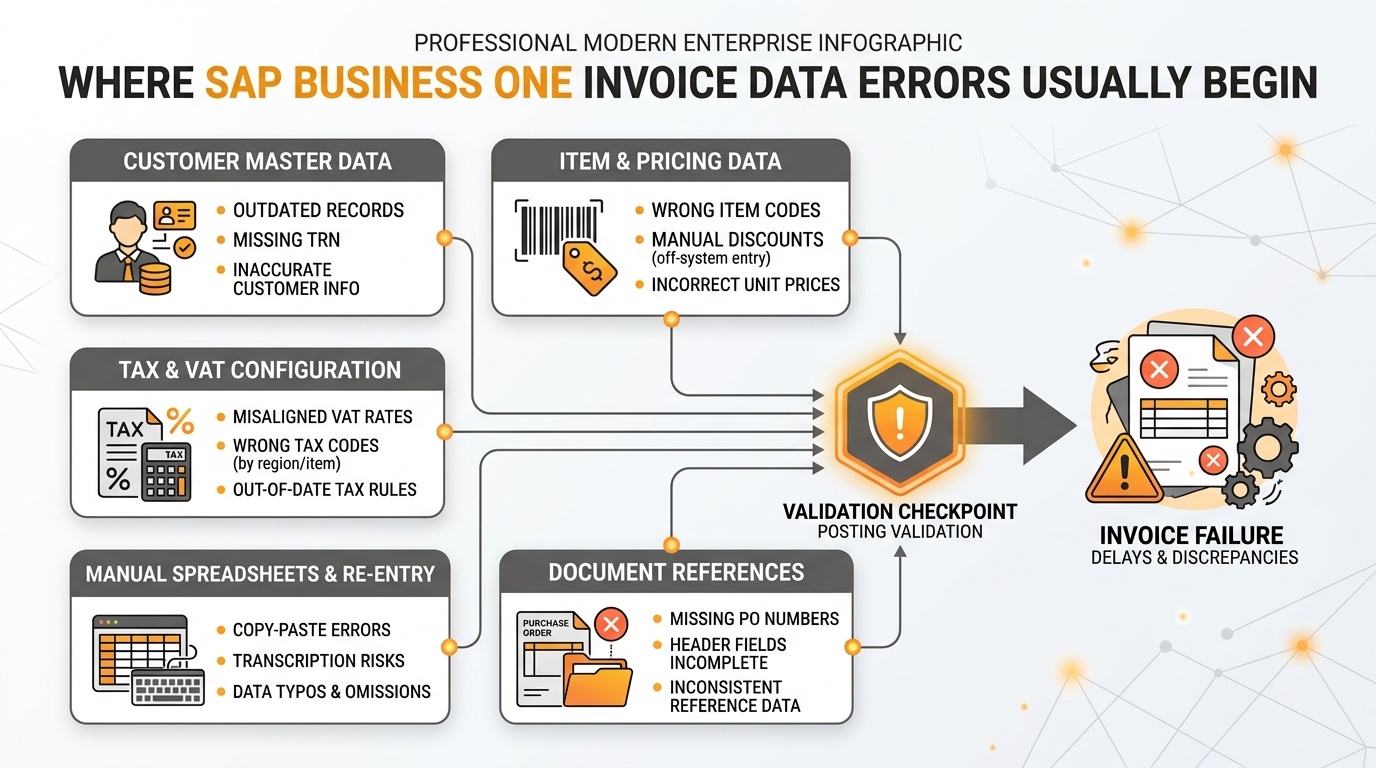
Where SAP Business One invoice data errors usually begin: identifying master data, tax configuration, and transaction discrepancies before e-invoicing transmission.
Many invoice-processing problems originate before an invoice reaches the external integration layer.
Common risk areas include:
- customer names and addresses
- tax-related information
- item master data
- quantities
- prices
- discounts
- accounting information
- transaction references
- customer identifiers
- document-level fields
- manually maintained supporting data
Consider an outdated customer record.
The issue may require finance teams to:
- identify the source of the incorrect data;
- correct the master record;
- revise the affected invoice;
- repeat validation;
- resubmit the transaction.
If the same underlying master-data issue affects several invoices, what appears to be a single transaction problem can become a recurring operational issue.
The real cost is not just the incorrect field
The wider impact can include:
- finance rework
- delayed invoice processing
- approval bottlenecks
- reconciliation effort
- additional exception handling
- spreadsheet-based workarounds
- reduced traceability
- higher support requirements
For decision-makers, the important question is therefore not:
“How many invoice fields are manually entered?”
A better question is:
“Can our current process consistently produce reliable invoice data without excessive manual checking?”
ERP Data Accuracy: The Foundation of UAE E-Invoicing Readiness
An e-invoicing integration cannot automatically correct weak source data inside SAP Business One.
A typical process may look like:
If the original data is incomplete or inconsistent, downstream systems must reject it, transform it, or return it for correction.
This is why e-invoicing should not be treated only as an integration project.
Businesses should review four connected areas.
1. ERP Readiness
Can SAP Business One consistently generate the required invoice information?
2. Data Readiness
Are customer, item, tax, and transaction records complete and consistently maintained?
3. Process Readiness
Are invoice creation, validation, approvals, corrections, and exception handling properly controlled?
4. Technical Readiness
Can the environment support field mapping, data transformation, integration, status updates, monitoring, and error handling?
A connector can move data.
It cannot automatically fix incomplete master records, weak governance, or inconsistent processes.
How SAP Business One Can Strengthen Invoice Data Before E-Invoicing
The most effective controls should be placed as close to the source of the data as practical.
Standardize Master Data
Customer and item records should follow defined data standards.
Businesses should review:
- duplicate records
- incomplete customer details
- outdated information
- inconsistent naming conventions
- incorrectly maintained tax data
- fields without clear ownership
Better source data reduces correction effort later in the invoice lifecycle.
Validate Critical Fields
Important invoice fields should be checked before a transaction moves downstream.
Potential controls may include:
- mandatory-field validation
- permitted-value rules
- data-format checks
- customer-data validation
- tax-data validation
- transaction-level checks
Validation should be based on actual business and e-invoicing requirements rather than adding unnecessary restrictions.
Strengthen Approval Workflows
Transactions requiring review should follow controlled approval rules instead of informal email-based processes.
A structured workflow should clearly define:
- which invoices require approval;
- who is responsible;
- when escalation is needed;
- what happens after rejection or correction.
Review Access Controls
Technology cannot compensate for weak governance.
Organizations should review who can:
- create or modify customer master data;
- change invoice-related fields;
- approve transactions;
- alter configuration;
- modify integration-related information.
Access should align with business responsibility.
Reducing Manual Invoice Entry Through SAP Business One Integration
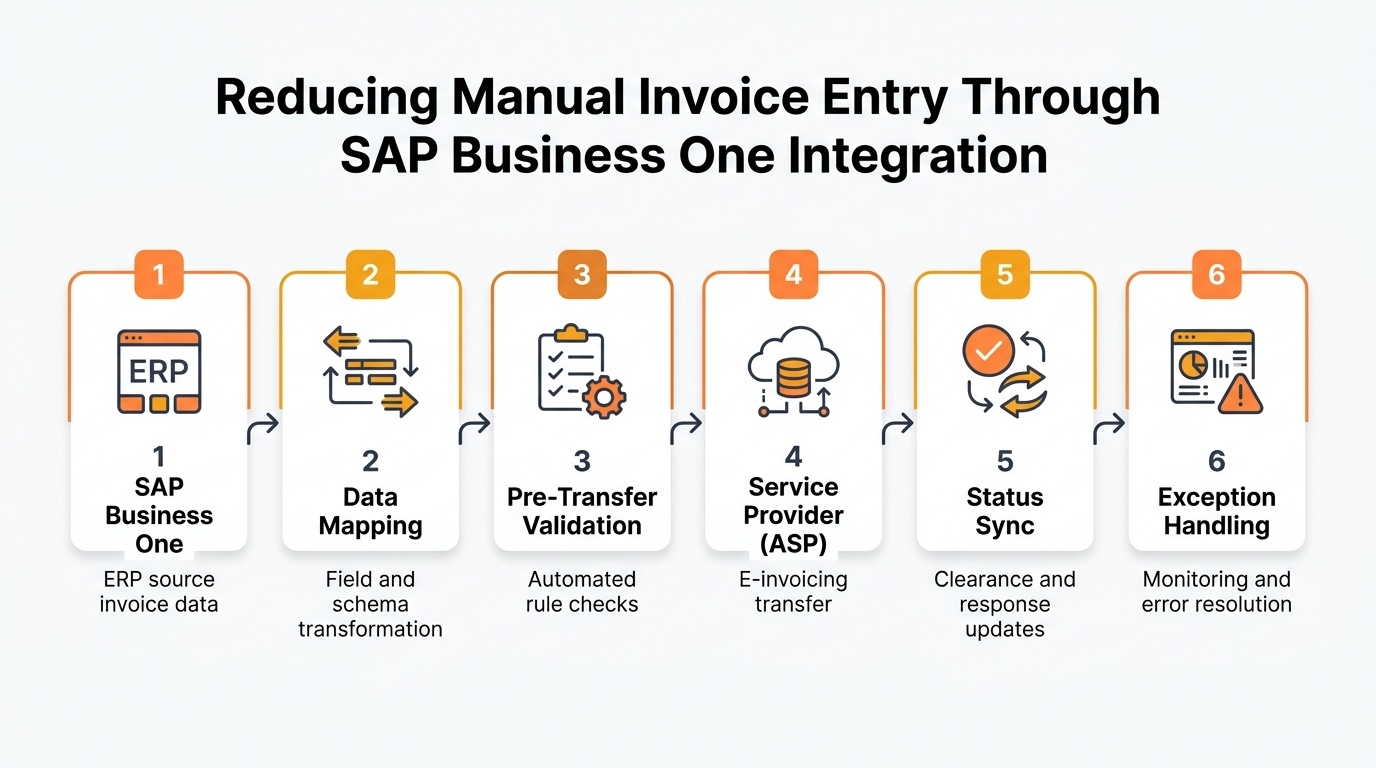
Reducing manual invoice entry through SAP Business One integration: 6-step end-to-end automated pipeline with pre-transfer validation, ASP connectivity, and status synchronization.
Once SAP Business One source data and internal processes are stable, integration can reduce repeated invoice handling.
A well-designed integration should cover more than simple data transfer.
Data Mapping
SAP Business One fields must correspond correctly with the fields required by the connected e-invoicing process.
Some values may also require transformation.
Automated Data Transfer
Invoice information can move from SAP Business One without users recreating the same data in another platform.
This reduces repetitive work and transcription risk.
Pre-Transfer Validation
Critical invoice data should be checked before transmission wherever practical.
This allows problems to be identified closer to their source.
Status Synchronization
Finance teams need visibility after an invoice has been transferred.
Users should be able to identify whether a transaction has:
- passed validation;
- been transmitted successfully;
- encountered a technical exception;
- been rejected;
- been corrected and resubmitted.
Duplicate Protection
The integration should prevent unintended duplicate processing when a transaction is retried following a timeout, user action, or system failure.
Exception Monitoring
Finance and IT teams need to know:
- which transaction failed;
- why it failed;
- who owns the problem;
- what corrective action is required;
- whether resubmission is necessary.
The objective is not simply automation.
It is controlled automation with visibility.
UAE E-Invoicing and Accredited Service Provider Integration
Under the UAE e-invoicing framework, businesses may need to work through an Accredited Service Provider (ASP) as part of the structured invoice-exchange process.
For SAP Business One users, this creates an important architecture question:
How will accurate invoice information move from SAP Business One into the ASP-controlled process, and how will transaction statuses return to the finance team?
Businesses should define:
- how SAP Business One fields will be mapped;
- whether data transformation is required;
- which validations occur inside SAP Business One;
- which validations happen downstream;
- how rejected invoices return for correction;
- how status information becomes visible;
- how resubmission works;
- how duplicate processing is prevented.
Without these controls, businesses may automate invoice transfer while still creating significant manual work around failures and exceptions.
When SAP Business One Configuration Is Not Enough for UAE E-Invoicing
Not every e-invoicing requirement requires SAP Business One customization.
Many gaps can first be addressed through:
- master-data cleanup;
- validation rules;
- workflow configuration;
- user-access controls;
- integration mapping;
- process redesign.
Customization becomes relevant when a specific e-invoicing requirement cannot be handled effectively through standard configuration or integration alone.
This may include:
- additional invoice fields;
- specialized validation logic;
- industry-specific workflows;
- custom document processing;
- data-transformation requirements;
- integration with existing third-party applications;
- automated exception or status handling.
Existing SAP Business One customizations should also be reviewed before implementation.
Older modifications may affect:
- document behaviour;
- posting logic;
- approval workflows;
- field availability;
- APIs;
- existing integrations.
Configuration, Integration or Customization?
A practical sequence is:
The goal should be to use the least complex architecture that still meets the actual requirement.
Any customization introduced should have clear:
- business ownership;
- documentation;
- testing procedures;
- maintenance responsibility;
- upgrade considerations.
Where UAE E-Invoicing Projects Commonly Break Inside SAP Business One
E-invoicing problems often become visible at the integration stage, but the root cause may begin much earlier inside SAP Business One.
Incomplete Customer Master Data
Missing or outdated customer information can create downstream validation problems.
Businesses should verify that relevant customer records are complete and clearly owned.
Incorrect or Inconsistent Tax Data
Tax-related information may come from master data, transaction configuration, or business rules.
If these values are inconsistent, finance teams may need to investigate and correct invoices manually.
Manual Data Re-Entry
When employees copy data between SAP Business One, spreadsheets, portals, or external tools, error risk increases.
Integration should reduce unnecessary re-entry wherever possible.
Weak Validation Before Submission
Waiting for the external e-invoicing process to identify every error creates additional correction work.
Important invoice data should be validated before transmission.
Poor Status Visibility
Submitting an invoice is only part of the process.
Finance teams also need to know what happened after submission.
Unclear Exception Ownership
If no one knows whether finance, IT, operations, or another team owns a particular failure, resolution becomes slow and dependent on informal communication.
These are the gaps businesses should address before they become recurring e-invoicing exceptions.
Managing Validation Errors and E-Invoicing Exceptions
Error management should be designed before go-live.
An error message alone is not an exception-management process.
Consider an invoice rejected because required customer data is incomplete.
The business should be able to determine:
- What failed?
- Is the problem in master data, transaction data, or the integration?
- Who owns the correction?
- Where should the data be corrected?
- Can the transaction be resubmitted?
- How will successful completion be confirmed?
Separate Data Errors from Technical Errors
Different problems require different owners.
Data error:
Incorrect or incomplete customer information.
Likely owner: finance, master-data team, or operations.
Technical error:
Interface, network, or integration failure.
Likely owner: IT or integration support.
Fix the Source, Not Just the Failed Invoice
If teams repeatedly copy error messages into spreadsheets and coordinate corrections by email, they may simply replace one uncontrolled process with another.
The better objective is:
Identify the source of the exception and prevent recurrence.
This improves the reliability of both SAP Business One and the connected e-invoicing process.
Building an SAP Business One E-Invoicing Process That Can Scale
A UAE e-invoicing implementation should not be designed only around current invoice volumes.
It should also support future growth without creating proportionally more manual work.
Validate Data Before It Leaves SAP Business One
Critical invoice information should be checked as early as possible.
Automate Repetitive Data Movement
Users should not need to recreate invoice information that already exists inside SAP Business One.
Return Status to the Business
Finance teams need clear visibility into successful and unsuccessful transactions.
Create Structured Exception Workflows
Exceptions should follow defined correction and escalation paths.
Build for Change
Field mappings, validation rules, integrations, and business processes may change over time.
The architecture should therefore support ongoing maintenance.
A scalable e-invoicing process is not simply one that can transmit invoices.
It should be able to:
validate, transmit, monitor, correct, and support transactions consistently as volume increases.
The Business Case for Fixing Invoice Data Before UAE E-Invoicing Go-Live
UAE e-invoicing creates a technology requirement, but it also exposes weaknesses in existing invoice operations.
For CEOs, CFOs, CIOs, and CTOs, the opportunity is broader than technical compliance.
Reduce Finance Rework
Cleaner master data and better validation reduce repeated corrections and manual checks.
Improve Processing Visibility
Status monitoring gives finance teams clearer visibility into transactions requiring attention.
Reduce Spreadsheet and Email Dependency
A controlled ERP and integration process reduces informal workarounds that are difficult to manage.
Strengthen Process Ownership
Clearly defined ownership makes invoice errors easier to resolve.
Support Higher Transaction Volumes
Automation becomes increasingly valuable as invoice volumes increase.
Improve ERP Control Beyond E-Invoicing
Better master data, validation, access controls, workflows, and monitoring can strengthen day-to-day SAP Business One operations as well.
The executive question should therefore not be:
“Can SAP Business One connect to UAE e-invoicing?”
It should be:
“Can our invoice process produce reliable data, operate at scale, and provide enough visibility to manage exceptions without excessive manual intervention?”
Conclusion
UAE e-invoicing readiness is not simply about connecting SAP Business One to an external platform.
The reliability of the overall process depends on whether invoice information can be:
- created accurately;
- validated consistently;
- transferred automatically;
- monitored clearly;
- corrected through controlled workflows.
For SAP Business One users, the priority should be to identify weaknesses before those weaknesses reach the e-invoicing layer.
That means reviewing:
- master-data quality;
- invoice-entry processes;
- validation controls;
- workflows;
- integrations;
- customizations;
- access rights;
- exception handling;
- scalability;
- ongoing support.
Organizations that strengthen these areas before mandatory implementation will be in a better position to reduce manual intervention, improve invoice accuracy, and operate UAE e-invoicing more efficiently.
FAQs About UAE E-Invoicing and SAP Business One
See How UAE E-Invoicing Fits Your SAP Business One
Identify data-quality gaps, validation risks, ASP integration requirements, and invoice rejection points before UAE e-invoicing becomes mandatory. Book a UAE E-Invoicing Demo with Emerging Alliance to evaluate your current SAP Business One invoice process and understand the changes needed for compliance.