SAP Business One Production Routing: From BOM to Shop-Floor Control
Quick Answer: What Is SAP Business One Production Routing?
SAP Business One production routing helps manufacturers organize production into defined stages and sequences. Each route stage can include materials, resources, and production activities, allowing businesses to control how work moves from the bill of materials to the production order and ultimately to finished goods.
For manufacturers, routing provides better visibility into production steps, resource usage, material issue, scheduling, and shop-floor execution.
Why Production Routing Matters in SAP Business One
Manufacturing rarely happens in a single step.
A finished product may move through cutting, machining, assembly, inspection, packaging, or several other production stages before completion.
Without a structured routing process, manufacturers may face:
Unclear production sequences
Materials issued too early or too late
Limited visibility into resource requirements
Production bottlenecks
Difficulty tracking individual manufacturing stages
Delays between production activities
SAP Business One production routing helps organize these activities into a structured production flow.
Instead of treating production as one single operation, manufacturers can divide it into logical route stages and manage each stage more effectively.
Routing Stages in SAP Business One
Routing stages allow manufacturers to divide the production process into separate operational phases.
A route stage can contain:
Inventory components
Production resources
Labor or machine resources
Production-related text or instructions
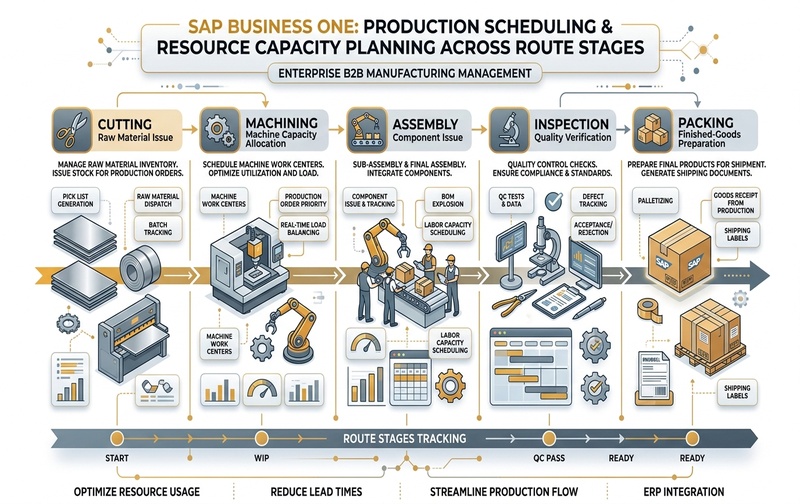
For example, a manufacturer producing a fabricated component may create routing stages such as:
- Cutting
- Machining
- Assembly
- Quality Inspection
- Packing
This creates a clearer production structure than managing every material and resource as one continuous list.
Routing stages can then be incorporated into the Bill of Materials and transferred into production orders.
Route Sequence and Production Order Processing
Route sequence determines the order in which production stages should occur.
Each route stage is assigned a sequence so SAP Business One can organize production activities in the correct operational order.
For example:
This sequencing gives production teams a more structured view of how an item should move through manufacturing.
When the production order is created, the relevant route stages, components, and resources become part of the production structure.
This helps manufacturing teams understand:
- which activity happens first
- which components are required at each stage
- which resources are needed
- how production moves toward completion
How Routing Connects the BOM and Production Order
The Bill of Materials defines what is required to manufacture a finished item.
Production routing adds another layer by defining how those requirements move through production.
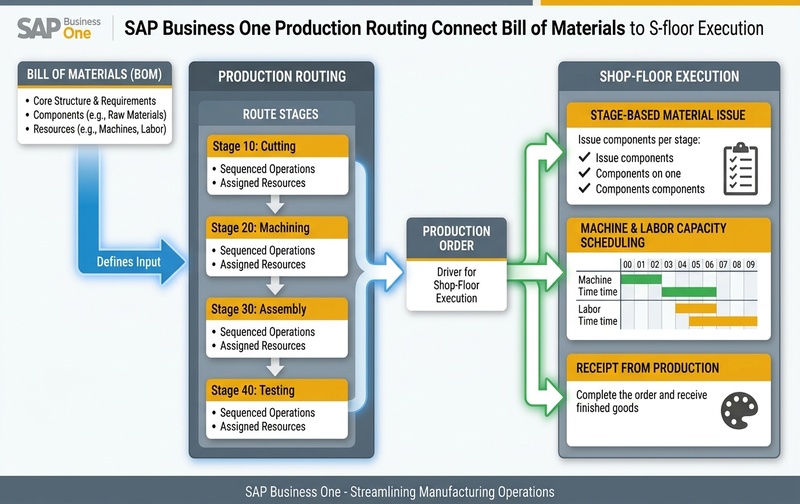
A simplified process looks like this:
The BOM therefore defines the production structure, while routing organizes the sequence of manufacturing activities.
This becomes particularly useful when production involves multiple departments, machines, work centers, or process stages.
Issuing Components by Routing Stage
One of the important advantages of production routing is the ability to organize components according to the stage in which they are required.
Instead of issuing all production materials at the beginning of the production order, components can be associated with specific route stages.
For example:
- raw material may be required during cutting
- semi-finished material may be required during assembly
- packing material may only be required during the final stage
This supports better material control and can reduce unnecessary movement of inventory across the production floor.
It also helps production teams understand exactly when particular components are required.
Resources and Production Capacity
Production routing can also include resources required during manufacturing.
Resources may represent:
machines
production equipment
labor capacity
production lines
other manufacturing resources
Associating resources with route stages gives manufacturers better visibility into where capacity is required during the production process.
This can help identify potential production constraints before they become major bottlenecks.
For example, if multiple production orders require the same machine during the same period, production planners can evaluate the resource requirement and adjust scheduling accordingly.
Production Scheduling Across Routing Stages
Routing becomes especially valuable when manufacturers need better production scheduling.
Each production stage may require a different amount of time.
For example:
| Route Stage | Typical Production Activity |
|---|---|
| Cutting | Raw material preparation |
| Machining | Machine processing |
| Assembly | Component assembly |
| Inspection | Quality verification |
| Packing | Finished-goods preparation |
By organizing production into these stages, manufacturers can better estimate how production progresses through the factory.
Production dates and resource requirements can then be managed more systematically rather than relying only on manual coordination.
Production Priority and Pick List Management
Production orders can also be prioritized based on operational requirements.
Priority helps manufacturing teams understand which orders require attention first when several production orders are active.
SAP Business One also supports pick-list handling for production-related inventory.
A pick list can be generated from a production order so warehouse or production teams can prepare required components before production begins.
This improves coordination between inventory and manufacturing teams.
Instead of manually identifying every required component, production staff can work from a structured material list connected to the production order.
Practical SAP Business One Production Routing Example
Consider a manufacturer producing an industrial metal component.
The production process may look like this:
Stage 10: Cutting
Raw steel is issued and cut according to the production requirement.
Stage 20: Machining
The cut material moves to machining equipment where the required dimensions are created.
Stage 30: Assembly
Additional components are issued and assembled.
Stage 40: Quality Inspection
The finished assembly is checked against production and quality requirements.
Stage 50: Packing
Packing materials are issued and the completed product is prepared for inventory or shipment.
Instead of managing this production order as one large process, routing separates it into clearly defined manufacturing stages.
This makes the production flow easier to understand and manage.
What Production Routing Improves for Manufacturers
A properly structured production routing process can improve several areas of manufacturing control.
Manufacturers gain clearer visibility into:
production sequence
stage-level material requirements
production resources
operational dependencies
production order priorities
component picking
resource requirements
shop-floor progress
The primary benefit is not simply having more production data.
The real value comes from creating a repeatable production structure that connects planning, materials, resources, and execution.
Common Production Routing Setup Mistakes
Production routing is most effective when the routing structure reflects the actual manufacturing process.
Common problems occur when businesses:
- create too many unnecessary route stages
- create stages that do not match real shop-floor activities
- assign components to incorrect production stages
- ignore machine or labor resource requirements
- use inconsistent route sequences
- treat every product as having the same production process
The routing design should therefore reflect how production actually operates.
The goal is not to create the most detailed routing structure possible.
The goal is to create enough production structure to improve planning, visibility, and control without creating unnecessary complexity.
When Should Manufacturers Use SAP Business One Production Routing?
Production routing is particularly useful when manufacturing involves:
multiple production stages
different machines or resources
stage-specific material requirements
complex Bills of Materials
production scheduling requirements
multiple active production orders
capacity constraints
coordination between warehouse and production teams
For very simple manufacturing processes, extensive routing may not always be necessary.
But as production complexity increases, routing can provide stronger operational control.
SAP Business One Production Routing FAQs
See Your Production Routing Process in SAP Business One
If your production process involves multiple stages, machines, materials, or production orders, the routing structure should reflect how your shop floor actually operates.
A well-designed SAP Business One production routing process can connect BOMs, materials, resources, production orders, and shop-floor activities in one structured workflow.
Book a SAP Business One production demo to see how routing can be configured around your manufacturing process.