
SAP Business One Exchange Rate Management: Automating Currency Updates
Quick Answer: How Can SAP Business One Automate Exchange Rate Updates?
SAP Business One can manage foreign-currency transactions by maintaining exchange rates within the system. Automating exchange-rate updates can reduce manual finance work, improve currency accuracy, and minimize errors in invoices, payments, receivables, payables, and financial reporting.
For businesses dealing with multiple currencies, the objective is not simply to update a rate automatically. The exchange-rate process must also use the appropriate source, update frequency, currency configuration, and validation controls so financial transactions remain accurate.
Why Exchange Rate Management Matters in SAP Business One
Businesses operating across countries or purchasing and selling in foreign currencies frequently depend on accurate exchange rates.
When exchange rates are updated manually, finance teams may face:
For growing businesses, these issues can become more significant as transaction volumes and currencies increase.
Effective SAP Business One exchange-rate management provides a controlled process for maintaining currency values and supporting accurate financial operations.
Common Exchange Rate Challenges for SAP Business One Users
Manual Exchange Rate Updates
Finance teams may need to regularly obtain currency rates and enter them into SAP Business One.
This creates unnecessary repetitive work and increases the possibility of human error.
Outdated Currency Rates
If the exchange rate is not updated on time, transactions may use an outdated value.
This can affect the accuracy of financial calculations and reporting.
Multiple Currency Transactions
Companies working with customers, suppliers, banks, or subsidiaries across different countries may process transactions in several currencies.
Managing these currencies manually becomes increasingly difficult as transaction volume grows.
Inconsistent Exchange Rate Processes
Different teams may follow different procedures for obtaining or entering exchange rates.
Without a standardized process, financial data can become inconsistent.
Foreign Currency Reporting Issues
Incorrect or outdated rates can affect financial reporting, currency valuation, receivables, payables, and other finance-related processes.
How Exchange Rates Work in SAP Business One
SAP Business One maintains currency information that can be used when processing transactions involving foreign currencies.
Depending on the company’s configuration, users can work with:
Primary operating currency of the legal entity.
Standard currency for consolidated corporate reporting.
Currencies assigned to specific vendors or customers.
Cross-border invoices, orders, and payment entries.
Centralized date-driven exchange rates and indexes.
Dynamic real-time rate application at transaction time.
Multi-currency financial statements and revaluations.
The important consideration is ensuring that exchange-rate data is maintained consistently and according to the organization’s financial processes.
How to Automatically Update Exchange Rates in SAP Business One
Automatic exchange-rate updates typically require an integration or configured mechanism that retrieves currency information from an appropriate external source and updates the relevant exchange-rate data in SAP Business One.
Automated Exchange Rate Workflow:
The exact implementation depends on the organization’s SAP Business One environment, integration architecture, currencies, rate provider, and business requirements.
Step 1: Identify the Required Currencies
Start by identifying the currencies used across:
Only the currencies required by the business should be included in the exchange-rate process.
Step 2: Select a Reliable Exchange Rate Source
The business should determine where exchange-rate information will originate. The source should be evaluated based on:
Step 3: Define the Update Frequency
Exchange rates may need to be updated according to the company’s operating requirements. For example, an organization may require:
The appropriate frequency depends on transaction volume and financial-control requirements.
Step 4: Connect the Exchange Rate Source to SAP Business One
An integration mechanism can retrieve the required currency data and transfer it into SAP Business One.
Depending on the architecture, this may involve APIs, integration platforms, middleware, or custom development.
Step 5: Validate the Updated Rates
Automation should not eliminate financial controls. After rates are retrieved, businesses should consider validation rules such as:
Step 6: Apply the Rates to Business Transactions
Once the exchange-rate information is available in SAP Business One, it can support relevant foreign-currency transactions according to the system’s configuration and transaction rules.
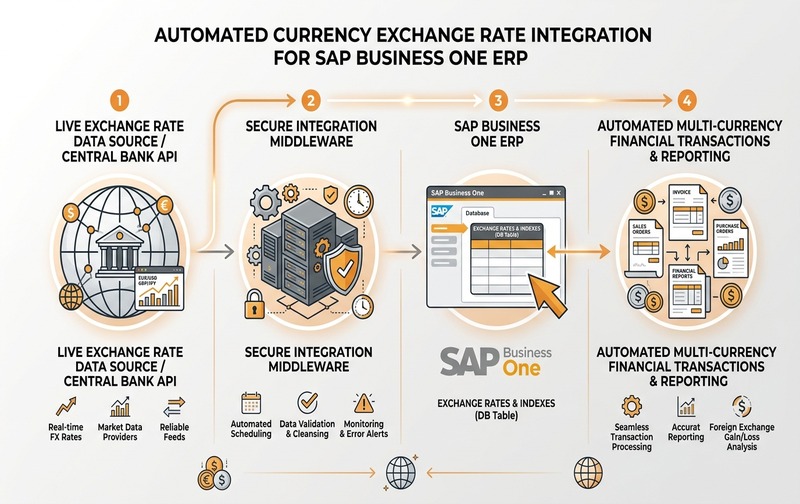
Enterprise architecture for automated currency exchange rate retrieval and database updates in SAP Business One.
Manual vs Automated Exchange Rate Management in SAP Business One
Automation does not mean that every exchange-rate decision should be completely uncontrolled. The better approach is automation with validation and monitoring.
Business Impact of Automating SAP B1 Exchange Rates
Reduced Manual Finance Work
Finance teams spend less time repeatedly collecting and entering exchange-rate information.
Lower Risk of Data-Entry Errors
Automated retrieval can reduce errors associated with manually typing currency rates.
Better Transaction Accuracy
Using timely exchange-rate information can help businesses maintain more consistent foreign-currency transactions.
Improved Financial Control
A defined automated process can create a more standardized approach to exchange-rate management.
Better Scalability
Businesses operating with multiple currencies can manage increasing transaction volumes without proportionally increasing manual work.
What Happens When Exchange Rates Are Not Managed Properly?
Poor exchange-rate management can create downstream problems across the finance function.
Potential consequences include:
The impact can become more significant for businesses with high foreign-currency transaction volumes.
SAP Business One Exchange Rate Automation: Key Implementation Considerations
Before implementing automation, businesses should evaluate several technical and financial factors.
Currency Requirements
Identify all currencies that need to be maintained and determine how frequently they change.
Data Source Reliability
The exchange-rate source should provide dependable and consistent information.
Integration Architecture
The organization should determine how the external source will communicate with SAP Business One.
Error Handling
The process should define what happens when:
- The rate provider is unavailable
- An API request fails
- A currency is missing
- An unexpected rate is received
- SAP Business One cannot accept the update
Auditability
Finance teams should be able to understand when rates were updated and how exceptions were handled.
Security
Any integration handling financial data should follow appropriate authentication, access-control, and security practices.
When Should Businesses Automate Exchange Rate Updates in SAP Business One?
Automation becomes particularly valuable when a business:
For companies with limited foreign-currency activity, manual maintenance may still be sufficient. The decision should be based on transaction volume, operational complexity, risk, and financial-control requirements.
SAP Business One Exchange Rate Management for Growing Businesses
As businesses expand internationally, currency management becomes part of broader ERP scalability.
A well-designed SAP Business One environment should connect exchange-rate management with the wider financial workflow rather than treating currency updates as an isolated administrative task.
This is particularly important for companies managing:
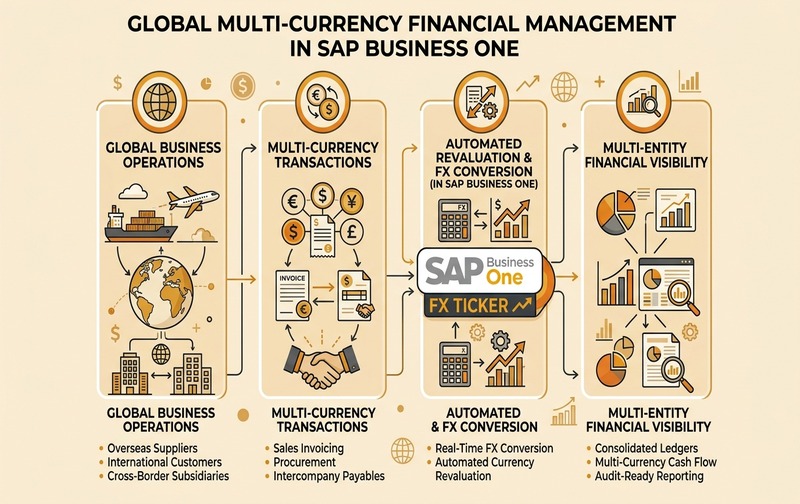
Global multi-currency financial management workflow connecting international operations, real-time conversion, and consolidated financial visibility.
Conclusion
Exchange-rate management is a small but important component of SAP Business One financial operations.
For businesses handling foreign-currency transactions, manually collecting and entering rates can create unnecessary effort and introduce avoidable risks. A properly designed automated exchange-rate process can improve consistency, reduce repetitive finance work, and support more reliable transaction processing.
However, automation should not be implemented simply to eliminate manual data entry. The solution should also consider the exchange-rate source, update frequency, integration architecture, validation, security, exception handling, and financial controls.
For organizations using SAP Business One across multiple currencies or countries, the right approach is to design exchange-rate management around the broader finance and ERP workflow.