SAP Business One Pricing: License, Implementation & Total Cost Guide
SAP Business One Pricing: License, Implementation & Total Cost Guide
Quick Answer: How Much Does SAP Business One Cost?
SAP Business One pricing is not based on one universal price. Your total investment depends on the number and type of users, deployment model, implementation complexity, data migration, integrations, customizations, add-ons, training and ongoing support.
For this reason, businesses evaluating SAP Business One cost should look beyond the software license alone and calculate the complete implementation and long-term Total Cost of Ownership (TCO).
The most accurate SAP B1 price therefore starts with a clear assessment of your users, processes, locations, integrations and future growth requirements.
How Does SAP Business One Pricing Work?
SAP Business One pricing is generally made up of several different cost components rather than a single software fee.
The main components are:
SAP Business One licenses
Cloud or on-premise deployment
Implementation services
Configuration
Data migration
Customization
Third-party integrations
Industry-specific add-ons
User training
Support and maintenance
Infrastructure where applicable
This distinction is important.
A company asking only for the SAP Business One license cost may receive an incomplete picture of what the ERP project will actually require.
For CEOs, CFOs and IT leaders, the more useful question is:
What will SAP Business One cost to implement, operate and scale over the next three to five years?
What Determines SAP Business One Cost?
Two companies with the same number of employees can have significantly different SAP Business One project costs.
Why?
Because ERP complexity depends on the business processes that must be supported.
| Pricing factor | How it affects SAP Business One cost |
|---|---|
| Number of users | More licensed users generally increase software expenditure |
| User type | Different users require different levels of system functionality |
| Deployment model | Cloud and on-premise environments have different commercial and infrastructure considerations |
| Number of entities | Multiple companies, branches or locations can increase implementation complexity |
| Business processes | Complex manufacturing, distribution or service workflows require more configuration |
| Data migration | Large, fragmented or poor-quality legacy data requires additional migration effort |
| Customization | Business-specific developments increase design, development and testing requirements |
| Integrations | Connections with CRM, WMS, e-commerce, banking and other systems increase project scope |
| Add-ons | Manufacturing, quality, mobility and other industry capabilities can add licensing and implementation costs |
| Training | Training requirements vary according to user numbers, roles and process complexity |
| Support | Post-go-live support requirements affect ongoing ownership cost |
The goal should therefore not be to find the cheapest possible implementation.
The goal should be to design the right SAP Business One configuration at the lowest sustainable Total Cost of Ownership.
SAP Business One License Types
SAP Business One uses a named-user licensing approach. Each authorized user requires an appropriate license based on the functionality that user needs.
The two important categories businesses commonly evaluate are Professional and Limited users.
SAP Business One Professional User
A Professional user requires broad access to SAP Business One functionality.
These licenses are generally appropriate for roles that need to work across multiple operational areas or require advanced system functionality.
Typical examples may include:
- ERP administrators
- Key finance users
- Operations managers
- Senior business users
- Users working with production or MRP
- Internal SAP administrators
The correct license should always be mapped against the person’s actual role and system requirements.
SAP Business One Limited User
Limited licenses are designed for users whose responsibilities require access to a narrower functional area.
Depending on the licensed role and applicable SAP terms, Limited users may be aligned to areas such as:
- Finance
- Logistics
- CRM
This distinction matters commercially.
If an organization gives a broad-access license to every employee regardless of actual system usage, SAP license cost can rise unnecessarily.
License design should therefore be part of the ERP discovery process—not an afterthought.
Professional vs Limited Users: Why License Mapping Matters
Consider two employees.
A finance controller may need broad access to financial processes, reporting and business information.
A warehouse employee may only need logistics-related functionality necessary to complete daily operations.
Providing both people with the same license without first evaluating their roles may not be commercially efficient.
Before purchasing licenses, map:
This exercise can help avoid:
- Over-licensing
- Under-licensing
- Unnecessary software expenditure
- Access problems
- Compliance concerns
- Purchasing additional licenses without understanding utilization
The right question is not:
“How many employees do we have?”
It is:
“How many employees actually need SAP Business One, and what functionality does each person require?”
SAP Business One Cloud Pricing
SAP Business One cloud pricing should be evaluated differently from a traditional on-premise investment.
In a cloud deployment, organizations typically need to evaluate factors such as:
SAP lists cloud deployment as an option for SAP Business One and describes it as a model that can be deployed using a monthly license fee.
However, your actual commercial proposal can vary based on the implementation partner, hosting architecture, country, licensing arrangement and service scope.
That is why businesses should compare the complete cloud cost, not only the monthly software figure.
SAP Business One Cloud vs On-Premise Cost
Both models can be appropriate. The better financial model depends on your infrastructure strategy and operational requirements.
| Area | Cloud | On-Premise |
|---|---|---|
| Infrastructure | Hosted environment | Company-controlled infrastructure |
| Initial infrastructure investment | Generally lower | Can be higher |
| IT administration | Can be reduced depending on service model | Greater internal responsibility |
| Accessibility | Designed for remote accessibility | Depends on infrastructure configuration |
| Control | Shared with hosting/service architecture | Greater direct infrastructure control |
| Cost model | Typically more recurring expenditure | May involve higher upfront infrastructure investment |
| Scalability | Can be easier to expand | May require infrastructure planning |
| Backup/DR | Often included or separately managed by provider | Customer must design/manage requirements |
A CFO should compare both models over several years rather than making the decision purely from the first-year price.
SAP Business One Implementation Cost
One of the most common mistakes in ERP budgeting is assuming:
It does not.
Implementation involves converting your current business processes into a working ERP environment.
The implementation effort can therefore become a major part of the overall SAP Business One investment.
What Is Included in SAP Business One Implementation Cost?
A structured implementation commonly includes the following stages.
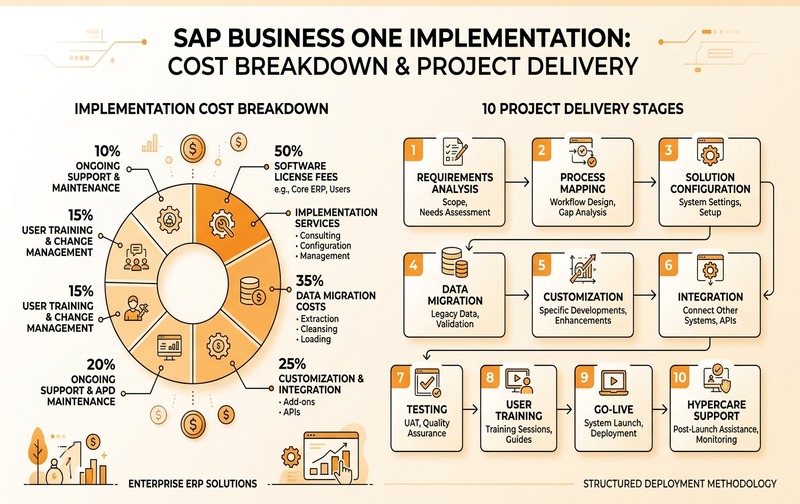
Structured 10-stage SAP Business One implementation roadmap detailing requirement discovery, solution configuration, data migration, integration, and post-go-live hypercare.
1. Requirement Analysis
The implementation partner works with stakeholders to understand:
- Current processes
- Business problems
- Reporting requirements
- Existing applications
- User roles
- Integration needs
- Compliance requirements
- Future growth plans
Weak discovery often leads to expensive changes later.
2. Business Process Mapping
Current workflows are mapped against SAP Business One functionality.
The objective is to identify:
- Processes SAP can support through standard functionality
- Configuration requirements
- Process changes
- Integration requirements
- Genuine customization gaps
3. Solution Configuration
The SAP environment is configured according to approved business requirements.
This may include:
- Financial structure
- Warehouses
- Item masters
- Business partner structure
- Approval processes
- Tax configuration
- Inventory processes
- Sales
- Purchasing
- Production
- Reporting
4. Data Migration
Existing business data may need to be cleaned, prepared and transferred from legacy applications.
Typical migration areas include:
- Customers
- Suppliers
- Items
- Opening balances
- Inventory
- Price lists
- Chart of accounts
- Outstanding transactions
Poor legacy data can significantly increase migration effort.
5. Customization
Some companies require functionality beyond standard configuration.
Customizations can include:
- Reports
- Approval processes
- User interfaces
- Automation
- Specialized operational workflows
Customization should be controlled carefully.
Every unnecessary customization can increase:
- Initial implementation cost
- Testing requirements
- Documentation
- Upgrade complexity
- Long-term maintenance
6. Integration
SAP Business One may need to exchange information with systems such as:
- CRM
- E-commerce
- WMS
- Banking systems
- Payment gateways
- Manufacturing applications
- Barcode systems
- Third-party logistics
- Business intelligence applications
Integration complexity is one of the most important variables affecting implementation scope.
7. Testing
Testing confirms that configured processes work correctly before go-live.
This can include:
- Functional testing
- Integration testing
- User Acceptance Testing
- Data verification
- Reporting validation
8. User Training
Even a technically successful ERP project can fail if users do not understand how to operate the new system.
Training cost depends on:
- Number of users
- Number of roles
- Locations
- Process complexity
- Training approach
9. Go-Live
Go-live activities may include:
- Final data migration
- Opening balance validation
- User activation
- Process monitoring
- Issue management
10. Hypercare and Support
The first weeks after implementation usually require closer support while teams adapt to new processes.
This should be included in project planning rather than treated as an unexpected expense.
SAP Business One Add-On Costs
SAP Business One can be extended for industry-specific or process-specific requirements.
Depending on the business, additional capabilities may be required for:
- Advanced manufacturing
- Production planning
- Quality management
- Warehouse operations
- Barcode scanning
- Mobility
- Payroll
- E-invoicing
- Advanced reporting
- Industry compliance
Add-ons can involve:
- Software licensing or subscription
- Implementation
- Configuration
- Integration
- Training
- Annual support
Before purchasing an add-on, determine whether the requirement can already be addressed through standard SAP Business One functionality or configuration.
SAP Business One Integration Costs
Integration requirements often make the difference between a straightforward ERP implementation and a complex transformation project.
For example, a company may need SAP Business One connected with:
Integration cost depends on factors such as:
- Number of systems
- API availability
- Data volume
- Direction of data movement
- Frequency of synchronization
- Error handling
- Security requirements
- Complexity of business rules
List all integrations before asking vendors for final pricing.
Otherwise, seemingly inexpensive ERP quotations can become significantly more expensive during implementation.
SAP Business One Customization Costs
Customization is sometimes necessary—but it should not be the default solution to every process difference.
Before approving custom development, ask:
- Can standard SAP Business One functionality handle this?
- Can configuration solve the requirement?
- Should the business process itself change?
- Is an established add-on available?
- Will this customization create future maintenance problems?
A disciplined approach can reduce implementation cost while creating a cleaner, more scalable ERP environment.
SAP Business One Data Migration Costs
Data migration is frequently underestimated.
A company with several years of inconsistent master data across spreadsheets, legacy ERP systems and departmental applications may require considerably more preparation than a company with clean, standardized data.
Migration effort increases when there are:
- Duplicate customers
- Duplicate item codes
- Inconsistent supplier records
- Incomplete tax information
- Incorrect units of measure
- Old or inactive records
- Complex opening balances
- Historical transaction requirements
Cleaning data before migration can reduce risk, effort and post-go-live problems.
SAP Business One Training and Support Costs
ERP cost does not end at go-live.
Businesses should understand:
- What support is included
- Support hours
- Response times
- Remote vs onsite support
- Enhancement processes
- Upgrade assistance
- Additional training
- System health checks
- License administration
When comparing two SAP Business One quotations, compare the support scope—not just the annual fee.
SAP Business One Pricing in India
Businesses researching SAP Business One pricing in India should avoid treating online price lists as final quotations.
The actual project investment can vary depending on:
- User count and license mix
- Industry
- Number of branches
- Implementation scope
- GST and localization requirements
- Cloud or on-premise deployment
- Manufacturing requirements
- Add-ons
- Integrations
- Data migration
- Support model
For example, a trading organization using primarily finance, purchasing, sales and inventory may have a very different implementation scope from a manufacturer requiring production planning, quality control, barcode processes and shop-floor integration.
The best pricing comparison therefore starts with an identical scope of work across vendors.
SAP Business One Pricing in the UAE
Organizations evaluating SAP Business One in the UAE should similarly evaluate the complete solution rather than comparing only the license component.
Important considerations can include:
- Number of legal entities
- Branches
- User roles
- VAT requirements
- E-invoicing readiness
- Banking integrations
- Inventory and warehouse requirements
- Cloud infrastructure
- Third-party integrations
- Support requirements
Regional compliance and integration requirements can materially affect implementation scope.
Businesses planning ERP projects should therefore include current and upcoming compliance requirements during solution discovery instead of adding them after implementation.
Example SAP Business One Pricing Scenarios
Exact costs should be based on your requirements, but the following scenarios illustrate why SAP B1 pricing differs between companies.
Scenario 1: Small Trading Company
Typical environment:
- Single company
- Single location
- Small user base
- Finance
- Purchasing
- Sales
- Inventory
- Standard reports
- Limited integrations
- Clean migration data
The majority of the project can potentially be handled through standard configuration.
Scenario 2: Growing Manufacturing Company
Typical environment:
- Multiple departments
- Finance
- Sales
- Purchasing
- Inventory
- Production
- Planning
- Warehousing
- Quality requirements
- Multiple user roles
- Barcode or manufacturing add-ons
- External system integrations
The SAP Business One implementation cost can increase because of production design, migration, integrations and additional manufacturing requirements.
Scenario 3: Multi-Branch Organization
Typical environment:
- Multiple locations
- Larger user base
- Complex approval workflows
- Advanced reporting
- Third-party integrations
- Large historical data volumes
- Customized operational processes
- Multiple management reporting requirements
Here, implementation effort and long-term architecture may be more important than the base software license cost.
SAP Business One Total Cost of Ownership
SAP Business One pricing should ultimately be evaluated as Total Cost of Ownership (TCO).
A Practical TCO Model
SAP Business One TCO = Software + Implementation + Infrastructure + Add-ons + Integrations + Customization + Training + Support + Internal Administration
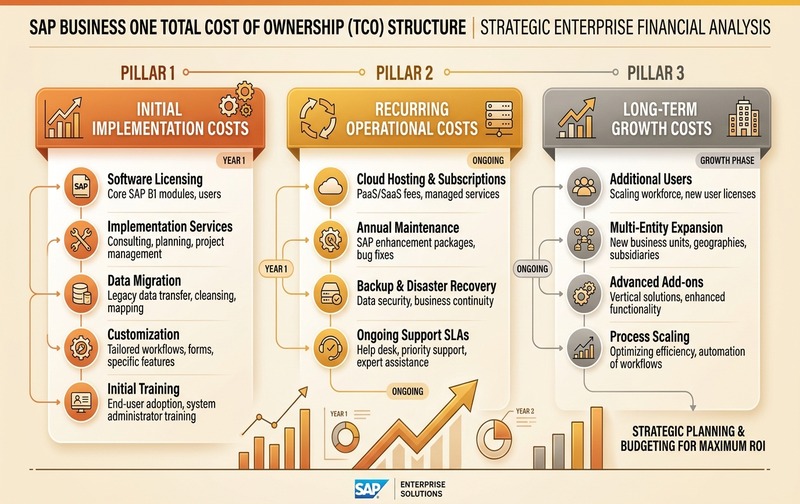
SAP Business One Total Cost of Ownership (TCO) breakdown comparing upfront project costs, recurring annual operations, and multi-year scalability expenses.
Initial Costs
These may include:
- Licensing
- Implementation
- Data migration
- Integration
- Customization
- Infrastructure
- Training
Recurring Costs
Depending on the selected model, these may include:
- Subscription
- Hosting
- Support
- Maintenance
- Add-on subscriptions
- Infrastructure
- Backup
- Security
- Ongoing enhancements
Growth Costs
As the business expands, also consider:
- Additional users
- New branches
- New legal entities
- Additional integrations
- New add-ons
- New reporting requirements
A low first-year quotation does not automatically mean a low TCO.
Hidden SAP Business One Costs Businesses Should Consider
Some expenses are easy to overlook during initial budgeting.
Excessive Customization
Building too many custom processes can increase development, testing and future maintenance.
Incorrect License Allocation
Providing broad licenses where narrower access would satisfy the role may create unnecessary expense.
Poor Data Quality
Cleaning data during the implementation project instead of before it can consume additional consulting time.
Unplanned Integrations
Discovering integration requirements after signing the project scope often leads to change requests.
Scope Creep
Adding new processes after implementation begins can increase cost and delay go-live.
Weak User Adoption
Poor training can create additional support requirements and prevent the company from achieving the expected ERP value.
Choosing Based Only on Lowest Price
An incomplete implementation quotation can appear inexpensive while excluding critical requirements that are charged later.
How to Reduce SAP Business One Cost Without Compromising the Project
Cost optimization should not mean removing essential functionality.
Instead, focus on eliminating unnecessary complexity.
1. Map Licenses to Actual Roles
Determine exactly what each employee needs before purchasing licenses.
2. Define Scope Before Implementation
Document business requirements, locations, integrations and reporting needs before finalizing the project.
3. Prioritize Standard Functionality
Use SAP Business One standard processes wherever they meet the business requirement.
4. Control Customization
Customize only where there is a clear operational or commercial justification.
5. Clean Data Early
Prepare and validate legacy data before migration begins.
6. Plan Integrations Upfront
Document every third-party application that needs to exchange data with SAP.
7. Implement in Phases Where Appropriate
Not every enhancement necessarily needs to be delivered on day one.
8. Evaluate TCO, Not Only Initial Price
Consider three-to-five-year ownership costs before selecting a deployment and implementation model.
When Is the Cheapest SAP Business One Quote Actually More Expensive?
A lower initial quotation can become more expensive when important requirements are excluded.
For example:
A proposal may not include:
- Historical data migration
- Complex reports
- Integrations
- Additional warehouses
- Manufacturing extensions
- Custom approvals
- User training
- Post-go-live support
These items can later become change requests.
The better procurement approach is therefore:
Compare scope first. Compare price second.
How to Get an Accurate SAP Business One Price
The most reliable way to calculate SAP Business One pricing is through a structured requirement assessment.
Your implementation partner should understand:
Only then should a final commercial proposal be created.
This approach gives management a clearer picture of:
- Upfront investment
- Recurring costs
- Implementation effort
- Potential additional expenses
- Long-term TCO