SAP Business One Implementation Cost: Pricing, Licenses & Total Cost Guide
Quick Answer: How Much Does SAP Business One Implementation Cost?
SAP Business One implementation cost depends on the number of users, license requirements, business processes, deployment model, data migration, integrations, customizations, add-ons, training, and post-go-live support.
A relatively standard single-company implementation will normally cost considerably less than a multi-location or manufacturing deployment requiring complex integrations and industry-specific functionality.
The most accurate way to calculate your SAP Business One budget is to evaluate the total cost of ownership (TCO) rather than looking only at software license prices.
A complete SAP Business One investment can include:
SAP officially supports both cloud and on-premise deployment options, and implementation services are generally delivered through its partner ecosystem.
What Is Included in SAP Business One Implementation Cost?
SAP Business One implementation cost is the investment required to configure SAP Business One around your organization’s actual processes and prepare the system for business use.
It should not be confused with the SAP Business One license cost.
A typical implementation project may include:
| Cost Component | What It Covers |
|---|---|
| SAP B1 licenses | User access and software licensing |
| Business process assessment | Mapping finance, sales, purchasing, inventory, production and other workflows |
| System configuration | Company structure, financial settings, warehouses, taxes, approvals and master data |
| Data migration | Moving customers, vendors, items, opening balances and historical data |
| Integrations | Connecting SAP B1 with other business applications |
| Customization | Developing functionality outside standard processes |
| Add-ons | Industry or process-specific extensions |
| Reports | Management dashboards, operational reports and document formats |
| Testing | Business process and user acceptance testing |
| Training | Preparing key users and end users |
| Go-live support | Assistance during cutover and stabilization |
| Ongoing support | Post-implementation technical and functional support |
This is why comparing two SAP Business One quotations based only on the final price can be misleading. The scope behind the quotation matters as much as the price itself.
SAP Business One License Cost vs. Implementation Cost
One of the most common budgeting mistakes is treating SAP Business One license pricing and SAP Business One implementation pricing as the same thing.
They are different cost categories.
SAP Business One License Cost
This relates to the rights users receive to access SAP Business One.
The overall licensing requirement can be affected by:
- Number of users
- Type of user access
- Deployment arrangement
- Subscription or other commercial model
- Geographic requirements
- Additional solutions
SAP Business One Implementation Cost
Implementation covers the work required to make the ERP operational.
It may include:
- Requirement analysis & process mapping
- System configuration
- Data migration
- Third-party integration
- Custom development
- Testing & user training
- Go-live cutover & project management
Organizations should evaluate all of these components before approving an ERP budget.
What Determines SAP Business One Implementation Cost?
No single SAP Business One implementation price applies to every organization. The following factors typically have the greatest impact.
1. Number and Type of SAP Business One Users
The number of people accessing SAP Business One directly affects licensing requirements and can also increase implementation complexity.
A company with users across:
- Finance
- Sales
- Purchasing
- Inventory
- Production
- Quality
- Management
will usually require more configuration and training than a business deploying ERP primarily for finance and inventory.
More users can also mean:
- More authorization structures
- More workflows
- Additional training
- More test scenarios
- Greater change-management requirements
The important question is therefore not simply: “How many employees do we have?” It is: “Which employees actually need SAP access, and what level of access do they require?”
Proper user mapping can help prevent unnecessary licensing expenditure.
2. Business Process Complexity
Two organizations with 30 SAP users can have very different implementation costs.
For example, a trading organization with relatively straightforward purchasing, inventory and sales workflows may require less implementation effort than a manufacturer managing:
- Bills of materials
- Production orders
- Material requirements planning
- Batch tracking
- Serial numbers
- Quality controls
- Multiple warehouses
- Subcontracting
- Production costing
- Shop-floor activities
The more process variations SAP must support, the greater the configuration, testing and training effort.
3. Cloud vs. On-Premise Deployment
Deployment strategy affects both initial and ongoing SAP Business One costs.
SAP currently describes Business One deployment options including cloud and on-premise environments. Cloud deployment uses a recurring licensing approach, while on-premise deployment provides greater direct control over ERP data and infrastructure.
Reduces the need for businesses to maintain ERP server infrastructure. Costs can include:
- Software subscription
- Hosting
- Implementation & integration
- Support & add-ons
Direct infrastructure control. Introduces considerations such as:
- Servers & database environment
- Backup infrastructure & security
- IT administration
- Hardware lifecycle & upgrades
Which option costs less? There is no universal answer. Cloud can reduce initial infrastructure requirements, while on-premise deployment may suit organizations that have specific infrastructure, security or operational requirements.
The correct comparison is based on three-to-five-year total cost of ownership, not just first-year expenditure.
4. Data Migration Requirements
Data migration is frequently underestimated during ERP budgeting.
Companies may need to move information from:
- Tally
- Excel
- Legacy ERP systems
- Accounting software
- CRM platforms
- Warehouse applications
- Internally developed applications
Typical data may include: Customer master, vendor master, item master, chart of accounts, inventory balances, open sales orders, open purchase orders, receivables, payables, fixed assets, batch information, and serial-number records.
Historical data often contains: duplicates, incorrect naming, missing codes, inconsistent units, obsolete customers or vendors, incomplete tax information, and different formats across departments.
Migrating poor-quality data directly into SAP Business One does not solve the problem. It moves the problem into the new ERP.
A good SAP B1 implementation therefore includes data cleansing, mapping, validation and reconciliation, not simply file uploads.
5. SAP Business One Customization
Customization can significantly influence SAP Business One implementation pricing.
Some organizations attempt to reproduce every workflow from their previous ERP inside SAP Business One. That is rarely the best approach.
Before developing a customization, ask: Can the requirement be handled using standard SAP Business One functionality or by changing the business process?
Custom development can be justified when it solves a genuine competitive, operational or compliance requirement. However, unnecessary customization can create:
- Higher initial cost
- Longer implementation timelines
- More testing
- Upgrade complexity
- Additional support requirements
- Greater dependence on custom code
A fit-to-standard approach should therefore be evaluated before custom development is approved.
6. Third-Party Integrations
Many SAP Business One environments do not operate independently. The ERP may need to exchange information with systems such as:
SAP provides an integration framework intended to support scenarios including third-party solutions, cloud extensions, EDI, collaboration and web services.
Every integration should be evaluated for:
- Data direction & frequency
- API availability
- Error handling & security
- Transaction volume
- Reconciliation requirements
- Ownership & support responsibility
A seemingly small integration can become expensive if these requirements are unclear.
7. Industry-Specific SAP Business One Add-ons
Standard SAP Business One can cover many core ERP requirements, but some businesses require additional capabilities for industry-specific processes. Examples may include:
- Manufacturing: Advanced production planning, production scheduling, quality management, shop-floor control, machine integration
- Pharmaceutical: Advanced batch control, quality workflows, compliance documentation, expiry management, traceability
- Distribution: Advanced warehouse management, route planning, barcode processes, e-commerce integration
- Service organizations: Advanced field service, contract management, industry-specific billing
Add-ons can introduce:
- Additional software licensing
- Implementation fees
- Integration effort
- User training
- Support costs
They should therefore be included in the initial TCO calculation rather than treated as an afterthought.
8. Number of Companies, Locations and Warehouses
Implementation complexity rises when SAP Business One must support multiple: Legal entities, plants, branches, warehouses, countries, tax structures, and currencies.
A single-company, single-location ERP project is fundamentally different from a rollout across several plants or subsidiaries. The project may require additional:
- Master-data design
- Intercompany processes
- Authorization structures
- Tax configuration
- Reporting & integrations
- User training
Businesses planning future expansion should discuss scalability during the initial ERP design stage.
9. Reports, Dashboards and Analytics
Decision-makers often expect ERP implementation to automatically deliver every management report currently being prepared in Excel. That assumption can create scope expansion.
Before implementation, classify reports into: Operational reports, financial reports, compliance reports, management dashboards, and exception reports.
Then determine whether each requirement can be fulfilled using: Standard SAP reports, queries, dashboards, Crystal Reports, external BI solutions, or custom reporting.
Reporting requirements should be finalized early because they can affect data design and implementation scope.
10. Training and Change Management
Even technically successful ERP implementations can struggle when users are not properly prepared.
Training requirements vary depending on: Number of users, number of departments, process complexity, existing ERP experience, user turnover, location, and role-specific requirements.
Training should not simply explain where buttons are located. Users need to understand:
- What process they own
- What information they must enter
- When transactions should be posted
- Which approvals apply
- What downstream processes depend on their data
A well-configured ERP with poor user adoption will not produce the expected ROI.
SAP Business One Implementation Cost Breakdown
Instead of asking only, “How much does SAP Business One cost?”, decision-makers should ask what percentage of the project relates to each cost category.
A typical budget may contain:
| Cost Area | One-Time / Recurring | Main Cost Driver |
|---|---|---|
| Software licenses | One-time or recurring depending on commercial model | User requirements |
| Implementation | Primarily one-time | Scope and process complexity |
| Data migration | Primarily one-time | Volume and data quality |
| Customization | One-time + maintenance | Requirement complexity |
| Integration | Initial + possible recurring | Systems and transaction volume |
| Add-ons | License + implementation | Industry requirements |
| Infrastructure/hosting | Recurring or capital expenditure | Deployment model |
| Training | Initial + ongoing | Users and locations |
| Support | Recurring | SLA and service scope |
| Upgrades | Periodic | Environment and customization |
Independent 2026 market guides show considerable variation in implementation budgets, with published estimates ranging from relatively small standard projects to $150,000+ for complex deployments. These ranges should be treated only as market benchmarks because actual partner quotes vary significantly by scope, region and implementation model.
The only reliable price for your organization is a scope-based implementation quotation.
Example: Why Two 25-User SAP B1 Projects Can Cost Differently
Consider two companies with the same number of ERP users.
Company A: Distribution business
Requirements:
- 25 users
- One company
- One warehouse
- Finance
- Purchasing
- Inventory
- Sales
- Basic reporting
- Limited migration
- Minimal customization
Company B: Manufacturing company
Requirements:
- 25 users
- Two plants & four warehouses
- Production & BOMs
- MRP (Material Requirements Planning)
- Batch tracking & quality requirements
- Barcode scanning
- Third-party integrations
- Management dashboards
- Historical migration
- Custom approval processes
Both have 25 users. But their SAP Business One implementation costs will not be similar because user count is only one cost variable. This is why businesses should avoid comparing SAP quotations using price per user alone.
SAP Business One Total Cost of Ownership
A better ERP investment decision comes from calculating TCO, not just the implementation invoice.
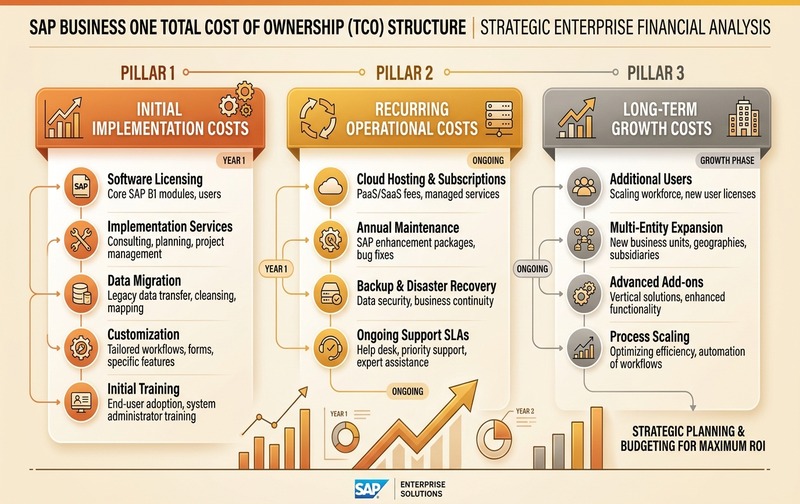
SAP Business One Total Cost of Ownership (TCO) framework: comprehensive multi-year evaluation across licensing, implementation, hosting, integrations, and ongoing operating costs.
A Simple SAP B1 TCO Formula
SAP B1 TCO = License + Implementation + Hosting/Infrastructure + Add-ons + Integrations + Support + Internal Resources + Future Enhancements
Evaluate this over at least three years.
Year 1
Usually includes the highest project expenditure:
- Licenses
- Implementation
- Migration
- Integration
- Infrastructure
- Training
- Go-live
Years 2–3
Costs may include:
- Subscription or maintenance
- Hosting
- Support
- Additional users
- New reports
- Integrations
- Enhancements
- Add-on renewals
A lower implementation quotation can therefore produce a higher long-term cost if the design creates excessive customization or support dependency.
Hidden SAP Business One Costs to Consider
Before approving an SAP Business One project, check whether the quotation includes the following items in the Statement of Work (SOW):
These items should appear clearly in the Statement of Work.
How to Reduce SAP Business One Implementation Cost Without Increasing Risk
Cost optimization should not mean removing activities essential to a successful ERP implementation. Instead, reduce unnecessary complexity.
Avoid customizing SAP simply because employees are familiar with the old process.
Poor master data increases both implementation effort and business risk.
Late scope changes increase development, testing and project-management effort.
Go live with the processes required to operate the business. Phase secondary improvements later.
Determine exactly which employees require which type of system access.
Every additional system connection introduces technical and support dependencies.
Your implementation partner understands SAP. Your employees understand your business. Successful projects require both.
SAP Business One Implementation Timeline
Implementation duration depends on scope rather than company size alone.
Independent 2026 ERP research commonly places standard SAP Business One implementations within approximately an 8-to-16-week range, while complex multi-entity, customized or heavily integrated projects can take longer.
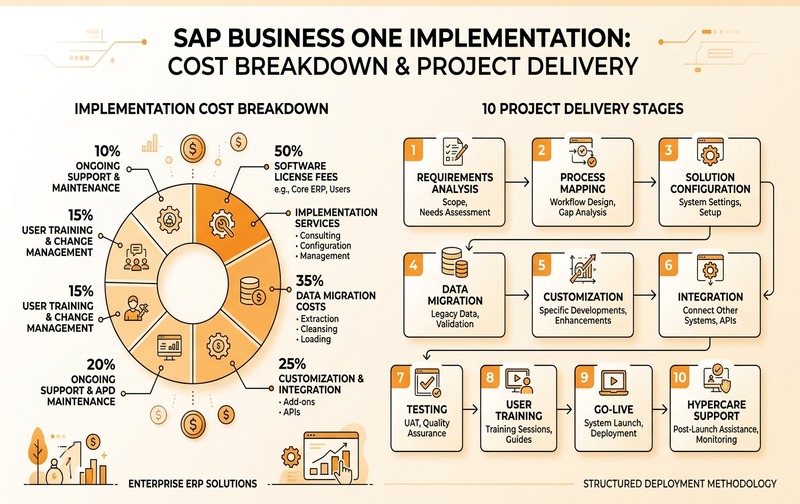
SAP Business One structured implementation lifecycle: 8 distinct phases governing scope, configuration, testing, and go-live stabilization.
A typical implementation lifecycle includes:
- Business requirements
- Process review
- Gap analysis
- Scope definition
- System architecture
- Configuration design
- Integration requirements
- Migration strategy
- SAP setup
- Reports
- Interfaces
- Approved customizations
- Extraction
- Cleansing
- Mapping
- Validation
- Functional testing
- Integration testing
- User acceptance testing
- Key-user training
- End-user training
- Process documentation
- Final migration
- Cutover
- Production deployment
- Issue resolution
- Process monitoring
- User support
A rushed project is not necessarily a cheaper project. ERP implementations should optimize time-to-value, not simply calendar duration.
How to Evaluate an SAP Business One Implementation Quote
Do not compare SAP partners using only the final number at the bottom of the quotation. Ask each provider to clarify:
A detailed implementation quotation can be better value than a cheaper quotation if it removes uncertainty and covers the actual operating requirements.
When Is a Higher SAP Business One Implementation Cost Justified?
A higher initial investment can make business sense when it reduces long-term operational problems. Examples include investments that improve:
The correct objective is not: “How do we implement SAP Business One as cheaply as possible?” It is: “How do we achieve the required business outcome without unnecessary ERP complexity?” That distinction matters.
How to Choose the Right SAP Business One Implementation Partner
SAP states that Business One implementation services are available through its ecosystem of accredited partners.
When evaluating an implementation partner, consider more than licensing discounts. Assess:
The implementation partner influences not only the initial project but also how maintainable the ERP environment remains over time.
SAP Business One Implementation Cost: Frequently Asked Questions
Request a SAP Business One Demo
Explore the SAP Business One features, workflows, integrations, and deployment options relevant to your business.
Book Your SAP Business One Demo → See how SAP Business One can fit your business requirements.