SAP Business One Cloud vs On-Premise: The Cost & TCO Decision
SAP Business One Cloud vs On-Premise: The Cost & TCO Decision
Quick Answer
SAP Business One Cloud typically lowers upfront infrastructure investment and shifts ERP spending toward recurring costs, while On-Premise requires higher initial investment but provides greater infrastructure control. The more cost-effective option depends on user growth, hosting, hardware, IT resources, integrations, support, security requirements, and the complete 3–5 year total cost of ownership (TCO).
SAP Business One Cloud vs On-Premise Cost: What Actually Changes?
Choosing between SAP Business One Cloud and On-Premise is not simply about comparing license prices.
The real financial decision is based on:
Initial ERP investment
Recurring software costs
Hosting expenses
Hardware requirements
IT administration
Maintenance and support
Backup and disaster recovery
Integrations and add-ons
Future user growth
Infrastructure expansion
Long-term total cost of ownership
A deployment model that appears cheaper in year one may become more expensive as users, branches, transactions, storage, integrations, and support requirements increase.
That is why businesses should compare complete deployment economics, not only the initial quotation.
The important question is therefore not:
“Which SAP B1 deployment is cheaper today?”
It is:
“Which deployment creates the right cost structure for the next three to five years?”
SAP Business One Cloud Cost Structure
SAP Business One Cloud allows businesses to run the ERP through hosted infrastructure rather than purchasing and maintaining the entire ERP environment internally.
This can significantly reduce upfront infrastructure expenditure.
However, cloud cost should be evaluated across multiple components.
SAP Business One User Licensing
The number and type of users can directly affect recurring ERP expenditure.
Organizations should estimate:
- Users required at go-live
- Users required after 12 months
- Expected users after three years
- Full-access users
- Limited-access users
- New branch users
- Additional operational teams
A cloud quotation based only on today’s headcount may underestimate the future ERP cost.
Cloud Hosting
Hosting costs may depend on:
Computing capacity
Storage
Database requirements
Number of users
Transaction volumes
Backup policies
Availability expectations
Disaster recovery
Performance requirements
Two SAP Business One Cloud quotations may therefore have very different infrastructure coverage.
Businesses should confirm exactly what the monthly or annual hosting fee includes.
Implementation
Cloud deployment does not remove SAP Business One implementation costs.
The project can still require:
Implementation cost is primarily driven by business complexity and project scope, not simply by where the ERP is hosted.
Add-Ons and Integrations
Many businesses need SAP Business One to communicate with additional systems.
Examples include:
Barcode solutions
Warehouse systems
Manufacturing applications
CRM
E-commerce
Banking systems
E-invoicing platforms
Logistics systems
Quality management solutions
Reporting tools
Third-party applications
These requirements should be included before calculating cloud TCO.
Support and Administration
Cloud deployment may reduce infrastructure-management responsibilities, but SAP Business One still requires functional and technical support.
Businesses may continue to need support for:
- Finance
- Inventory
- Procurement
- Production
- Sales
- Reporting
- Authorizations
- Master data
- Integrations
- Process changes
Therefore: Cloud hosting cost ≠ complete SAP Business One operating cost.
SAP Business One On-Premise Cost Structure
SAP Business One On-Premise places the ERP environment within infrastructure controlled directly by the organization or its chosen infrastructure provider.
This model usually requires greater upfront expenditure but can provide greater infrastructure control.
The cost model should include much more than licenses.
SAP Business One Licensing
On-premise deployments can involve a larger upfront software commitment.
The quotation should clearly separate:
SAP B1 licenses
Implementation
Database requirements
Infrastructure
Add-ons
Integrations
Support
Maintenance
Without this separation, management cannot make a meaningful cloud-vs-on-premise comparison.
Server Infrastructure
On-premise ERP may require investment in:
Servers
Processors
Memory
Storage
Networking
Operating systems
Database infrastructure
Backup systems
Power protection
Security infrastructure
Sizing infrastructure only for today’s transaction volume can create additional expenditure later.
Infrastructure should therefore reflect expected future growth.
Internal IT Administration
Running ERP infrastructure internally creates operational responsibilities.
These may include:
- Server monitoring
- Database administration
- Backups
- Security updates
- Operating-system maintenance
- Network management
- Disaster recovery
- Capacity planning
- Infrastructure troubleshooting
These activities are often missing from basic ERP price comparisons.
However, they form part of the actual TCO.
Hardware Expansion and Refresh
ERP infrastructure has a lifecycle.
As the business adds:
- Users
- Transactions
- Branches
- Warehouses
- Reports
- Databases
- Integrations
the company may need additional memory, storage, computing resources, or replacement hardware.
A realistic five-year on-premise cost calculation should therefore include possible infrastructure expansion.
CAPEX vs OPEX: The Financial Difference
The cloud-versus-on-premise decision also affects how ERP expenditure appears financially.
SAP Business One Cloud
Cloud usually moves more ERP expenditure toward operating expenditure (OPEX).
Businesses may benefit from:
- Lower initial infrastructure spending
- More predictable recurring costs
- Reduced physical server ownership
- Easier infrastructure expansion
- Lower internal infrastructure responsibility
This can be particularly attractive for growing companies that do not already maintain enterprise-grade ERP infrastructure.
SAP Business One On-Premise
On-premise generally creates more capital expenditure (CAPEX) upfront.
It may be suitable for companies that:
- Already own suitable infrastructure
- Have experienced internal IT teams
- Require direct infrastructure control
- Operate specialized local integrations
- Prefer infrastructure ownership
Neither model is automatically financially superior.
The correct comparison should consider:
Initial Investment + Recurring Cost + Infrastructure + IT Resources + Growth + Risk + TCO
The 3-Year and 5-Year TCO Test
A meaningful SAP Business One pricing comparison should extend beyond year one.
At minimum, management should calculate:
- Year-one investment
- Three-year TCO
- Five-year TCO
- Cost of expansion
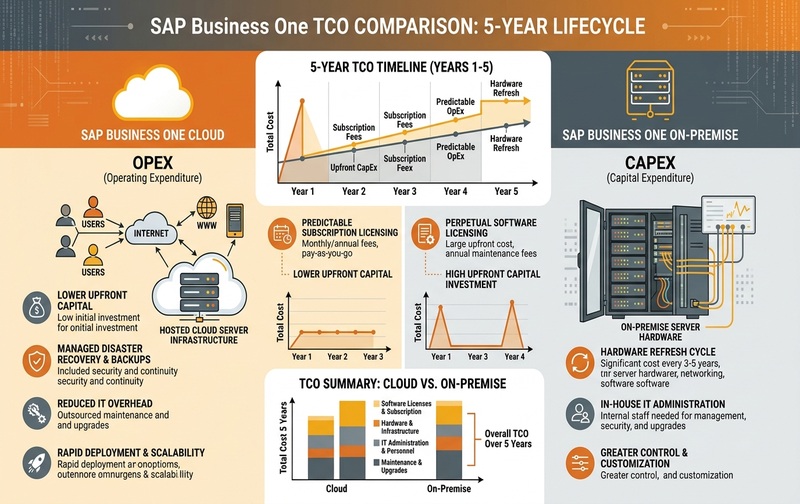
Comprehensive 5-Year TCO comparison framework contrasting SAP Business One Cloud recurring OPEX models with On-Premise upfront CAPEX and server infrastructure lifecycles.
SAP Business One Cloud TCO Formula
Cloud TCO =
- User licensing
- Hosting
- Implementation
- Data migration
- Integrations
- Add-ons
- Support
- Storage expansion
- Backup requirements
- Scaling costs
SAP Business One On-Premise TCO Formula
On-Premise TCO =
- Software licenses
- Server infrastructure
- Database requirements
- Implementation
- Data migration
- Integrations
- Add-ons
- Maintenance
- Internal IT administration
- Backup
- Security
- Hardware expansion
- Hardware replacement
- Support
Only after calculating these categories over the same timeframe can businesses make a meaningful cost comparison.
Why Year-One SAP B1 Pricing Can Be Misleading
Consider two ERP quotations.
Option A: Lower cloud startup cost.
Option B: Higher on-premise initial investment.
Option A may appear cheaper immediately.
But assume the business expects to:
- Double ERP users
- Add several branches
- Increase storage requirements
- Introduce barcode scanning
- Connect e-commerce
- Implement production planning
- Add advanced reporting
The recurring cloud cost may change significantly.
Now consider the opposite situation.
An organization chooses on-premise ERP but later requires:
- New servers
- Additional storage
- Database specialists
- Stronger backup infrastructure
- Disaster recovery
- Additional IT resources
The original purchase price would also fail to represent the true cost.
The ERP deployment decision should therefore reflect future operating requirements rather than current size alone.
User Growth: The TCO Variable Businesses Often Miss
User growth can materially affect SAP Business One deployment economics.
Businesses should model at least three scenarios.
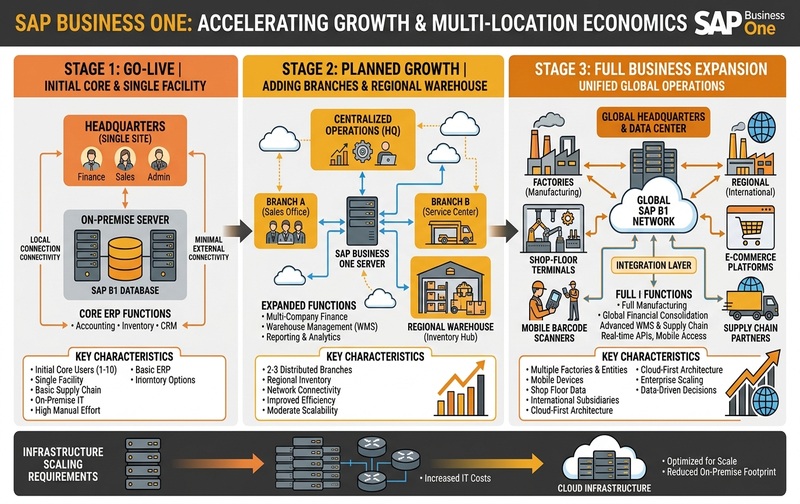
Enterprise scaling framework illustrating how user growth, distributed warehouse hubs, shop-floor terminals, and multi-location operations impact deployment economics.
Scenario 1: Go-Live
How many employees require ERP access immediately?
Scenario 2: Planned Growth
How many users could require SAP Business One within the next two to three years?
Scenario 3: Business Expansion
What happens if the organization adds:
- Factories
- Warehouses
- Branches
- Legal entities
- Finance teams
- Production users
- Sales teams
- Service teams
Pricing should show how each growth scenario changes the deployment cost.
This provides a clearer view of the cost of scaling SAP Business One.
SAP Business One Cloud vs On-Premise for Multi-Location Companies
Deployment becomes particularly important for businesses operating multiple factories, warehouses, branches, or countries.
Cloud can simplify centralized access because infrastructure is hosted centrally.
However, organizations should still evaluate:
Internet reliability
Branch connectivity
Application performance
Integration architecture
Business continuity
Data accessibility
Hosting reliability
On-premise environments can also support multiple locations, but networking and remote-access infrastructure may increase complexity.
For companies expanding across India and GCC markets, these costs should be included during ERP solution design.
Manufacturing: Where the Deployment Decision Gets More Complex
Manufacturers need to evaluate more than financial and accounting requirements.
SAP Business One may need to communicate with:
Barcode scanners
Shop-floor applications
Label printers
Production terminals
Weighing scales
Warehouse devices
Quality systems
Third-party manufacturing solutions
Before choosing cloud or on-premise deployment, businesses should confirm that every critical integration can operate effectively within the proposed architecture.
A low-cost hosting model provides limited value if essential shop-floor integrations become expensive or difficult to operate.
Data Security: Beyond the Cloud vs On-Premise Myth
A common misconception is:
Security cannot be evaluated that simply.
ERP security depends on factors including:
Access control
User permissions
Identity management
Network security
Patch management
Encryption
Backup policies
Disaster recovery
Monitoring
Hosting-provider controls
Internal security practices
On-premise deployment gives organizations greater direct infrastructure responsibility.
Cloud deployment transfers some infrastructure responsibility to the hosting environment.
The correct evaluation is therefore based on security architecture and controls, not simply the deployment label.
Customization and Integration Costs
Another misconception is that cloud deployment cannot support business-specific requirements.
The more important question is whether the required:
Add-ons
APIs
Extensions
Integrations
Reports
Automation
Shop-floor interfaces
External applications
are compatible with the proposed SAP Business One architecture.
Before choosing either deployment, document every required system connection.
Unexpected integration requirements can significantly increase project TCO.
Hidden SAP Business One Costs to Check
Before approving an SAP B1 quotation, verify whether it includes:
Leaving major items outside the original scope can completely change the three-year or five-year cost.
When SAP Business One Cloud May Fit Better
Cloud deployment may deserve stronger consideration when the business prioritizes:
- Lower upfront infrastructure investment
- Predictable recurring expenses
- Limited internal infrastructure resources
- Reduced server-management responsibility
- Easier infrastructure scalability
- Multiple operating locations
- Faster infrastructure provisioning
For growing businesses without existing ERP infrastructure, this can reduce the initial technology burden.
When SAP Business One On-Premise May Fit Better
On-premise deployment may deserve stronger consideration when the company:
- Already owns suitable infrastructure
- Maintains experienced IT resources
- Requires direct infrastructure control
- Operates specialized local integrations
- Has complex shop-floor requirements
- Has specific technology-governance requirements
These conditions do not automatically make on-premise less expensive.
They simply change the economics of the TCO calculation.
SAP Business One Cloud vs On-Premise Decision Matrix
This matrix should be treated as a preliminary screening tool.
The final deployment model should be based on functional, commercial, infrastructure, integration, and security requirements.
What Should an SAP B1 Pricing Proposal Include?
Before comparing quotations, make sure every SAP Business One proposal uses comparable assumptions.
Licensing
How many users are included, and what user types are required?
Hosting
What computing capacity, storage, backup, security, and availability are included?
Implementation
Which modules and business processes are part of the project scope?
Data Migration
How much legacy data will be transferred?
Integration
Which external applications and systems will connect with SAP Business One?
Customization
What additional development is required?
Support
What support is included after go-live?
Scalability
What happens to cost when users, branches, or transaction volumes increase?
Only after answering these questions can management accurately compare SAP Business One Cloud and On-Premise pricing.
The Minimum Complete SAP B1 Cost Model
An executive SAP Business One business case should show four numbers.
Year-One Cost
How much investment is required to implement and operate SAP B1 during the first year?
Three-Year TCO
What will software, infrastructure, hosting, support, and expansion cost over three years?
Five-Year TCO
What happens when infrastructure, users, branches, and transaction volumes increase?
Cost of Expansion
How does pricing change when the company scales?
These four figures provide substantially greater decision value than asking only:
“What is the SAP Business One license price?”
The Cost of Choosing the Wrong Deployment
The lowest-priced SAP Business One quotation does not necessarily create the lowest business cost.
Poor deployment decisions can create:
Performance problems
Integration difficulties
Unexpected infrastructure expenses
Increased support dependence
Scaling limitations
Upgrade complexity
Business disruption
Future migration costs
Deployment decisions should therefore balance:
Cost + Business Requirements + Technology + Risk + Scalability
SAP Business One Cloud vs On-Premise: Executive Decision Framework
Before approving either option, answer these five questions.
1. What Will Our Business Look Like in 3–5 Years?
Estimate future users, locations, transaction volumes, companies, warehouses, and production requirements.
2. What Infrastructure Do We Already Own?
Existing hardware and internal IT resources can materially affect on-premise economics.
3. Which Integrations Are Business-Critical?
Identify manufacturing, warehouse, finance, e-commerce, CRM, barcode, and third-party integrations before deciding the architecture.
4. How Much Infrastructure Responsibility Do We Want?
Determine whether internal IT should manage ERP infrastructure or whether more infrastructure responsibility should sit with a hosting provider.
5. What Is the Complete TCO?
Compare both deployment models across the same period using the same assumptions.
That financial comparison should form the foundation of the final deployment decision.
Frequently Asked Questions
See SAP Business One Cloud vs On-Premise in Action
SAP Business One costs can vary based on users, business processes, infrastructure, integrations, add-ons, and growth plans. See how different deployment options fit your business requirements.
Book an SAP Business One Demo
Explore the right deployment approach for your business before committing to licenses, infrastructure, or implementation.