
SAP Business One Alerts: Managing Messages, Notifications & Operational Exceptions
Quick Answer
SAP Business One alerts help businesses notify users when defined business conditions, transactions, or exceptions require attention. By configuring relevant alerts and assigning them to the right users, organizations can monitor operational events without relying entirely on manual checks. Effective alert management helps teams identify exceptions earlier, respond to required actions, and maintain better visibility across business processes.
What Are SAP Business One Alerts?
SAP Business One alerts are notifications that can inform users when specific business conditions or events require attention. Instead of expecting employees to continuously monitor transactions, reports, or operational activities, alerts can bring relevant exceptions to the appropriate user’s attention.
For example, a business may need users to know when an important transaction requires review, an operational condition has been reached, or a defined business rule requires action.
The value of an alert depends on more than simply creating it. The condition must be relevant, the recipient must be appropriate, and the notification should lead to a clear business action.
This makes alert management an important part of using SAP Business One effectively.
How Do SAP Business One Alerts Work?
The basic alert process can be viewed as:
An alert begins with a defined condition. When that condition is met, SAP Business One can notify the relevant user according to the configured setup.
A practical alert-management process should therefore answer four questions:
Without this structure, organizations can end up with notifications that create noise rather than useful operational visibility.
Managing Messages and Alerts in SAP Business One
Managing SAP Business One alerts requires more than configuring individual notifications. Businesses should periodically review the conditions, recipients, relevance, and outcomes of their alerts.
A useful alert-management process includes:
This approach helps keep alert configuration aligned with changing business requirements.
SAP Business One Alert Configuration: What Should You Consider?
Before configuring an alert, identify the business problem it is supposed to address.
For example, instead of creating an alert simply because a particular transaction exists, consider whether the transaction requires an immediate response.
A well-designed alert should have:
A clear condition
The trigger should represent a meaningful business event or exception.
A defined owner
The recipient should be the person responsible for reviewing or acting on the situation.
A clear purpose
Users should understand why the notification matters.
An expected action
Where appropriate, the alert should lead to a review, approval, correction, follow-up, or another business action.
A review process
Alert configurations should be reassessed when processes, responsibilities, or business rules change.
Common Business Uses for SAP Business One Alerts
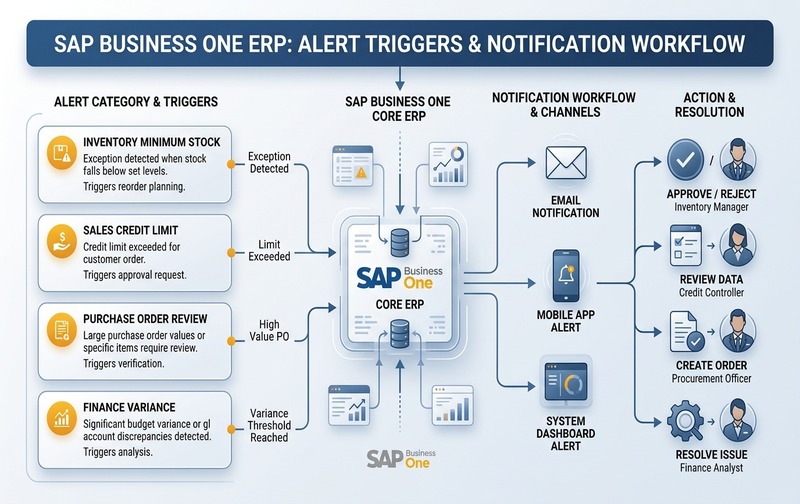
Enterprise alert workflow in SAP Business One: Configuring targeted alert triggers across inventory, credit limits, purchasing, and finance ensures automated operational oversight.
SAP Business One alerts can support different operational processes depending on the organization’s configuration and requirements.
Inventory and Stock Exceptions
Inventory teams may need timely visibility into defined stock-related conditions. An alert can help bring a relevant exception to the responsible user’s attention rather than relying solely on periodic manual reviews.
The exact condition should reflect the organization’s inventory policies and operational requirements.
Approval-Related Notifications
Approvals can involve multiple users and business processes. Notifications can help relevant users identify transactions or situations that require their attention.
The important consideration is not simply sending a notification, but ensuring that it reaches the person responsible for the next step.
Sales and Purchasing Exceptions
Sales and purchasing teams may need notifications when defined transaction conditions require review.
Examples can include situations involving:
- transaction thresholds
- unusual transaction conditions
- pending actions
- defined business rules
- exceptions requiring management attention
The appropriate configuration depends on the organization’s process design.
Financial and Accounting Exceptions
Finance teams often need visibility into transactions or conditions that require review. Alerts can support exception-based monitoring where a defined condition warrants attention from finance or management users.
Overdue Activities and Follow-Ups
Business users may also benefit from notifications relating to activities or follow-up requirements. The objective is to help users identify outstanding actions without requiring them to manually inspect every activity.
Production and Operations
Manufacturing and operations teams may have process-specific conditions that require attention.
Where standard SAP Business One functionality does not fully represent a company’s process, additional configuration, customization, integration, or industry-specific solutions may need to be evaluated.
SAP Business One Alerts for Exception Management
One of the most useful ways to think about alerts is as an exception-management mechanism.
Employees should not necessarily receive notifications for every transaction. Instead, alerts should highlight conditions where human attention is required.
For example:
Transactions meeting routine parameters flow uninterrupted without cluttering user inboxes.
Meaningful deviations immediately engage the assigned stakeholder to take timely action.
This approach helps organizations avoid turning alert systems into another source of information overload.
Why Too Many SAP Business One Alerts Can Become a Problem
More alerts do not automatically mean better visibility.
If users receive notifications for too many low-value events, they may begin ignoring them. This can reduce the practical value of the alert system.
Common alert-management problems include:
The objective should therefore be relevant notifications, not maximum notification volume.
SAP Business One Alerts vs Manual Monitoring
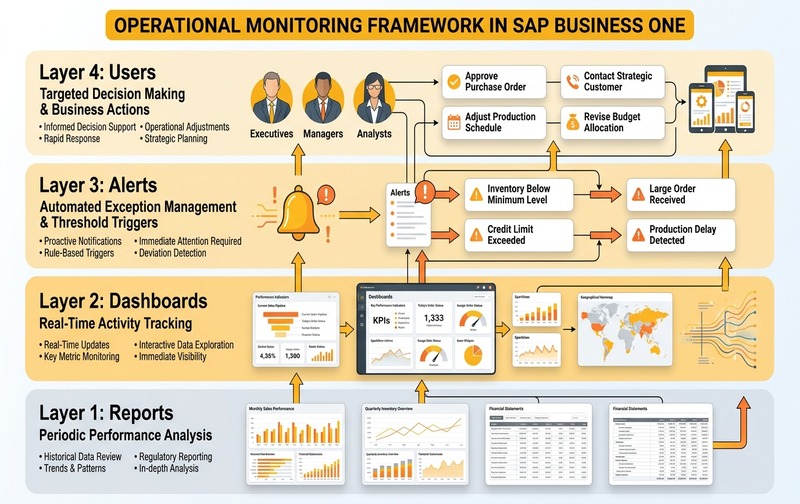
Operational monitoring synergy: Reports analyze historical trends, dashboards provide real-time status, and alerts trigger immediate exception handling for proactive enterprise control.
Manual monitoring requires employees to regularly check transactions, activities, reports, or other business information to identify conditions that require attention.
Alerts can provide another layer of operational visibility by notifying users when predefined conditions occur.
However, alerts should not be treated as a replacement for every monitoring or reporting process.
A practical model is:
➔ Understand overall performance
➔ Monitor business activity
➔ Highlight defined exceptions
➔ Take the required action
Using these mechanisms together can create a more structured approach to operational monitoring.
How to Improve SAP Business One Alert Management
Businesses can improve their alert configuration by focusing on relevance and ownership.
1. Start With Business Exceptions
Identify the situations where delayed action could create an operational problem.
2. Define the Responsible User
Every important alert should have a clear owner.
3. Avoid Unnecessary Notifications
Do not configure alerts for information that users already monitor effectively through normal workflows or reports.
4. Review Alert Conditions Regularly
Business processes change. An alert that was useful previously may become irrelevant after a process, policy, responsibility, or system configuration changes.
5. Test Before Broad Deployment
Validate the alert with representative business scenarios before assigning it to a large group of users.
6. Connect Alerts to Business Actions
The most useful notification is one where the recipient understands what needs to happen next.
When Standard SAP Business One Alerts May Not Be Enough
Not every organization has the same workflows, approval structures, integrations, or industry requirements.
A company may need additional capabilities when its alert requirements depend on:
In these situations, the requirement should be assessed before deciding whether standard configuration, customization, integration, or an industry add-on is appropriate.
The objective should be to design the alert process around the actual business workflow rather than forcing a complex process into a standard notification structure.
SAP Business One Alerts: Configuration Checklist
Before deploying an alert, review these questions:
This turns alert configuration from a purely technical task into a business-process decision.
Managing SAP Business One Alerts for Better Operational Control
SAP Business One alerts are most valuable when they are designed around meaningful business exceptions rather than simply increasing the number of notifications users receive.
A structured approach—defining the condition, assigning the right recipient, connecting the alert to a business action, and reviewing the configuration regularly—can help organizations make notifications more useful across finance, sales, purchasing, inventory, production, and other operational processes.
For organizations with more complex requirements, the next step is to assess whether standard SAP Business One configuration is sufficient or whether customization, integration, workflow extensions, or industry-specific capabilities are required.
Common Questions About SAP Business One Alerts
Evaluate Your SAP Business One Requirements
Effective alert management starts with understanding the underlying business process.
Emerging Alliance can help businesses assess SAP Business One requirements across implementation, customization, integration, cloud deployment, migration, and ongoing support.
Discuss your SAP Business One requirements with our team and explore an approach aligned with your business processes.