SAP Business One for Pharma: Fixing Integration Gaps Before They Disrupt Growth
Quick Answer
SAP Business One for Pharma can help pharmaceutical businesses reduce information gaps between purchasing, inventory, production, sales and finance. Its core processes and batch-management capabilities can provide a common operational record, while compatible integrations can exchange selected data with warehouse, laboratory and quality systems. The outcome depends on sound configuration, consistent master data and tested interfaces—not ERP software alone.
Before choosing an integration, identify which information is missing or late, which system owns it, and which decision is affected. Prioritize gaps that threaten material availability, batch traceability or financial reconciliation. Evaluate standard capabilities first, then confirm whether an add-on or supported interface is needed. Regulated processes may also require additional controls and computer-system validation appropriate to the system’s intended use.
Integration Gaps Behind Pharmaceutical Operational Disruptions
A pharmaceutical business may record supplier receipts in one application, warehouse movements in another and production consumption in a third. When updates do not reach the teams making decisions, reported stock availability can diverge from what is actually usable. The result is not merely duplicated administrative work: a delivery promise, purchase decision or production schedule may rely on incomplete information.
Three causes must be separated before remediation:
- Integration failure: a required update never arrives, arrives late or loses important fields.
- Process failure: an approval, ownership rule or exception workflow is missing despite working software connections.
- Data-quality failure: duplicated product codes, incorrect units of measure or inconsistent batch identifiers undermine otherwise functioning interfaces.
Connecting two systems will not fix a poorly defined approval process. Equally, training staff will not repair a failing interface. Trace a representative transaction from its origin to its accounting and operational consequences to locate the actual break.
Where Disconnected Systems Create the Greatest Business Risk
| Workflow | Typical gap | Business consequence | First control to test |
|---|---|---|---|
| Purchasing and receiving | Goods receipt not reflected in usable inventory | Avoidable shortages or inaccurate replenishment | Receipt-to-stock update and status rules |
| Inventory and warehousing | Missing batch or location reference | Time-consuming stock and traceability investigations | Item, batch, quantity and location mapping |
| Production | Consumption not linked to the relevant order | Material variance and reconciliation effort | End-to-end production posting |
| Quality and release | Quality status does not reach the operational workflow | Incorrect availability decisions | Status ownership and release restrictions |
| Sales and dispatch | Promised quantity differs from current availability | Delivery changes and customer dissatisfaction | Allocation, availability and dispatch confirmations |
| Finance | Late or unmatched operational transactions | Slower reconciliation and reporting | Document references and posting controls |
The risk table is a prioritization tool, not a claim that all these functions can be implemented without add-ons. Start with the gap that creates the greatest operational or control exposure. A company experiencing repeated material shortages may prioritize receipts and production availability before management dashboards.
Inventory Accuracy, Expiry Visibility and Batch Traceability
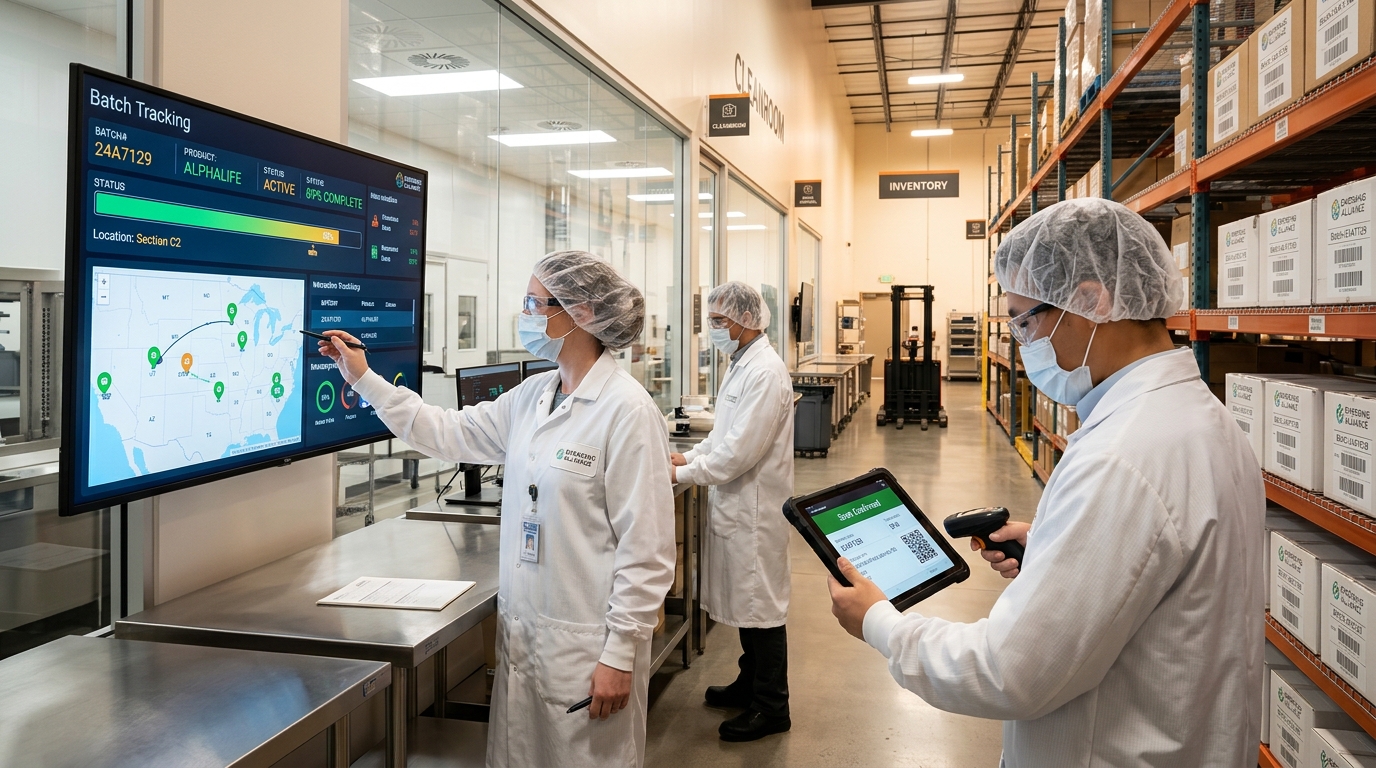
Inventory accuracy and batch traceability in pharmaceutical operations: Connecting warehouse goods receipts, batch tracking, and production consumption in SAP Business One.
Batch traceability is often the most consequential integration requirement. A business may capture a supplier batch at goods receipt yet lose the reference when a warehouse system sends a transfer or picking transaction to ERP. Recorded quantities may still appear correct even though an investigator cannot reliably connect the material to its subsequent movements.
SAP Business One provides batch-management and inventory-transaction capabilities that can support controlled item movements when correctly configured. The project must establish the tracking method, relevant master-data fields, appropriate permissions and consistent transaction practices. Expiry dates, units of measure and warehouse information must be preserved where required.
A practical batch-data test
Follow one representative material batch through receipt, quality status where applicable, warehouse transfer, production consumption, finished-product receipt, dispatch and return. At each stage, verify identifiers, quantities, references and users’ ability to retrieve the required history. Deliberately test partial receipts, corrections and failed messages—not only the ideal scenario.
Barcode scanning can reduce manual capture of item and batch identifiers, but the integration must handle duplicate scans, disconnected devices and rejected transactions. Scanning does not independently prove that records are complete or that recall procedures work. Recall readiness also depends on the company’s documented responsibilities, distribution records and tested response procedures.
A Connected Order-to-Cash and Production Workflow
Consider a manufacturer receiving a large order. Sales accepts the quantity using a stock export prepared the previous day. Production later discovers that part of the material has already been consumed. Purchasing expedites replenishment, the delivery date changes and finance receives the corrections only at month-end.
A more dependable workflow links the business decisions rather than simply moving files more frequently. Sales should use defined availability and allocation rules; production should record consumption against the appropriate transactions; purchasing should receive current material requirements; and finance should be able to reconcile related postings and document references.
SAP Business One can support purchasing, sales, inventory, production-related transactions and financial processing. Whether the company needs external planning, manufacturing execution or specialist quality applications is determined by its operating model. Before promising a fully connected process, assess the exact edition, features, add-ons, interfaces and implementation design proposed.
The objective is a transaction record that helps teams reach consistent decisions. Real-time updates are valuable only when their timing, validity and business meaning are defined. Some information may require a formal approval before it becomes usable, regardless of how quickly an interface transfers it.
Integrating Laboratory, Quality and Warehouse Applications

Connecting specialist pharmaceutical systems: Establishing data ownership and interface workflows between SAP Business One, LIMS, QMS, and WMS platforms.
Specialist systems may remain essential. A laboratory information management system (LIMS) manages laboratory activities; a quality management system (QMS) may manage nonconformances and approvals; a warehouse management system (WMS) may support directed picking and warehouse locations. An ERP integration should not be presented as a substitute for these systems merely because it displays selected data.
Design each interface around five questions:
- System of record: Which application is authorized to create or change the item, batch, result or status?
- Data contract: Which fields, formats, units, identifiers and transaction references must move?
- Trigger and timing: What event sends the information, and when must the receiving system use it?
- Exception control: How are invalid messages, retries, duplicate records and partial processing identified and resolved?
- Evidence and ownership: Who monitors the interface, maintains records and approves changes?
For example, a laboratory application may own test results while the business defines how an approved disposition affects ERP inventory status. A connection should respect the approved workflow and prevent uncontrolled overwriting of critical information. The precise implementation requires assessment of supported interfaces, security, access restrictions and intended use.
Pharmaceutical compliance is broader than connectivity. Requirements for documentation, audit trails, electronic records and computerized-system validation vary by jurisdiction and application. Quality and regulatory specialists should determine applicable obligations; neither batch tracking nor an API connection alone establishes compliance.
Eight-Stage Integration Remediation Plan
Stage 1 — Map transaction journeys
Document where purchase orders, receipts, batch identifiers, quality decisions, material movements, production postings, dispatches and financial entries originate. Include spreadsheets and manual approvals, not just named applications.
Stage 2 — Diagnose the break
Separate late or lost messages from incorrect source data and undefined process ownership. Capture examples, transaction IDs and the frequency of the problem before proposing a solution.
Stage 3 — Rank risk and impact
Prioritize safety- and control-relevant failures, material availability, traceability interruptions and financial exposure according to a documented business risk assessment.
Stage 4 — Establish data ownership
Define authoritative applications, approval rights, master-data standards and status changes. This prevents two systems from independently overwriting a critical field.
Stage 5 — Choose the least complex supported design
Assess native SAP Business One capabilities and configuration, then supported APIs, integration platforms, specialist add-ons and customization. Review compatibility, vendor support, licensing and upgrade implications.
Stage 6 — Build operational controls
Implement field validation, access restrictions, interface monitoring, error notifications, duplicate protection, reconciliations and documented recovery responsibilities.
Stage 7 — Test complete business outcomes
Validate receipts, batch transfers, consumption, rejected quality statuses, dispatches, returns, connection outages and recovery as applicable. Confirm the resulting inventory and financial records, not just a successful technical message.
Stage 8 — Measure and expand selectively
Compare performance with an established baseline. Expand only after critical transactions work reliably and business users, IT and quality owners have accepted the documented result.
Integration performance scorecard
| Measure | Definition to agree before launch | Evidence source |
|---|---|---|
| Manual interventions | Human corrections per 100 relevant transactions | Exception register |
| Interface failures | Failed or rejected messages as a proportion of attempted messages | Integration monitoring |
| Stock discrepancies | Investigated differences by item, batch or warehouse | Inventory reconciliation |
| Reconciliation effort | Staff time spent resolving unmatched transactions | Finance close log |
| Traceability completeness | Sampled transactions with the required end-to-end identifiers | Controlled traceability test |
These are suggested KPIs, not promised improvements. Changes in transaction volumes, training and process design can also affect the results.
Integration Costs, Return on Investment and Support Ownership
A realistic budget should distinguish one-time implementation costs from recurring operating costs. Initial expenditure may include data cleansing, requirements discovery, licensing, integration development, add-ons, migration, testing and training. Recurring obligations may include hosting, subscriptions, interface monitoring, support, upgrades and revalidation where applicable.
A CFO can construct a decision case using measurable baselines: time spent re-entering transactions, effort to reconcile records, number of exceptions and duration of stock investigations. Treat improved visibility and risk reduction as valuable outcomes, but do not automatically convert them into guaranteed financial savings.
Ask who will own interfaces after go-live. External application updates, credential changes and new warehouse processes can disrupt an otherwise successful deployment. Support contracts should identify incident response, escalation, change control and responsibility for maintaining documentation.
SAP Business One Partner Evaluation for Pharma Integration
The right implementation partner should be able to explain why a gap occurs—not just demonstrate a feature. Ask for a transaction map, a system-of-record matrix, supported interface options, known dependencies and test scenarios tied to your pharmaceutical workflows.
Useful procurement evidence includes a written scope, assumptions, data mapping responsibilities, acceptance criteria, integration monitoring plan and post-launch support model. Where validation is necessary, agree how business, quality and technical teams will contribute to requirements, testing and approval.
Emerging Alliance offers SAP Business One implementation and related ERP services. Its suitability for a particular integration depends on technical discovery, partner credentials relevant to the engagement and the documented needs of the pharmaceutical business. Confirm current partnership designations and service claims before publication or procurement rather than relying on an unverified badge.
Executive Decision Checklist Before Expanding Operations
Before approving integration work, the leadership team should be able to answer: Which decision is affected by each gap? Which system owns the data? What business outcome must improve? Can standard functionality solve the issue? What happens when an interface fails? Who signs off the test evidence? Who supports the design after launch?
If these answers remain unclear, an additional connector can make an already fragmented environment harder to maintain. A phased approach—targeting the highest-risk transaction first—creates a more defensible basis for future product, plant or distribution growth.
Frequently Asked Questions
Fix Pharmaceutical Integration Gaps Before They Disrupt Growth
Disconnected systems can affect pharmaceutical inventory, batch traceability, production coordination, and financial visibility. Evaluate how SAP Business One and appropriate integrations can address these gaps and support business growth.
Request a SAP Business One Demo with Emerging Alliance to explore relevant workflows and identify your integration requirements.