SAP Business One Payment Wizard: Payment Automation, Control & Efficiency for Growing Businesses
Quick Answer
SAP Business One Payment Wizard helps businesses process multiple incoming and outgoing payments through structured payment runs instead of handling every transaction individually. It can evaluate eligible open A/R and A/P transactions, apply defined payment methods and selection criteria, generate payment recommendations, and support payment execution and reporting.
For growing businesses, the real value is not simply faster payment processing. Payment Wizard can help finance teams standardize how payments are selected, reviewed, processed, and monitored as transaction volumes increase.
SAP describes the Payment Wizard as functionality for generating incoming and outgoing payments in batches based on selected open transactions and payment methods.
What Is the SAP Business One Payment Wizard?
The SAP Business One Payment Wizard is a finance-processing tool designed to handle groups of payments through a controlled payment run.
Instead of opening individual vendor or customer transactions and processing payments one by one, finance users can define criteria that determine which transactions should be considered for payment.
The Payment Wizard can work with open transactions including invoices, journal entries, payments on account, and credits, subject to configuration and eligibility.
A typical process involves:
In simple terms
The Payment Wizard helps turn:
➔
➔
➔
➔
For finance teams managing dozens or hundreds of transactions, this can provide a much more structured process than manually handling every payment separately.
Why Growing Businesses Need Payment Automation
Payment processing often appears manageable when a company has a relatively small number of customers, suppliers, invoices, and bank transactions.
Growth changes that.
More sales and procurement activity usually creates:
A process that works with 20 invoices can become difficult to control with hundreds or thousands of transactions.
The limitations of manual payment processing
When finance teams depend heavily on manual payment handling, several challenges can emerge. These may include:
- Processing vendor payments individually
- Re-entering similar payment information repeatedly
- Using spreadsheets to decide which suppliers should be paid
- Missing transactions because of manual filtering
- Applying inconsistent payment rules
- Spending excessive time reviewing due invoices
- Having limited visibility into why a transaction was excluded
- Increasing dependency on individual employees who understand the process
The problem is therefore not just speed.
It is control at scale.
How payment complexity increases with growth
A growing payment process often follows this pattern:
➔
➔
➔
➔
This is where SAP Business One Payment Wizard becomes useful.
It provides finance teams with a repeatable framework for selecting and reviewing payments based on defined criteria rather than relying entirely on manual decisions every time a payment batch is prepared.
How Does SAP Business One Payment Wizard Work?
The SAP Business One Payment Wizard works by evaluating open transactions against criteria selected by the finance user.
A simplified process looks like this:
➔
➔
➔
➔
➔
➔
➔
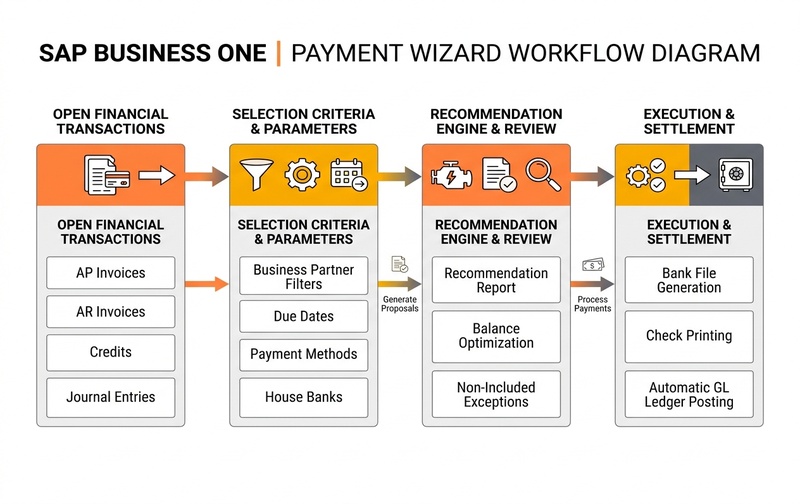
SAP Business One Payment Wizard Workflow Architecture: Structured evaluation of open transactions through selection criteria, recommendation review, and execution settlement.
The Wizard does not simply pay every open invoice automatically.
Users define the scope of the payment run and review recommended transactions before processing them.
1. Open transactions
The starting point is the set of open financial transactions available in SAP Business One. Depending on the scenario, these may include eligible:
- A/P invoices
- A/R invoices
- Journal entries
- Credits
- Payments on account
2. Selection criteria
The user defines which transactions should be considered. Criteria can narrow the payment run according to factors such as:
- Business partner
- Transaction dates
- Due dates
- Payment method
- Payment type
- Other payment-run parameters
3. Payment recommendation
SAP Business One evaluates eligible transactions and creates a Recommendation Report. This allows the finance team to see which transactions the system proposes for the payment run.
4. Review and exception handling
Finance users can review included transactions and investigate items that were not included. SAP Business One provides a Non-Included Transactions report for transactions excluded from the recommendation due to errors or eligibility conditions.
5. Execution
Once the recommendation has been reviewed, the payment run can be processed according to the selected workflow and configuration.
What Can SAP Business One Payment Wizard Automate?
Payment Wizard can help streamline several activities involved in routine payment processing.
Batch outgoing payments
One of the most common uses is handling multiple supplier payments together. Instead of manually processing every eligible A/P transaction, finance teams can define a payment run and allow SAP Business One to identify transactions that meet the selected criteria.
Incoming payments
Payment Wizard can also support incoming-payment scenarios where appropriate. This means the tool is not exclusively a vendor-payment feature. SAP documentation describes the Wizard as supporting both incoming and outgoing payments in batches.
Multiple Open Transactions
Transactions can be evaluated together instead of requiring individual payment processing. This becomes particularly valuable as invoice volume grows across the organisation.
Payment Methods
The Wizard considers configured payment methods when determining how eligible transactions should be processed. Depending on company configuration and localization, these may include:
- Bank transfers
- Checks
- Other supported payment methods
Payment Recommendations
Another important automation feature is the recommendation process. The system can determine which open transactions fit the defined criteria and present them to users for review. This combines automation with human financial control.
SAP Business One Payment Wizard Prerequisites
Successful payment automation depends heavily on correct master data and configuration.
If the underlying setup is incomplete, Payment Wizard may produce unexpected recommendations, exclude transactions, or fail to support the intended payment workflow.
Configure payment methods
Payment methods determine how transactions are processed through the Wizard. Finance and SAP teams should ensure the relevant methods are correctly configured for the organization’s payment processes. Payment methods may influence:
- Incoming versus outgoing payments
- Payment means
- Bank-account usage
- Grouping behavior
- Other payment-processing rules
Configure house banks and bank accounts
Correct house-bank configuration is particularly important for bank-related payment processing. SAP Business One allows business-partner payment-run settings to reference a house bank account used by the Payment Wizard. Incorrect or incomplete bank configuration can therefore affect downstream payment processing.
Maintain business-partner payment data
Supplier and customer master data should be accurate and complete. Relevant information may include:
- Payment methods
- House-bank information
- Bank details
- Payment-block status
- Other payment-run settings
Poor master data can quickly reduce the effectiveness of payment automation.
Verify open transactions
Payment Wizard works with eligible open transactions. Before troubleshooting the Wizard itself, finance teams should confirm that the underlying document is:
- Open
- Eligible for payment
- Within the payment-run criteria
- Not intentionally blocked
SAP Business One Payment Wizard Process: Step by Step
Understanding the full process is important because most Payment Wizard issues occur when users focus only on the final execution stage.
A reliable payment run begins much earlier.
Step 1: Create or Load a Payment Run
Start by creating a new payment run or loading an existing one.
Saved payment runs can be useful when similar payment criteria are used repeatedly.
This creates a controlled starting point for the payment process.
Step 2: Define General Parameters
Next, define the main parameters governing the run. Depending on the configuration and payment scenario, these can include:
- Payment-run date
- Posting-related parameters
- Incoming or outgoing payment type
- Relevant payment means
These parameters establish the scope of the run.
Step 3: Select Business Partners
Determine which customers or vendors should be considered. This is particularly useful when payments need to be prepared for:
- A specific vendor group
- Selected suppliers
- Particular customers
- A subset of the organization’s business partners
Correct business-partner selection prevents unnecessary transactions from entering the recommendation process.
Step 4: Define Document Parameters
Now define the document criteria.
This stage can determine which open transactions qualify based on factors such as date and document conditions.
For example, a company may want to pay invoices due within a particular period rather than every open supplier invoice.
Step 5: Select Payment Methods
Choose the relevant payment methods.
Payment-method configuration influences which transactions can proceed and how SAP Business One groups or handles them during the payment run.
Step 6: Review the Recommendation Report
This is one of the most important stages. SAP Business One presents recommended transactions based on the selected criteria.
SAP documents that transactions in the Recommendation Report are grouped first by business partner, then payment method, and then according to grouping options configured in the payment method.
Finance users should review:
- Transactions proposed for payment
- Payment amounts
- Payment methods
- Business partners
- Exceptions
- Non-included transactions
Do not treat the Recommendation Report as a screen to skip. It is a key control point between automatic transaction selection and actual payment processing.
Step 7: Save or Execute the Payment Run
After reviewing the recommendation, users can continue according to the available save or execution options.
Depending on the run and configuration, the process may allow the user to retain selection criteria or recommendations for subsequent use rather than immediately executing the payment.
Step 8: Review Payment Reports
The final stage provides reporting and visibility around the completed or prepared payment run. SAP Business One includes Payment Wizard reports such as:
- Non-Included Transactions Report
- Country/Region Summary Report
- Currency Summary Report
- Business Partner Summary Report
- Payment Method Summary Report
- Bank Account Summary Report
- Payment Summary Report
These reports help finance teams understand what happened during the run instead of treating payment processing as a black box.
Understanding the Payment Wizard Recommendation Report
The Recommendation Report is central to the SAP Business One Payment Wizard process.
It acts as the review layer between transaction selection and payment processing.
What does the Recommendation Report show?
The report displays open transactions that qualify according to the payment-run parameters and configuration.
Users can select which recommended payments or transactions should ultimately be included in the run.
Why should finance teams review the recommendation?
Automating payment selection does not remove the need for financial oversight.
Reviewing recommendations gives the finance team an opportunity to identify:
- Unexpected transactions
- Unusual amounts
- Excluded documents
- Payment-method issues
- Business-partner problems
- Transactions that should not yet be processed
This is particularly important when payment values are material.
What are Non-Included Transactions?
Not every open transaction will necessarily appear in the recommendation.
SAP Business One provides the Non-Included Transactions option to display transactions that were not included and contain errors affecting their recommendation.
This report should be one of the first places users investigate when an expected invoice is missing.
Why Are Some Invoices Missing from SAP B1 Payment Wizard?
An invoice may be absent from the SAP Business One Payment Wizard because it does not meet the selected payment-run criteria, has payment-related restrictions, uses incompatible configuration, or is otherwise ineligible for the current run.
Rather than immediately assuming there is a software issue, review the transaction and master-data configuration systematically.
SAP Business One allows payment blocking at transaction and business-partner levels, which can prevent selected transactions from being processed through the Wizard.
Troubleshooting sequence
A practical troubleshooting order is:
➔
➔
➔
➔
➔
➔
Following a structured diagnostic sequence prevents finance teams from changing configuration unnecessarily.
Payment Run vs Payment Order Run in SAP Business One
Although the terms sound similar, a Payment Run and Payment Order Run can represent different stages or approaches within the payment process.
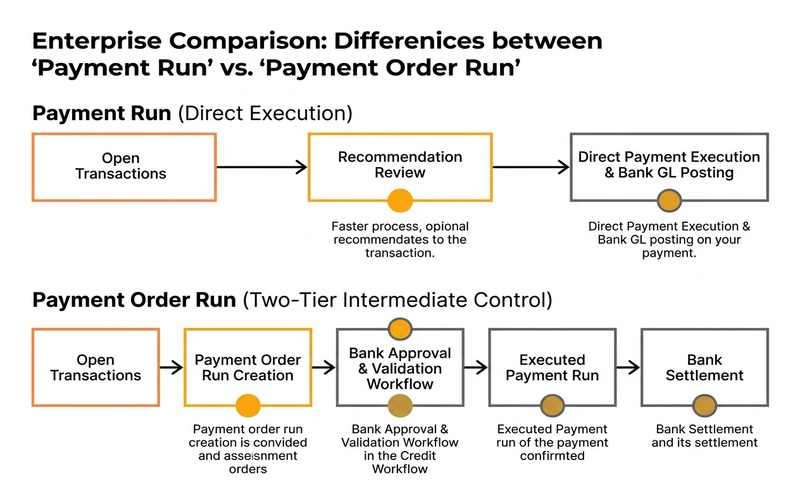
Enterprise Comparison: Direct Payment Run execution versus Payment Order Run intermediate order management and bank authorization workflows in SAP Business One.
SAP documentation confirms that documents included in a payment order run can later have that payment order run executed into a payment run.
The appropriate approach depends on the organization’s banking process, configuration, localization, and payment-control requirements.
How SAP Business One Supports Bank Payment File Processing
Organizations processing large volumes of bank payments may also require payment files that can be transferred into banking workflows.
The Payment Wizard can participate in these scenarios depending on the organization’s setup.
House-bank configuration matters
The Payment Wizard relies on configured bank and house-bank information when relevant payment methods require it.
Incorrect bank details can therefore affect:
- Payment recommendations
- Payment-file preparation
- Bank-account assignment
- Downstream processing
Bank file format
SAP’s current Payment Wizard documentation includes a Bank File Format Type within the Recommendation Report and references supported file-format mechanisms.
However, payment-file functionality should never be assumed to behave identically for every business. Requirements can vary according to:
- Country or localization
- Bank
- Payment method
- SAP Business One configuration
- Add-ons
- File-format requirements
Before moving a payment-file process into production, companies should validate the exact requirements with their bank and SAP Business One implementation team.
Payment Wizard Reports and Financial Visibility
Automation without visibility can simply make mistakes happen faster.
That is why Payment Wizard reporting is important. SAP Business One provides multiple summary views and reports around payment runs. These can help answer questions such as:
Why this matters for growing businesses
As transaction volumes increase, managers cannot practically inspect every invoice manually.
Structured payment reporting provides a way to review payment activity at a higher level while still allowing exceptions to be investigated. This supports stronger:
- Exception management
- Finance review
- Payment visibility
- Process consistency
- Audit preparation
How Payment Wizard Improves Financial Control
The business value of Payment Wizard is not limited to processing speed.
Its larger contribution can be improved process control.
Standardized payment processing
Defined selection criteria reduce dependence on ad hoc manual decisions. Instead of every employee using a different method to identify payments, businesses can establish a more consistent approach.
Better visibility before execution
The Recommendation Report provides an opportunity to inspect proposed payments before moving forward. That creates a deliberate review stage.
Better exception management
Non-included transactions become visible rather than simply disappearing from a spreadsheet-based payment process.
Reduced repetitive work
Batch-oriented processing can reduce the effort required to handle high volumes of individual transactions.
More structured governance
Payment blocks, payment methods, business-partner settings, banking configuration, recommendations, and reports together create a more controlled payment framework.
SAP Business One Payment Wizard Business Use Cases
Growing distributor managing hundreds of supplier invoices
A distributor may receive invoices from dozens or hundreds of suppliers every month.
Without structured payment processing, the finance team may manually review due dates, prepare spreadsheets, select invoices, and then create payments.
Payment Wizard can centralize much of the transaction-selection process inside SAP Business One.
Manufacturer managing scheduled supplier payments
Manufacturers often depend on regular payments to:
- Raw-material suppliers
- Component suppliers
- Logistics vendors
- Maintenance providers
- Service contractors
Payment Wizard can help structure scheduled payment batches based on defined financial criteria.
Multi-branch organization standardizing payment routines
As businesses add branches, inconsistent finance processes become increasingly difficult to manage.
A defined payment-run process can help establish more consistent payment procedures across teams.
Finance team processing recurring payment batches
Organizations that repeatedly process similar payment groups can benefit from saving selection criteria and using structured payment runs instead of rebuilding the process manually each time.
Common SAP Business One Payment Wizard Mistakes
1. Incorrect payment-method configuration
A payment method that has not been configured correctly can prevent otherwise valid transactions from being processed as expected.
2. Incomplete business-partner bank details
Payment automation is only as reliable as the master data behind it. Poor banking information can create unnecessary exceptions.
3. Overly restrictive selection criteria
Sometimes the missing transaction is not a configuration problem at all. The payment run may simply use criteria that exclude it.
4. Ignoring Non-Included Transactions
If an expected invoice is absent, the Non-Included Transactions report should be reviewed before deeper troubleshooting begins.
5. Skipping the Recommendation Report
Automation should not eliminate payment review. Finance users should validate the recommendation before execution.
6. Poor master-data governance
Outdated payment methods, incomplete bank details, or inconsistent business-partner setup can undermine even a technically correct Payment Wizard configuration.
7. Assuming Payment Wizard is completely automatic
Payment Wizard is better understood as controlled payment automation. Users still define rules, review recommendations, manage exceptions, and decide when payment processing should proceed.
Best Practices for More Reliable Payment Automation
Growing businesses can improve SAP Business One Payment Wizard reliability by following several practical controls:
- Standardize payment methods across appropriate vendors and customers.
- Maintain accurate bank information in relevant master data.
- Review open-document criteria before executing the run.
- Use Payment Blocks deliberately rather than inconsistently.
- Review the Recommendation Report before processing payments.
- Investigate excluded transactions instead of bypassing them.
- Control user authorizations around sensitive finance activities.
- Test bank-file workflows before production use.
- Review payment results and reports after major runs.
- Audit payment master data periodically as the business grows.
The objective should not simply be to automate more.
It should be to create a payment process that remains consistent, reviewable, and scalable.
Payment Wizard in SAP Business One Web Client
SAP Business One Web Client also includes functionality for managing Payment Runs.
Current SAP documentation describes views for:
This is particularly relevant for organizations increasing their use of SAP Business One Web Client.
However, available functionality can depend on the specific SAP Business One release and environment. Businesses should therefore verify their exact version before designing payment processes around Web Client capabilities.
When Standard Payment Wizard Configuration May Not Be Enough
Payment Wizard can support many routine payment processes, but growing companies may eventually develop requirements beyond a standard setup. Examples include:
At this stage, the challenge is no longer simply:
“How do we run Payment Wizard?”
The more important question becomes:
“How should our end-to-end payment process be designed inside SAP Business One?”
That may require a combination of:
- SAP Business One configuration
- Master-data cleanup
- Workflow redesign
- Banking integration
- Custom development
- Reporting improvements
- Process-control review
Improve Payment Automation with SAP Business One
Payment Wizard can be much more than a faster way to create payments.
When properly configured, it can help growing businesses establish a more structured process for:
- Selecting transactions
- Managing payment methods
- Reviewing recommendations
- Identifying exceptions
- Processing payment batches
- Improving payment visibility
But automation does not correct weak master data, inconsistent payment methods, incomplete banking configuration, or poorly designed finance processes.
As payment volume grows, the objective should be to make payment operations more controlled, repeatable, and scalable.
SAP Business One Payment Wizard FAQs
Need to Improve Your SAP Business One Payment Process?
If your finance team still spends significant time manually selecting invoices, investigating missing transactions, preparing payment batches, or managing inconsistent payment settings, it may be time to explore a more efficient payment workflow.
See how Emerging Alliance can help you streamline SAP Business One Payment Wizard configuration, payment methods, banking setup, and payment workflows for greater automation and control.
Book an SAP Business One Payment Wizard Demo.