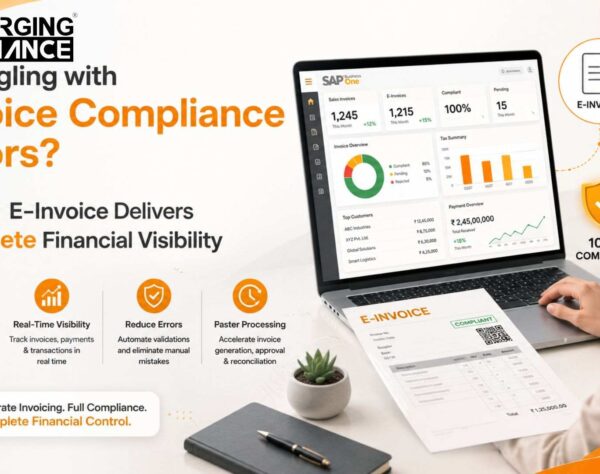
SAP B1 E-Invoice Compliance Risks: Key Business Concerns
Quick Answer: What Are the Main SAP B1 E-Invoice Compliance Risks?
SAP B1 E-Invoice compliance depends on more than simply creating an invoice in SAP Business One. A controlled process requires accurate master and transaction data, correctly configured GST and tax rules, appropriate e-invoice integration, validation, successful invoice processing, status visibility, reconciliation, and exception handling.
Using SAP Business One does not automatically eliminate e-invoice risk. Incorrect GSTINs, tax classifications, document information, configuration errors, manual data entry, integration failures, or weak monitoring can interrupt the invoice workflow.
For businesses with growing transaction volumes, these weaknesses can affect finance operations, dispatch processes, customer service, reconciliation, reporting, and overall business continuity.
The objective should therefore be to establish a controlled flow:
SAP Business One includes electronic-document and India e-billing capabilities, but the exact configuration, communication method, service architecture, integration and third-party requirements depend on the SAP Business One environment and business scenario.
Where SAP B1 E-Invoice Compliance Risks Actually Begin
E-invoice risk rarely starts only when an invoice is submitted for processing.
In many SAP Business One environments, the risk begins much earlier—with the data, configuration and operational processes used to create the transaction.
A typical SAP B1 E-Invoice process can be represented as:
Each stage creates a potential control point.
1. Sales Transaction
The process begins with the commercial transaction.
Customer, item, pricing, location and tax-related information may already be present before the invoice is created.
Possible risks:
- Incorrect customer GST information
- Incorrect billing or shipping details
- Inconsistent item master information
- Incorrect tax classification
- Incomplete transaction data
- Incorrect document references
Errors introduced here can flow downstream into the invoice and eventually into the e-invoice process.
2. SAP Business One Invoice Creation
The next risk point is the A/R invoice itself.
SAP B1 may contain the transaction, but businesses still need appropriate controls over how the invoice is created and what information is mandatory.
Possible risks include:
- Missing mandatory information
- Wrong tax determination
- Incorrect customer details
- Incorrect invoice values
- Incorrect document type
- Manual edits bypassing expected controls
The earlier these errors are detected, the less operational disruption they create later.
3. Data and Tax Validation
Before the invoice progresses further, the organization should verify that the information required by the e-invoice process is complete and structurally correct.
This can include checks around:
- GSTIN
- Tax values
- HSN/SAC information
- Document numbers
- Invoice dates
- Customer information
- Place-of-supply-related information
- Invoice totals
- Other required transaction fields
The specific validations depend on the applicable transaction and the configuration being used.
4. E-Invoice Generation and Integration
Once invoice data is prepared, it has to move through the applicable e-invoice mechanism.
Depending on the SAP Business One architecture, this may involve SAP e-billing functionality, electronic-document services, APIs, service providers, integration layers, add-ons or other configured components.
SAP documentation notes that electronic-document functionality commonly requires setup around services and protocols, and that registration or third-party intermediary configuration may also be necessary depending on the scenario.
5. IRN and Processing Status
For applicable Indian e-invoices, invoice details are submitted through an Invoice Registration Portal, and an Invoice Reference Number is generated for successfully processed documents.
That creates another important control requirement:
Does SAP B1 know what happened after submission?
Businesses need visibility into whether an invoice was:
- Successfully processed
- Rejected
- Waiting for action
- Failed because of a system issue
- Resubmitted
- Cancelled where applicable
Without reliable status feedback, teams may know that an invoice exists in SAP B1 without knowing whether the downstream process completed correctly.
6. Customer and Dispatch Process
An e-invoice problem can quickly become an operational problem.
For organizations where invoicing is closely linked with:
- Dispatch
- Delivery documentation
- Customer communication
- Collections
- Order closure
a processing failure may delay activities beyond the finance department.
7. Reconciliation
Successful generation is not the end of the process.
SAP B1 records, e-invoice records and subsequent reporting should remain consistent.
Otherwise businesses may encounter:
- Missing reference information
- Status differences
- Duplicate records
- Unmatched documents
- Manual reconciliation effort
- Difficulty investigating exceptions
8. Reporting and Monitoring
A controlled environment should allow responsible teams to identify exceptions quickly.
If finance or IT teams can only discover failures through customer complaints, manual portal checks or end-of-period reconciliation, the process lacks adequate operational visibility.
7 SAP B1 E-Invoice Compliance Risks Businesses Should Assess
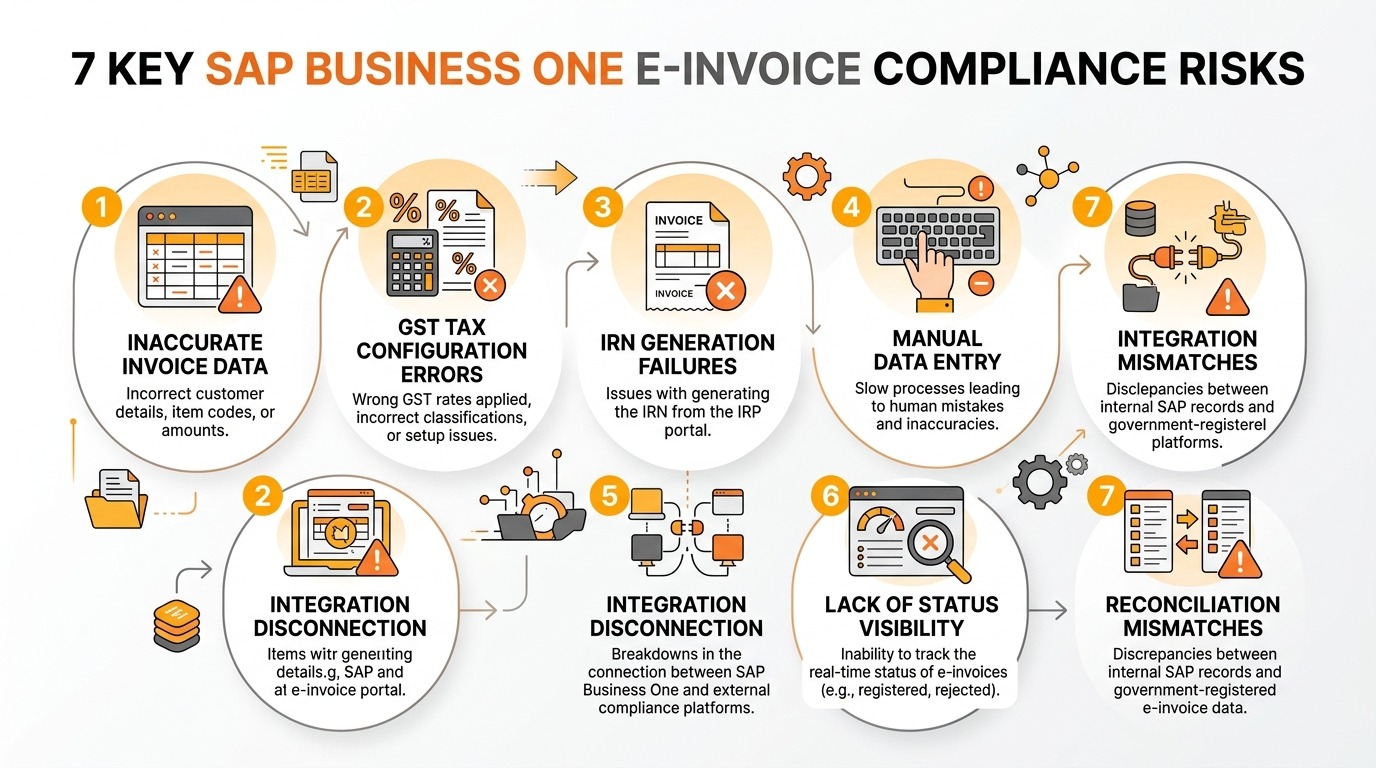
Key SAP Business One e-invoice compliance risks: Data inaccuracies, GST tax configuration errors, IRN generation failures, manual processing, integration gaps, and reconciliation mismatches.
1. Incorrect or Incomplete Invoice Data
Risk
The invoice reaches the e-invoice process with incorrect, incomplete or inconsistent information.
Root Cause
Typical causes may include:
- Incorrect customer master data
- Missing GST information
- Incorrect item information
- Incomplete transaction fields
- Wrong invoice references
- Poor master-data governance
- Uncontrolled manual changes
Business Consequence
Incorrect data can result in validation failures, invoice rework and processing delays.
Finance teams may have to investigate the underlying transaction, correct information and repeat parts of the process.
When invoice volumes are high, even a relatively small number of data exceptions can create significant operational workload.
Required Control
Businesses should establish:
- Master-data validation
- Mandatory-field controls
- Transaction validation before submission
- Exception reporting
- Defined ownership for correcting rejected transactions
The objective is to prevent bad data from reaching downstream processing.
2. GST and Tax Configuration Errors
Risk
SAP B1 generates transactions using tax settings that do not correctly reflect the intended business scenario.
Root Cause
Potential causes include:
- Incorrect tax configuration
- Incorrect tax codes
- Inaccurate customer or item setup
- Incorrect location-related configuration
- Changes to business processes that are not reflected in ERP configuration
- Inconsistent configuration across transaction types
Business Consequence
Tax errors can create invoice-processing failures and reconciliation problems.
They may also force finance teams to review transactions manually and coordinate with ERP or IT teams before invoices can move forward.
Required Control
Organizations should periodically review:
- GST configuration
- Tax determination
- Master-data dependencies
- Transaction scenarios
- Configuration changes
- User access to tax-sensitive settings
Tax configuration should be treated as an ERP control, not merely as an implementation setting that is configured once and forgotten.
3. E-Invoice or IRN Generation Failures
Risk
The SAP Business One invoice is successfully created, but downstream e-invoice processing does not complete as expected.
Root Cause
Possible reasons include:
- Invalid invoice information
- Validation failures
- Integration interruptions
- Connectivity issues
- Authentication problems
- Downstream service availability
- Incorrect integration configuration
- Unhandled API responses
For applicable transactions, the IRP validates submitted invoice information and generates the IRN following successful processing.
Business Consequence
The invoice may remain operationally incomplete even though it exists inside SAP B1.
That can create uncertainty for:
- Finance
- Dispatch
- Sales
- Customer service
- IT support
Users may also start creating manual workarounds when system failures are not handled clearly.
Required Control
A robust process should provide:
- Submission monitoring
- Success/failure status
- Error messages
- Retry or resubmission procedures
- Exception ownership
- Audit trail of processing events
4. Manual Data Entry and Duplicate Processing
Risk
Users manually transfer invoice information between SAP Business One and a separate e-invoice process.
Root Cause
Common causes include:
- Separate portal usage
- Spreadsheet-based preparation
- Copy-and-paste workflows
- Partial integration
- Legacy operating procedures
- Exceptions handled outside SAP B1
Business Consequence
Every additional manual step creates another opportunity for inconsistency.
Users may:
- Enter incorrect values
- Process the wrong invoice
- Duplicate an activity
- Miss an invoice
- Delay processing
- Lose track of which system contains the latest status
Required Control
Where technically and commercially appropriate, organizations should evaluate integration and automation that minimize repeated data entry.
Human involvement should focus primarily on controlled exceptions rather than routine transaction transfer.
5. ERP-to-E-Invoice Integration Failures
Risk
The connection between SAP Business One and the e-invoice processing environment becomes unreliable.
Root Cause
Possible causes include:
- API failures
- Service interruptions
- Incorrect mapping
- Authentication problems
- Expired credentials or configuration
- Integration-service failure
- Middleware problems
- Changes to external interfaces
SAP Business One’s Electronic Document Service, for example, can process and communicate electronic documents and update electronic-document statuses in SAP Business One for supported scenarios. However, applicability depends on localization, protocol and architecture.
Business Consequence
An integration problem can create a queue of transactions requiring intervention.
When organizations lack monitoring, the first indication may be:
- Delayed invoices
- Finance complaints
- Dispatch delays
- Missing statuses
- Customer enquiries
Required Control
Integration should include:
- Health monitoring
- Error logging
- Alerting
- Transaction-level status
- Retry procedures
- Support escalation
- Change management
Integration should be managed as part of a business-critical finance system, not as an invisible technical connector.
6. Invoice-Status Visibility Gaps
Risk
Finance and IT teams cannot easily determine the current status of each invoice.
Root Cause
This usually occurs when:
- SAP B1 and external systems are poorly synchronized
- Portal status is not returned to the ERP
- Users depend on manual checks
- Error logs are technical and inaccessible to finance
- There is no exception dashboard
- Responsibility for failures is unclear
Business Consequence
Teams spend time answering basic questions:
- Was the invoice submitted?
- Was it accepted?
- Was it rejected?
- Why did it fail?
- Has someone corrected it?
- Was it processed again?
This increases dependency on individuals and makes issue resolution slower.
Required Control
Decision-makers should expect centralized status visibility wherever the selected architecture supports it.
The organization should be able to distinguish successful transactions from failed and pending transactions without manually checking every invoice.
7. Reconciliation and Record-Matching Problems
Risk
SAP Business One information does not match downstream e-invoice records.
Root Cause
Possible reasons include:
- Manual processing
- Failed status updates
- Duplicate transactions
- Missing IRN information
- Corrections made in one system but not another
- Partial integration
- Incomplete processing logs
Business Consequence
Finance teams may have to perform time-consuming manual reconciliation.
Differences can become more difficult to investigate as invoice volume increases.
Required Control
The organization should maintain:
- Unique document references
- Processing-status records
- IRN/status linkage where applicable
- Exception reports
- Reconciliation routines
- Clear handling of corrected or cancelled transactions
What Happens When SAP B1 and E-Invoice Processes Are Not Properly Connected?
Weak integration changes the issue from a technical inconvenience into an operational problem.
A typical sequence looks like:
Cause → Consequence → Business Impact
| Cause | Consequence | Business Impact |
|---|---|---|
| Separate e-invoice portal | Users enter the same information again | More processing effort and opportunity for errors |
| No automated validation | Incorrect information moves downstream | More rejected or failed transactions |
| Manual status checking | Finance teams must verify documents one by one | Slower visibility into invoice status |
| Manual IRN handling | Users manually copy numbers, codes or files | Higher risk of mistakes during invoice generation |
| Disconnected exception handling | Failed invoices are managed through side channels | Delays in identifying and correcting issues |
| Separate customer records | Tax identifiers and customer details must be checked manually | Greater risk of tax or customer data mismatches |
| Manual reconciliation | Teams compare multiple systems and files | More time spent resolving differences |
| No centralized audit trail | Processing history is split across systems | More difficult to track and audit transactions |
The underlying issue is not simply whether an e-invoice can eventually be generated.
The question is:
How much manual intervention, investigation and coordination is required to make that happen every day?
A process that works for 50 invoices may become difficult to manage at 500 or 5,000 transactions if exception handling and data movement remain manual.
10 Warning Signs Your SAP B1 E-Invoice Process Needs Attention
Decision-makers should review the current environment if several of these conditions are familiar:
- Employees manually re-enter invoice information outside SAP Business One.
- Invoice processing failures or rejections occur repeatedly for similar reasons.
- The same invoice-data errors appear frequently, indicating that problems are not being prevented at source.
- E-invoice generation is regularly delayed after invoices are created in SAP B1.
- Users depend heavily on separate portal-based processing for routine transactions.
- Finance teams cannot quickly identify invoice status without checking another system.
- Reconciliation frequently identifies differences between SAP B1 and downstream invoice information.
- Several disconnected applications, spreadsheets or utilities are involved between invoice creation and completion.
- Increasing transaction volume is creating processing bottlenecks or additional headcount requirements.
- Finance and IT teams lack centralized visibility into failures, error reasons and pending transactions.
One warning sign does not automatically mean the entire architecture needs replacement.
However, multiple recurring symptoms usually justify a structured review of data, configuration, integration, automation and exception management.
How SAP Business One Can Strengthen E-Invoice Control
SAP Business One should form the ERP foundation of the process, but organizations need to distinguish between what SAP B1 provides and what must be configured, integrated or supplemented.
SAP documents electronic-document and India e-billing functionality for SAP Business One. SAP also notes that electronic-document processing can require configuration of protocols, Electronic Document Service, Electronic File Manager, integration components or external intermediaries depending on the scenario.
Therefore:
SAP Business One capability ≠ automatic compliance.
The effectiveness of the process depends on implementation, configuration, data quality, integration and operating controls.
| Business Problem | SAP B1 / Integration Control | Business Value |
|---|---|---|
| Incomplete invoice information | SAP master/transaction controls plus validation rules | Errors can be identified earlier |
| Incorrect tax data | Correct GST configuration and controlled master data | More consistent invoice processing |
| Manual re-entry | Direct integration or controlled electronic-document processing | Less duplicated effort and fewer manual errors |
| Slow error identification | Automated error messages linked to the invoice | Exceptions can be resolved more quickly |
| Missing IRN / status records | Two-way status and IRN updates within SAP B1 | Status visibility remains centralized |
| Dispatch bottlenecks | Timely, automated or direct invoice generation | Fewer delays at shipping and dispatch |
| Hard-to-audit records | Centralized invoice status and transaction history | Easier reporting, review and reconciliation |
| Inefficient exception management | Defined error handling and exception procedures | Clearer ownership and faster resolution |
| Month-end processing stress | Scalable, structured transaction flow | Less reliance on end-of-period workarounds |
Standard SAP Business One Capabilities
Depending on version, localization and configuration, SAP Business One can provide capabilities associated with:
- GST transaction processing
- Electronic documents
- E-billing for India
- Electronic-document monitoring
- Document statuses
- Data required for downstream invoice processing
SAP’s India localization documentation specifically provides an e-billing capability for generating electronic invoicing documents.
What May Require Configuration or Additional Components
Depending on the environment, businesses may still require:
- GST configuration
- Electronic-document setup
- EDS or related SAP components
- Integration services
- API connectivity
- GSP/IRP connectivity arrangements
- Third-party e-invoice solutions
- Add-ons
- Custom validation
- Status synchronization
- Custom reporting
- Exception workflows
The appropriate architecture should be determined after reviewing the SAP B1 version, localization, transaction requirements, current integrations and business processes.
How SAP B1 E-Invoice Risks Can Vary by Industry
The core e-invoice controls may be similar, but the operational impact of failure can vary substantially by industry.
Pharmaceutical
Pharmaceutical businesses often operate with:
- Large product masters
- Batch-related operational processes
- Multiple transaction and documentation dependencies
- Strong transaction-accuracy expectations
An invoicing error may therefore require investigation across several connected operational records rather than a simple correction to one field.
Manufacturing
Manufacturers may process:
- Large SKU volumes
- Repeated customer transactions
- Multiple locations
- Dispatch-dependent invoicing
- High daily invoice volumes
Integration reliability and transaction throughput therefore become particularly important as the business grows.
Medical Equipment
Medical-equipment organizations may deal with:
- High-value products
- Detailed product information
- Customer-specific documentation
- Equipment-specific commercial transactions
Invoice accuracy and document visibility can therefore become important parts of customer-service and finance control.
Food & Beverage
Food and beverage businesses frequently operate in environments involving:
- High transaction frequency
- Fast order-to-dispatch cycles
- Distribution networks
- Large product catalogs
A slow or manual invoice process can quickly become a bottleneck during high-volume periods.
Wholesale & Distribution
Distributors often have:
- Large customer bases
- High invoice frequency
- Multiple sales channels
- Rapid order-to-invoice requirements
A disconnected e-invoice process may force the finance team to scale manual work as sales volume increases.
Engineering
Engineering organizations may have:
- Project-linked billing
- Customer-specific commercial conditions
- Milestone transactions
- Complex invoice references
Validation therefore needs to account for the actual billing scenario rather than assuming every transaction follows a simple standard invoice flow.
Automotive, Electrical and Electronics
These sectors can involve:
- High SKU counts
- Repeat B2B invoicing
- OEM or distributor relationships
- Tight dispatch timelines
Status visibility becomes particularly important when invoicing and shipment operations are closely connected.
What Should Businesses Evaluate in an SAP B1 E-Invoice Solution?
A CFO, CIO, CTO or business owner should evaluate the solution as an operational control framework—not only as an invoice-generation utility.
1. How Closely Does It Integrate With SAP Business One?
Ask:
- Is invoice information taken directly from SAP B1?
- Is duplicate data entry required?
- Can processing results be returned to SAP B1?
- How are failed transactions handled?
- Which SAP B1 versions and databases are supported?
2. How Is Invoice Data Validated?
Evaluate:
- Mandatory-field validation
- GSTIN checks supported by the solution
- Document-format checks
- Tax-related validations
- Customer and item master dependencies
- Error identification before submission
The objective should be to detect preventable errors as early as possible.
3. How Is GST and Tax Configuration Managed?
Determine:
- Which configuration remains inside SAP B1?
- Which rules exist inside the integration layer?
- How are changes tested?
- Who owns tax-configuration maintenance?
- How are unusual transaction scenarios handled?
4. What Level of Automation Is Available?
Consider whether users need to:
- Export files
- Upload files
- Re-enter data
- Trigger every invoice manually
- Copy IRNs back into SAP B1
- Check processing status manually
Automation should remove routine effort without eliminating appropriate approval and exception controls.
5. How Are Errors Handled?
A good implementation should answer:
- Where are failed transactions shown?
- Is the error understandable to finance users?
- Can users identify the underlying invoice?
- What happens after correction?
- Can transactions be resubmitted safely?
- Is the history retained?
6. Can Teams Monitor E-Invoice Status?
Management should know whether the process provides visibility into:
- Successful transactions
- Failed transactions
- Pending transactions
- Reprocessed transactions
- Relevant IRN/status information
7. Can the Process Scale?
Evaluate whether invoice volumes can grow without requiring a proportional increase in manual effort.
Consider:
- Peak-hour volumes
- Multiple branches
- Additional GST registrations
- More users
- New sales channels
- More transaction types
8. How Is Reconciliation Managed?
Ask whether teams can easily reconcile:
A reliable reference chain significantly simplifies exception investigation.
9. What Reporting Is Available?
Useful reporting may include:
- Successful invoices
- Failed invoices
- Error categories
- Pending transactions
- Processing time
- Reconciliation exceptions
The exact dashboards required should reflect operational priorities.
10. How Are Security and Access Controlled?
Review:
- User authorization
- Credential management
- Integration authentication
- Administrative access
- Configuration access
- Processing logs
SAP itself provides authorization concepts around electronic-document processing in its ERP environments, reinforcing the importance of treating e-invoice processing as a controlled business process rather than an unrestricted utility.
11. What Support and Maintenance Model Is Available?
Ask:
- Who owns integration failures?
- Who monitors changing technical requirements?
- Who supports SAP configuration?
- Who supports API or integration errors?
- What is the escalation path during business-critical failures?
12. Can the Architecture Adapt?
Regulatory and technical environments evolve.
The solution should therefore be evaluated for its ability to accommodate:
- Process changes
- New transaction scenarios
- SAP upgrades
- Interface changes
- Authentication changes
- Future regulatory requirements
The Business Case for Strengthening SAP B1 E-Invoice Processes
The strongest business case is not necessarily built around penalties or promised savings.
It is built around operational control.
Fewer Manual Processing Steps
When SAP B1 data flows through an appropriate integrated process, businesses can reduce repeated copying, exporting and re-entering of information.
Faster Invoice Processing
Removing unnecessary handoffs can shorten the time between SAP B1 invoice creation and downstream processing.
Lower Data-Error Exposure
Validation and automation help reduce opportunities for transcription errors and inconsistent records.
Better Invoice-Status Visibility
Finance and IT teams can spend less time determining whether an invoice has succeeded, failed or remains pending.
Improved Reconciliation
A clear link between the ERP transaction and e-invoice processing information makes exceptions easier to investigate.
Better Audit Preparedness
Structured transaction records, status information and documented exception processes help organizations explain how invoice processing is controlled.
Greater Operational Control
Teams can identify recurring failure patterns instead of repeatedly resolving isolated symptoms.
Improved Scalability
Automation allows transaction volume to increase without creating the same proportional increase in repetitive manual processing.
Lower Dependency on Disconnected Workflows
Businesses become less dependent on:
- Individual users
- Spreadsheets
- Manual portal checks
- Repeated data entry
- Informal communication between finance and IT
The desired outcome is not simply a more technical invoice process.
It is a more manageable business process.
What Does a Strong SAP B1 E-Invoice Process Look Like?
A strong architecture creates an end-to-end control chain.
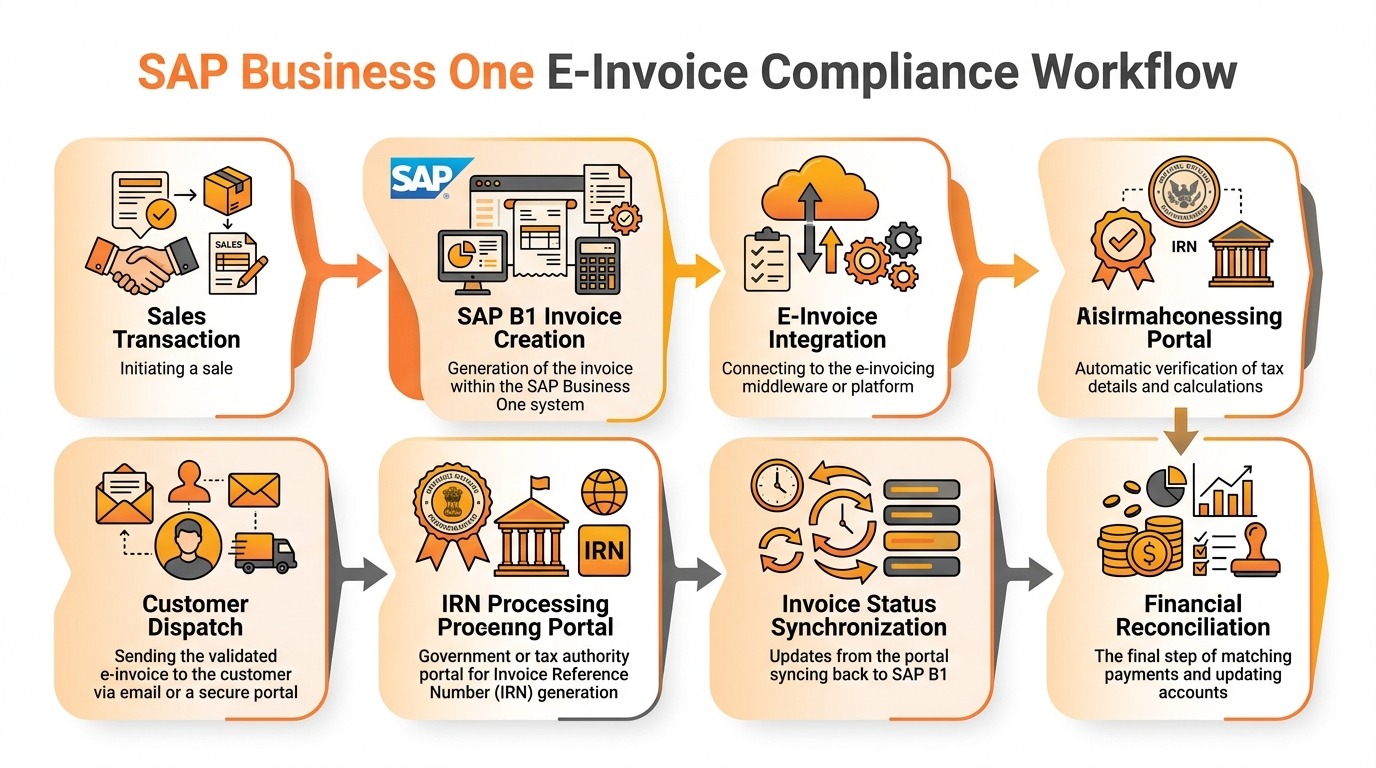
End-to-end controlled SAP Business One e-invoice workflow: From sales order and transaction validation through IRN generation, status synchronization, dispatch, and finance reconciliation.
The exact technical architecture can differ between SAP Business One environments. However, the control principles remain similar.
Stage 1: Sales Order / Transaction
What should happen
Customer, item, tax and transaction data should originate from controlled ERP master and transaction records.
What can go wrong
Incorrect customer or item information enters the transaction.
Required control
Master-data governance and required-field controls.
Business outcome
Better data quality before invoicing begins.
Stage 2: SAP B1 Invoice
What should happen
SAP Business One creates the invoice using the appropriate commercial and tax information.
What can go wrong
Users select incorrect data, document types or tax settings.
Required control
Configuration, authorizations and transaction-validation rules.
Business outcome
More consistent invoice creation.
Stage 3: Automated Data Validation
What should happen
The transaction should be checked for required information before downstream submission.
What can go wrong
Incomplete or structurally incorrect invoice information continues into the integration.
Required control
Pre-submission validation and clear exception messages.
Business outcome
More issues detected before they affect downstream processing.
Stage 4: E-Invoice Integration
What should happen
Approved invoice information should move through the configured electronic-document or integration process.
What can go wrong
API, service, mapping or connectivity failures interrupt transmission.
Required control
Integration monitoring, logging and retry procedures.
Business outcome
More reliable transaction processing.
Stage 5: IRN Processing
What should happen
For applicable Indian e-invoices, required invoice information is submitted to an Invoice Registration Portal for processing and IRN generation.
What can go wrong
The document fails validation or downstream communication fails.
Required control
Transaction-level success and failure status with understandable error information.
Business outcome
Faster exception resolution.
Stage 6: Invoice Status Update
What should happen
The organization should be able to identify the latest processing status.
What can go wrong
External processing succeeds or fails without being reflected in the operational workflow.
Required control
Status synchronization, monitoring or controlled status reporting.
Business outcome
Finance and IT have greater visibility.
Stage 7: Customer and Dispatch Workflow
What should happen
The next operational step proceeds using the appropriate invoice status and supporting documents.
What can go wrong
Teams dispatch goods, communicate with customers or close transactions without knowing that invoice processing has failed.
Required control
Where appropriate, connect operational workflows with invoice-processing status.
Business outcome
Reduced downstream disruption.
Stage 8: Reconciliation
What should happen
SAP B1 invoice information and e-invoice processing records should be traceable and reconcilable.
What can go wrong
Records are missing, duplicated or inconsistent.
Required control
Reference matching and exception reconciliation.
Business outcome
More efficient finance review.
Stage 9: Reporting
What should happen
Management should be able to identify performance and exceptions.
What can go wrong
Problems remain invisible until users manually investigate them.
Required control
Reporting for success, failure, pending transactions and reconciliation exceptions.
Business outcome
Better management visibility and process improvement.
Manual / Fragmented Process vs. Integrated SAP B1 E-Invoice Process
| Process Area | Fragmented Approach | Integrated Approach |
|---|---|---|
| Invoice Data | Manual handling | Validated ERP data |
| E-Invoice Generation | Separate process | Integrated workflow |
| Validation | After submission | Before or during submission |
| Status Tracking | Manual check | Real-time / automated |
| IRN Handling | Manual storage | Managed in SAP B1 |
| Error Visibility | External portal | Centralized record |
| Audit Trail | Fragmented | Traceable in ERP |
| Scalability | Limited | High |
A strong SAP B1 E-Invoice process is not simply about generating an e-invoice. It is about creating a controlled flow of accurate data from the ERP through validation, e-invoice processing, status monitoring, and reconciliation.
The exact architecture, integration method and components should still be determined based on the SAP Business One version, localization, transaction scenarios and business requirements.
Strengthen Your SAP B1 E-Invoice Environment Before Process Gaps Become Operational Problems
Growing invoice volumes can expose weaknesses that were previously manageable through manual effort.
A process that depends on users repeatedly correcting invoice information, uploading files, checking portals, reconciling statuses or coordinating failures between finance and IT deserves closer examination.
Emerging Alliance can help organizations evaluate their current SAP B1 E-Invoice environment and identify areas where stronger integration, validation, automation or process controls may be appropriate.
A review can focus on:
- Current SAP Business One E-Invoice setup
- GST and invoice-data workflow
- Integration architecture
- Manual processing points
- Invoice-validation gaps
- IRN and status handling
- Error-management workflows
- Reconciliation challenges
- Reporting requirements
- Automation opportunities
- Implementation requirements
- Integration customization
- Ongoing SAP B1 E-Invoice support
Treat E-Invoice as an ERP Control
E-invoice compliance should be treated as an ERP control and business-continuity issue—not simply a finance process.
SAP Business One may contain the transaction, but successful e-invoice processing still depends on the quality and control of the complete workflow.
The strongest operating model is:
As invoice volumes and operational complexity increase, organizations should review whether their SAP B1 E-Invoice process can identify errors early, process transactions consistently, return clear status information and support efficient reconciliation.
Emerging Alliance can help you assess your current SAP B1 E-Invoice environment and identify practical opportunities to improve integration, automation, validation and operational control.
Frequently Asked Questions About SAP B1 E-Invoice
Identify the gaps before they become operational problems.
If your finance or IT team is dealing with repeated invoice errors, manual e-invoice processing, integration failures or reconciliation issues, an SAP B1 E-Invoice process review can help identify where the problem originates and which controls should be strengthened.
Talk to Emerging Alliance about SAP Business One E-Invoice implementation, integration, customization, automation or support.