SAP B1 Barcode Integration: The Inventory Accuracy & Warehouse Control Playbook
Quick Answer
SAP B1 barcode integration connects barcode-based identification and scanning workflows with SAP Business One inventory processes. Instead of warehouse teams repeatedly entering item codes, quantities, batch numbers, serial numbers, or storage details manually, scanning can capture and validate the required information closer to the actual warehouse transaction.
For growing manufacturers, distributors, wholesalers, pharmaceutical companies, and other inventory-intensive businesses, the value is not simply faster scanning. The bigger opportunity is better inventory accuracy, stronger traceability, fewer manual data-entry gaps, and tighter warehouse control.
The right implementation depends on your warehouse processes, barcode structure, devices, inventory complexity, SAP Business One configuration, and whether additional mobile warehouse or integration capabilities are required.
Inventory Growth Without Inventory Control
Inventory problems rarely begin as major ERP problems.
They usually start with small operational gaps.
A warehouse employee receives an item but enters the wrong quantity. A picker selects a similar-looking product. A batch number is typed incorrectly. A stock transfer is physically completed but updated in the ERP later. A cycle count identifies a difference that nobody can easily explain.
One error may appear insignificant.
Hundreds of transactions across multiple users, warehouses, items, bins, batches, serial numbers, and locations can create a much larger control problem.
The result can include discrepancies between physical and system stock, longer stock-counting exercises, picking delays, repeated verification, inventory adjustments, traceability difficulties, and reduced confidence in ERP data.
This is where SAP B1 barcode integration becomes more than a warehouse productivity tool.
It becomes part of inventory governance.
SAP B1 Barcode Integration: What It Actually Means
SAP Business One can maintain barcode information against inventory items and units of measure. Barcode integration extends that data into operational workflows where warehouse employees identify and process inventory through scanning instead of relying primarily on manual item entry.
A barcode scanner, handheld terminal, mobile device, or warehouse application captures a barcode. The scanning workflow identifies the relevant item or transaction information, validates it against configured business rules, and passes the transaction into SAP Business One.
The exact architecture depends on the implementation.
Some businesses require straightforward item identification. Others need advanced workflows involving bin locations, batches, serial numbers, multiple warehouses, production, quality processes, picking, dispatch, or offline mobile operations.
That distinction matters.
Barcode capability and barcode-driven warehouse execution are not always the same thing.
A successful implementation therefore starts with processes rather than hardware.
Barcode Scanning Across the Inventory Lifecycle
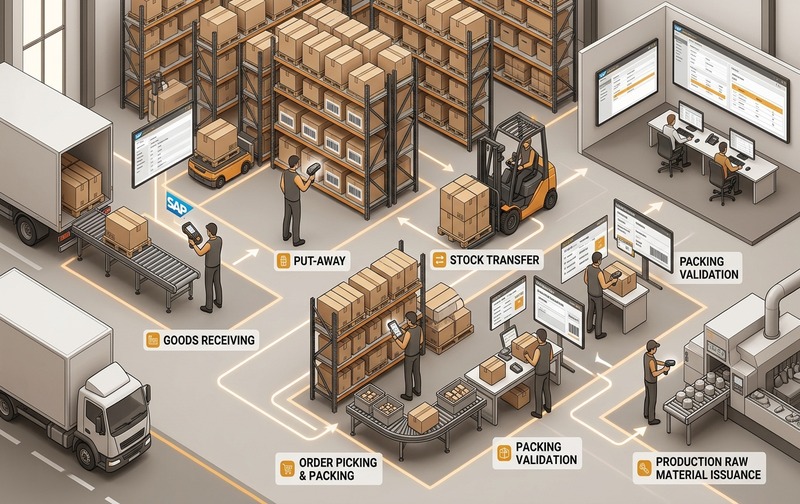
Sequential barcode validation checkpoints across receiving, put-away, transfers, picking, counting, and production issuance in SAP Business One.
The strongest business case for SAP Business One barcode scanning appears when scanning is connected across multiple inventory movements instead of being restricted to one warehouse activity.
Goods Receipt
Receiving is one of the first points at which inventory accuracy can be protected.
Instead of relying entirely on manual item selection, warehouse employees can scan incoming products and compare them with the expected transaction.
Depending on the configured workflow, the process can help validate the correct item, quantity, warehouse, batch, serial number, or other required information before the inventory transaction is completed.
The objective is simple:
Capture accurate inventory information when stock enters the business rather than correcting it later.
Put-Away and Bin Movement
Receiving an item correctly does not guarantee that warehouse employees will know where it is physically stored.
For organizations using bin-controlled warehouses or detailed storage structures, scan-enabled movements can connect the item with the relevant storage location.
This creates a clearer relationship between:
What inventory exists → where it exists → how much exists → which batch or serial number is stored there.
Better location accuracy can make future picking, counting, and stock verification considerably easier.
Inventory Transfers
Stock transfers are especially vulnerable to timing gaps.
Inventory may physically move from one warehouse or storage location to another before the corresponding ERP transaction is recorded.
Barcode-enabled transfer workflows can bring the physical movement and ERP transaction closer together.
That reduces the period during which the physical warehouse and SAP Business One may show different realities.
Picking and Dispatch
Picking accuracy directly affects customer service.
When products have similar packaging, descriptions, dimensions, or item codes, visual identification alone can increase the possibility of selecting the wrong material.
A configured scanning workflow can validate the selected product against the required transaction before dispatch.
Instead of discovering an incorrect shipment after delivery, businesses gain another control point inside the warehouse.
Inventory Counting
Stock counting often exposes problems that were created much earlier.
If goods receipts, transfers, issues, returns, and picking activities were inaccurately recorded, physical inventory eventually differs from ERP inventory.
Scanning can simplify item identification during cycle counting and physical inventory processes while reducing repeated manual code entry.
The bigger objective is not merely faster stock counts.
It is reducing the number of unexplained differences that stock counts discover.
Production Material Movement
Manufacturing businesses may also need to track materials moving into and out of production.
When integrated with the appropriate processes, barcode scanning can support stronger identification of raw materials, components, work-in-process movements, and finished goods.
For batch- or serial-controlled manufacturers, this becomes especially valuable when traceability must extend across the production lifecycle.
Inventory Accuracy Beyond Faster Data Entry
The business case for SAP B1 barcode integration is frequently described as “saving warehouse time.”
That is only one part of the value.
Better Item Identification
Typing or searching for item codes introduces human interpretation into every transaction.
Scanning identifies the encoded item directly.
That is particularly useful when companies manage thousands of SKUs or products with similar names, packaging, or specifications.
Fewer Manual Re-Entry Points
Every time the same information is written down, moved to a spreadsheet, communicated verbally, and finally entered into ERP, another possibility for error is introduced.
Barcode workflows can remove unnecessary intermediate steps.
The warehouse activity becomes the point at which the transaction data is captured.
Stronger Transaction Discipline
ERP accuracy depends on users following the correct process consistently.
Barcode-enabled workflows can introduce validation points before a transaction is completed.
A scan can therefore become part of the operational control mechanism rather than merely an alternative to typing.
Better Batch and Serial Traceability
Batch- and serial-controlled businesses require more than quantity-level inventory accuracy.
They may need to know exactly which batch was received, transferred, issued, produced, returned, or delivered.
Connecting barcode scanning with batch and serial processes can reduce the dependency on manually entering long identifiers and strengthen transaction-level traceability.
More Reliable Inventory Visibility
Management reporting is only as reliable as the underlying transactions.
When physical stock movements are captured more consistently, purchasing, sales, finance, production, and operations teams work from a more dependable inventory picture.
That supports better decisions around procurement, replenishment, production planning, fulfilment, and working capital.
Native SAP B1 Barcodes vs Full Barcode Scanner Integration
This is an important distinction for businesses evaluating a barcode project.
SAP Business One provides barcode-related item master capabilities. Businesses can maintain barcode information associated with inventory items and units of measure.
But a warehouse may require much more than simply maintaining barcode values.
A full scanning environment may involve handheld devices, mobile screens, warehouse-specific workflows, validation logic, batch and serial capture, bin-location processing, label printing, user permissions, connectivity requirements, integrations, or SAP Business One add-ons.
Therefore, the correct question is not:
“Does SAP Business One support barcodes?”
The more useful question is:
“Which warehouse transactions should our employees execute through scanning, and what SAP B1 architecture is required to support them?”
That moves the conversation from feature availability to process design.
SAP B1 Barcode Integration Architecture
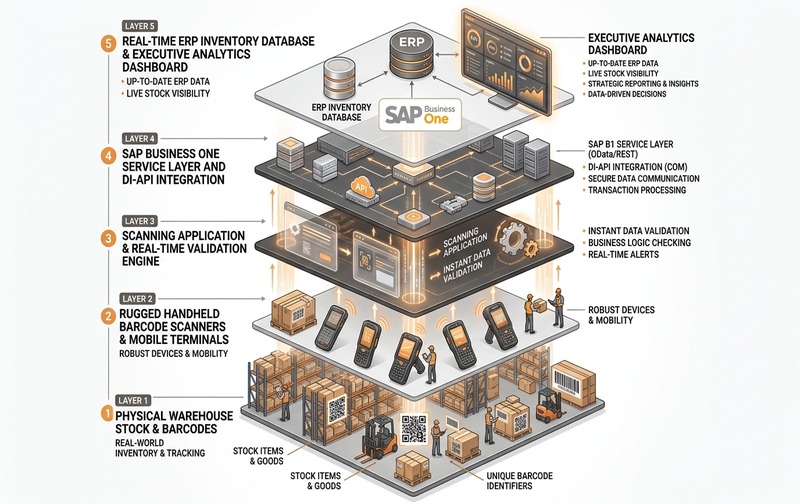
System architecture blueprint: Multi-layered data integration from physical warehouse barcode capture to SAP Business One ERP validation and executive visibility.
A practical barcode scanner integration with SAP typically contains several connected layers.
The objective should be a controlled information flow:
➔
Scan
➔
Validation
➔
SAP B1 Transaction
➔
Inventory Visibility
If employees scan products but transactions still depend on multiple manual steps afterward, much of the expected benefit is lost.
Barcode Master Data: The Foundation Most Projects Underestimate
A scanner cannot fix poor master data.
Before implementing SAP B1 inventory scanning, businesses should examine the quality and consistency of their item master information.
Duplicate barcodes, missing barcode assignments, inconsistent units of measure, incorrect item status, incomplete batch configuration, poor warehouse structures, or unclear bin-location rules can undermine the scanning process.
Barcode implementation should therefore begin with master-data governance.
The business must establish clear ownership for barcode creation, assignment, modification, validation, and retirement.
This is especially important when one product can exist in different pack sizes or units of measure.
A box, case, pallet, and individual unit may require different identification logic even though they relate to the same underlying product.
SAP B1 Barcode Workflows by Business Type
Barcode requirements vary significantly by industry.
Manufacturing
Manufacturers may use scanning to control raw-material receipt, warehouse transfers, material issue, production movements, finished-goods identification, and batch or serial traceability.
The priority is often connecting warehouse accuracy with production control.
Pharmaceuticals
Pharmaceutical inventory requires close attention to batch information, expiry dates, traceability, quality processes, and controlled inventory movement.
A barcode workflow can become an important supporting layer for capturing the correct material and batch information at operational checkpoints.
Distribution and Wholesale
High transaction volumes make manual identification increasingly difficult as a distributor scales.
Receiving, put-away, picking, transfers, cycle counting, and dispatch are common candidates for barcode-driven workflows.
Food and Process Industries
Batch identification, production dates, expiry information, traceability, and inventory rotation can make barcode accuracy particularly important.
The objective is not simply locating stock but understanding exactly which stock should move.
Automotive Components and Engineering
Large numbers of similar parts can make item identification difficult.
Barcode scanning can help warehouse and production teams validate the correct component before completing an inventory movement.
When SAP B1 Barcode Integration Becomes a Priority
A barcode project deserves serious consideration when operational growth begins exposing weaknesses in manual inventory processes.
Typical signals include frequent stock adjustments, repeated picking corrections, long inventory counts, growing warehouse headcount without proportional productivity improvement, difficulties tracking batches or serial numbers, delayed stock updates, multiple warehouses, increasing transaction volumes, and excessive dependence on spreadsheets or handwritten records.
One isolated issue may not justify a project.
Several occurring together usually indicate a process-control problem.
The underlying question is whether the business can continue scaling transaction volume without scaling inventory errors and administrative effort at the same rate.
SAP B1 Barcode Implementation: The Right Starting Point
A successful implementation should not begin by purchasing scanners.
It should begin by mapping transactions.
The implementation team should identify which physical warehouse actions create SAP Business One transactions, who performs them, what information must be captured, which validation rules are required, and what should happen when something does not match expectations.
A practical implementation sequence is:
The goal is not simply to make an existing manual process digital.
It is to remove unnecessary steps and strengthen controls at the same time.
Common Barcode Integration Mistakes
A barcode project can fail even when the scanner itself works perfectly.
One common problem is automating a poorly designed process. If responsibilities, transaction sequences, and exception handling are unclear, scanning may simply make confusion happen faster.
Another problem is focusing exclusively on hardware.
Device selection matters, but barcode structure, SAP configuration, mobile workflow, integration architecture, network reliability, master data, printing, user authorization, and exception handling can matter just as much.
Businesses should also avoid designing only for the “happy path.”
Warehouses regularly encounter damaged labels, duplicate codes, unexpected products, partial quantities, incorrect batches, unavailable bins, connectivity issues, returns, or quantity differences.
A strong solution defines what happens when the scan does not match expectations.
Damaged and Unreadable Barcode Handling
Real warehouse environments are not controlled laboratory environments.
Labels may become torn, dirty, faded, covered, badly printed, or physically damaged during handling and transportation.
A barcode strategy therefore needs an exception process.
Depending on the business requirement, this may involve controlled manual lookup, barcode reprinting, supervisor authorization, quarantine, relabelling, or validation against other item information.
Allowing employees to bypass scanning without governance can recreate the exact data-quality problem the barcode project was intended to solve.
Exception handling should therefore be treated as part of the solution design rather than an afterthought.
Measuring Barcode Integration ROI
The return on SAP barcode integration should not be judged only by scanner cost.
Measure the operational process before and after implementation.
Useful metrics include inventory variance, number of stock adjustments, receiving time, picking time, picking corrections, cycle-count duration, transaction re-entry, stock-transfer delays, warehouse rework, batch or serial traceability time, dispatch errors, and user productivity.
Finance leaders should also consider the indirect effects of poor inventory information.
Unreliable stock data can influence purchasing, production planning, order fulfilment, working capital, expedited purchasing, inventory carrying costs, and customer-service performance.
The business case is therefore broader than warehouse labour savings.
It is about improving confidence in the inventory data used across the organization.
SAP B1 Barcode Integration vs More Warehouse Manpower
When transaction volumes increase, businesses sometimes respond by adding more warehouse employees.
That may solve immediate capacity constraints.
It does not necessarily solve process-control problems.
If five employees work with a manual process that produces inventory mismatches, adding another five employees can increase throughput without addressing the underlying source of the mismatches.
Technology should not replace necessary operational roles simply for the sake of automation.
But where employees spend significant time identifying items, re-entering data, verifying transactions, correcting errors, and reconciling differences, barcode integration can help redirect effort toward higher-value warehouse activities.
The objective becomes:
More transaction capacity without proportional growth in manual control work.
Choosing the Right SAP B1 Barcode Solution
There is no universal barcode setup for every SAP Business One customer.
A small distributor operating from one warehouse has very different requirements from a pharmaceutical manufacturer managing batches, expiry dates, quality controls, multiple locations, and regulated traceability.
Before selecting a solution, evaluate your warehouse complexity, number of users, transaction volumes, warehouse count, bin requirements, batch and serial requirements, label standards, mobile-device needs, network environment, production processes, required integrations, and exception scenarios.
The best solution is not necessarily the one with the longest feature list.
It is the one that fits the transactions employees actually need to perform.
From Barcode Scanning to Inventory Governance
Barcode scanning delivers the most value when businesses stop treating it as a standalone warehouse feature.
Its strategic role is connecting physical inventory movement with ERP transactions more consistently.
That creates a stronger operating model:
➔
Validate immediately
➔
Record accurately
➔
Trace completely
➔
Manage confidently
For growing businesses using SAP Business One, that foundation can become increasingly important as product ranges, warehouses, transaction volumes, employees, batches, serial numbers, and customer expectations expand.
The scanner is only the interface.
The real value lies in the control behind it.
Better Inventory Accuracy Starts at the Transaction
Inventory discrepancies are rarely created inside a management report.
They are created when the physical transaction and the ERP transaction stop matching.
SAP B1 barcode integration gives businesses an opportunity to control that problem closer to its source.
With the right barcode structure, warehouse workflow, master data, validation logic, scanning devices, and SAP Business One integration, organizations can build more reliable inventory processes without depending on additional manual checking at every stage.
For businesses already experiencing stock mismatches, warehouse delays, batch or serial traceability gaps, or increasing manual transaction effort, the next step should be evaluating where barcode-driven control can create the greatest operational impact.
SAP B1 Barcode Integration FAQs
Book an SAP B1 Barcode Demo
See how barcode-enabled SAP Business One workflows can support receiving, inventory movements, batch and serial traceability, stock counting, picking, and warehouse control.
Talk to Emerging Alliance about your current warehouse process and identify the right SAP B1 barcode integration approach for your business.