SAP B1 Barcode Adoption Strategy for Enterprise Warehouses
Quick Answer
SAP B1 Barcode is a warehouse automation solution integrated with SAP Business One that uses barcode scanning to improve inventory accuracy, speed up warehouse operations, and reduce manual errors.
It helps businesses:
- Improve inventory accuracy and visibility
- Speed up goods receipt, dispatch, and transfers
- Reduce picking and packing errors
- Enable batch, serial, and bin-level tracking
- Increase warehouse productivity
- Minimize manual data entry and corrections
For best results, it should be implemented as part of a structured warehouse transformation, not just a scanning tool.
Why Barcode Adoption Matters for Modern Warehouses
Modern warehouses manage growing product volumes, tighter delivery schedules, multiple storage locations, and increasing customer expectations. Manual processes become difficult to control as transaction volumes increase.
Barcode adoption helps enterprises create a digital warehouse environment in which every significant inventory movement is recorded closer to the point of activity.
Digital Warehouse Transformation
Traditional warehouse processes often depend on handwritten notes, spreadsheets, printed picking lists, and delayed ERP updates.
These disconnected activities create gaps between physical inventory and system inventory.
A warehouse barcode system helps eliminate those gaps by enabling employees to record transactions using scanners or mobile devices during receiving, put-away, stock transfers, picking, packing, cycle counting, and dispatch.
This creates a more connected digital warehouse in which SAP Business One remains the central source of operational data.
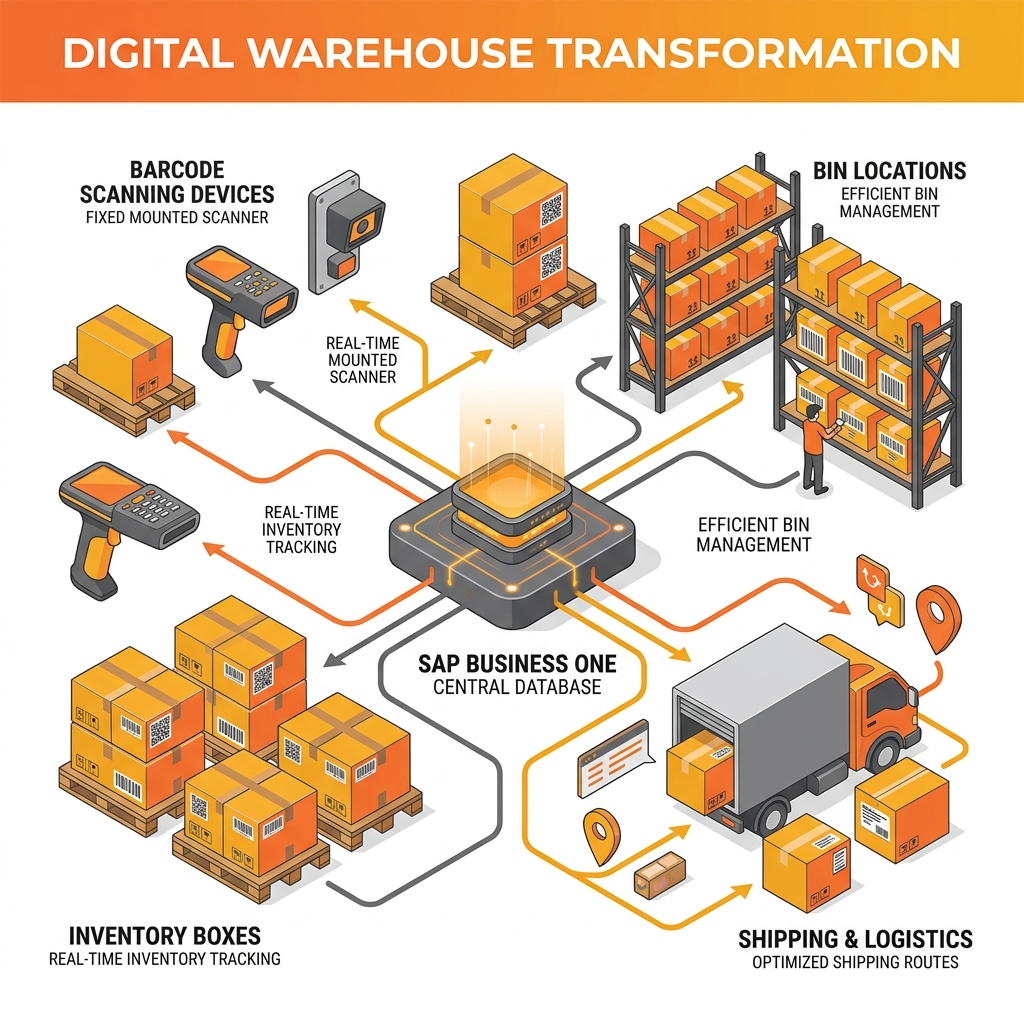
Digital warehouse systems bridge the gap between physical inventory and ERP data.
Higher Inventory Accuracy
Inventory accuracy affects procurement, production planning, order fulfillment, customer service, and financial reporting.
When warehouse transactions are entered manually, common errors include:
- Incorrect item codes
- Wrong quantities
- Inaccurate bin locations
- Duplicate entries
- Missed stock movements
- Incorrect batch or serial numbers
Barcode inventory management validates items and quantities during execution, reducing the dependency on manual entry and improving the reliability of stock records.
Faster Warehouse Operations
Warehouse employees spend valuable time searching for items, confirming product codes, completing paperwork, and updating inventory records after activities are finished.
SAP Business One Barcode can streamline these activities by guiding users through standardized workflows.
This helps accelerate:
- Goods receipt
- Put-away
- Bin transfers
- Picking and packing
- Production material issue
- Production receipt
- Stock counting
- Dispatch
- Returns processing
Faster transaction processing allows businesses to handle higher warehouse volumes without relying on proportional increases in administrative work.
Improved Workforce Productivity
A well-designed barcode workflow makes warehouse activities easier to follow.
Employees do not need to memorize long item codes or repeatedly enter transaction details. Instead, they scan items, locations, batches, serial numbers, or documents based on predefined processes.
This reduces unnecessary effort, shortens training cycles, and allows warehouse teams to concentrate on movement and fulfillment rather than paperwork.
Better Operational Visibility
Real-time inventory transactions improve visibility for warehouse managers and business leaders.
They can monitor:
- Inventory availability
- Stock location
- Goods receipt progress
- Open picking activities
- Warehouse transfers
- Inventory discrepancies
- Dispatch status
- Batch and serial movement
- Order fulfillment performance
This enables faster decisions across purchasing, manufacturing, sales, finance, and supply chain operations.
| Manual Warehouse Operations | SAP B1 Barcode Operations |
|---|---|
| Paper-based receiving | Barcode-enabled goods receipt |
| Manual item entry | Scan-based item validation |
| Delayed inventory updates | Near real-time SAP updates |
| Frequent picking mistakes | Guided picking and validation |
| Limited stock visibility | Centralized inventory visibility |
| Manual cycle counting | Structured barcode-based counting |
| Duplicate data entry | Integrated ERP transactions |
| Difficult batch tracking | Barcode-based batch identification |
| Inconsistent warehouse processes | Standardized operational workflows |
| Higher reconciliation effort | Reduced inventory correction work |
Key takeaway: The business value lies not simply in scanning faster, but in creating consistent and traceable warehouse transactions.
Common Challenges During SAP B1 Barcode Adoption
Barcode implementation can deliver significant benefits, but adoption problems can reduce the expected value.
Employee Resistance to New Technology
Warehouse employees may be comfortable with existing manual practices, even when those practices are inefficient.
Some users may believe barcode scanning adds extra steps or increases management control over their activities.
Leadership should explain how the new process reduces repetitive work, minimizes errors, and simplifies daily responsibilities. Employees are more likely to support change when they understand its practical benefits.
Continued Manual Inventory Habits
A common implementation mistake is allowing manual and barcode processes to operate indefinitely in parallel.
This creates duplicate effort and conflicting inventory records.
Businesses should define clear standard operating procedures showing which transactions must be completed through barcode workflows and how exceptions should be handled.
Poor Process Standardization
Different employees or warehouse locations may follow different methods for receiving, picking, transferring, or counting stock.
Technology applied to inconsistent processes often increases complexity rather than reducing it.
Before deployment, organizations should define standardized workflows for each warehouse activity.
Inadequate User Training
Short software demonstrations are not enough to build sustainable adoption.
Warehouse employees need practical training based on real operational situations, such as:
- Receiving incorrect quantities
- Handling damaged goods
- Picking substitute items
- Managing batch-controlled inventory
- Processing serial-numbered items
- Correcting scanning errors
- Handling stock discrepancies
- Completing returns
Scenario-based training improves confidence and reduces dependence on supervisors after go-live.
Inaccurate Master Data
SAP B1 Barcode depends on reliable master data.
Problems may arise from:
- Duplicate item codes
- Missing barcode assignments
- Incorrect units of measure
- Inconsistent product descriptions
- Invalid warehouse locations
- Inaccurate bin information
- Poor batch or serial configuration
Master data cleanup should be completed before barcode deployment begins.
Weak Change Management
Warehouse transformation is not only a technology initiative. It is an operational change programme.
Management should communicate:
- Why the project is required
- Which problems it will solve
- How employee roles will change
- What training will be provided
- How performance will be measured
- Where employees can obtain support
Visible involvement from operations leaders improves accountability and adoption.
Limited Performance Visibility
Without performance dashboards or agreed KPIs, businesses may not know whether barcode adoption is delivering results. Management should monitor operational outcomes rather than simply checking whether scanners are being used.
Lack of Continuous Improvement
Warehouse processes change as product volumes, layouts, business models, and customer expectations evolve. A barcode solution should therefore be reviewed regularly instead of treated as a one-time implementation.
SAP B1 Barcode Adoption Strategies for Success
A structured implementation approach helps reduce disruption and improve long-term value.
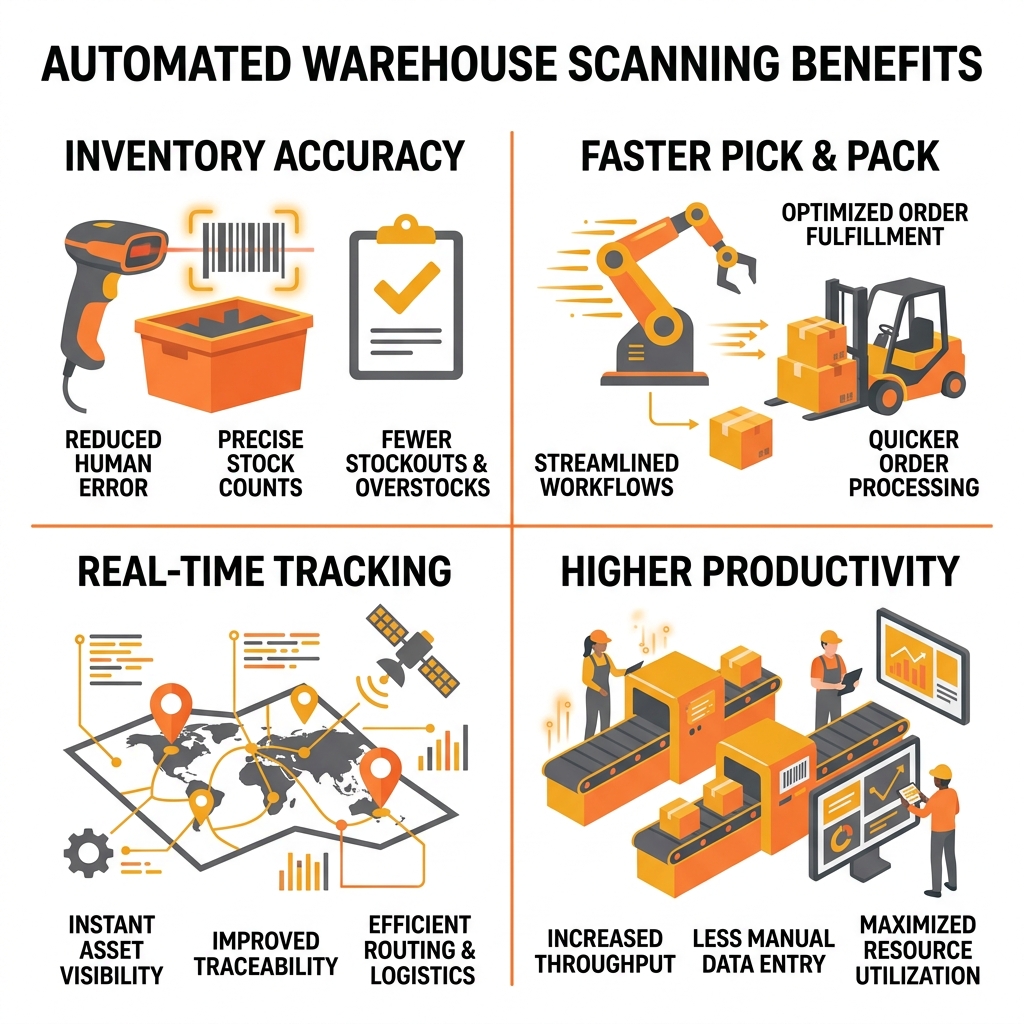
A structured adoption strategy ensures warehouse transformation success.
1. Assess Current Warehouse Workflows
The first step is to understand how inventory currently moves through the warehouse.
The assessment should cover:
- Goods receipt
- Quality checks
- Put-away
- Bin transfers
- Material issue
- Production receipt
- Picking
- Packing
- Dispatch
- Returns
- Cycle counting
- Inventory adjustments
Businesses should identify activities that create delays, errors, duplicate work, or poor visibility.
A practical assessment provides the foundation for process redesign and implementation planning.
2. Define Measurable Business Objectives
The project should begin with clear operational goals.
Typical objectives may include:
- Improve inventory accuracy
- Reduce picking errors
- Shorten goods receipt time
- Increase orders processed per employee
- Reduce inventory reconciliation
- Improve batch and serial traceability
- Increase barcode transaction adoption
- Accelerate order fulfillment
Targets should be based on baseline data and realistic operating conditions.
3. Standardize Barcode Processes
Each barcode-enabled activity should follow a documented workflow.
For example, the goods receipt process may include:
- Scan the purchase document.
- Scan the item barcode.
- Confirm the received quantity.
- Record batch or serial details where applicable.
- Scan the destination bin.
- Validate the transaction.
- Update SAP Business One.
Standardization reduces variation between users, shifts, and warehouse locations.
4. Clean Inventory Master Data
Data preparation should include:
- Item master validation
- Barcode assignment
- Alternative barcode review
- Unit-of-measure confirmation
- Warehouse and bin validation
- Batch and serial settings
- Product description standardization
- Inactive item removal
- Duplicate record correction
Accurate master data is essential for reliable barcode scanning and ERP updates.
5. Design User-Friendly Workflows
Warehouse teams should not be forced to navigate unnecessary screens or complex transaction steps.
Workflows should be designed around the physical activity being performed.
A good barcode process should help users quickly understand:
- What to scan
- Which quantity to confirm
- Where to place the inventory
- Whether the transaction is valid
- How to correct an exception
- What action comes next
Simplified workflows improve speed and user confidence.
6. Train Warehouse Teams Through Real Scenarios
Training should take place in an environment that closely resembles daily warehouse operations.
Employees should practise:
- Standard transactions
- Incorrect item scans
- Quantity differences
- Missing barcodes
- Damaged inventory
- Batch and serial errors
- Incorrect bin selection
- Partial picking
- Order cancellation
- Device connectivity problems
Supervisors should receive additional training on reporting, exception management, and user support.
7. Introduce a Phased Deployment
A phased rollout reduces implementation risk.
A typical deployment may include:
- Phase 1: Goods receipt and put-away
- Phase 2: Stock transfers and bin movements
- Phase 3: Picking and packing
- Phase 4: Dispatch and returns
- Phase 5: Cycle counting
- Phase 6: Production and advanced traceability
Businesses can begin with one warehouse, one shift, or one transaction type before expanding.
This allows the implementation team to identify issues and improve workflows without disrupting the entire operation.
8. Integrate Barcode Transactions with SAP Business One
The barcode solution should support the organization’s approved SAP Business One workflows.
Depending on the business process and implementation scope, transactions may update or support:
- Inventory
- Purchasing
- Sales
- Production
- Warehouse transfers
- Batch management
- Serial number management
- Bin locations
- Delivery processing
- Goods issue and receipt
The exact integration and transaction coverage will depend on the selected SAP B1 Barcode solution, configuration, add-ons, devices, and business requirements.
9. Monitor User Adoption
Management should measure actual usage after deployment.
Useful indicators include:
- Barcode transactions by user
- Percentage of transactions completed through scanning
- Manual transaction volume
- Error frequency
- Exception volume
- Time required per activity
- Training support requests
- Adoption by warehouse location
Low adoption may indicate workflow problems, weak training, unsuitable devices, or inconsistent supervision.
10. Continuously Optimize Warehouse Operations
Post-implementation reviews should examine:
- Picking routes
- Warehouse layout
- Barcode label placement
- Device performance
- Network connectivity
- Bin structure
- Employee feedback
- Transaction exceptions
- Inventory accuracy
- Fulfillment speed
Continuous improvement helps the solution remain effective as warehouse volumes and business requirements change.
Business Benefits of Successful SAP B1 Barcode Adoption
Higher Inventory Accuracy
Scanning reduces manual item and quantity entry, helping organizations maintain more reliable inventory records.
This supports better procurement planning, production scheduling, sales commitments, and financial reporting.
Faster Goods Receipt and Put-Away
Warehouse employees can validate products and quantities during receiving and direct inventory to the appropriate location.
This reduces paperwork and shortens the time between physical receipt and stock availability.
Fewer Picking and Shipping Errors
Guided picking can help employees validate whether they have selected the correct item, quantity, batch, serial number, or location.
Reducing errors can lower:
- Customer complaints
- Returns
- Repacking
- Reshipment costs
- Credit notes
- Emergency replacements
Improved Employee Productivity
Barcode automation reduces time spent entering data, checking item codes, correcting mistakes, and searching for inventory.
The resulting productivity improvement will depend on warehouse design, transaction volume, process complexity, and adoption quality.
Better Inventory Visibility
SAP Business One inventory data becomes more useful when transactions are captured accurately and promptly.
This helps managers identify available stock, slow-moving products, shortages, open warehouse activities, and inventory discrepancies.
Lower Operational Costs
Improved warehouse accuracy can reduce costs associated with:
- Manual administration
- Inventory corrections
- Overtime
- Rework
- Shipping errors
- Emergency procurement
- Excess inventory
- Customer returns
Faster Business Decisions
Reliable inventory visibility enables quicker responses to production requirements, customer enquiries, purchasing decisions, and fulfillment risks.
Stronger Traceability
Businesses managing regulated, serialized, perishable, or batch-controlled inventory can improve traceability by connecting scanned inventory movements with SAP Business One records.
Long-Term Warehouse Scalability
Standardized barcode processes help organizations manage growth across additional products, employees, order volumes, and warehouses.
This allows the operation to expand without increasing manual coordination at the same rate.
Measuring SAP B1 Barcode ROI
| KPI | What It Measures |
|---|---|
| Inventory accuracy | Alignment between physical and system stock |
| Picking accuracy | Percentage of orders picked correctly |
| Receiving time | Time required to receive and record inventory |
| Order cycle time | Time from order release to dispatch |
| Transactions per employee | Warehouse productivity |
| Manual transaction rate | Dependence on non-barcode processes |
| Inventory adjustment value | Cost of stock discrepancies |
| Return rate | Fulfillment quality |
| Cycle counting time | Efficiency of inventory verification |
| User adoption rate | Consistent use of barcode workflows |
Businesses should avoid assuming universal performance percentages. Results depend on current process maturity, transaction volumes, warehouse design, data quality, employee adoption, and implementation scope.
A reliable ROI analysis should compare:
- Current labour effort
- Existing error-related costs
- Inventory adjustment levels
- Fulfillment delays
- Return and rework expenses
- Expected efficiency gains
- Implementation and support costs
Practical SAP B1 Barcode Warehouse Scenario
Consider a wholesale distribution company operating multiple warehouses.
The business relies on printed picking lists and manual SAP updates. Warehouse employees occasionally select similar-looking products, while inventory transfers are sometimes recorded hours after the physical movement.
These delays cause stock discrepancies, order confirmation problems, and time-consuming reconciliation.
The organization introduces SAP B1 Barcode through a phased strategy.
The implementation begins with goods receipt, put-away, and stock transfers. Item and bin data are cleaned before deployment, while employees receive scenario-based training.
After the first phase stabilizes, barcode workflows are extended to picking, packing, and dispatch.
The business gains:
- More consistent inventory transactions
- Faster receiving and stock placement
- Fewer item selection errors
- Better visibility across warehouses
- Reduced dependency on paper records
- Improved accountability for warehouse movements
The value comes from combining SAP integration with process standardization and user adoption—not from scanners alone.
Is SAP B1 Barcode Right for Your Business?
SAP B1 Barcode may be suitable for businesses experiencing:
- Frequent inventory discrepancies
- High manual warehouse effort
- Picking and dispatch errors
- Slow goods receipt
- Limited batch or serial traceability
- Delayed ERP updates
- Multiple warehouses
- Increasing order volumes
- Poor bin-level visibility
- Excessive inventory reconciliation
- Paper-based cycle counting
- Low warehouse productivity
It can support industries such as:
- Manufacturing
- Wholesale and distribution
- Retail
- Pharmaceuticals
- Food and beverage
- Automotive
- Engineering
- Medical equipment
- Consumer products
- Logistics and warehousing
The best approach is to assess warehouse processes, inventory controls, SAP Business One configuration, devices, infrastructure, and user readiness before selecting a solution.
Why Choose Emerging Alliance for SAP B1 Barcode Implementation
SAP B1 Barcode implementation requires an understanding of both ERP transactions and real warehouse operations.
Emerging Alliance helps organizations align SAP Business One with their warehouse automation goals through a structured, business-focused implementation approach.
Our services can include:
Our objective is not simply to deploy a barcode scanning solution. We help businesses create standardized warehouse processes that improve inventory reliability, employee adoption, operational visibility, and long-term ERP value.
SAP B1 Barcode for Long-Term Warehouse Performance
SAP B1 Barcode can strengthen warehouse operations by connecting physical inventory activities with SAP Business One processes.
However, implementation success depends on more than technology.
Organizations need:
- Standardized processes
- Accurate master data
- User-friendly workflows
- Practical training
- Strong change management
- Measurable KPIs
- Continuous optimization
A structured adoption strategy helps enterprises improve inventory accuracy, accelerate warehouse execution, reduce errors, increase employee productivity, and create a scalable foundation for future growth.
By treating SAP B1 Barcode as an operational transformation initiative rather than a scanner deployment, businesses can generate stronger and more sustainable returns from their SAP Business One investment.
Frequently Asked Questions
Planning Warehouse Automation?
A personalized assessment can help determine which warehouse processes should be automated first, what data must be corrected, and how barcode workflows can align with SAP Business One.
Schedule a free SAP B1 Barcode consultation with Emerging Alliance to review your warehouse challenges and build a practical adoption roadmap.