SAP Business One HRMS: Capabilities, Payroll & HR Automation Guide
Quick Answer
SAP Business One supports employee master information and ERP-connected employee administration, but it is not a complete native HRMS or payroll platform. Organizations requiring payroll processing, attendance, leave management, employee lifecycle workflows, or broader HR automation typically need a dedicated HRMS integrated with SAP Business One according to their operational, payroll, and localization requirements.
HR Process Gaps That Create Business Problems
Fragmented HR and payroll processes rarely remain isolated within the HR department. As organizations grow, employee information may be maintained in spreadsheets, attendance may come from another application, payroll may be processed separately, and finance may receive payroll data only after manual consolidation.
This creates a larger operational problem. Employee records are duplicated, departmental changes may not reach finance on time, payroll teams depend on manually prepared inputs, and accounting teams spend additional effort reconciling payroll outputs before posting them into SAP Business One.
For CEOs, CFOs, CIOs, HR leaders, and IT heads, the issue is therefore not simply whether HR needs better software. The real question is whether workforce information, payroll processes, approvals, and ERP data are sufficiently connected to support growth without increasing administrative dependency.
Organizations already using SAP Business One often reach this point when workforce complexity grows faster than their existing HR processes. Employee master data may exist in the ERP, while attendance, leave, payroll, documents, approvals, and employee changes remain distributed across separate tools.
A SAP Business One HRMS approach addresses this gap by defining which employee-related information should remain connected with the ERP, which processes require a dedicated HRMS or payroll platform, and how approved HR data should move between the systems.
The objective is not to force every HR activity into SAP Business One. It is to create a controlled HR and ERP architecture that reduces duplicate data entry, improves payroll coordination, and gives management more reliable workforce information.
SAP Business One HR Capabilities for Workforce Management
SAP Business One includes employee master data within its Human Resources area. SAP documentation identifies the EmployeesInfo business object as representing employee master data, and the application supports employee details that can be maintained and updated.
That foundation can support several ERP-connected employee administration needs. Organizations can maintain employee-related records, associate employees with organizational information such as departments or branches where configured, and connect employee information with users and business processes. SAP also documents the ability to link employee master data with user setup, helping align system users with employee records.
However, these capabilities should not be confused with a full HRMS. Standard SAP Business One should not be assumed to provide comprehensive payroll calculation, statutory payroll processing, recruitment, performance management, benefits administration, leave policy engines, attendance capture, employee self-service, or every employee lifecycle workflow required by a modern HR function.
Those requirements generally belong to a dedicated HRMS, payroll application, localized add-on, or customized solution. The exact boundary depends on the SAP Business One version, deployment, localization, add-ons already in use, and the organization’s HR operating model.
A practical evaluation therefore separates three layers. SAP Business One core ERP capabilities manage ERP-relevant employee and organizational information. Dedicated HRMS functionality manages specialized workforce and payroll processes. Integration and customization capabilities determine how data moves between the two.
That distinction prevents a common implementation mistake: selecting an HR solution based on a feature list without defining the system of record for each data element. Before integration design begins, decision-makers should decide where employee identity, salary information, attendance, leave, department assignment, payroll results, accounting dimensions, and approval status will be mastered.
SAP Business One HRMS Integration for Payroll and Employee Data
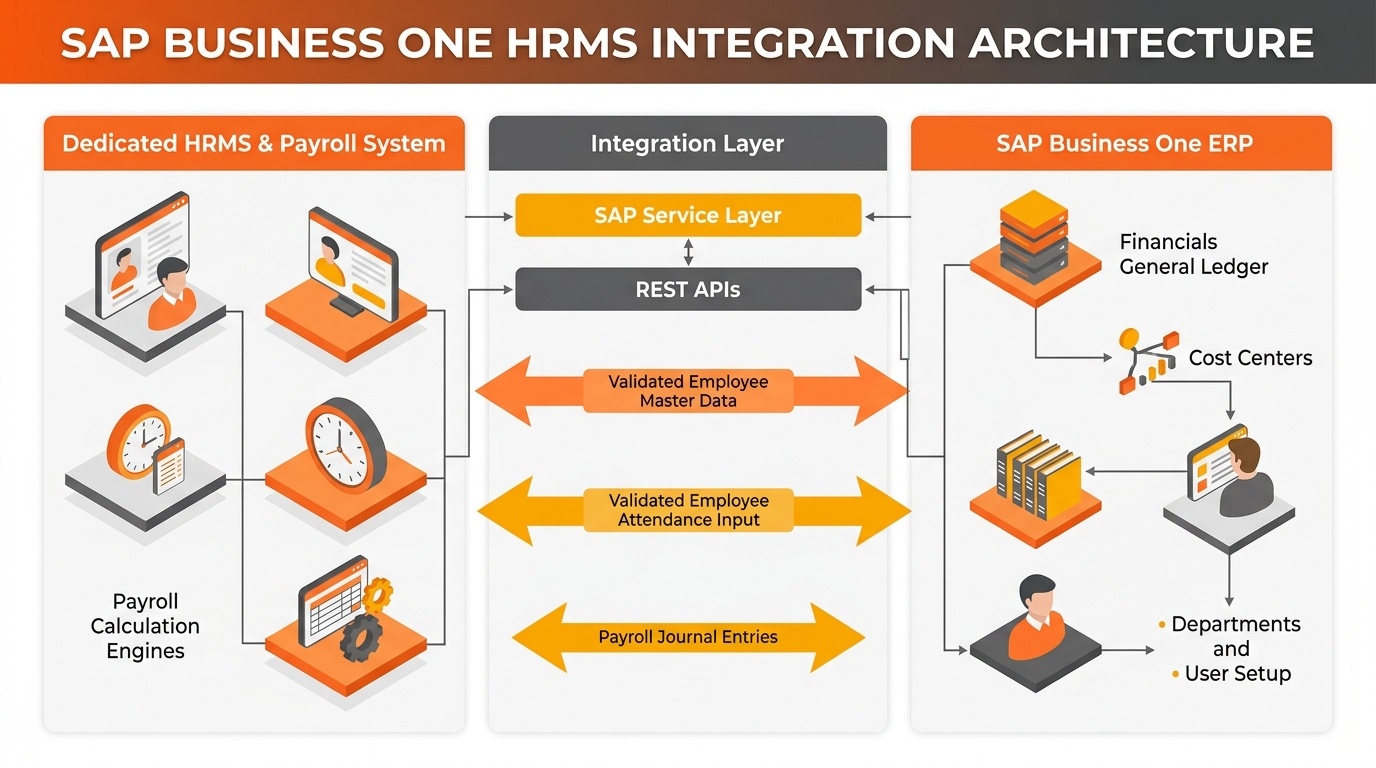
SAP Business One HRMS Integration Architecture: Connecting employee master records, attendance inputs, and localized payroll outputs with ERP general ledger accounting.
A connected HRMS should reduce duplicate maintenance rather than create two competing employee databases. The first design question is therefore not “Can the systems connect?” but “Which system owns each field, and when should changes move?”
Employee master information is often central to the integration scope. Depending on the chosen HRMS and implementation, selected employee details can be synchronized with SAP Business One so that ERP records reflect approved workforce changes. Department, branch, cost center, reporting attributes, status changes, or other organizational data may also be included where they are relevant to ERP processing.
Payroll integration is different because payroll contains sensitive and often highly localized information. A connected architecture may pass payroll outputs, summarized accounting values, employee cost allocations, or approved posting data to SAP Business One rather than replicating every payroll calculation inside the ERP.
Attendance and leave information can also influence payroll or workforce workflows. Integration may pass approved attendance results, leave balances, payroll inputs, or exception data between systems, but the direction and frequency should be designed around ownership, privacy, and processing requirements.
SAP Business One provides technical integration options, including Service Layer APIs and the Integration Framework. SAP describes Service Layer as an extension API based on HTTP and OData, while the Integration Framework can connect SAP and non-SAP applications and services.
That does not mean every HRMS can integrate automatically. Integration depth depends on the HRMS product, available APIs or connectors, SAP Business One environment, data model, middleware strategy, localization, security requirements, payroll design, and custom development needs.
Payroll Management with an SAP Business One-Connected HRMS
A dedicated HRMS or payroll application typically performs payroll-specific processing. Depending on the solution and country requirements, this can include collecting approved attendance or leave inputs, applying compensation structures, calculating payroll results, producing employee-facing outputs, and supporting required local processes.
Keeping those responsibilities clear is important. HRMS payroll processing determines employee compensation according to the organization’s payroll configuration and applicable requirements. SAP Business One financial processing records the approved financial impact according to the ERP’s chart of accounts, dimensions, controls, and reporting structure.
Without integration, payroll teams may export results, manipulate spreadsheets, map account codes manually, and send journals to finance. Finance then validates totals against payroll reports before posting. This process may work at lower complexity, but it becomes fragile as employee volume, entities, cost centers, variable pay structures, or reporting requirements increase.
An integrated approach can reduce these handoffs. Payroll outputs can be transformed into the structure required by SAP Business One, validated, and transferred through an agreed posting process. The integration may use summarized values, employee-level allocations, or another agreed model depending on confidentiality and reporting needs.
HR Automation Opportunities Across the Employee Lifecycle
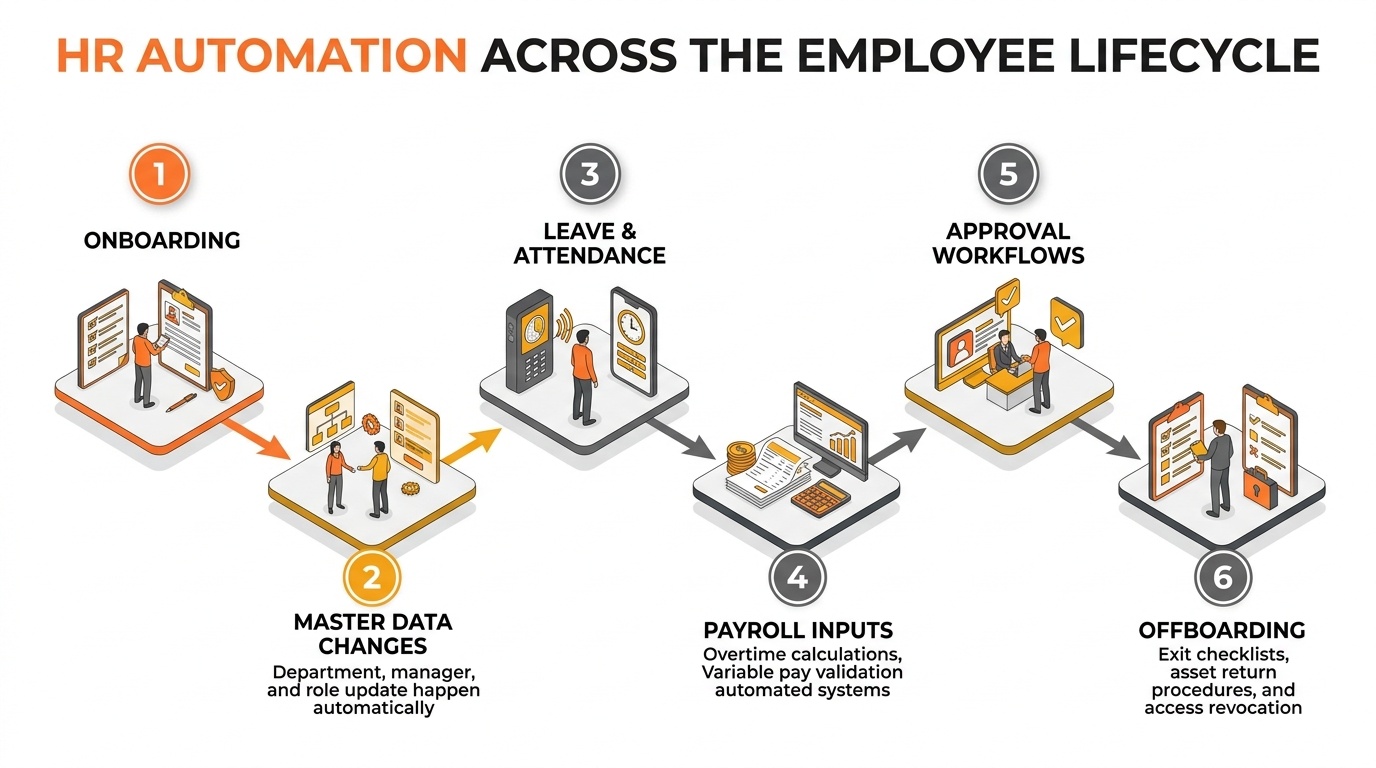
Automated HR lifecycle with SAP Business One: Streamlining onboarding, master data updates, time tracking, payroll inputs, approvals, and offboarding workflows.
Once data ownership and integration are defined, automation can target the repetitive handoffs that create operational delays.
Onboarding: The manual problem is repeated employee creation across HR, payroll, and ERP-related records. The automation approach is to capture approved employee information once, validate mandatory fields, and trigger relevant downstream record creation or synchronization. The business impact is faster setup with fewer transcription errors.
Employee master-data changes: Department transfers, manager changes, location changes, and status updates are often communicated by email. An integrated workflow can route the change for approval, update the HR system of record, and synchronize ERP-relevant fields. This improves consistency between workforce and financial structures.
Leave and attendance: Manual consolidation creates payroll delays and exception chasing. Where the HRMS supports attendance and leave workflows, approved results can feed payroll inputs automatically. The impact is not merely faster processing; it also creates a clearer audit trail for how payroll inputs were derived.
Payroll inputs: Variable pay, deductions, overtime, or other approved inputs may arrive from multiple owners. Workflow-based capture can apply validation and approval before payroll cut-off. This reduces late adjustments and gives HR clearer visibility into unresolved exceptions.
Approval processes: Informal email approvals make it difficult to prove who authorized a change. Structured workflows can assign approvers based on department, role, or transaction type and preserve status history. The business impact is stronger process control and fewer approval bottlenecks.
Offboarding: Employee exits can require final HR actions, payroll processing, asset or responsibility handover, and system-access changes. A structured offboarding workflow can coordinate tasks and trigger ERP-related actions where appropriate, reducing the risk of incomplete closures.
Automation should follow process design, not precede it. Automating an unclear ownership model simply makes inconsistencies move faster.
How Integrated HRMS Improves ERP-Connected Workforce Operations
Payroll coordination can improve because approved employee and time-related changes reach the payroll process through defined workflows. Finance can receive payroll accounting outputs in a consistent structure, reducing manual reformatting and making reconciliation more predictable.
Data accuracy also becomes easier to govern. A clearly defined system of record reduces competing versions of employee status, department, cost center, or organizational assignment. Exceptions can be identified as integration issues rather than hidden in separate files.
HR and finance collaboration improves because the integration defines where ownership changes. HR remains responsible for workforce data and HR processes, while finance retains control over accounting structures and ERP posting. Instead of transferring responsibility through spreadsheets, both teams work through a designed interface.
Management visibility can also improve. When ERP-relevant workforce information aligns with departments, cost centers, projects, branches, or other reporting structures, leaders can interpret workforce-related costs in a broader operational context.
SAP Business One HRMS Implementation and Integration Considerations
Implementation complexity is shaped by the current environment. The SAP Business One version, database and deployment model, existing add-ons, customizations, integrations, and available APIs can determine which technical approach is practical and how much regression testing is required.
HRMS capability must be assessed against real processes, especially payroll. A solution that handles employee records well but does not support the required payroll structure, localization, attendance model, approvals, or reporting can shift complexity into customization.
Integration architecture affects reliability and supportability. Decision-makers should determine whether the design will use APIs, the SAP Business One Service Layer, Integration Framework, middleware, files, scheduled jobs, or a vendor connector. The chosen method influences monitoring, error handling, upgrade impact, and maintenance responsibilities.
Data migration is equally important. Employee records often contain duplicates, inconsistent department names, outdated statuses, missing identifiers, and historical data that may not need to move. Cleansing and ownership decisions should happen before migration, not after go-live.
Security requires deliberate design because HR and payroll data is sensitive. Roles, access levels, integration credentials, segregation of duties, audit requirements, and data transfer methods should be reviewed by HR, IT, finance, and security stakeholders.
Localization and statutory requirements can materially change payroll scope. Multi-country or multi-entity organizations may need different payroll engines, local configurations, calendars, reports, or providers. These requirements can affect both solution choice and integration design.
Finally, user training, support ownership, monitoring, and future scalability need explicit plans. An integration that works technically but lacks operational ownership can degrade quickly when payroll rules, employee structures, or ERP configurations change.
When an SAP Business One HRMS Approach Fits Your Business
An integrated approach is relevant when SAP Business One already anchors finance and operations but HR processes remain fragmented. The strongest signals are repeated manual handoffs between HR, payroll, and finance rather than the simple absence of an HR application.
A connected HRMS may also be appropriate when payroll is processed outside the ERP and finance spends significant effort preparing or reconciling payroll postings. The requirement becomes stronger when employee costs must be allocated across departments, branches, projects, or other ERP reporting dimensions.
Spreadsheet-based HR administration is another signal. Spreadsheets are useful analytical tools, but they become risky as operational systems of record when multiple people edit employee data, approvals are difficult to track, or payroll depends on manually consolidated files.
However, deeper evaluation is necessary for complex payroll structures, multiple countries, many legal entities, highly customized HR processes, union or industry-specific rules, extensive historical data, or an established enterprise HR platform. In those environments, replacing the existing HR system may not be the objective; integrating it appropriately with SAP Business One may be the better architectural question.
SAP Business One HRMS: What Decision-Makers Should Evaluate Before Choosing a Solution
- Functional fit: Confirm that the HRMS supports the employee lifecycle processes the organization actually uses, not simply a broad feature catalogue.
- Payroll fit: Validate payroll structures, local requirements, calendars, variable components, outputs, and the provider’s approach to regulatory updates.
- Integration depth: Identify exactly which employee, organizational, payroll, and accounting data can move between systems, in which direction, and at what frequency.
- Automation capability: Evaluate whether workflows can support real approval logic, exceptions, escalations, and lifecycle events without excessive custom development.
- Data accuracy: Define systems of record, unique employee identifiers, validation rules, duplicate prevention, and error-resolution ownership.
- Security and access control: Review role-based access, sensitive payroll data, integration credentials, auditability, and segregation of duties.
- Scalability: Consider employee growth, additional entities, new locations, payroll complexity, transaction volume, and future integration needs.
- Reporting: Confirm that management can relate workforce information to ERP dimensions without creating a parallel reporting reconciliation process.
- Implementation effort: Assess migration, mapping, integration development, workflow configuration, testing, payroll parallel runs where appropriate, and change management.
- Customization requirements: Separate mandatory business requirements from preferences. High customization should have a clear operational justification and an ownership plan.
- Vendor expertise: Evaluate whether the implementation team understands SAP Business One, HRMS processes, payroll dependencies, APIs, data migration, and the relevant localization environment.
- Post-implementation support: Clarify who monitors integrations, resolves failed transactions, maintains mappings, manages upgrades, and supports payroll-critical issues.
Moving from Disconnected HR Processes to an Integrated SAP Business One HRMS
Disconnected HR and payroll processes become an ERP problem when employee changes, payroll outputs, cost allocations, approvals, and organizational data repeatedly cross into finance and operations through manual work.
A well-designed SAP Business One HRMS environment connects those handoffs without pretending that one system must perform every function. SAP Business One remains the ERP foundation for financial and operational processing, while a dedicated HRMS or payroll platform manages specialized workforce processes and exchanges approved data through a controlled integration architecture.
For decision-makers, the key questions are practical: which system owns each data element, which payroll outputs must reach accounting, which employee changes affect ERP processes, which workflows should be automated, and how will exceptions be monitored?
The right architecture depends on the organization’s HR processes, payroll requirements, SAP Business One environment, integration options, localization, security model, and growth plans. That is why solution evaluation should begin with process mapping and data ownership rather than a software feature comparison.
Conclusion
SAP Business One HRMS should be evaluated as an integration and operating-model decision, not as a label for putting every HR process inside the ERP. SAP Business One can support employee-related ERP information, while dedicated HRMS and payroll capabilities may be required for workforce administration.
Organizations already using SAP Business One should assess integration depth, payroll fit, automation needs, data accuracy, security, scalability, and implementation effort before selecting a solution. The strongest business case exists where disconnected HR and finance processes create repeated manual work, reconciliation, and inconsistent workforce information.
Frequently Asked Questions
Explore SAP Business One HRMS for Your Business
If your organization already uses SAP Business One but HR, payroll, attendance, approvals, and finance still depend on disconnected processes, an architecture review can identify where integration will create the most operational value.
Discuss your current HR workflows, payroll requirements, SAP Business One environment, employee-data structure, reporting needs, and automation priorities with an implementation specialist.
Book an SAP Business One HRMS Demo to review the solution fit, integration scope, payroll-to-accounting requirements, and practical implementation approach for your business.