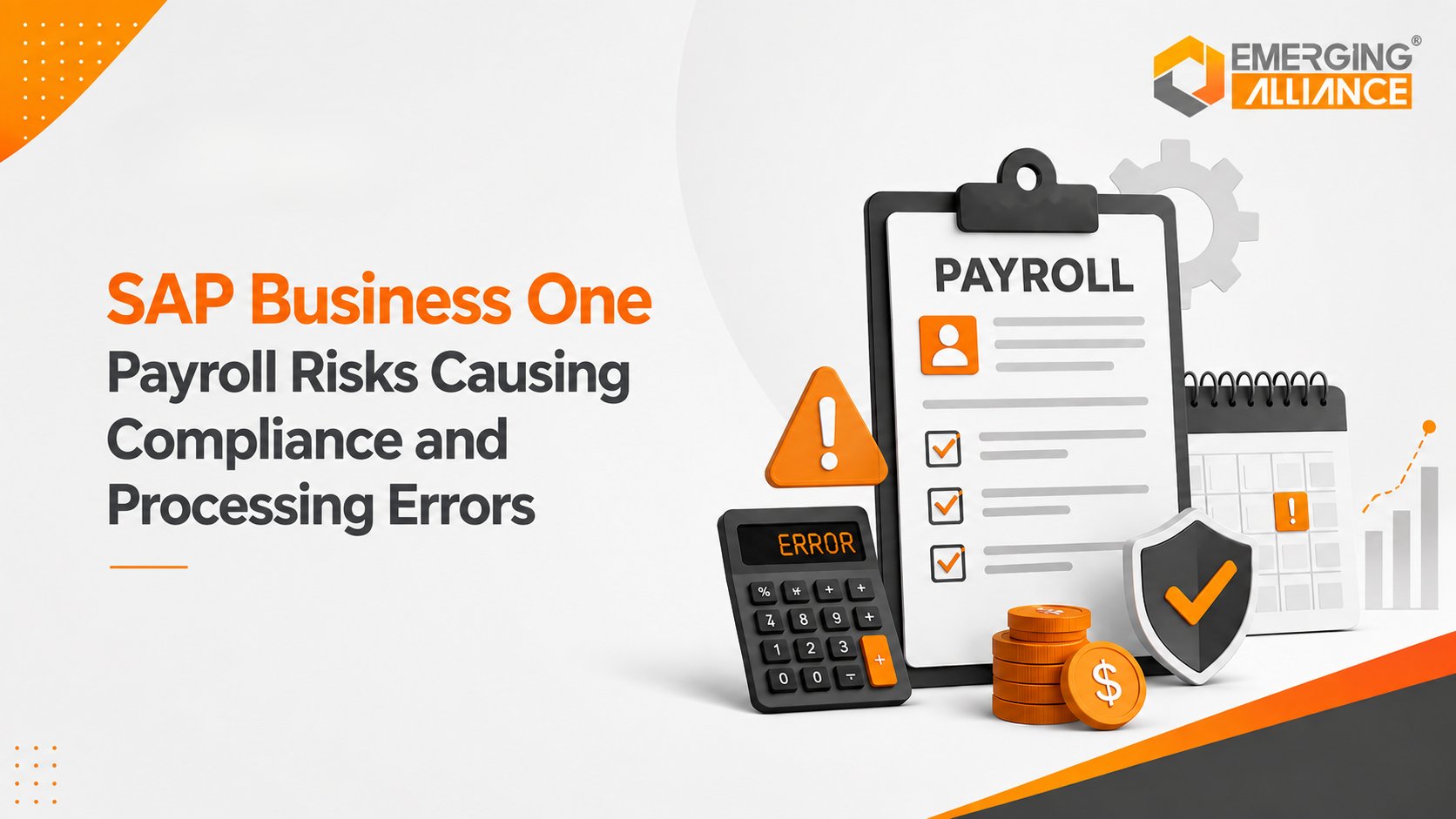
SAP Business One Payroll Risks Causing Compliance and Processing Errors
Quick Answer
SAP Business One Payroll risks often originate before salary calculation begins. Inaccurate employee data, attendance discrepancies, payroll configuration gaps, manual adjustments, weak approvals, integration failures, and poor financial reconciliation can all create processing or compliance issues.
For business leaders, payroll accuracy is not only about calculating the correct salary. It depends on whether every payroll input, change, approval, exception, financial posting, and correction is properly controlled.
A reliable payroll environment therefore requires accurate data, governed workflows, integration, validation, reconciliation, and traceability across HR, payroll, and finance.
Why Small Payroll Errors Can Become Larger Business Risks
Consider a salary revision approved shortly before payroll cut-off.
The revised salary is entered into the payroll process, but the effective date is incorrect.
The calculation engine may process exactly what it receives. Yet because the source information is wrong, the employee receives an incorrect amount.
What initially appears to be a small payroll issue can quickly involve several teams.
HR needs to confirm the approved salary and effective date.
Payroll must identify which calculation was affected.
Finance needs to determine whether an incorrect amount has already been posted.
Management needs confidence that similar salary revisions have not been affected.
The employee expects an explanation and timely correction.
This raises several important business questions:
- Why did incorrect information reach payroll?
- Why was the unusual change not identified during validation?
- Who entered and approved the change?
- Can the organization trace what happened?
- Has finance received the correct adjustment?
- Could the same issue affect other employees?
Correcting one salary fixes the visible problem.
Finding and correcting the control weakness prevents the same problem from recurring.
That is why payroll processing errors should be viewed as a business-control risk, not simply an HR administration problem.
The Hidden SAP Business One Payroll Risk Chain
Payroll errors rarely start with the final calculation.
They generally develop through a sequence of connected events:
Incorrect Data → Wrong Payroll Input → Incorrect Calculation → Manual Correction → Approval Gap → Accounting Difference → Employee or Compliance Impact
For example, incorrect employee information can become an inaccurate payroll input.
Once that input reaches the payroll process, even correctly configured calculations may produce the wrong result because they are working with incorrect information.
A payroll team may then correct the problem manually.
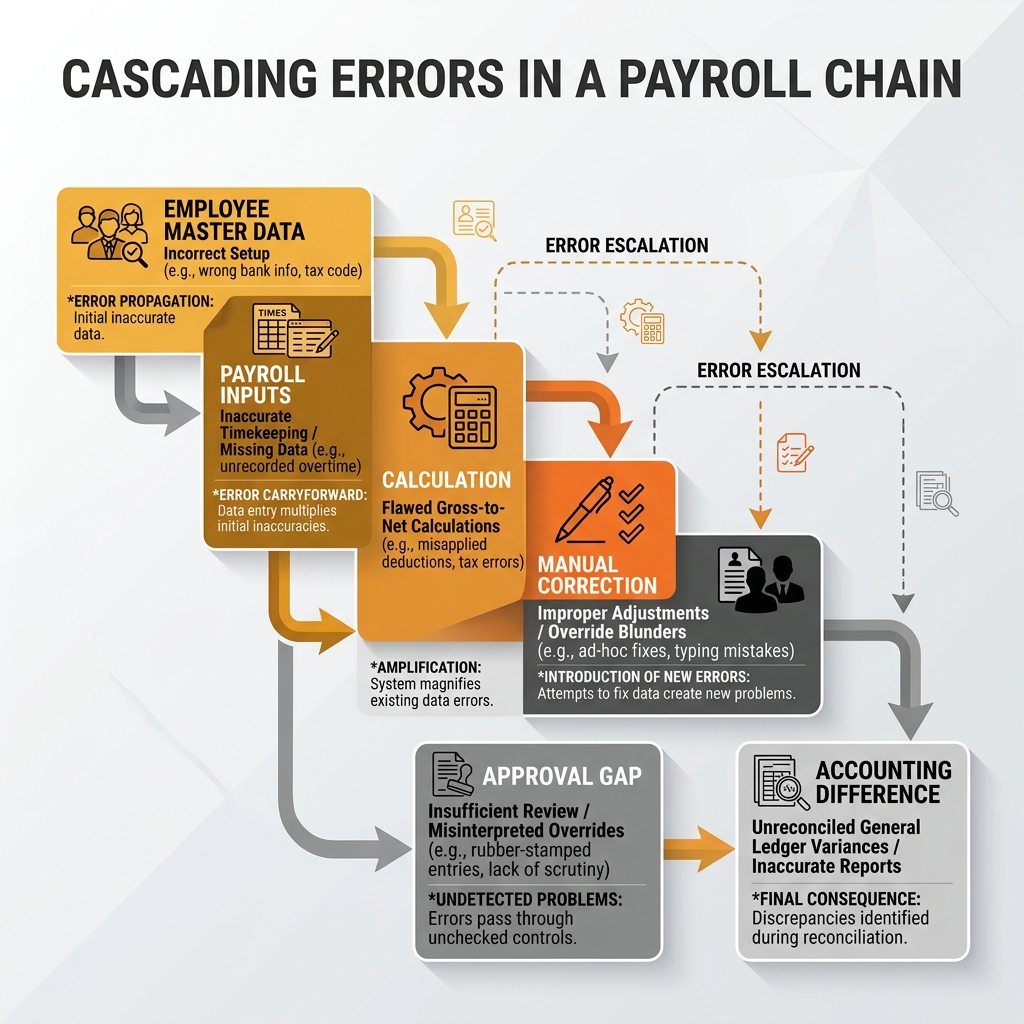
Cascading compliance and processing risks often trigger broader financial and governance issues across the business.
But if that manual adjustment is not properly authorized, documented, and reconciled, another control risk is introduced while trying to solve the original problem.
The corrected payroll amount may also differ from information already posted to:
- accounting
- cost centers
- departmental reports
- payment records
- statutory reporting processes
A simple data-quality problem can therefore become a financial and governance issue.
The risk becomes greater when employee data, attendance applications, spreadsheets, payroll tools, and SAP Business One depend on repeated manual transfers.
Spreadsheets themselves are not necessarily the problem.
Risk increases when spreadsheets become uncontrolled bridges between critical processes without clear ownership, validation, approval, or version control.
Where SAP Business One Payroll Processes Break Down
A practical payroll risk assessment should examine four connected operational layers:
- Employee data
- Payroll inputs
- Payroll controls
- Finance integration
Each layer can introduce errors that affect later stages.
1. Employee Data: Payroll Accuracy Begins Before Calculation
Payroll can only be as accurate as the information it receives.
Employee-related information may include:
- salary details
- joining dates
- resignation or termination dates
- employment status
- departments
- bank information
- salary revisions
- organizational assignments
The primary risk at this stage is data integrity.
Consider an employee who moves from one department to another.
Their salary may still be calculated correctly. However, if the cost-center assignment remains outdated, payroll costs may be allocated to the wrong department.
The employee is paid correctly, but management reporting becomes inaccurate.
Effective dates create another risk.
A salary revision entered with the wrong effective period may produce an incorrect salary even though the new salary amount itself is correct.
Employee-status changes also need timely control.
Joining, resignation, termination, unpaid absence, and similar events must reach the appropriate payroll process before payroll is finalized.
Control Objective
Businesses should establish clear employee-data ownership, access restrictions, approval for sensitive changes, effective-date validation, payroll cut-off rules, and review of recent master-data changes. Payroll accuracy starts with controlled employee information.
2. Payroll Inputs: Operational Information Must Reach Payroll Reliably
Payroll also depends on information that changes from one processing period to another.
Typical variable inputs include:
- attendance
- overtime
- leave
- shifts
- incentives
- bonuses
- reimbursements
- deductions
- arrears
- exceptional payments
These inputs often originate outside the payroll application.
Attendance may come from one system.
Leave approvals may come from another.
Incentives may be maintained in spreadsheets.
Reimbursement information may come through a separate workflow.
Payroll employees then need to consolidate those sources.
Every manual handoff creates possible failure points, including:
- missing entries
- duplicated values
- outdated files
- incorrect processing periods
- unauthorized modifications
- incomplete data
- inconsistent versions
What a Better Data Flow Looks Like
Approved Operational Data → Period Validation → Completeness Check → Exception Review → Payroll Processing
The objective is not automation for its own sake.
The objective is to make sure approved operational information reaches payroll accurately, completely, and at the right time.
When evaluating an SAP Business One payroll add-on or integration, businesses should therefore assess how effectively it handles these upstream dependencies.
3. Payroll Controls: Accurate Inputs Still Need Governance
Even accurate employee data and payroll inputs require controls before payment.
Important payroll controls include:
- validation rules
- exception reporting
- approval workflows
- role-based access
- segregation of duties
- change tracking
- controlled adjustments
- payroll finalization procedures
A payroll process that depends primarily on one experienced employee may function well for a smaller organization.
However, it can create concentration risk as transaction volume and complexity increase.
Where organizational structure allows, responsibility should be separated between:
- payroll preparation
- sensitive changes
- exception review
- approval
- finalization
Exception Management Matters
Management does not need to review every normal payroll transaction manually. Instead, the system and process should make unusual transactions visible.
Examples include:
- unexpected salary increases
- unusually large deductions
- substantial overtime
- large arrears
- missing attendance
- unusual bonuses
- high-value manual corrections
This enables payroll teams to focus their review on transactions that deserve additional attention.
The goal is not simply faster payroll processing.
It is controlled payroll processing.
4. Finance Integration: Payroll Accuracy Must Continue Into Accounting
Payroll does not end when salaries are finalized.
Payroll results also affect:
- general ledger accounts
- employee expenses
- payroll liabilities
- departments
- cost centers
- management reporting
- month-end closing
- financial reconciliation
A payroll result can therefore appear correct to HR while still producing inaccurate financial information.
For example, employees may receive the correct salaries while workforce expenses are posted to incorrect cost centers.
Finance needs confidence that payroll results correspond with accounting entries.
Finance Should Be Able to Verify
- payroll totals
- GL postings
- department allocations
- cost-center allocations
- payroll liabilities
- manual corrections
- adjustment postings
- reconciliation differences
Payroll-to-finance reconciliation should be a formal part of the payroll process rather than an activity performed only when something appears wrong.
Auditability is equally important.
Management should be able to establish:
What changed → When it changed → Who changed it → Why it changed → Who approved it → What reached finance
Without this visibility, payroll investigations become slower and more dependent on individuals.
Five Payroll Failure Scenarios Executives Should Not Ignore
Scenario 1: Salary Revision Reaches Payroll Too Late
What Happens
HR approves a salary revision, but the change reaches payroll after the processing cut-off or carries the wrong effective date.
Why It Happens
Possible causes include:
- unclear master-data ownership
- weak payroll cut-off procedures
- delayed communication
- duplicate HR and payroll records
- incorrect effective dates
Business Impact
The employee may receive an incorrect salary. Payroll may need to process arrears or an exceptional correction. Finance may need to adjust accounting records. Management may also need to investigate whether other salary revisions were affected.
Control Required
Establish: salary-data ownership, formal payroll cut-offs, effective-date validation, authorized changes, pre-payroll review of recent revisions
Scenario 2: Attendance Does Not Match Payroll
What Happens
Approved attendance, overtime, leave, or shift information differs from the values used during payroll processing.
Why It Happens
Common causes include:
- incomplete attendance integration
- manual exports
- spreadsheet consolidation
- outdated data files
- incorrect processing periods
- unapproved edits
Business Impact
Employees can be overpaid or underpaid even when the payroll formulas are correct. Payroll employees then spend additional time comparing operational attendance records with processed values.
Control Required
Use a governed attendance-to-payroll process with: approved data, correct payroll period, completeness checks, duplicate checks, exception reporting, final input validation
Scenario 3: Payroll or Statutory Configuration Is Not Maintained Correctly
What Happens
The payroll environment continues using outdated or incorrectly maintained calculation rules.
Why It Happens
Responsibility may be unclear for:
- regulatory monitoring
- payroll configuration
- testing changes
- approving configuration updates
- validating payroll outputs
Business Impact
Incorrect payroll rules can affect: deductions, contributions, calculations, statutory reporting, employee payments. This can create correction work, payroll queries, reconciliation issues, or compliance exposure.
Control Required
Businesses should establish: Requirement Review → Configuration Change → Testing → Approval → Production Update → Validation
Country-specific payroll obligations should always be checked against current applicable requirements and appropriate professional guidance.
Scenario 4: Manual Payroll Adjustment Bypasses Controls
What Happens
A payroll employee enters an arrear, incentive, correction, reimbursement, deduction, or exceptional payment without sufficient authorization.
Why It Happens
Urgent business situations sometimes encourage teams to bypass standard processes. This often occurs when the current payroll architecture cannot handle exceptions efficiently.
Business Impact
The adjustment may be legitimate but difficult to demonstrate later. Poorly controlled adjustments can also cause: duplicate corrections, payroll discrepancies, financial mismatches, weak audit trails
Control Required
Every significant manual adjustment should include: Reason → Supporting Evidence → Authorized Entry → Approval → Payroll Impact → Finance Reconciliation
Manual activity does not automatically create risk. Uncontrolled manual activity does.
Scenario 5: Payroll Does Not Reconcile With Finance
What Happens
Payroll confirms one total while finance identifies another amount after accounting entries are posted.
Why It Happens
Possible causes include:
- incorrect GL mappings
- outdated cost centers
- adjustment timing
- incomplete postings
- integration errors
- duplicated transactions
Business Impact
Finance spends additional time identifying differences. Month-end reporting may be delayed. Management reports can temporarily contain inaccurate workforce costs.
Control Required
Establish a standard reconciliation process covering: payroll totals, accounting postings, cost centers, departments, liabilities, corrections, variances, reconciliation approval
What Payroll Processing Errors Really Cost
For CEOs and CFOs, payroll becomes material when the consequences move beyond the payroll team.
Financial Cost
Payroll errors may cause: incorrect salaries, duplicate payments, incorrect deductions, exceptional payments, repeated adjustments, recovery activity. Even when the financial amount is eventually corrected, investigation and reconciliation consume additional resources.
Compliance Exposure
Incorrect payroll configuration or processing may require corrective action. The exact obligations differ by jurisdiction, so organizations need appropriate ownership of statutory requirements, configuration, validation, and professional review where necessary. Compliance risk is therefore linked not only to calculation logic but also to governance.
Operational Cost
Every avoidable payroll error creates additional work. HR investigates employee information. Payroll recalculates amounts. Managers approve corrections. Finance reconciles postings. Employees raise questions. Repeated correction cycles reduce payroll productivity and consume resources that could support higher-value activities.
Employee Confidence
Employees reasonably expect salary information to be accurate. Repeated payroll errors can increase employee queries and weaken confidence in internal HR and payroll processes. Even when errors are corrected quickly, recurrence creates concern about the reliability of the process.
Management Reporting Risk
Executives rely on payroll information for: workforce budgeting, department analysis, hiring decisions, profitability reviews, cost planning, business forecasting. Incorrect department or cost-center allocation can undermine those decisions even if individual salaries are paid correctly.
Auditability
Payroll controls become difficult to verify when organizations cannot establish: who changed information, when it changed, why it changed, who approved it, how the change affected payroll, how it reached finance. Reliable audit trails reduce dependence on individual knowledge during investigations.
What a Controlled SAP Business One Payroll Process Should Look Like
A controlled payroll architecture should connect each stage through a deliberate sequence:
Employee Master Data → Attendance & Leave → Payroll Inputs → Validation → Payroll Calculation → Exception Review → Approval → Finalization → Accounting Posting → Reconciliation → Audit & Reporting
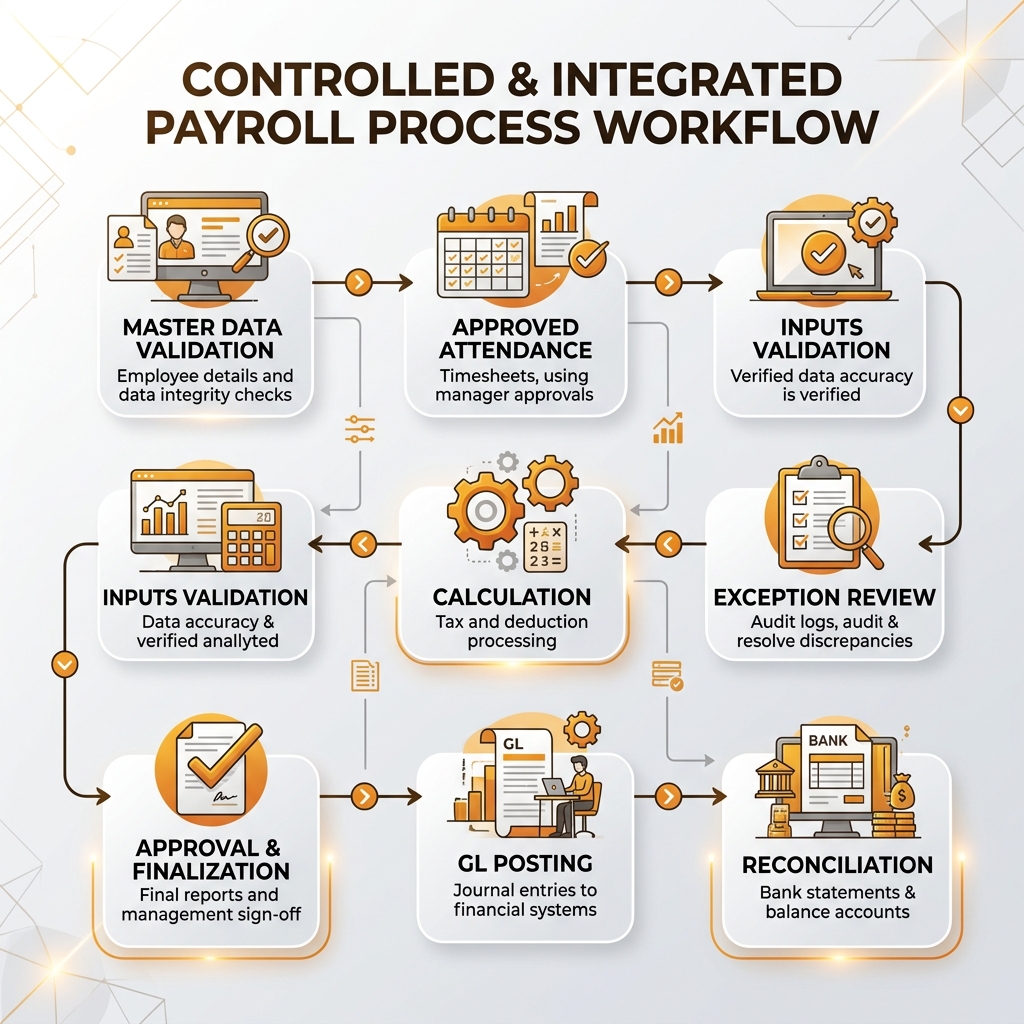
An integrated data workflow eliminates manual handoffs, ensuring high fidelity from master records to GL posting.
Employee Master Data
Maintain controlled salary-relevant employee information with clear ownership and authorization around sensitive changes.
Attendance and Leave
Ensure approved attendance, leave, shifts, overtime, and related records reach payroll for the correct employee and period.
Payroll Inputs
Bring together earnings, deductions, incentives, reimbursements, and other variable inputs from defined sources.
Validation
Identify missing, duplicated, inconsistent, or unusual values before salary calculation.
Payroll Calculation
Apply configured earnings, deductions, organizational rules, and applicable payroll logic consistently.
Exception Review
Separate normal transactions from activity requiring additional attention.
Approval
Require appropriate review and authorization before final payroll processing.
Payroll Finalization
Establish a controlled point after which the approved payroll becomes the formal result. Corrections after finalization should follow defined procedures.
Accounting Posting
Transfer payroll outcomes into appropriate general ledger accounts, departments, and cost centers.
Reconciliation
Compare payroll totals with accounting entries and investigate differences before the process is closed.
Audit and Reporting
Maintain sufficient visibility into: changes, approvals, adjustments, exceptions, postings, payroll outcomes.
Technology alone does not guarantee this operating model. The architecture also depends on configuration, integrations, access controls, internal responsibilities, local requirements, and the organization’s wider HR environment.
SAP Business One Payroll Add-On vs Fragmented Payroll Processing
The most useful comparison is not simply: Manual Payroll vs Automated Payroll. The stronger executive comparison is: Fragmented Payroll Processing vs Controlled Payroll Architecture.
Fragmented Payroll Environment
A fragmented environment may operate through: HR Records → Attendance Software → Spreadsheets → Payroll Application → Manual Finance Posting.
This model may remain manageable for a smaller or stable workforce. However, as transaction volume increases, repeated manual activity can create: duplicate entry, inconsistent data, delayed updates, version-control problems, reconciliation effort, weak auditability, and dependency on individual employees.
Integrated SAP Business One Payroll Environment
An appropriate SAP Business One payroll integration or add-on can potentially create clearer information flows between approved employee data, operational inputs, payroll processing, and finance.
However, automation alone should not determine the purchasing decision. Businesses should assess:
- payroll requirements by country
- employee-data integration
- attendance connectivity
- approval workflows
- exception handling
- payroll configuration flexibility
- finance integration
- reporting
- auditability
- access controls
- scalability
- implementation support
The objective is not maximum automation. The objective is reliable, governed, and scalable payroll processing.
When Your Payroll Process Has Outgrown Its Current Model
Payroll modernization becomes more relevant when several warning signs begin appearing together.
No individual warning sign proves that an SAP Business One payroll add-on is required. However, several occurring together can justify a broader review of the existing payroll architecture.
Why Emerging Alliance for SAP Business One Payroll
Payroll modernization requires more than selecting calculation features. Organizations need to understand how employee information, attendance, payroll inputs, approvals, accounting, and reporting should work as one connected process.
Emerging Alliance can help businesses evaluate SAP Business One-related payroll requirements by reviewing:
Depending on the business requirement, the appropriate approach may involve: payroll integration, an SAP Business One payroll add-on, configuration improvements, process redesign, or a combination of these approaches.
The objective is to create a payroll architecture that balances processing efficiency with financial and operational control.
Conclusion
SAP Business One payroll risk should not be viewed only as an HR issue. Payroll connects: Employees → HR → Operations → Finance → Compliance → Management.
Weak data, incorrect inputs, uncontrolled adjustments, integration gaps, or reconciliation problems can therefore affect several areas of the business.
Organizations should focus on identifying where payroll errors originate instead of repeatedly correcting only the final result.
A controlled payroll operating model requires:
- reliable employee information
- governed payroll inputs
- effective validation
- exception management
- approval workflows
- controlled adjustments
- finance integration
- reconciliation
- auditability
As employee numbers and operating complexity increase, leadership should regularly evaluate whether the existing payroll architecture can continue supporting the business without increasing manual dependency and control risk.
Frequently Asked Questions
Reduce Payroll Risk Before It Reaches Employees and Finance
Payroll errors often indicate deeper weaknesses in employee data, integrations, approvals, configuration, or reconciliation. Emerging Alliance can help you assess your SAP Business One payroll environment, identify control gaps, and determine the right payroll integration or add-on approach for your business.
Schedule Your SAP Business One Payroll Demo