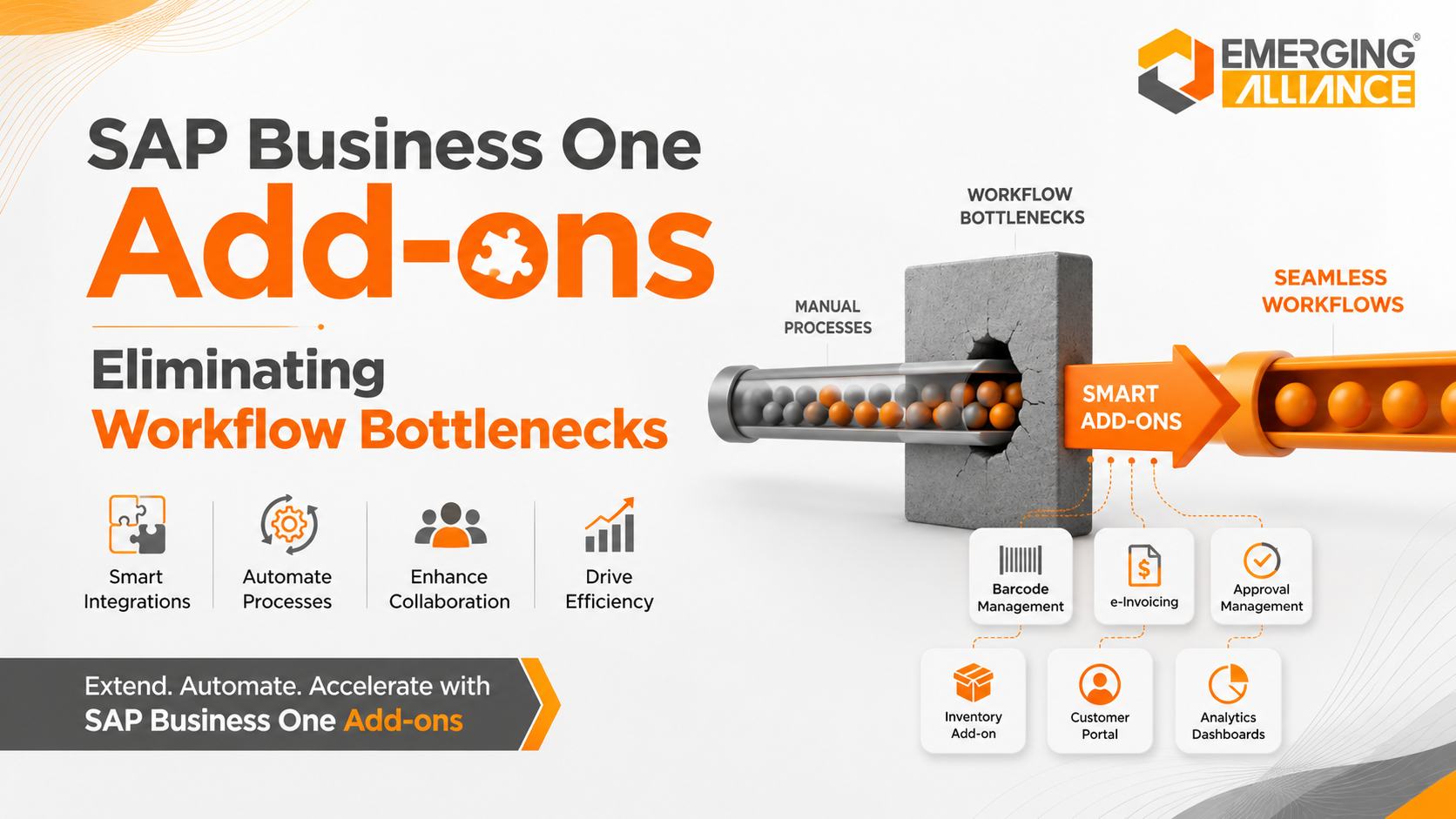
SAP Business One Add-ons Eliminating Workflow Bottlenecks
SAP Business One Add-ons for Faster, More Efficient Workflows
Business growth often exposes operational problems that were less visible when transaction volumes were lower. Manual approvals begin to delay purchasing. Employees enter the same information in multiple systems. Warehouse teams depend on paper records. Finance spends too much time reconciling data. Managers wait for reports before making decisions. SAP Business One Add-ons help address these bottlenecks by extending SAP Business One with workflow automation, integration, reporting, compliance, warehouse, human resources, and industry-specific capabilities. The right add-ons allow businesses to automate repetitive activities, improve data consistency, strengthen operational control, and process higher transaction volumes without increasing administrative effort at the same rate.
Key takeaway: SAP Business One Add-ons extend the core ERP platform with specialized capabilities that help businesses remove process delays and operate more efficiently.
What Are SAP Business One Add-ons?
SAP Business One Add-ons are software extensions that add capabilities to the standard SAP Business One environment.
Depending on the selected solution, an add-on may automate a workflow, connect an external application, support a local compliance requirement, improve warehouse execution, provide industry-specific functionality, or simplify access to business information.
Common examples include:
- Barcode and warehouse management
- Approval workflow automation
- Electronic invoicing
- Payroll and HR management
- Document management
- Customer and supplier portals
- Reporting and business intelligence
- CRM, e-commerce and logistics integrations
- Manufacturing and quality-management extensions
Add-on functionality varies by provider, region, SAP Business One version, database platform, and deployment model. Businesses should therefore evaluate compatibility, support, security, and upgrade requirements before implementation.
Why Growing Businesses Need SAP Business One Add-ons
SAP Business One provides an integrated ERP foundation for finance, sales, purchasing, inventory, customer management and operations. However, individual organizations may have processes or regulatory requirements that extend beyond the standard system.
For example, a distributor may require mobile barcode scanning. A manufacturer may need specialized shop-floor controls. A service company may require a customer portal. A business operating across regulated markets may need localized electronic invoicing.
SAP Business One Add-ons help close these functional gaps without forcing the organization to replace its existing ERP platform.
Businesses commonly consider add-ons when they experience:
- Repetitive data entry
- Slow approval cycles
- Inventory discrepancies
- Disconnected software applications
- Spreadsheet-dependent reporting
- Manual document handling
- Compliance-related processing delays
- Limited customer or supplier self-service
- Difficulty scaling existing workflows
When implemented correctly, add-ons standardize these processes and improve the flow of information across departments.
Workflow Bottlenecks SAP Business One Add-ons Can Solve
Duplicate Data Entry
Employees often re-enter customer, order, inventory, purchasing or financial information across spreadsheets and standalone applications.
This creates:
- Duplicate records
- Processing delays
- Reporting inconsistencies
- Higher administrative effort
- Increased risk of human error
Integration and automation add-ons can exchange information between SAP Business One and approved external systems. This reduces repeated data entry and helps maintain consistent records across connected processes.
Business outcome: Faster transaction processing, fewer errors and lower administrative workload.
Approval Delays
Purchase requests, sales discounts, payments and other transactions may depend on email, phone calls or paper-based approvals.
Informal approval processes make it difficult to identify:
- Who owns the decision
- Which request is pending
- How long approval has taken
- Whether established limits were followed
Workflow add-ons can route transactions according to predefined approval rules and escalation paths. Depending on the solution, approvers may also receive alerts or access approval tasks remotely.
Business outcome: Faster decisions, clearer accountability and stronger process governance.
Inventory Inaccuracies
Paper-based warehouse activity and delayed stock updates can create differences between physical inventory and ERP records.
These discrepancies may lead to:
- Stockouts
- Excess inventory
- Picking errors
- Production delays
- Incorrect delivery commitments
- Higher working-capital requirements
Barcode and warehouse-management add-ons can support receiving, put-away, picking, packing, stock transfers, cycle counting and shipment processing.
When warehouse transactions are recorded at the point of activity, inventory visibility becomes more timely and reliable.
Business outcome: Better stock accuracy, faster fulfilment and improved inventory control.
Procurement Inefficiencies
Procurement often involves purchase requests, approvals, vendor quotations, purchase orders, documentation and supplier follow-up.
When these activities are managed through separate emails and spreadsheets, purchasing teams lose visibility and cycle times increase.
Procurement-focused add-ons can help standardize request, approval and supplier-document workflows while linking relevant transactions to SAP Business One.
Business outcome: Shorter procurement cycles, improved traceability and better supplier coordination.
Financial Processing Delays
Finance teams may spend considerable time collecting documents, validating transactions and reconciling information before invoicing or month-end close.
Relevant add-ons can support areas such as:
- Electronic invoicing
- Automated document capture
- Payment integration
- Expense workflows
- Financial reporting
- Document archiving
Electronic invoicing requirements vary by jurisdiction. Any selected solution must be assessed against applicable local regulations and technical mandates.
Business outcome: Faster processing, stronger documentation and reduced reconciliation effort.
Reporting Delays
Reports assembled manually from multiple spreadsheets may already be outdated when management receives them.
Reporting and business-intelligence add-ons can consolidate approved operational data into dashboards, alerts and management reports.
The quality of these insights still depends on accurate source data, clearly defined KPIs and appropriate user access.
Business outcome: Faster access to operational information and more confident decision-making.
Disconnected Business Applications
Businesses increasingly use CRM platforms, e-commerce systems, logistics applications, banking tools, payroll software and customer portals alongside their ERP.
Without integration, employees must manually transfer information between these applications.
Integration add-ons or middleware can connect SAP Business One with approved third-party systems and automate agreed data flows.
Business outcome: Fewer information silos, improved process continuity and better cross-functional collaboration.
Key SAP Business One Add-ons for Operational Efficiency
Barcode and Warehouse Solutions
Barcode solutions help warehouse teams record inventory movements more accurately and efficiently.
Depending on the product, capabilities may include:
- Goods receipt scanning
- Bin and location management
- Put-away
- Picking and packing
- Stock transfers
- Cycle counting
- Batch and serial-number capture
- Production-related material movement
- Shipping validation
These tools are particularly valuable for businesses with high transaction volumes, multiple storage locations, regulated traceability requirements or frequent picking errors.
Approval Workflow Automation
Approval workflow add-ons establish structured rules for transactions such as:
- Purchase requests
- Purchase orders
- Sales discounts
- Credit limits
- Vendor payments
- Expense claims
- Journal approvals
A well-designed approval workflow reduces unnecessary waiting while preserving financial and operational controls.
Payroll and HRMS
Payroll and HRMS add-ons may support:
- Employee records
- Attendance
- Leave management
- Payroll calculations
- Employee self-service
- Statutory reporting
- Reimbursements
- Workforce analytics
Payroll and statutory functionality must be validated for the country or region in which the organization operates.
Electronic Invoicing
Electronic invoicing add-ons can connect SAP Business One transactions with mandated invoicing, reporting or clearance platforms.
Depending on the jurisdiction and solution, the process may involve:
- Invoice-data validation
- Required document formatting
- Digital signatures
- Government or network submission
- Response-status updates
- Reference-number capture
- Audit-document storage
Businesses should verify whether the solution supports their current regulatory model and future compliance changes.
Document Management
Document-management add-ons centralize files associated with SAP Business One transactions.
These may include:
- Purchase orders
- Supplier invoices
- Delivery documents
- Customer contracts
- Quality records
- Certificates
- Employee documents
- Service records
Centralized document access improves retrieval, collaboration, audit preparation and information governance.
Customer and Supplier Portals
Portals allow approved external users to access selected information without depending on repeated email requests.
A customer portal may provide access to:
- Order status
- Invoices
- Statements
- Payment information
- Support requests
- Product or service documents
A supplier portal may support quotation requests, order visibility, document submission and collaboration.
Proper authentication, authorization and data-security controls are essential.
Reporting and Business Intelligence
Reporting extensions help decision-makers track operational and financial performance through dashboards, KPIs and scheduled reports.
Useful measures may include:
- Order fulfilment
- Inventory turnover
- Purchase lead time
- Gross margin
- Receivables ageing
- Production performance
- Service response time
- Approval turnaround time
Reports should be designed around business decisions rather than simply displaying more data.
Application and Platform Integration
Integration add-ons connect SAP Business One with external platforms such as:
- CRM systems
- E-commerce stores
- Banking applications
- Logistics providers
- Payroll tools
- Manufacturing systems
- Customer-service platforms
- Business-intelligence applications
Integration design should define system ownership, validation rules, error handling, security, monitoring and support responsibilities.
Manual Processes vs SAP Business One Add-ons
| Manual process | Add-on-enabled process | Business value |
| Re-entering data across systems | Automated and controlled data exchange | Fewer errors and faster processing |
| Email-based approvals | Rule-based approval routing | Faster decisions and stronger accountability |
| Paper warehouse records | Barcode-enabled transactions | Better inventory accuracy |
| Spreadsheet-based reporting | Dashboards and scheduled reports | Faster management visibility |
| Manual employee administration | Integrated HR and payroll workflows | Lower administrative effort |
| Repeated customer status requests | Secure self-service portal | Faster service and reduced support workload |
| Manual invoice compliance | Localized e-invoicing workflow | More consistent processing and audit readiness |
| Physical document storage | Linked digital document repository | Easier retrieval and improved governance |
Business Benefits of SAP Business One Add-ons
Faster Process Execution
Automation reduces delays caused by repetitive data entry, manual routing and disconnected applications.
This can shorten:
- Order-to-cash cycles
- Purchase approval times
- Warehouse processing
- Invoice generation
- Customer-response times
Improved Data Accuracy
Recording information once and validating it through controlled workflows reduces duplication and inconsistency.
More reliable data improves operational reporting, planning and decision-making.
Higher Employee Productivity
Employees can spend less time transferring data, searching for documents and following up on routine approvals.
This allows teams to focus on customer service, analysis, process improvement and other higher-value activities.
Better Cross-Functional Collaboration
Integrated workflows provide finance, sales, purchasing, inventory, manufacturing and service teams with more consistent information.
This improves coordination and reduces delays caused by departmental information silos.
Stronger Governance and Compliance
Structured approvals, access controls, audit trails and centralized documents help organizations apply policies more consistently.
Compliance outcomes still depend on proper configuration, documented procedures and ongoing monitoring.
Lower Process Costs
Add-ons may reduce costs associated with:
- Rework
- Paper handling
- Manual reconciliation
- Inventory errors
- Approval delays
- Duplicate systems
- Administrative workload
The financial return should be evaluated against licensing, implementation, integration, training, maintenance and upgrade costs.
Improved Customer Experience
Accurate inventory information, faster order processing, timely invoicing and better service visibility can improve customer satisfaction and retention.
Scalable Operations
Standardized workflows make it easier to handle higher transaction volumes without increasing manual administration proportionally.
This supports business expansion, new locations and more complex operational requirements.
How to Select the Right SAP Business One Add-ons
The best add-on strategy begins with a business-process assessment rather than a product demonstration.
Identify the Highest-Impact Bottlenecks
Document where work is delayed, duplicated or frequently corrected.
Useful questions include:
- Which activities require repeated manual entry?
- Where do approvals remain pending?
- Which reports take the longest to prepare?
- Where are errors most common?
- Which processes depend heavily on one employee?
- Which customer requests consume unnecessary support time?
Define the Required Business Outcome
Avoid selecting a solution based only on a long feature list.
Define measurable objectives such as:
- Reducing approval turnaround time
- Improving stock accuracy
- Shortening order-processing time
- Lowering invoice rejection rates
- Reducing document-retrieval time
- Eliminating duplicate data entry
Verify Technical Compatibility
Confirm compatibility with:
- SAP Business One version
- SAP HANA or Microsoft SQL Server
- Cloud or on-premises deployment
- Operating systems and devices
- Existing customizations
- External applications
- Planned SAP upgrades
Evaluate Integration Architecture
Determine how the add-on connects to SAP Business One and other systems.
Review:
- APIs and integration methods
- Data ownership
- Synchronization frequency
- Error handling
- Monitoring
- Security controls
- Recovery procedures
Assess Total Cost of Ownership
The complete cost may include:
- Software licensing
- Implementation
- Configuration
- Custom development
- Integration
- Data migration
- User training
- Annual maintenance
- Infrastructure
- Upgrade testing
- Ongoing support
A lower initial price does not necessarily indicate a lower long-term cost.
Review Vendor and Partner Support
Clarify who will support the add-on after implementation.
Review:
- Product roadmap
- Release frequency
- SAP-version compatibility
- Local regulatory updates
- Response commitments
- Escalation procedures
- Documentation
- Reference customers
Plan User Adoption
Even technically strong solutions fail when workflows are difficult to use or employees do not understand the change.
Include process owners and end users during design, testing and training.
SAP Business One Add-on Selection Checklist
Use this checklist before approving an add-on:
- A clearly defined business problem
- Measurable operational objectives
- Confirmed SAP Business One compatibility
- Documented integration requirements
- Defined security and access controls
- Vendor-support responsibilities
- Upgrade and maintenance plan
- Realistic total-cost estimate
- User-acceptance testing
- Training and change-management plan
- Reporting and success measures
- Post-go-live support arrangement
Common SAP Business One Add-on Mistakes
Selecting Features Before Processes
A feature-rich solution may still fail when the underlying business process has not been clearly defined.
Map the current process, identify the bottleneck and design the future workflow before finalizing the product.
Installing Overlapping Add-ons
Multiple add-ons may perform similar functions, creating duplicate data, support ambiguity and unnecessary licensing costs.
Review the complete application landscape before purchasing another solution.
Excessive Customization
Custom development may solve an immediate issue but increase upgrade complexity and long-term support costs.
Use standard functionality wherever it adequately meets the business requirement.
Ignoring Upgrade Compatibility
An add-on that is not maintained for new SAP Business One releases may delay upgrades or create operational risk.
Require a documented compatibility and testing approach.
Underestimating User Adoption
Automation changes responsibilities and working practices. Without training and ownership, users may return to spreadsheets or manual workarounds.
Measuring Activity Instead of Outcomes
Completing implementation is not the same as delivering business value.
Track measures such as transaction time, error rates, stock accuracy, approval turnaround and administrative effort.
Choosing an SAP Business One Add-ons Partner
The implementation partner should understand both SAP Business One technology and the operational process being improved.
Evaluate potential partners on:
| Evaluation criterion | Why it matters |
| SAP Business One expertise | Supports sound configuration and integration |
| Industry-process knowledge | Connects product functionality to real operational requirements |
| Add-on implementation experience | Reduces delivery and compatibility risks |
| Integration capability | Supports reliable data exchange with connected applications |
| Security awareness | Protects business information and system access |
| Training and change management | Improves adoption and process consistency |
| Post-go-live support | Helps resolve issues and maintain operations |
| Upgrade planning | Protects long-term system compatibility |
| Managed services | Supports monitoring and continuous optimization |
The partner should be able to explain not only what the add-on does, but also how success will be measured.
Why Emerging Alliance for SAP Business One Add-ons
Emerging Alliance helps organizations assess workflow bottlenecks, evaluate SAP Business One Add-ons and implement solutions aligned with practical operational requirements.
The engagement can include:
- Business-process assessment
- Solution and compatibility evaluation
- Add-on configuration
- SAP Business One integration
- Third-party system integration
- Data validation
- User-acceptance testing
- Training
- Go-live support
- Ongoing managed services
The objective is not to add more software unnecessarily. It is to identify where automation, integration or specialized functionality can deliver measurable operational value.
Conclusion
SAP Business One Add-ons help growing businesses address workflow gaps that cannot be solved efficiently through manual work or disconnected applications.
The right solution can improve warehouse accuracy, accelerate approvals, automate compliance activities, simplify document access, integrate business platforms and provide better operational visibility.
However, successful implementation depends on more than product selection. Businesses must define the process problem, confirm technical compatibility, assess total cost, plan user adoption and establish long-term support ownership.
A structured assessment helps ensure that each add-on contributes to measurable productivity, control and scalability.
Frequently Asked Questions
What are SAP Business One Add-ons?
SAP Business One Add-ons are extensions that add specialized capabilities to the standard ERP system. They may support workflow automation, system integration, reporting, warehouse management, electronic invoicing, HR processes, portals, document management or industry-specific operations.
How do SAP Business One Add-ons improve workflow efficiency?
They reduce manual processing by automating defined tasks, routing approvals, exchanging information between connected systems and providing users with timely operational data. The exact efficiency improvement depends on process design, product capabilities, implementation quality and user adoption.
Which SAP Business One processes can be automated?
Potential areas include purchasing, sales approvals, inventory movements, warehouse execution, invoicing, reporting, document handling, payroll, customer service and third-party integration. The available functions depend on the selected add-on and local requirements.
Can SAP Business One Add-ons integrate with existing software?
Many add-ons can connect SAP Business One with CRM, e-commerce, logistics, banking, payroll and reporting platforms. Compatibility should be confirmed through a technical assessment covering APIs, data mapping, security, synchronization and support responsibilities.
Do SAP Business One Add-ons work with SAP HANA and SQL Server?
Some products support both SAP HANA and Microsoft SQL Server, while others support only specific environments or versions. Businesses should obtain written compatibility confirmation before selection or upgrade.
How do barcode add-ons improve inventory management?
Barcode add-ons capture warehouse transactions when goods are received, moved, counted, picked or shipped. This reduces delayed updates and manual entry, helping improve stock accuracy, traceability and fulfilment speed.
Are SAP Business One Add-ons suitable for growing companies?
Yes, particularly when transaction growth creates manual bottlenecks or when the business needs specialized functionality. A scalable add-on can help process higher volumes without requiring the same proportional increase in administrative effort.
How much do SAP Business One Add-ons cost?
Cost depends on the product, number of users, functionality, integration scope, customization, implementation effort, support model and deployment environment. Businesses should compare total cost of ownership rather than licensing price alone.
Can SAP Business One Add-ons affect future upgrades?
Yes. Add-ons and custom integrations must be tested for compatibility with future SAP Business One releases. Selecting actively maintained products and establishing an upgrade-testing plan reduces this risk.
How should a business choose an SAP Business One Add-on?
Begin with a documented business problem and measurable expected outcome. Then evaluate functionality, compatibility, integration, security, scalability, vendor support, user experience and total cost of ownership.
How long does SAP Business One Add-on implementation take?
Implementation time varies according to product complexity, integrations, data requirements, customizations, testing and user readiness. A limited workflow add-on may require less effort than a warehouse, localization or multi-system integration project.
Why work with an SAP Business One implementation partner?
An experienced partner can assess requirements, compare solution options, verify compatibility, design integrations, configure workflows, train users and provide post-go-live support. This reduces implementation risk and improves the likelihood of measurable business results.
Ready to Eliminate Workflow Bottlenecks?
Emerging Alliance can help you evaluate your current SAP Business One environment and identify high-impact opportunities for workflow automation.
The assessment can cover:
- Manual and repetitive processes
- Approval delays
- Inventory and warehouse challenges
- Disconnected applications
- Reporting gaps
- Compliance workflows
- Document-management requirements
- Customer and supplier self-service
Book a personalized SAP Business One Add-ons consultation to identify the solutions best aligned with your operational priorities.