SAP Business One for Pharma: Streamlining Compliance, Batch Management & Manufacturing
Quick Answer
SAP Business One for Pharma can help pharmaceutical companies connect purchasing, inventory, batch-controlled materials, production, sales, and financial processes in one business management platform. For pharma manufacturers, the value is not simply having an ERP system; it is creating better visibility across batch management, production, inventory, traceability, costing, and compliance-related controls.
SAP Business One supports batch-number management, including batch characteristics and expiration dates, and provides forward and reverse batch trace reports. It also supports production orders and MRP processes that can help manufacturers plan materials and record production activities.
For pharmaceutical businesses, however, ERP configuration must reflect actual manufacturing and quality processes. Regulatory compliance is not created simply by installing SAP Business One. It depends on appropriate system configuration, master data, workflows, documentation, controls, validation procedures, integrations, and operating practices.
A pharmaceutical company evaluating SAP Business One should therefore assess batch traceability, formulation and BOM management, production planning, quality processes, expiry and shelf-life management, inventory control, costing, reporting, integrations, and implementation requirements before selecting its final solution architecture.
Why Pharmaceutical Companies Need More Than Basic ERP Visibility
Pharmaceutical operations generate interconnected data at almost every stage of the product lifecycle.
A raw material arrives from a supplier with its own lot or batch information. It may enter quarantine before quality approval. Once released, it can be issued to production against a formulation or bill of materials. The resulting intermediate or finished product receives its own batch information. Quality checks may determine whether the product can be released. The finished batch then moves through warehouse and distribution processes before reaching customers.
When these events are managed across disconnected spreadsheets, standalone applications, manual registers, and accounting systems, management visibility becomes difficult.
The business consequences can include:
India’s Schedule M requirements include recording information such as batch numbers, starting-material quantities, production stages, in-process controls, yields, deviations, and reprocessing information. It also requires procedures and records covering areas such as receipt, quarantine, storage, testing, recalls, and returns.
That makes operational traceability and controlled information flow important considerations when evaluating pharmaceutical ERP software.
What SAP Business One Can Address in Pharma Operations
SAP Business One provides an integrated foundation across core business processes. For pharmaceutical organizations, the implementation can be designed around the company’s specific operating model.
The most relevant areas include:
The important distinction is between core functionality and pharma-specific requirements that may need additional configuration, extensions, or integration.
A pharmaceutical company should not assume that every GMP, serialization, validation, quality, or regulatory requirement is automatically provided by the standard SAP Business One application.
Batch Management and Pharmaceutical Traceability
Batch management is one of the most important areas for pharmaceutical manufacturers.
SAP Business One allows companies to manage items using batch numbers and associate information such as expiration dates and warehouse locations with batches.
This creates the foundation for tracking inventory at a more granular level than simply tracking total item quantities.
For example, consider a finished product with three batches:
- Batch A — expires in March
- Batch B — expires in June
- Batch C — expires in September
Instead of viewing the product as one undifferentiated inventory balance, batch-level information allows users to identify the quantities and characteristics associated with each batch.
The traceability requirement becomes more important when a quality issue is discovered. A pharmaceutical manufacturer may need to determine:
- Which raw-material batches were used?
- Which production batch consumed them?
- Where is the finished batch currently stored?
- Which customers received the affected batch?
- How much inventory remains available?
SAP Business One provides forward and reverse batch trace reports for this type of analysis.
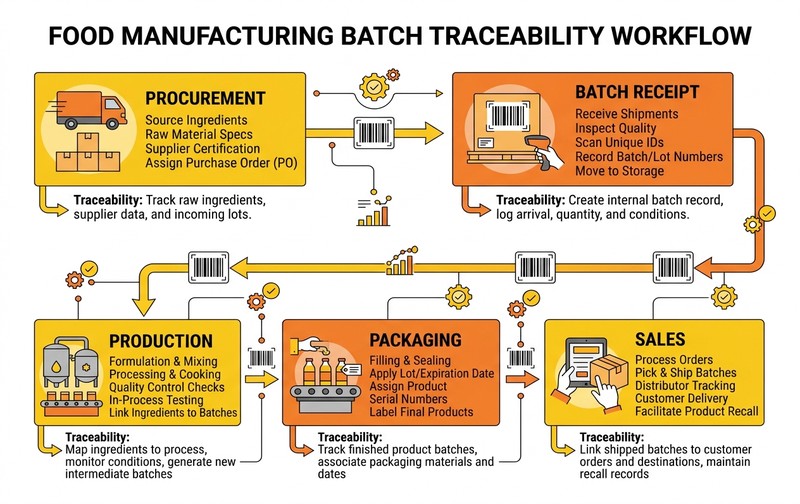
Forward and reverse batch traceability workflow in SAP Business One: tracking raw materials from supplier receipt through quarantine, production orders, finished batches, and customer distribution.
This supports a practical traceability chain:
➔
Raw Material
➔
Production Order
➔
Finished Batch
➔
Warehouse
➔
Customer
The exact traceability model depends on how the company’s master data, batch management, production processes, and integrations are configured.
Manufacturing, Formulation and Production Control
Pharmaceutical manufacturing is not simply an inventory movement from raw materials to finished goods.
Production may involve formulations, active ingredients, excipients, packaging materials, intermediate products, yield expectations, rework, and production-stage controls.
SAP Business One production orders can record the progress of manufacturing activities, while components can be issued and finished items received into inventory. Production orders can also collect production costs.
MRP can support material planning by calculating requirements across production structures and time periods.
For pharma manufacturers, the implementation should therefore map:
➔
MRP
➔
Raw-Material Requirements
➔
Procurement
➔
Batch Receipt
➔
Quality Release
➔
Production Order
➔
Material Consumption
➔
Finished Batch
➔
Quality Release
➔
Inventory
➔
Distribution
The ERP system becomes much more valuable when these processes are connected rather than maintained separately.
Formulation and BOM Management
A pharmaceutical company should evaluate how its product structures will be represented in the ERP.
Depending on the manufacturing model, this may involve:
The exact formulation requirements should be documented during implementation rather than assumed to be covered by a standard BOM structure.
Quality, Quarantine and Batch Release
Quality processes are central to pharmaceutical manufacturing.
A material may be received into inventory but should not necessarily be available for unrestricted production or sale immediately. Companies may need defined processes for sampling, testing, approval, rejection, quarantine, and release.
Schedule M specifically addresses procedures and records associated with material receipt, quarantine and storage, testing, release or rejection, complaints, recalls, and returns.
An SAP Business One implementation should therefore consider how quality-related status and business rules will work alongside inventory and batch transactions.
A practical process may look like:
For finished products:
Where the standard application does not cover a required quality workflow, an industry add-on, customization, laboratory system, or integration may be appropriate.
This distinction is critical. A pharmaceutical ERP implementation should be designed around the company’s validated operating procedures rather than forcing the process into a generic ERP workflow.
Expiry, Shelf Life and Inventory Management
Pharmaceutical inventory can lose commercial value when products approach expiry.
Managing total inventory quantity without visibility into individual batch expiry dates can make stock planning difficult.
Batch information in SAP Business One can include expiration dates, allowing organizations to manage inventory at batch level.
A pharma inventory strategy should consider:
FEFO — First Expired, First Out — may also be relevant where the business process requires inventory to be issued based on expiry dates.
However, FEFO should be treated as an operational policy that must be properly configured and executed, not simply assumed because batch management exists.
Production Costing and Margin Visibility
Pharmaceutical manufacturers also need to understand what each product and production batch actually costs.
A production-costing model may include:
Actual business requirements may be more complex.
For example, material prices can change between purchasing cycles. Yield can vary. Rework can increase consumption. Wastage can affect cost. Packaging materials may represent a significant portion of the finished-product cost.
An integrated ERP environment can connect purchasing, inventory, production, and finance data so management can investigate these cost movements.
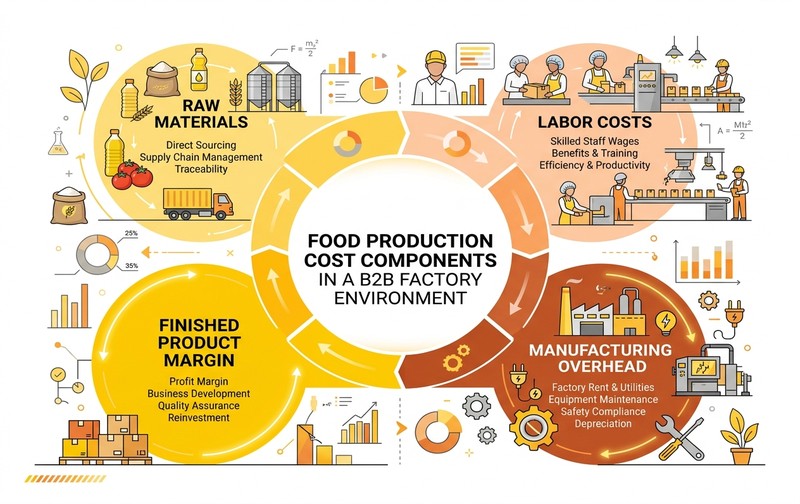
Pharmaceutical production costing and margin visibility in SAP Business One: connecting purchasing costs, direct machine and labor resources, overhead allocation, and variance reporting.
For decision-makers, the objective is not merely to calculate an accounting value. It is to answer practical questions such as:
- Which products have the strongest margins?
- Which batches have higher material consumption?
- Where is production variance occurring?
- How does wastage affect cost?
- Which raw materials are driving cost increases?
- Are inventory and financial records aligned?
These insights can support pricing, procurement, production planning, and profitability decisions.
Pharmaceutical Procurement and Supplier Control
Pharmaceutical manufacturing begins long before production.
Supplier selection and material procurement directly affect manufacturing continuity and product quality.
An ERP implementation can connect purchasing activities with inventory requirements and production planning.
The process can be structured around:
➔
Purchase Request
➔
Purchase Order
➔
Goods Receipt
➔
Batch Identification
➔
Quality/Quarantine Process
➔
Inventory Availability
This provides better visibility into material availability and purchasing commitments.
For critical materials, organizations should also define the information that needs to be captured and controlled, including supplier batch references, material specifications, certificates, approval status, and other relevant documentation.
The ERP should support the business process, while quality and supplier-management procedures remain clearly defined outside or alongside the transaction system where required.
Compliance: What ERP Can and Cannot Do
One of the most important considerations when evaluating SAP Business One for pharmaceutical companies is understanding the difference between ERP controls and regulatory compliance.
ERP software can provide infrastructure for:
But software alone does not make a pharmaceutical organization compliant.
Compliance depends on factors such as:
This is especially important when discussing regulations such as GMP, Schedule M, FDA requirements, or electronic-record controls.
Therefore, avoid statements such as “SAP Business One makes your pharmaceutical company fully compliant.”
A more accurate approach is:
“SAP Business One can provide transaction, inventory, production, and traceability controls that support pharmaceutical business processes, while compliance depends on the complete system, configuration, procedures, validation, controls, and applicable regulatory requirements.”
SAP Business One for Pharmaceutical Manufacturing: Standard vs Extended Requirements
Not every pharmaceutical business has the same operating model.
A small pharmaceutical distributor may primarily need batch inventory, expiry management, purchasing, sales, finance, and traceability.
A manufacturer may require substantially more:
Therefore, implementation planning should classify requirements into three groups:
This prevents a common ERP implementation mistake: assuming that every business requirement should be solved through customization.
Customization should have a clear business reason, ownership model, testing process, maintenance plan, and long-term value.
Pharmaceutical ERP Integration Requirements
Modern pharma operations rarely operate in isolation.
Depending on the business, SAP Business One may need to exchange information with:
The integration architecture should define:
- What data is exchanged?
- Which system is the source of truth?
- How frequently is data synchronized?
- What happens when an interface fails?
- How are errors identified and corrected?
- How is data integrity maintained?
These questions should be answered before implementation rather than after the system goes live.
SAP’s broader pharmaceutical solutions also demonstrate that advanced serialization and track-and-trace requirements can involve specialized solutions beyond the core ERP layer. SAP Advanced Track and Trace for Pharmaceuticals, for example, addresses serialization, tracking, tracing and regulatory reporting in an SAP S/4HANA environment. That distinction is useful when defining the scope of an SAP Business One pharmaceutical architecture.
SAP Business One Implementation Considerations for Pharma
A pharmaceutical ERP implementation should begin with business-process discovery rather than software configuration.
A practical implementation sequence is:
When SAP Business One May Fit a Pharmaceutical Business
SAP Business One can be considered when a pharmaceutical company needs an integrated platform for core business operations and wants stronger visibility across inventory, production, purchasing, sales, and finance.
It may be relevant for organizations that are experiencing:
Business fit should be evaluated based on the company’s actual complexity.
A pharmaceutical company with highly specialized serialization, advanced laboratory, global regulatory, or complex process-manufacturing requirements may require additional solutions or a different SAP architecture.
The right question is therefore not simply “Can SAP Business One be used in pharma?”
“Can SAP Business One, together with the required configuration, extensions and integrations, support our specific pharmaceutical processes and compliance requirements?”
SAP Business One for Pharma: Business Benefits to Evaluate
The potential business value should be measured against operational outcomes rather than a list of software features.
Key areas to evaluate include:
The actual benefits will depend on implementation quality, process adoption, data quality, integration scope, and user adoption.
What to Evaluate Before Choosing SAP Business One for Pharma
Before approving an implementation, pharmaceutical decision-makers should evaluate the following:
This evaluation creates a more realistic business case than comparing ERP feature lists alone.
Common SAP Business One Pharma Implementation Mistakes
Conclusion
SAP Business One for Pharma can provide a connected foundation for pharmaceutical purchasing, inventory, production, batch management, sales, and financial processes.
Its relevance to pharmaceutical businesses becomes clearer when the implementation is designed around real operational requirements such as batch traceability, expiry management, production control, material planning, quality processes, costing, and reporting.
SAP Business One supports batch-number management and forward/reverse batch trace reporting, while production orders and MRP provide important manufacturing and planning capabilities.
However, pharmaceutical compliance should never be presented as an automatic outcome of ERP implementation. The final solution needs to reflect applicable regulations, business procedures, system controls, validation requirements, integrations, and documentation.
For pharmaceutical companies evaluating an ERP investment, the next step should be a process-level assessment: identify the current gaps, map the required pharma workflows, determine what SAP Business One can handle natively, and identify where additional configuration, industry extensions, or integrations are required.
FAQs
Evaluate SAP Business One for Your Pharma Operations
If batch traceability, manufacturing visibility, inventory control, production planning, or disconnected pharmaceutical processes are creating operational challenges, a practical ERP demonstration can show how the required workflows can be structured.
Review your pharmaceutical processes, identify the gaps that need to be addressed, and see how SAP Business One can support your specific requirements through configuration, industry extensions, and integrations where necessary.
Request a SAP Business One demo for your pharmaceutical business.