SAP Implementation Challenges: Common Risks, Causes & Solutions
SAP Implementation Challenges: Common Risks, Causes & Solutions
SAP implementation can transform how an organization manages finance, sales, procurement, inventory, production, supply chain, customer operations, and reporting.
But implementing SAP successfully requires much more than configuring software.
Organizations often struggle when business requirements are unclear, processes are poorly defined, data is unreliable, integrations are underestimated, customization expands without control, or users are not prepared for the new way of working.
Understanding these SAP implementation challenges before the project begins can help businesses control risk, reduce delays, improve user adoption, and achieve better outcomes from their SAP investment.
Quick Answer: What Are the Biggest SAP Implementation Challenges?
The most common SAP implementation challenges include unclear business requirements, poor process mapping, weak project governance, excessive customization, inaccurate master data, integration complexity, scope creep, insufficient testing, low user adoption, unrealistic timelines, and weak post-go-live support.
Successful SAP implementations address these risks early through strong executive sponsorship, clear process ownership, fit-to-standard principles, disciplined data migration, structured testing, change management, and experienced implementation support.
Why Is SAP Implementation Challenging?
SAP implementations are complex because they affect far more than IT infrastructure.
An SAP project can change how multiple departments perform everyday business processes, including:
A configuration decision made in one function can affect several other departments.
For example, changing how material master data is structured may influence procurement, warehouse management, production planning, costing, reporting, and financial transactions.
This interconnected environment is one reason businesses should treat SAP implementation as a business transformation initiative, not simply a software installation.
13 Common SAP Implementation Challenges
1. Unclear Business Requirements
One of the earliest SAP implementation risks begins before configuration starts.
If project teams cannot clearly explain what business processes must be improved, the implementation team may end up configuring SAP around incomplete or conflicting requirements.
Common symptoms include:
How to reduce the risk
Before configuration begins:
The objective should not be to reproduce every feature of the existing system.
The objective should be to determine how SAP can support a more controlled, scalable business process.
2. Poor Business Process Mapping
SAP connects processes across departments.
If individual teams optimize their own functions without considering the complete process, problems can appear later.
Consider an order-to-cash process.
It can involve:
A problem at any stage can affect the entire transaction.
What businesses should do
Map important end-to-end processes before finalizing system design.
Examples include:
Process mapping helps businesses identify:
Duplicate activities
Manual approvals
Spreadsheet dependencies
Unclear responsibilities
Control gaps
Integration requirements
Reporting requirements
SAP should support the desired operating model—not simply automate inefficient existing processes.
3. Excessive SAP Customization
Customization may be necessary when a company has genuinely unique business requirements.
But excessive customization is one of the most common SAP implementation issues.
Organizations sometimes request custom functionality because:
“That is how our old system worked.”
This approach can introduce unnecessary complexity.
Excessive customization can increase:
A better approach: Fit-to-standard
Start by evaluating whether SAP standard functionality can support the business requirement.
Customize only when there is a clear business justification.
Before approving customization, ask:
Is this requirement legally or operationally necessary?
Can SAP standard functionality support the process?
Can the business process be improved instead?
What is the long-term maintenance impact?
What measurable value will the customization create?
A disciplined customization policy makes the SAP environment easier to maintain and scale.
4. Poor Master Data Quality
An ERP system cannot create reliable decisions from unreliable data.
Migrating inaccurate data into SAP simply transfers existing problems into the new system.
Typical data issues include:
These issues can later affect transactions, reporting, procurement, planning, costing, and financial accuracy.
How to improve SAP data migration
Businesses should:
Data cleansing should begin early.
It should not be treated as a final task immediately before go-live.
5. Integration Complexity
SAP rarely operates completely independently.
Organizations may need SAP to communicate with:
Integration requirements that appear simple during planning may become significant technical dependencies later.
Important integration questions
Before implementation, determine:
Which systems must exchange data with SAP?
Which system will be the system of record?
Should information move in real time or on a schedule?
What happens when an integration fails?
How will duplicate transactions be prevented?
How will integration errors be monitored?
Who owns each interface?
Integration architecture should be defined early rather than discovered during testing.
6. Scope Creep
SAP projects often begin with a clearly defined scope.
Then additional requests appear.
A new report.
Another workflow.
Another integration.
Another custom field.
Another approval process.
Individually, these requests may appear small.
Collectively, they can significantly affect timelines, budgets, testing, training, and project risk.
How to control scope creep
Establish formal change governance.
Every significant change request should include:
Business justification
Priority
Effort estimate
Cost
Timeline impact
Testing impact
Dependency assessment
Approval authority
Not every useful idea needs to be part of phase one.
Some requirements can be moved into a structured post-go-live improvement roadmap.
7. Weak Project Governance
SAP implementations require timely decisions.
When responsibility is unclear, project teams can spend days waiting for approvals or debating requirements.
A strong governance structure typically includes:
Executive sponsor
Project steering committee
Project manager
SAP implementation partner
Functional leads
Technical leads
Business process owners
Key users
Each person should understand what decisions they own.
Executive sponsorship matters
Senior leadership should actively support:
Without strong executive ownership, departmental preferences can begin driving the implementation instead of enterprise objectives.
8. Unrealistic Implementation Timelines
Businesses naturally want faster SAP implementation.
However, compressing the timeline without considering project complexity can create downstream problems.
Critical activities require sufficient time, including:
A shorter implementation is not automatically a better implementation.
The goal should be an efficient but controlled implementation.
Timeline estimates should consider:
Number of business entities
Number of users
Geographic locations
Business process complexity
Custom development
Integrations
Data migration volume
Compliance requirements
Resource availability
9. Inadequate Testing
Testing should answer one important question:
Can the organization safely operate through SAP from beginning to end?
Testing only individual screens or transactions is not enough.
Businesses should validate real operational scenarios.
For example:
Or:
SAP testing should typically include:
Edge cases should also be tested.
Examples include:
These are often where operational problems appear after go-live.
10. Weak Change Management
A technically correct SAP implementation can still struggle if employees do not adopt the new processes.
SAP often changes:
Who performs an activity
Who approves transactions
Which information must be entered
When information must be entered
How departments communicate
How performance is measured
Resistance usually increases when users do not understand why these changes are being introduced.
Effective change management should explain:
Communication should begin during implementation—not immediately before go-live.
11. Insufficient SAP User Training
Training should teach employees how to perform their work within the new process.
Generic system demonstrations are rarely enough.
Users need role-based training.
For example:
A production planner requires different SAP knowledge from a finance manager.
A warehouse operator requires different training from a procurement manager.
Effective SAP training should include:
Role-specific scenarios
Realistic business transactions
Common exceptions
Approval processes
Reporting responsibilities
Error handling
Practical exercises
Key users can also become internal SAP champions who support other employees after go-live.
12. Poor Cutover Planning
Go-live involves moving the organization from the existing environment into SAP.
This transition must be carefully coordinated.
Cutover activities may include:
Each activity should have:
An owner
Deadline
Dependency
Validation procedure
Escalation path
A detailed cutover checklist helps reduce uncertainty during one of the most critical stages of the SAP project.
13. Weak Post-Go-Live Support
Go-live is not the end of SAP implementation.
It is the beginning of real operational use.
During the first weeks, users may discover:
A structured hypercare period allows these issues to be prioritized and resolved quickly.
After stabilization, organizations should establish an ongoing SAP improvement model.
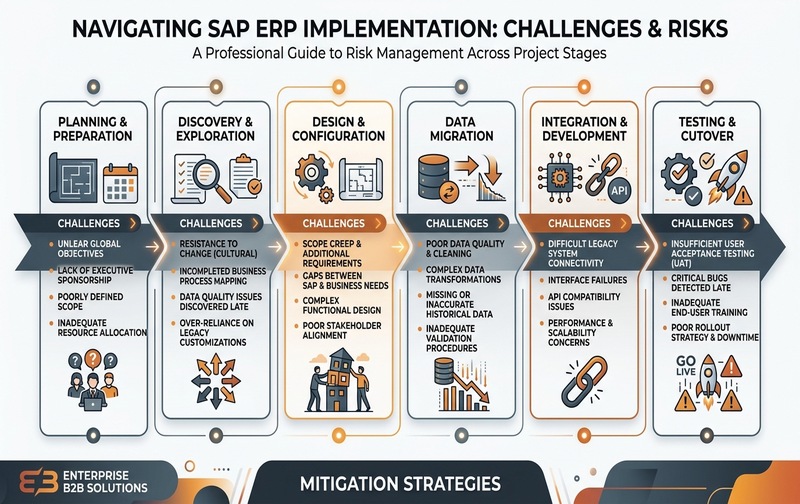
Figure 1: Navigating SAP ERP Implementation Challenges and Risks Across Project Stages.
SAP Implementation Challenges by Project Stage
Different implementation risks appear at different stages.
Businesses should therefore manage SAP risk throughout the complete implementation lifecycle rather than waiting until go-live.
Why Do SAP Implementations Fail?
SAP implementations usually fail because of a combination of business, people, process, data, and technology problems—not because of one isolated technical issue.
Common root causes include:
The earlier these risks are identified, the easier they are to control.
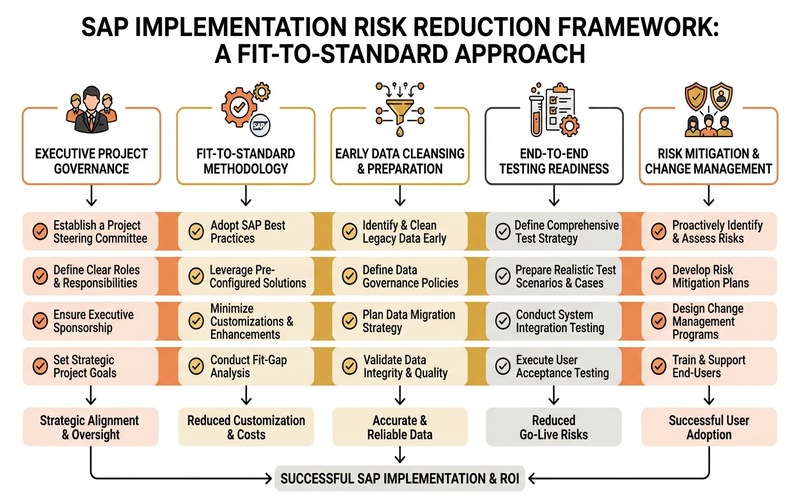
Figure 2: Comprehensive SAP Implementation Risk Reduction Framework with a Fit-to-Standard Approach.
How to Reduce SAP Implementation Risk
Successful SAP implementations typically share several characteristics.
Define measurable business outcomes
Do not define success as:
“SAP went live.”
Define what should improve.
Examples:
Faster month-end closing
Improved inventory accuracy
Reduced manual data entry
Better production visibility
Faster order processing
Fewer spreadsheet dependencies
Improved approval control
More reliable financial reporting
These outcomes help keep the project aligned with business value.
Assign clear process owners
Every critical business process needs an accountable owner.
Process owners should participate in:
This reduces ambiguity and improves accountability.
Follow fit-to-standard principles
Use standard SAP functionality wherever it adequately supports the process.
Customization should solve a genuine requirement rather than preserve unnecessary legacy practices.
Start data preparation early
Data quality often becomes one of the largest SAP implementation challenges.
Begin cleansing, ownership definition, and migration planning well before go-live.
Test end-to-end business scenarios
Testing individual transactions does not guarantee that a complete business process will work.
Validate real operational scenarios across departments.
Prepare users before go-live
Training, communication, role clarity, and change management should run alongside configuration and testing.
User readiness is part of implementation readiness.
Plan for post-go-live stabilization
Define:
Hypercare resources
Support channels
Issue severity levels
Escalation procedures
Response ownership
Enhancement processes
before the system goes live.
SAP Implementation Success Checklist
Before approving SAP go-live, decision-makers should confirm:
If several of these items remain unresolved, additional implementation preparation may be necessary before go-live.
How Do You Know an SAP Implementation Is at Risk?
Warning signs often appear before a project fails.
Management should investigate when:
These indicators do not automatically mean the implementation will fail.
However, they suggest that project governance or implementation readiness requires attention.
When Should You Bring in an SAP Implementation Partner?
Organizations should consider experienced SAP implementation support when they need assistance with:
Business process assessment
SAP solution design
Implementation planning
Configuration
Data migration
System integration
Custom development
Testing
User training
Cutover
Go-live support
SAP optimization
The implementation partner should not simply configure software.
A strong partner should help the organization identify risk, challenge unnecessary complexity, align SAP with business processes, and establish a stable foundation for future growth.
How to Evaluate an SAP Implementation Partner
Before selecting a partner, ask:
1. Do they understand our industry?
Industry knowledge helps implementation teams understand operational realities and common process requirements.
2. How do they handle fit-to-standard versus customization?
A good implementation partner should not automatically recommend custom development.
3. What is their data migration methodology?
Ask how they approach cleansing, reconciliation, test migration, and validation.
4. How do they manage integrations?
Integration ownership, monitoring, exception handling, and testing should be clearly defined.
5. How do they manage project risk?
Ask about governance, escalation, issue tracking, scope control, and steering committee involvement.
6. What happens after go-live?
Implementation support should include a clear stabilization and support approach.
Build a More Controlled SAP Implementation
SAP implementation challenges are easier to manage when they are identified before they become operational problems.
Organizations should establish clear objectives, strong process ownership, reliable data, disciplined scope governance, realistic testing, structured change management, and post-go-live support from the beginning of the project.
The goal is not simply to implement SAP.
The goal is to create an ERP environment that gives the business better control, visibility, accountability, and scalability.
If your organization is planning an SAP implementation, replacing an existing ERP, or struggling with an ongoing SAP project, Emerging Alliance can help assess your processes, implementation risks, integration requirements, data readiness, and project approach.