SAP Business One Barcode: Reducing Stock Errors & Warehouse Control
Inventory discrepancies rarely begin as major warehouse problems. They usually start with small operational errors: an incorrect quantity entered during goods receipt, the wrong item picked for an order, a batch recorded manually, or stock moved between locations without an immediate system update.
As transaction volumes grow, these small errors can create larger problems across purchasing, production, sales, finance, and customer service.
SAP Business One Barcode processes can help businesses connect physical warehouse movements with digital inventory records more accurately. By scanning items, batches, serial numbers, locations, or warehouse documents at the point of activity, businesses can reduce repetitive manual entry and improve inventory visibility.
For growing manufacturers, distributors, pharmaceutical companies, food businesses, automotive suppliers, and other inventory-intensive organizations, barcode-enabled SAP Business One processes can support stronger warehouse control without requiring employees to depend entirely on manual data entry.
Quick Answer: How Does SAP Business One Barcode Improve Inventory Control?
SAP Business One barcode management helps businesses identify items and capture warehouse transactions using barcodes instead of relying only on manual entry. Depending on the configuration and barcode solution, scanning can support receiving, picking, inventory transfers, stock counting, batch and serial tracking, production movements, and dispatch.
SAP Business One itself provides inventory, barcode, batch, serial-number, and unit-of-measure capabilities. Mobile scanning, guided warehouse workflows, automatic validation, advanced label printing, and specialized transaction processing may require an integrated barcode solution or add-on.
Why Stock Errors Become a Bigger Problem as Warehouses Grow
A warehouse may operate reasonably well with manual processes when transaction volumes are low.
But growth changes the operating environment.
More products mean more SKUs. More customers mean more orders. More warehouses create more stock transfers. Batch-controlled products increase traceability requirements. Additional warehouse employees create more opportunities for inconsistent data entry.
Common inventory problems include:
- receiving the correct product but entering the wrong quantity;
- selecting a similar-looking SKU during picking;
- recording the wrong batch or serial number;
- moving inventory physically without updating SAP immediately;
- placing stock in an incorrect bin or warehouse location;
- discovering discrepancies only during stock counting;
- shipping an incorrect item to a customer;
- maintaining spreadsheet records separately from SAP Business One.
The business impact extends beyond the warehouse.
Incorrect inventory can affect procurement decisions, production planning, order commitments, dispatch schedules, financial reporting, working capital, and customer service.
The objective of barcode inventory management is therefore not simply to scan products faster.
How SAP Business One Barcode Inventory Management Works
A barcode acts as a machine-readable identifier.
Depending on the warehouse design, a barcode can represent:
- an item or SKU;
- a unit of measure;
- a batch;
- a serial number;
- a warehouse;
- a bin location;
- a pallet;
- a carton;
- a production component;
- or another operational identifier.
Instead of manually searching for and typing information, an employee scans the relevant code using a handheld scanner, mobile device, or supported scanning application.
The barcode application identifies the corresponding record and then guides or validates the transaction.
A simple goods receipt workflow could look like this:
This reduces the number of points where information needs to be entered manually.
SAP Business One also supports multiple barcodes for individual units of measure. SAP documentation explains that businesses can maintain several barcodes against a UoM and identify a default barcode for use in relevant documents.
That becomes useful when the same product is purchased, stored, or sold using different packaging units.
Native SAP Business One Barcode Features vs Barcode Add-On Capabilities
One of the most important decisions when planning barcode implementation is understanding what SAP Business One already handles and what requires an additional application or integration.
SAP Business One provides the underlying inventory records and transaction processes. Barcode solutions typically extend those capabilities to the warehouse floor.
The distinction matters because purchasing barcode scanners alone does not create an automated warehouse.
The scanner needs to be connected to a process that knows:
- what is being scanned;
- which SAP transaction is being performed;
- what information needs validation;
- where the stock should move;
- what exceptions should prevent posting;
- and when SAP Business One should be updated.
The quality of that workflow determines the actual business value of barcode implementation.
SAP Business One Barcode Scanning for Goods Receipt and Putaway
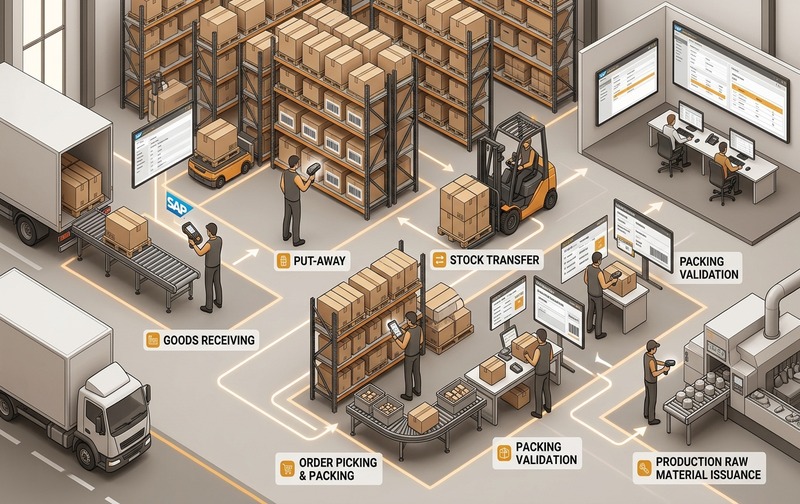
Barcode scanning across the SAP Business One inventory lifecycle: validating receiving, put-away, transfers, and picking at the point of physical handling.
Goods receipt is one of the earliest opportunities to prevent inventory errors.
Without scanning, an employee may need to identify the item manually, enter a quantity, record a batch or serial number, and select the destination location.
Errors created at receiving can remain hidden until picking, production, stock counting, or customer delivery.
A barcode-enabled receiving process can be designed as:
This creates validation before inventory enters available stock.
For batch-managed products, the process can also capture relevant traceability information when stock is received.
SAP Business One supports batch and serial-number management for inventory. SAP describes serial numbers as a method for tracking individual items, while batches track quantities of products sharing common characteristics such as manufacturing information or expiry dates.
For industries such as pharmaceuticals, food, chemicals, electronics, automotive parts, and medical equipment, this level of traceability can be operationally important.
Improving Picking Accuracy with SAP B1 Barcode Scanning
Picking is another high-risk warehouse activity.
Consider a warehouse with similar product names, packaging, or item numbers. A picker may accidentally select:
- the wrong SKU;
- the wrong batch;
- an incorrect quantity;
- a product from an incorrect location;
- or the wrong serial-number-controlled item.
Visual inspection alone becomes less reliable as transaction volumes increase.
A controlled SAP Business One barcode picking process can guide warehouse users through:
Instead of asking the user to determine everything manually, the system can compare scanned information with the expected transaction.
If the scanned item does not match the required item, the workflow can be designed to flag the discrepancy before dispatch.
SAP Business One Barcode Inventory Transfers Between Warehouses and Bins
Internal stock transfers can create inventory visibility problems when physical movement and system posting occur at different times.
For example, employees may:
- physically move products;
- record the movement separately;
- update SAP later.
During that gap, SAP may show inventory in one location while the products are physically stored somewhere else.
Barcode scanning can shorten this gap.
A typical transfer workflow is:
SAP Business One supports inventory transfer processes, including handling batches and serial numbers for relevant items. Current SAP Business One Web Client documentation also supports batch/serial selection in inventory transfer requests.
The operational objective is straightforward:
SAP B1 Barcode Management for Batch and Serial Number Traceability
Barcode inventory management becomes particularly valuable where the identity of stock matters as much as the quantity.
There are two common forms of traceability.
Batch Tracking
Batch management groups multiple units that share common attributes.
Businesses may use batches to track information associated with:
- production lots;
- manufacturing dates;
- expiry dates;
- supplier lots;
- quality-related attributes;
- recall requirements.
SAP documentation identifies expiry and manufacturing-related characteristics as examples of information associated with batch-managed stock.
A barcode workflow can reduce the need to repeatedly type long batch numbers during receiving, transfer, production, picking, or counting.
Serial Number Tracking
Serial numbers identify individual units rather than groups of items.
They are particularly relevant for:
- high-value equipment;
- electronics;
- machinery;
- medical equipment;
- warranty-controlled products;
- serviceable assets.
Scanning a serial number allows warehouse users to identify the precise unit involved in a transaction.
This can improve traceability from receipt through delivery and subsequent service processes.
Barcode-Based Inventory Counting in SAP Business One
Inventory counting is where accumulated warehouse mistakes often become visible.
The system may show 100 units while warehouse staff physically find 97.
The immediate question is the difference of three units.
The more important question is: Where did the discrepancy originate?
Possible causes include:
- incorrect goods receipt;
- picking errors;
- unrecorded transfers;
- incorrect production issues;
- misplaced products;
- duplicate entries;
- wrong quantities;
- damaged or lost stock.
Barcode-supported inventory counting can reduce manual identification errors during physical counts.
The workflow may follow:
SAP Business One’s Web Client supports inventory counting, including counting by units of measure and working with batch or serial-number information.
Barcode scanning does not eliminate the need for stock reconciliation, but it can improve the reliability and speed of collecting physical count data.
Mobile Barcode Scanning for SAP Business One Warehouses
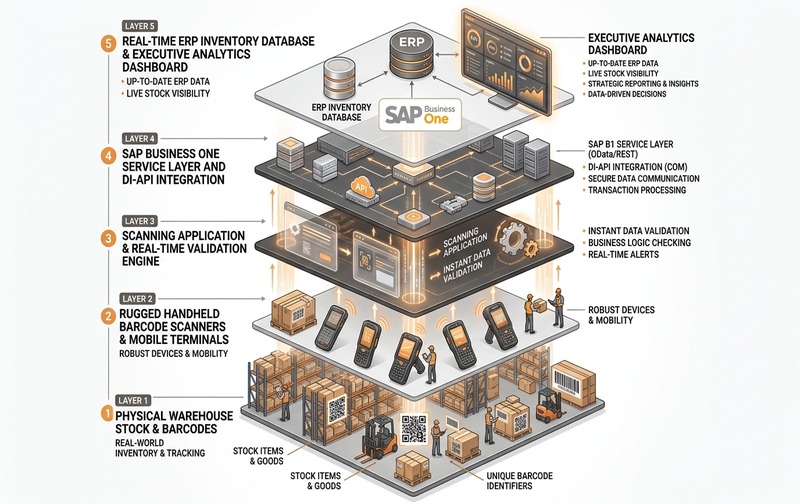
SAP Business One barcode scanner integration architecture: synchronizing rugged handheld scanners, validation engines, and ERP database in real time.
Traditional warehouse operations often require employees to perform physical tasks away from desktop computers.
That creates an operational gap.
A worker might:
- write information on paper;
- remember quantities;
- update a spreadsheet;
- return to a workstation later;
- then enter the transaction into SAP.
Every additional handoff creates another opportunity for error.
A mobile SAP Business One barcode solution can move data capture closer to the point where inventory activity occurs.
Depending on the application and integration, warehouse users may be able to perform supported processes using handheld scanners, industrial mobile devices, or smartphones.
Potential mobile workflows include:
- receiving;
- putaway;
- picking;
- packing;
- stock transfer;
- inventory counting;
- batch capture;
- serial-number capture;
- production material movements;
- dispatch verification.
The objective is not simply mobility.
Barcode Control for Production and Manufacturing Inventory
Inventory errors do not stop at warehouse shelves.
Manufacturers must also control how raw materials, components, semi-finished goods, and finished products move through production.
A wrong material issue can create:
- inaccurate material consumption;
- incorrect production costs;
- batch traceability gaps;
- stock discrepancies;
- rework;
- production delays.
Barcode-enabled workflows can support controlled material movement by requiring users to scan the component involved in the transaction.
For example:
After production:
For regulated or traceability-intensive manufacturers, connecting these warehouse and production movements can provide a clearer audit trail.
Barcode Types and Labels for SAP Business One
Implementing barcode inventory management requires more than choosing a scanner.
The barcode itself must match the process.
Common approaches include:
Item Barcode
Identifies the product or SKU.
Unit-of-Measure Barcode
Differentiates packaging levels such as: each; box; carton; pallet. This can be important when the same product is purchased and sold in different units.
Batch Barcode
Represents batch or lot-related information.
Serial Number Barcode
Identifies one specific unit.
Location Barcode
Identifies warehouse areas, shelves, racks, or bins.
QR Code
Can encode more information than many traditional linear barcode formats and may be useful for selected operational requirements.
Barcode design should therefore begin with the business process rather than the printing software.
Ask:
Then design labels and scanning rules around that requirement.
How SAP Business One Barcode Reduces Inventory Errors
The strongest value of barcode implementation comes from replacing avoidable manual decisions with controlled validation.
1. Less Manual Item Entry
Scanning can remove the need to repeatedly type or search for item codes.
2. Better Picking Validation
The scanned product can be compared with the expected product before transaction completion.
3. Stronger Batch and Serial Capture
Long numbers can be captured through scanning rather than manual typing where the barcode design supports it.
4. Faster Inventory Transactions
Warehouse employees can process repetitive tasks with fewer manual steps.
5. Improved Location Accuracy
Location scanning can help confirm where products are being removed from or placed.
6. Better Stock Visibility
Posting warehouse movements closer to the point of activity reduces delays between physical stock and SAP inventory records.
7. More Reliable Inventory Counting
Scanning can reduce product-identification mistakes during physical counts.
The business outcome is not simply “faster scanning.”
It is a more reliable inventory dataset for purchasing, operations, production, finance, sales, and management.
Common SAP Business One Barcode Problems to Prevent
Barcode technology can still fail if the underlying process is poorly designed.
Duplicate or Incorrect Barcode Master Data
A scanner can only identify the information configured behind the barcode. Incorrect item-to-barcode mapping simply automates the wrong information.
Damaged or Unreadable Labels
Labels can become scratched, torn, dirty, faded, or obscured. The implementation therefore needs a defined exception process for unreadable labels.
Poor Wireless Coverage
Real-time mobile scanning can become unreliable if warehouse connectivity is unstable.
Wrong UoM Configuration
A carton and individual unit may represent very different quantities. Barcode and UoM configuration should therefore be aligned carefully.
Weak Batch or Serial Rules
Barcode scanning cannot compensate for unclear traceability requirements. Businesses need to determine when batch or serial information must be captured and validated.
No User Training
Employees need to understand not only how to scan, but why the required sequence matters.
Too Much Customization
A heavily customized workflow can become difficult to maintain. Start with the business-critical transactions first and extend only when there is a clear requirement.
Industries That Benefit from SAP Business One Barcode Inventory Management
Barcode inventory management can support a wide range of inventory-intensive industries.
Pharmaceutical Companies
Barcode workflows can support batch identification, expiry-related processes, warehouse traceability, and controlled inventory movement.
Food and Beverage
Batch and lot tracking can support product traceability and inventory rotation processes.
Manufacturing
Manufacturers can improve control over raw materials, components, production movements, and finished goods.
Automotive and Spare Parts
Large item catalogs and similar-looking components make scan-based identification useful for receiving and picking.
Medical Equipment
Serial-number tracking can help identify individual equipment throughout sales and service processes.
Electronics
Serial-controlled stock benefits from individual-unit traceability.
Wholesale and Distribution
High order volumes make receiving, picking, stock transfer, and dispatch accuracy critical.
The implementation design should still reflect each industry’s workflows rather than deploying the same barcode process everywhere.
SAP Business One Barcode Implementation: Key Steps
A successful implementation should start with warehouse processes, not scanner procurement.
Step 1: Identify High-Error Transactions
Review where discrepancies currently occur. Examples include: Goods Receipt PO; stock transfer; picking; inventory counting; production issue; finished-goods receipt; delivery.
Step 2: Review Master Data
Validate: item codes; barcode assignments; UoMs; warehouse structures; bin locations; batches; serial-number rules.
Step 3: Define the Scanning Workflow
For every transaction, determine: What should be scanned? What should be validated? What happens when the scan is wrong? Who can override an exception?
Step 4: Select Devices
Consider: handheld scanners; industrial mobile computers; smartphones/tablets; label printers; wireless infrastructure.
Step 5: Configure the SAP Integration
Define how scanned information reaches SAP Business One and which transaction is created or updated.
Step 6: Test Exceptions
Do not test only perfect transactions. Test: incorrect SKU; wrong warehouse; duplicate barcode; wrong batch; insufficient quantity; unreadable label; missing barcode; connectivity interruption.
Step 7: Pilot Before Full Rollout
Start with one warehouse, process, or transaction type. Correct workflow problems before expanding the solution.
What to Verify Before Choosing a SAP B1 Barcode Solution
A barcode solution should be evaluated against the warehouse’s real operational requirements.
Verify
Confirm whether the solution supports the transactions you need, including:
- goods receipt;
- picking;
- delivery;
- stock transfer;
- inventory counting;
- batch management;
- serial numbers;
- bin locations;
- production movements.
Ask
Ask the implementation partner:
- Is the integration real-time?
- What happens when the wrong item is scanned?
- How are batch and serial numbers validated?
- Can multiple warehouses be supported?
- How are barcode labels generated?
- What devices are supported?
- What happens if warehouse connectivity fails?
- Can user permissions control transactions?
- How are custom warehouse requirements handled?
Test
Ask for demonstrations using your actual workflow instead of relying only on generic product demonstrations.
The most important question is:
When Does SAP Business One Need a Barcode Add-On?
Not every organization requires the same level of barcode automation.
Standard SAP Business One may be sufficient when barcode requirements are basic and transactions are predominantly handled through normal SAP interfaces.
An additional barcode solution becomes more relevant when businesses need:
- handheld warehouse scanning;
- mobile transaction processing;
- guided workflows;
- scan validation;
- location scanning;
- rapid high-volume receiving;
- mobile stock counting;
- customized warehouse processes;
- specialized label printing;
- production scanning;
- dispatch verification.
The decision should therefore be based on workflow complexity, not simply whether SAP Business One can store barcode data.
Measuring the Business Impact of SAP Business One Barcode Implementation
Do not evaluate barcode implementation only by whether scanning works.
Measure operational outcomes before and after implementation.
Useful KPIs include:
- inventory discrepancy rate;
- picking error rate;
- receiving time per transaction;
- order-picking time;
- stock-count duration;
- number of manual corrections;
- transfer-posting delays;
- incorrect shipment rate;
- inventory adjustment value;
- batch/serial traceability exceptions.
These measures provide a stronger business case than simply stating that barcode technology improves efficiency.
Building Better Warehouse Control with SAP Business One Barcode
Stock accuracy is not created during month-end reconciliation.
It is created every time inventory enters, moves through, or leaves the warehouse.
When warehouse employees depend heavily on manual item searches, handwritten notes, delayed transaction posting, and repetitive data entry, inventory discrepancies become increasingly difficult to prevent as the business grows.
SAP Business One Barcode processes can bring identification, validation, and transaction capture closer to the point where inventory activity actually happens.
The strongest implementations go beyond simply adding scanners.
They connect:
For businesses experiencing recurring stock discrepancies, picking errors, delayed warehouse updates, or batch and serial-number traceability challenges, the first step should be identifying which warehouse transactions create the greatest risk.
SAP Business One Barcode Inventory Management FAQs
Ready to Improve SAP Business One Warehouse Accuracy?
Review your receiving, picking, stock transfer, batch/serial tracking, and inventory-counting processes to identify where barcode automation can reduce manual errors.
Book a SAP Business One Barcode Demo to evaluate the right scanning and warehouse-control approach for your business.