SAP Business One Cloud Migration: Costs, Benefits & Business Case
Quick Answer: SAP Business One Cloud Migration Costs, Benefits and Business Value
SAP Business One Cloud Migration is more than moving ERP infrastructure to a hosted environment. It requires evaluating migration cost, scalability, operational efficiency, security and IT management, and expected business value. The right decision depends on current infrastructure, growth plans, integrations, customizations, user requirements, data volumes, and the complexity of the migration itself.
For many growing businesses, the trigger is the infrastructure around SAP Business One. As servers age, backup responsibilities grow and expansion adds administration, ERP hosting can become a management issue rather than a purely technical one.
Where Existing SAP Business One Infrastructure Creates Business Constraints
An on-premise SAP Business One environment can remain effective for years when the underlying infrastructure is well maintained and aligned with business requirements. The constraint appears when infrastructure complexity starts growing faster than the organization’s ability or willingness to manage it.
Aging servers can require refresh planning, operating-system maintenance, database administration, and capacity upgrades. Fragmented branch infrastructure adds complexity. Internal IT teams may spend more time maintaining ERP availability instead of improving automation, analytics, integration, or security.
Scalability can become a concern when new users, locations, integrations, or reporting workloads require additional capacity. If expansion depends on hardware procurement, local setup, or added administration, infrastructure can slow business initiatives.
Business continuity is another factor. Backup, disaster recovery, power resilience, hardware redundancy, recovery testing, and downtime planning require ownership. For companies with limited internal infrastructure resources, these responsibilities can create operational exposure.
Distributed operations may also require reliable ERP access without increasingly complex location-specific infrastructure.
These issues do not mean on-premise deployment is inherently unsuitable. They indicate a point at which infrastructure ownership should be reviewed against business continuity, scalability, cost, and management priorities.
The Business Case for Moving SAP Business One to the Cloud
The business case for moving SAP Business One to the cloud starts with a measurable operating requirement, not with the assumption that cloud is automatically better.
Cloud becomes strategically relevant when the company needs infrastructure that can scale with users, transaction volumes, locations, or operational complexity without repeatedly expanding physical server capacity. It can also support distributed access, reduce dependence on locally managed hardware, and shift portions of infrastructure administration to a cloud or hosting model.
For senior management, the distinction is between technology convenience and business value. Reduced server ownership matters when it lowers refresh-cycle exposure, frees IT capacity, or improves spending predictability.
A strong SAP Business One migration to cloud business case should therefore connect the deployment model to specific requirements such as:
- supporting new branches or users without equivalent physical infrastructure growth;
- reducing internal server-management responsibilities;
- strengthening backup and disaster-recovery planning;
- improving access for distributed teams;
- aligning ERP capacity with changing business demand; and
- reducing delays caused by infrastructure procurement or maintenance.
How SAP Business One Cloud Changes the ERP Operating Model
SAP Business One Cloud changes where and how ERP infrastructure is operated. The core ERP functionality still depends on the SAP Business One application, configuration, database, add-ons, integrations, and business processes. Cloud deployment changes the infrastructure model around that application.
The ERP environment can be hosted on cloud infrastructure designed around agreed capacity, availability, access, backup, and recovery requirements. Users can access it through the selected deployment architecture. This reduces physical infrastructure dependency and can make capacity changes easier as requirements grow.
However, migrating SAP Business One to the cloud does not automatically improve poor master data, redesign inefficient workflows, correct weak authorization models, or remove unnecessary customizations. Those are application and process issues.
Integrations require deliberate review. Connections to external applications, APIs, printers, scanners, local systems, SAP Business One add-ons, and custom reports may require changes after migration.
The correct cloud design combines infrastructure planning with application compatibility so the operating model supports access, scalability, continuity, and support requirements.
SAP Business One Cloud Migration Costs Across the Full Project Lifecycle
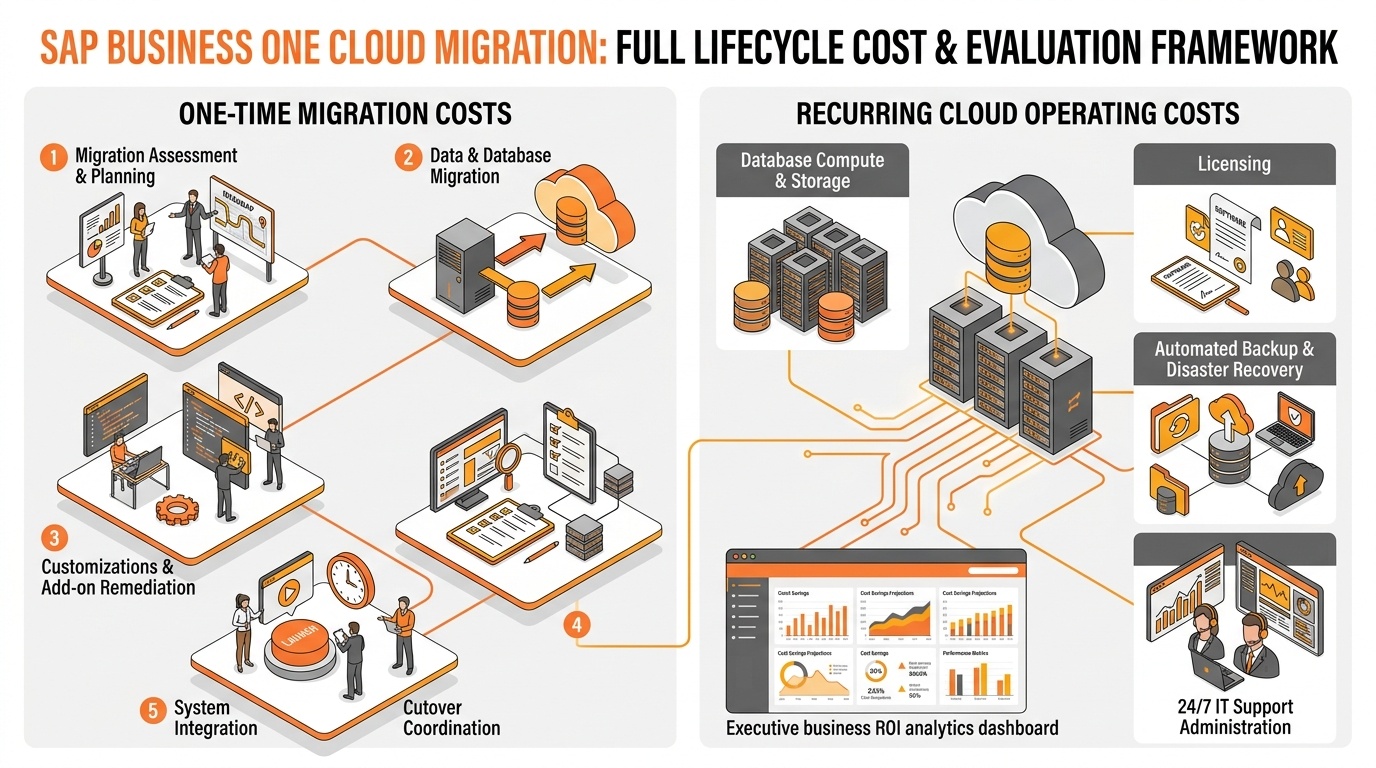
Comprehensive SAP Business One cloud migration cost framework: distinguishing one-time transition investments from recurring operating and resilience costs.
SAP Business One Cloud migration costs should be assessed across the full project lifecycle rather than reduced to a single hosting price.
A useful commercial model separates one-time migration costs from recurring cloud operating costs.
| Cost area | Typical cost type | What requires evaluation |
|---|---|---|
| Migration assessment and planning | One-time | Current architecture, dependencies, scope, risk |
| Data and database migration | One-time | Database size, history, cleansing, validation |
| Customizations and add-ons | One-time / recurring | Compatibility, remediation, licensing |
| Integration changes | One-time / recurring | APIs, interfaces, external systems |
| Testing and UAT | One-time | Functional, performance, interface validation |
| Consulting and implementation | One-time | Design, migration, cutover, coordination |
| Training and user preparation | One-time | Access changes, operating procedures |
| Cloud hosting/infrastructure | Recurring | Capacity, availability, storage, compute |
| Licensing | Recurring or contractual | SAP and third-party licensing structure |
| Backup, DR and security | Recurring | Recovery targets, retention, controls |
| Support and administration | Recurring | Monitoring, incidents, upgrades, operations |
Cost varies significantly by environment. A standard deployment with limited integrations has a different migration profile from a multi-branch system with large history, custom reports, multiple interfaces, and low downtime tolerance.
Key cost drivers include user count, database size, transaction history, customizations, third-party add-ons, integrations, branch requirements, reporting complexity, data quality, industry requirements, and required cutover windows.
Licensing also needs review because SAP Business One, database, cloud, and third-party commercial terms can differ by target deployment. CFOs and CIOs should evaluate the complete cost of moving, operating, supporting, and scaling the environment over the chosen period.
The Hidden Migration Costs That Can Affect the Business Case
Initial estimates become unreliable when they focus only on infrastructure and exclude less visible work.
Data cleansing is a common example. Moving old, duplicate, inconsistent, or unnecessary data can increase migration effort and testing complexity. Organizations must decide what historical data should move, what should be archived, and what must remain accessible.
Integration redevelopment can also create unexpected effort. Interfaces built around local servers, static IP addresses, file shares, scheduled jobs, or custom middleware may need redesign.
Add-on compatibility deserves separate validation. An add-on that works in the current environment may require a newer version, configuration change, infrastructure dependency, or vendor support.
Other frequently underestimated areas include custom reports, user acceptance testing, security configuration, temporary parallel environments, user training, downtime planning, post-go-live stabilization, and change management.
These costs affect both budget and risk; missing dependencies often appear later as change requests.
Before approving the migration, executives should ask: Which assumptions are included? Which integrations have been tested? Which add-ons are confirmed? What data is moving? What downtime is acceptable? What support is included after go-live? Clear answers improve cost visibility before commercial approval.
Business Benefits of SAP Business One Cloud Migration
SAP Business One cloud migration benefits are most useful when connected to operational outcomes rather than listed as technical features.
Scalability: When growth requires more users, storage, compute capacity, or locations, cloud-hosted infrastructure can provide a more flexible capacity model. The operational effect is less dependence on physical server expansion, which may support faster business growth.
Infrastructure flexibility: Companies facing server replacement or capacity constraints can shift from hardware ownership toward a managed infrastructure model. This may reduce the internal effort associated with procurement, maintenance, and refresh planning.
Operational continuity: A properly designed cloud deployment can support stronger backup, availability, and disaster-recovery arrangements. The business outcome is not guaranteed uptime; it is a more structured approach to recovery objectives and continuity planning.
Remote accessibility: Distributed users can access ERP through the agreed cloud access architecture. For multi-location businesses, this can simplify support for branches, remote teams, or expanding operations.
IT resource allocation: Reducing routine physical infrastructure administration can allow internal IT teams to spend more time on integrations, process improvement, analytics, cybersecurity, and business applications.
Expansion readiness: Adding a new site may require less local ERP infrastructure than an equivalent on-premise model. This can make SAP Business One cloud deployment relevant to companies expanding geographically.
Predictable infrastructure management: Recurring cloud costs can improve planning compared with irregular hardware-refresh expenditure, although predictability does not automatically mean lower total cost.
From Migration Cost to Business ROI: Building the SAP Business One Cloud Business Case
SAP Business One cloud migration ROI should compare the full migration and operating investment with measurable financial, operational, scalability, and risk-related value.
Use a simple framework:
Total migration and cloud operating costs vs. measurable cost savings + operational value + scalability value + risk reduction
Costs should include migration, remediation, testing, training, infrastructure, licenses, support, backup, disaster recovery, and administration. Value should include current infrastructure spending, refresh cycles, IT effort, continuity costs, downtime exposure, and expansion requirements.
Some benefits are directly measurable, such as avoided server purchases or reduced infrastructure support effort. Others—recovery readiness, easier expansion, or greater flexibility—are strategic and should be valued separately rather than converted into unsupported savings.
This is where ERP Total Cost of Ownership (TCO) becomes more useful than comparing monthly hosting fees with existing server costs. TCO should evaluate both deployment models over a realistic period and include refresh cycles, support, internal labor, resilience, upgrades, growth, and change requirements.
A credible business case should show assumptions, measurable and strategic benefits, recurring obligations, and sensitivity to growth.
SAP Business One Cloud Migration Risks and Planning Priorities
Cloud migration risk is manageable when dependencies are identified before cutover.
Migration governance should focus on business continuity, not only technical completion.
The Technical and Operational Checks Before SAP Business One Cloud Migration
Before finalizing cost, architecture, or timeline, validate the components that drive effort and business risk.
Start with the current SAP Business One version and database environment. Version compatibility can affect target architecture, upgrade requirements, add-ons, and testing.
Then evaluate database size, transaction history, data retention, and data quality. These influence migration duration, storage, backup design, and cutover planning.
Review user count and access patterns. Concurrent users, branch users, remote users, administrators, and external access requirements affect sizing and security design.
Map customizations, add-ons, reports, and integrations. This application landscape often determines more project effort than the infrastructure move itself.
Document branch and location requirements, especially where local printers, scanners, warehouse devices, file shares, or integrations depend on site connectivity.
Confirm security, backup, disaster recovery, and network requirements. Recovery objectives, retention policies, identity controls, internet resilience, and access architecture must match operational expectations.
Finally, define testing requirements and downtime tolerance. A company that can tolerate a longer weekend cutover has a different migration design from one that requires near-continuous operations.
These checks convert a generic cloud proposal into a realistic SAP Business One cloud migration strategy with clearer cost, risk, and execution assumptions.
When SAP Business One Cloud Migration Becomes a Strategic Business Decision
SAP Business One Cloud Migration deserves serious evaluation when ERP infrastructure begins intersecting with growth, continuity, capital planning, or management capacity.
Common triggers include planned business expansion, an approaching server replacement cycle, increasing IT maintenance effort, multi-location operations, distributed teams, rising user counts, growing integration requirements, business continuity concerns, or limited internal infrastructure resources.
Migration may also be relevant when the organization needs more flexible ERP access or predictable infrastructure spending. However, it is not an automatic next step. A stable on-premise environment with recent investment, specialized local dependencies, or advantageous economics may justify deeper analysis before change.
If data quality is poor, customizations are undocumented, or integrations are not mapped, assessment and remediation may be required before committing to a migration date.
The strategic question is whether the cloud deployment model fits operational requirements, application dependencies, risk tolerance, growth plans, and the financial model better than the current environment.
A Practical SAP Business One Cloud Migration Roadmap
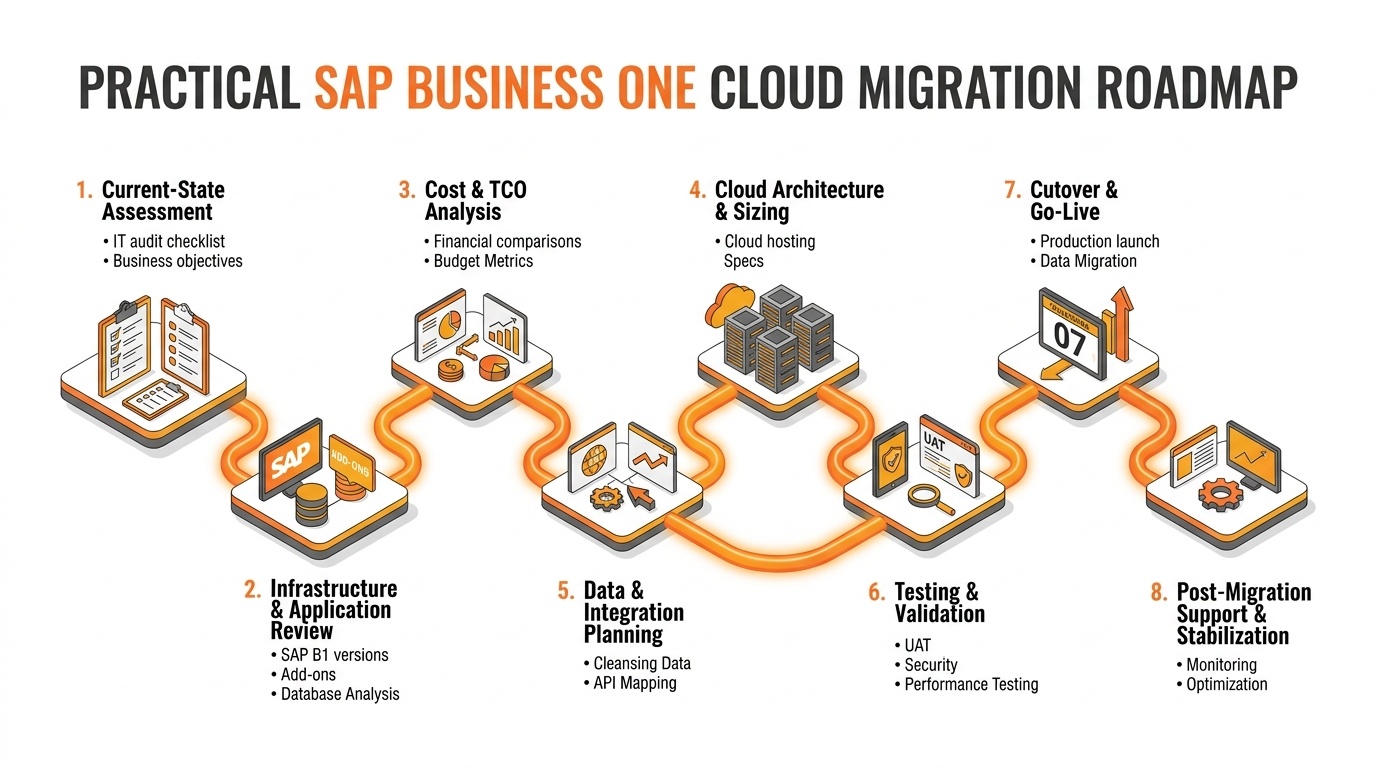
A practical step-by-step roadmap for SAP Business One cloud migration, outlining discovery, TCO analysis, architecture, testing, cutover, and post-go-live stabilization.
Current-state assessment: Document the environment, infrastructure constraints, growth plans, and business objectives.
Infrastructure and application review: Assess database, versions, customizations, add-ons, integrations, users, security, and recovery needs.
Cost and TCO analysis: Compare migration and recurring cloud costs with ownership, refresh, support, administration, and growth costs.
Migration architecture: Define hosting, sizing, access, security, availability, backup, and recovery.
Data and integration planning: Confirm migration scope, archiving, interface changes, and remediation.
Testing: Validate functions, integrations, performance, security, reports, and critical scenarios.
User preparation: Prepare users for access, procedures, support, and cutover.
Migration and go-live: Execute cutover, validate data and integrations, and confirm production readiness.
Post-migration support: Stabilize operations, verify backups, review capacity, and confirm ownership.
Conclusion
SAP Business One Cloud Migration becomes relevant when ERP infrastructure creates cost, scalability, continuity, access, or management constraints. The opportunity is to evaluate whether a different deployment model improves flexibility and supports growth.
A sound decision requires cost visibility, realistic benefits, TCO analysis, dependency review, migration readiness, and alignment with the application landscape and financial model. The strongest case is based on actual infrastructure, growth plans, operating requirements, and measurable priorities.
FAQs
Plan Your SAP Business One Cloud Migration
Evaluate your SAP Business One environment, migration needs, infrastructure challenges, integrations, customizations, and cloud costs.
Book an SAP Business One Cloud Demo to explore the right migration approach, scalability options, and next steps.