SAP Business One BOM Types: Preventing Production and Inventory Errors
/* Universal Box-Sizing for the entire blog */ .sap-bom-wrapper, .sap-bom-wrapper *, .sap-bom-wrapper *::before, .sap-bom-wrapper *::after { box-sizing: border-box !important; } /* Mobile Alignment & Fluid Layout (Responsive across all screens div, .mkdf-page-content-holder.mkdf-grid-col-12 { padding-left: 0 !important; padding-right: 0 !important; width: 100% !important; } /* Reset post text container padding */ .mkdf-blog-holder.mkdf-blog-single article .mkdf-post-text, .mkdf-blog-holder.mkdf-blog-single article .mkdf-post-text-main { padding-left: 0 !important; padding-right: 0 !important; margin-left: 0 !important; margin-right: 0 !important; width: 100% !important; } /* Ensure wrapper is clean and fluid */ .sap-bom-wrapper { width: 100% !important; max-width: 100% !important; margin: 0 !important; padding: 0 !important; box-sizing: border-box !important; } /* Normalize content padding wrapper on mobile so there is no double padding */ .sap-bom-content-padding { padding-left: 0 !important; padding-right: 0 !important; width: 100% !important; box-sizing: border-box !important; } /* Quick Answer Box symmetric padding */ .sap-bom-quick-answer { padding: 18px 14px !important; width: 100% !important; box-sizing: border-box !important; margin-left: 0 !important; margin-right: 0 !important; } /* Responsive card grids: 1 column on mobile to prevent overflow */ .sap-bom-wrapper div[style*=”minmax(220px”], .sap-bom-wrapper div[style*=”minmax(240px”] { grid-template-columns: 1fr !important; } /* Table wrapper horizontal scrolling */ .sap-bom-table-wrap { overflow-x: auto !important; -webkit-overflow-scrolling: touch !important; width: 100% !important; box-sizing: border-box !important; } /* Ensure headings, paragraphs, and words wrap properly */ .sap-bom-wrapper h1, .sap-bom-wrapper h2, .sap-bom-wrapper h3, .sap-bom-wrapper h4, .sap-bom-wrapper p, .sap-bom-wrapper li, .sap-bom-wrapper span { word-wrap: break-word !important; overflow-wrap: break-word !important; } }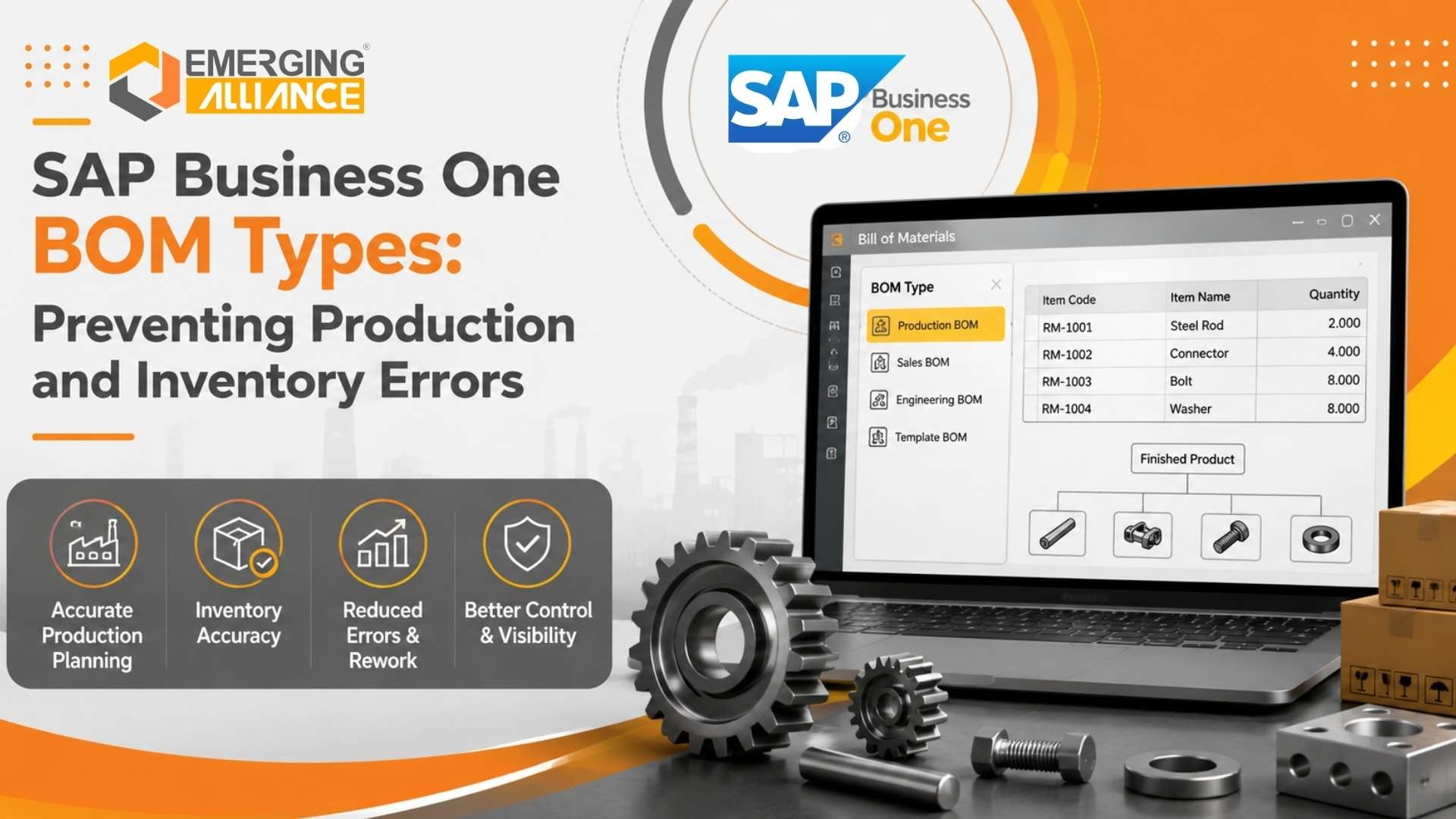
Quick Answer
SAP Business One supports four main Bill of Materials (BOM) types: Production, Sales, Assembly, and Template BOMs. Each serves a different operational purpose.
A Production BOM supports manufacturing and production orders. Sales and Assembly BOMs are primarily used to sell groups of products, while Template BOMs provide greater flexibility when components need to be changed during sales transactions.
A phantom BOM adds another important manufacturing capability. It allows businesses to group components logically inside a multi-level BOM without treating that intermediate grouping as a separately stocked item.
Selecting the right BOM structure is important because it can affect production planning, MRP, inventory control, component consumption, costing, order processing, and manufacturing visibility.
What Is a Bill of Materials in SAP Business One?
A Bill of Materials is the structured list of components, materials, resources, and quantities required to produce or represent a finished product.
For a manufacturer, a BOM can answer questions such as:
What raw materials are required?
How many units of each component are needed?
Which subassemblies belong to the finished product?
Which resources are involved in manufacturing?
How should materials flow into a production order?
Which items need to be considered during material planning?
Consider a manufacturer producing industrial control panels.
One finished panel may require:
Without a controlled BOM, these requirements can be managed through spreadsheets, employee knowledge, or manual production instructions.
That becomes increasingly risky as product complexity grows.
SAP Business One allows the product structure to become part of the ERP system, helping production, inventory, purchasing, planning, and operations work from a common definition of what is required.
But defining a BOM is only the beginning.
The more important question is:
What Is a Phantom BOM in SAP Business One?
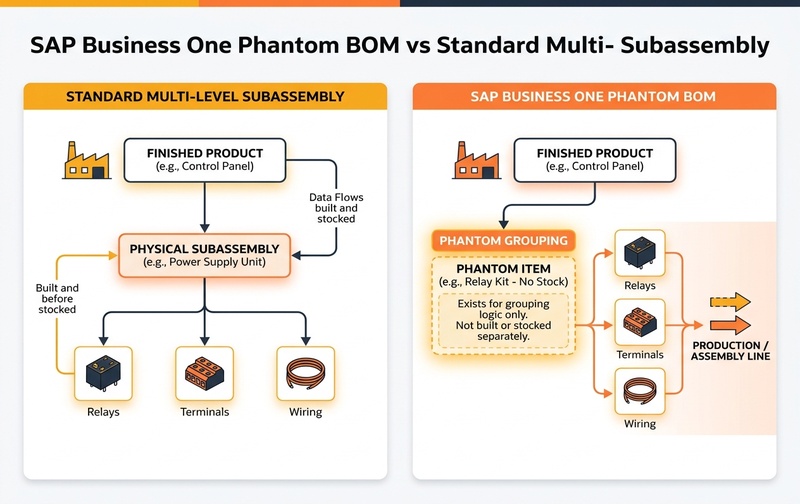
A phantom BOM is a logical grouping of components within a larger BOM structure.
The phantom item itself is not intended to represent a separately stocked physical subassembly. Instead, it provides an engineering or structural level that makes a complex BOM easier to organize.
When the parent product is processed for production, the components underneath the phantom level can be brought into the relevant production structure instead of requiring the phantom item itself to be manufactured and stocked separately.
Simple Phantom BOM Example
Imagine a company manufacturing an industrial machine.
The finished machine requires an electrical control set containing:
- relay
- terminal block
- fuse
- connector
- wiring harness
From an engineering perspective, grouping these components under an item called “Electrical Control Set” makes the BOM easier to understand.
But the company may never manufacture or stock one physical inventory item called “Electrical Control Set.”
In that situation, the grouping can potentially be treated as a phantom structure.
The BOM could conceptually look like this:
The phantom level provides structure.
The actual underlying components are what production needs.
Why Manufacturers Use Phantom Items
Phantom items are especially useful when engineering teams want a logical hierarchy without creating unnecessary inventory transactions for intermediate groupings.
A finished product can contain dozens or hundreds of materials. Organizing every component directly under the finished product can make BOM maintenance difficult. Phantom structures allow related components to be grouped together logically.
Suppose several machines use the same electrical component set. Instead of rebuilding that component structure repeatedly, the manufacturer can maintain a reusable logical grouping. This can improve consistency and BOM governance.
Not every engineering subassembly needs to become a stocked ERP item. If an intermediate grouping is never stored separately, creating inventory movements for it may add unnecessary transactional complexity.
Engineering teams often think in modules or functional assemblies. Production teams may need the actual components. A well-designed phantom structure can help connect those two perspectives.
Phantom BOM vs Standard Subassembly
One of the most important implementation decisions is determining whether an intermediate item should be treated as a phantom structure or as a normal manufactured subassembly.
| Consideration | Phantom | Standard |
|---|---|---|
| Physical product | Usually no | Yes |
| Stocked separately | No | Typically yes |
| Inventory visibility | No | Often yes |
| Component consumption | Direct at parent | Via subassembly |
| Engineering grouping | Yes | Yes |
| Separate production | No | Yes |
| Production tracking | Not required | Common |
Use a phantom item when:
- the grouping is primarily structural
- the intermediate item is not physically stocked
- its underlying components should flow into higher-level production
- the same component grouping is reused across products
Consider a normal subassembly when:
- the subassembly is physically manufactured
- it is stocked before final production
- planners need inventory visibility
- it has its own production cycle
- it needs independent cost or production tracking
This distinction should be based on the real production process rather than simply on how engineers prefer to display the product structure.
The Four SAP Business One BOM Types
SAP Business One provides four BOM types designed for different operational scenarios.
They are:
- Production BOM
- Sales BOM
- Assembly BOM
- Template BOM
Using the wrong type can create confusion around production, customer documents, inventory handling, and component visibility.
1. Production BOM
A Production BOM is designed for products that are physically manufactured.
It defines the relationship between the finished product and the materials or resources required to produce it.
For example, a manufacturer producing office chairs might define:
Components: seat, backrest, base, wheels, gas lift, arm rests, fasteners
The Production BOM can then become the foundation for manufacturing transactions.
Production BOMs can support:
- production orders
- component requirements
- manufacturing planning
- material consumption
- resource planning
- finished-goods receipt
- MRP calculations
- structured production processes
When should you use a Production BOM?
Use it when the business actually converts materials or components into a finished product.
Typical industries include:
For manufacturing companies, this is normally the most operationally significant BOM type.
2. Sales BOM
A Sales BOM is designed for situations where several items are sold together as a predefined package.
The customer is purchasing a parent product, while the individual components that make up that product can be represented within the sales document.
Consider a computer bundle:
monitor, keyboard, mouse, desktop computer
The business sells the package as one commercial offering, but the individual components remain relevant.
Sales BOMs are useful when:
- several products are always sold together
- customers need visibility into the components
- the company wants a predefined sales bundle
- component quantities follow the parent quantity
For example, if a customer purchases ten workstation packages, the quantities of the associated components can follow the sales quantity.
Common use cases
Sales BOMs may suit:
- technology bundles
- equipment packages
- promotional kits
- hardware bundles
- packaged accessories
- predefined product combinations
A Sales BOM should not be confused with manufacturing.
Its primary purpose is to manage a structured combination of items in the sales process.
3. Assembly BOM
An Assembly BOM is also used for selling a collection of items, but its presentation differs from a Sales BOM.
The customer-facing transaction generally focuses on the parent item, while the underlying components do not need to be presented in the same way as they are in a Sales BOM.
Imagine selling:
which contains: safety helmet, gloves, protective glasses, reflective vest
The customer may simply need to see “Warehouse Safety Kit” rather than every underlying component on the sales document.
Assembly BOMs are useful when:
- several inventory components make up one sellable bundle
- customers do not need the detailed component breakdown
- the company wants a cleaner commercial presentation
- inventory still needs to reflect the component structure
Sales BOM vs Assembly BOM
The simplest distinction is:
Sales BOM: the components are commercially relevant and visible.
Assembly BOM: the parent package is commercially more important than showing each underlying component.
The correct choice therefore depends partly on how the business wants the customer to see the transaction.
4. Template BOM
A Template BOM provides greater flexibility than a fixed Sales or Assembly BOM.
It acts more like a predefined list of possible components that can be adjusted during a transaction.
For example:
could initially contain: desk, chair, monitor, keyboard, storage cabinet
But one customer may want:
- two monitors
- no storage cabinet
- a different chair
A Template BOM is more suitable when the bundle should act as a starting configuration rather than a rigid component structure.
Template BOMs are useful when:
- customer requirements vary
- sales teams need configuration flexibility
- components may be substituted
- quantities may change
- optional items may be removed
- additional items may be added
Typical scenarios include:
- configurable equipment packages
- office packages
- IT solutions
- customizable product kits
- project-based sales bundles
SAP Business One BOM Types Comparison
Primary Purpose: Manufacturing finished products
Best Used For: Production orders & MRP planning
Flexibility: Strictly controlled via production structure
Primary Purpose: Selling predefined product kits
Best Used For: Fixed sales packages & customer visibility
Flexibility: Limited component changes
Primary Purpose: Selling bundled items under single parent
Best Used For: Customer-facing commercial packages
Flexibility: Limited
Primary Purpose: Configurable sales combinations
Best Used For: Dynamic bundles & customizable kits
Manufacturing Focus: Low (Sales driven)
The most important distinction is that a Production BOM supports manufacturing, while the other three BOM types primarily support different sales-document scenarios.
How Multi-Level BOMs Work in SAP Business One
Real manufacturing environments rarely use only one BOM level.
Consider a machine containing:
Each assembly can itself contain multiple components.
This creates a multi-level BOM.
Multi-level BOMs provide a more realistic representation of complex manufactured products because engineering and production structures are rarely completely flat.
However, they also introduce more planning decisions.
The manufacturer must determine:
Which subassemblies should be produced independently?
Which intermediate items should be stocked?
Which groups should be phantom structures?
Which level should hold resources?
How should production lead times be represented?
How should component shortages affect the production plan?
A poorly designed multi-level BOM can make an ERP system more complicated than the actual manufacturing process.
A well-designed one makes planning more transparent.
How Phantom Items Affect Production Planning
The main advantage of a phantom structure is that planning can focus on the underlying physical requirements instead of treating every engineering grouping as separately stocked inventory.
Imagine this structure:
➔ Component A
➔ Phantom Assembly
➔ Component B
➔ Component C
➔ Component D
Operationally, production is concerned with:
The phantom level helps organize the structure without unnecessarily introducing another physical inventory layer.
This becomes particularly valuable where component groupings are reused across several products.
But companies should avoid turning every logical grouping into a phantom item.
The decision should reflect:
- manufacturing sequence
- stocking strategy
- planning requirements
- production control
- costing requirements
- traceability requirements
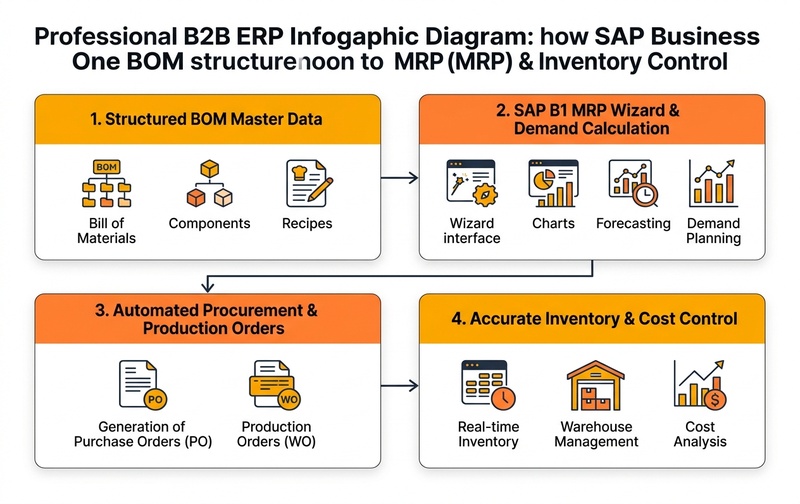
How BOM Structure Affects MRP
Material Requirements Planning depends heavily on accurate product structures.
MRP must understand what materials are required to satisfy expected production demand.
If the BOM is incorrect, planning can also become incorrect.
Potential consequences include:
missing purchase requirements, unnecessary procurement
excess inventory, component shortages
delayed production, production rescheduling
inaccurate material plans
For example, imagine a finished product requires four bearings, but the BOM mistakenly contains only two.
If demand is 1,000 finished units, the planning difference becomes:
Correct requirement: 4,000 bearings
Incorrect BOM requirement: 2,000 bearings
The ERP system can calculate correctly only when the master data reflects reality.
This is why BOM governance is not simply an IT responsibility.
It is a manufacturing-control responsibility.
How BOM Design Affects Inventory Control
Manufacturers sometimes create unnecessary intermediate inventory because their ERP structure does not match the physical production process.
Consider two scenarios.
A motor assembly is manufactured today, stored for several days, and later consumed during machine assembly.
Treating it as an independently produced and stocked subassembly may make operational sense.
An electrical component group exists only as an engineering structure. Its individual components are picked directly when the final machine is manufactured.
Treating this grouping as inventory may introduce unnecessary transactions. A phantom structure may be more appropriate.
The fundamental question should be:
If the answer is no, the BOM structure should be reviewed before creating another inventory layer.
BOM Structure and Manufacturing Cost Control
BOM accuracy also contributes to better manufacturing cost visibility.
A Production BOM establishes the expected materials and resources associated with a product.
If those inputs are incomplete or incorrect, managers may struggle to understand why actual manufacturing results differ from expectations.
Common problems include:
- incorrect material quantities
- obsolete components
- incorrect units of measure
- duplicate BOM lines
- unmaintained substitute materials
- missing resources
- incorrect production assumptions
For CFOs and operations leaders, BOM governance therefore has a financial dimension.
Incorrect product structures can influence:
A reliable BOM provides better input data for manufacturing control.
Common SAP Business One BOM Configuration Mistakes
1. Using a Phantom Item for a Real Stocked Subassembly
If an intermediate product is physically manufactured and stored, treating it purely as a phantom grouping may remove visibility that planners need.
Review whether the item needs:
- independent stock
- its own production order
- separate lead time
- dedicated costing
- quality inspection
- batch or serial traceability
If it does, a standard subassembly structure may be more appropriate.
2. Creating Inventory Items for Every Engineering Group
The opposite problem is also common.
A business may create ERP inventory items simply because engineering documentation contains multiple assembly levels.
Not every engineering group needs inventory control.
This can create:
- unnecessary goods movements
- extra production orders
- more master data
- complicated planning
- misleading inventory balances
Phantom items can reduce unnecessary intermediate structures when used appropriately.
3. Confusing Sales BOM With Production BOM
A sales kit and a manufactured product are not the same thing.
A Production BOM answers: What do we need to manufacture this product?
A Sales BOM answers: Which items are sold together as this commercial package?
Using one concept in place of the other can create operational confusion.
4. Choosing Sales BOM When Assembly BOM Better Fits Customer Documents
If customers do not need to see each component, an Assembly BOM may provide a cleaner sales-document structure.
The decision should account for:
- quotation presentation
- order presentation
- customer expectations
- invoicing requirements
- inventory behavior
5. Using a Fixed BOM for Highly Configurable Sales
When salespeople regularly replace components, change quantities, or remove options, a rigid BOM creates friction.
A Template BOM may be better suited to configurable bundles.
6. Ignoring Multi-Level BOM Complexity
Adding levels does not automatically improve control.
Every BOM level should serve a defined operational purpose.
Ask:
- Is this level stocked?
- Is it manufactured independently?
- Is it only an engineering grouping?
- Does MRP need to plan it independently?
- Does production need separate control?
If the answer to all of these is no, the structure may be unnecessarily complex.
7. Poor BOM Change Governance
A BOM should not become a static record that nobody reviews.
Without a controlled process for BOM updates, SAP Business One can continue planning against outdated manufacturing assumptions.
Manufacturers should establish ownership for:
- BOM creation & approvals
- revisions & effective changes
- component substitutions
- obsolete materials
- periodic validation
How to Choose the Right SAP Business One BOM Type
Use this practical decision framework.
Are you physically manufacturing the parent item?
Yes ➔ Consider a Production BOM.
Are several products sold as one predefined bundle and should customers see the individual components?
Yes ➔ Consider a Sales BOM.
Are several items sold together, but only the parent package needs to appear prominently to the customer?
Yes ➔ Consider an Assembly BOM.
Do salespeople need to change, remove, substitute, or add components?
Yes ➔ Consider a Template BOM.
Is an intermediate level only a logical or engineering grouping and not independently stocked?
Yes ➔ Evaluate whether a phantom structure is appropriate.
The final configuration should always be validated against the company’s actual manufacturing, inventory, costing, sales, and planning processes.
Business Questions to Ask Before Configuring BOMs
Before finalizing an SAP Business One BOM structure, manufacturing leaders should ask:
Production
- Is the item actually manufactured?
- Does it require a separate production order?
- What components and resources are consumed?
Inventory
- Is the intermediate item physically stored?
- Does it need independent stock visibility?
- Does it require batch or serial tracking?
Planning
- Should MRP plan this item separately?
- Does it have an independent lead time?
- Does purchasing depend on this structure?
Costing
- Do we need to track the cost of the intermediate stage?
- Are resources represented correctly?
- Are component quantities realistic?
Sales
- Should customers see individual components?
- Is the bundle fixed or configurable?
- Can salespeople substitute items?
These questions turn BOM configuration from a technical exercise into an operational design decision.
Turn Your BOM Structure Into Better Manufacturing Control
A BOM is much more than a list of raw materials.
It determines how SAP Business One understands the relationship between your products, components, inventory, production requirements, and sales structures.
The wrong BOM design can create unnecessary complexity, poor inventory visibility, planning errors, and production workarounds.
The right structure helps SAP Business One reflect how your factory actually operates.
Not sure whether your manufacturing process requires Production BOMs, multi-level BOMs, phantom items, or a combination of structures?
Emerging Alliance can help you evaluate your manufacturing workflow and configure SAP Business One around your production, MRP, inventory, and costing requirements.