

UAE E-Invoicing: Reducing Invoice Validation Delays and Billing Backlogs in SAP Business One
Quick Answer
UAE E-Invoicing requires in-scope businesses to exchange structured electronic invoices through Accredited Service Providers (ASPs), with relevant tax data reported to the Federal Tax Authority (FTA). For SAP Business One users, inaccurate master data, missing invoice fields and unreliable integrations can cause validation failures and unresolved billing queues. An appropriately configured integration can prepare structured data, carry out preliminary checks, connect to an ASP and return processing feedback. The result is better invoice traceability and less avoidable manual rework—not automatic compliance without testing and ongoing controls.
Why Invoice Delays Become a Business Risk
An invoice can be correctly posted in SAP Business One and still fail to complete the electronic exchange process. This distinction matters to CEOs, CFOs and IT leaders: ERP posting confirms an internal accounting transaction; it does not establish that the structured invoice was successfully exchanged and reported under the UAE framework.
Many UAE businesses rely on spreadsheets, email approvals or separate customer-management and finance applications alongside their ERP. Such processes may appear manageable when volumes are low. As branches, recurring orders and transaction types increase, however, missing information and manual handoffs can create processing queues.
The immediate goal is not simply to transmit invoices faster. It is to identify precisely where each invoice stands, prevent recurring errors and preserve an auditable route from ERP transaction to external status.
UAE E-Invoicing Requirements and Implementation Dates
Under the UAE Electronic Invoicing System, an eInvoice is structured invoice information exchanged electronically between supplier and buyer, with the relevant information reported to the FTA. A PDF, scanned invoice, image or email attachment alone is not an eInvoice.
The system uses the Peppol network and UAE-specific PINT-AE requirements. It operates through a decentralised five-corner model:
- Supplier (Corner 1): originates the invoice data.
- Supplier ASP (Corner 2): validates and processes the data for exchange.
- Buyer ASP (Corner 3): receives and validates the electronic message.
- Buyer (Corner 4): receives the invoice through its ASP arrangement.
- FTA (Corner 5): receives the required reported tax data.
The supplier-side ASP and buyer-side ASP perform distinct functions. Message-level acknowledgements and tax-data reporting statuses should be monitored separately from the internal SAP Business One document status.
UAE E-Invoicing rollout schedule
The pilot and voluntary implementation phases began on 1 July 2026. The published framework includes exclusions and later amendments, so businesses should confirm whether their transactions are in scope rather than assume that every invoice is covered. For example, B2C transactions are excluded from the initial mandatory scope; an October 2026 amendment also introduced a temporary exclusion for transactions within the same tax group for a defined period from 1 January 2027. Confirm eligibility and any conditions in the official legislation.
Regulatory update (3 November 2026): The Ministry of Finance introduced a revised service-provider accreditation framework in October 2026 and announced updated administrative penalties on 30 October 2026. Businesses should verify current accreditation and legal obligations through the Ministry’s official eInvoicing portal before contracting or deploying.
Where SAP Business One Invoice Validation Breaks Down
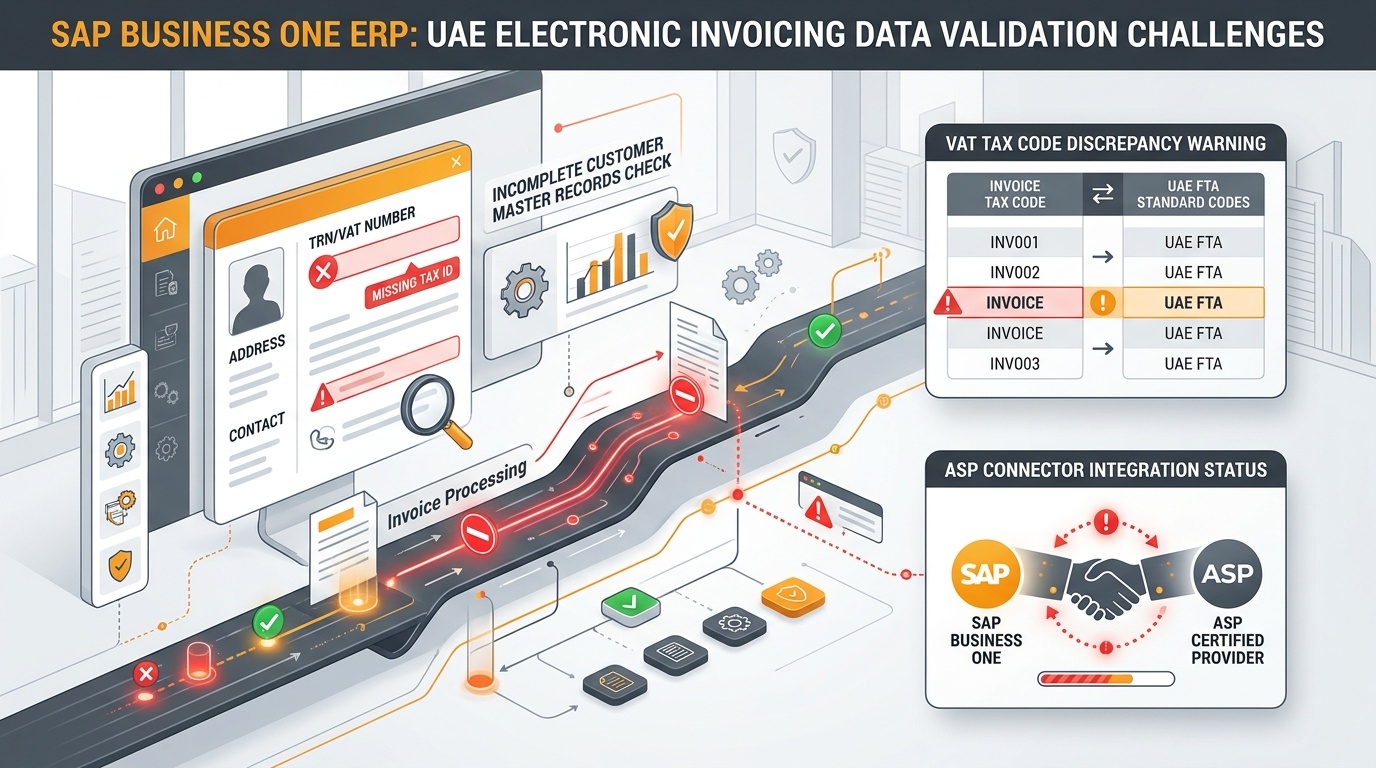
Where SAP Business One invoice validation breaks down: identifying customer master data gaps, tax mapping errors, and ASP connector failures before transmission.
SAP Business One can manage invoicing, sales, purchasing and financial data. Electronic invoicing readiness depends on how those records are configured, mapped and passed to a compatible external service.
Incomplete or inconsistent master data
A legal name, customer identifier, address or required registration field may be missing or outdated. Staff can still generate a transaction internally while its external message fails a required validation. The solution is to correct the responsible source record and establish controls that prevent similar gaps on future invoices.
Tax and transaction mapping errors
A tax code or invoice classification suitable for an internal workflow may not map correctly to the applicable structured fields. Inconsistent amounts, incorrect currency handling or missing references can also create a mismatch. Mapping should be documented by transaction type and tested with realistic invoices and credit notes.
Integration and communication failures
A connector may encounter an unavailable endpoint, authentication problem, unsupported format or interrupted message delivery. An invoice should not be recorded as successfully exchanged merely because it was exported from SAP Business One. The integration needs reliable acknowledgements, retry controls and an auditable exception history.
Missing visibility after submission
Without central monitoring, finance may not know whether an invoice is still waiting for an ASP response, has been rejected or needs a correction. Technical statuses should be translated into clear operational actions rather than left in an integration log that only IT can interpret.
From SAP Business One Invoice to Electronic Exchange
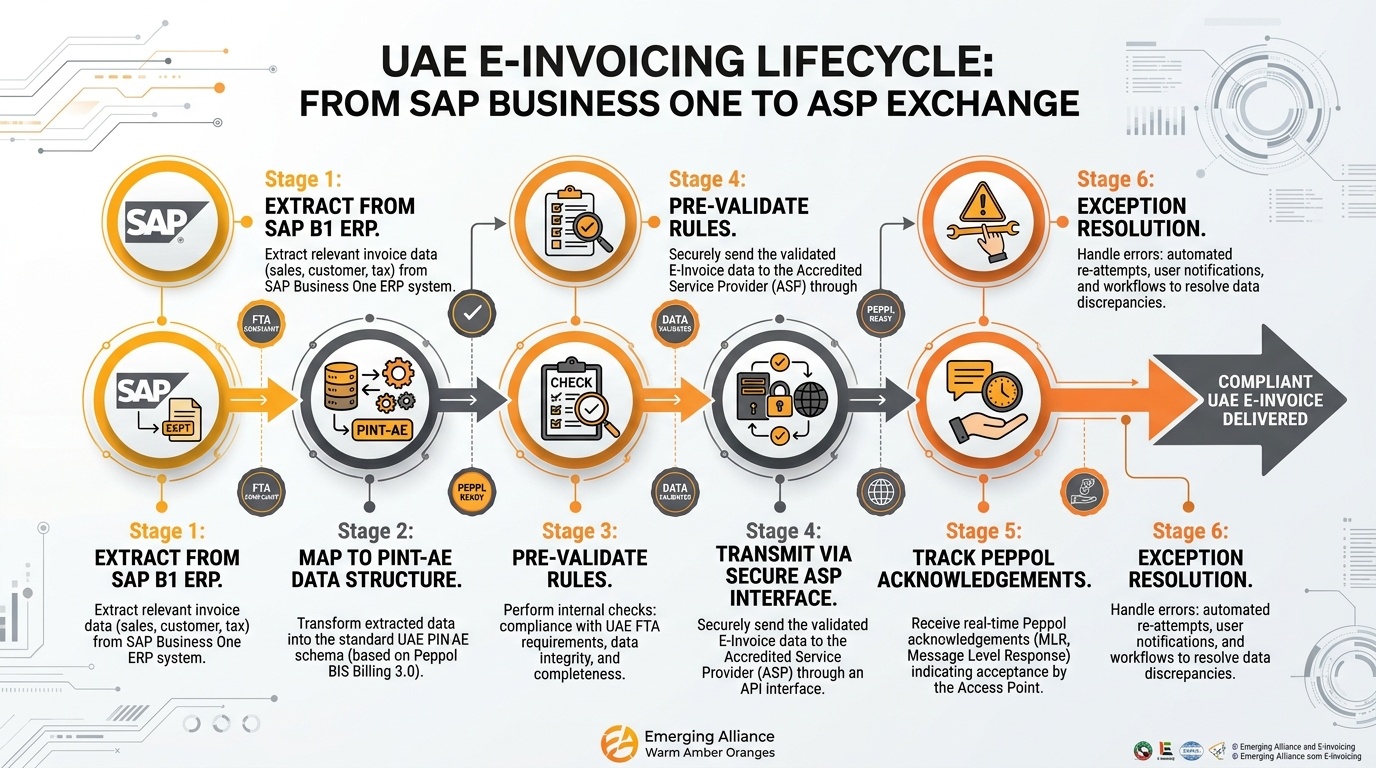
From SAP Business One invoice to electronic exchange: the six stages connecting ERP transactions to Accredited Service Provider validation and FTA compliance.
A well-designed implementation connects accounting processes to the selected ASP without unnecessary rekeying. Actual capabilities depend on the SAP Business One version, connector, middleware and service agreement.
Important: Preliminary checks within SAP Business One or middleware do not replace validation performed by the accredited service providers. A successful ERP posting, connector submission or PDF generation should not be treated as proof of completed electronic exchange.
For example, a distributor issuing invoices across several branches may submit a batch in which some records have incomplete customer fields. With pre-validation and exception routing, those records can be identified earlier. Finance can correct the relevant data while the integration continues handling eligible transactions according to its configured controls.
This is an illustrative workflow, not a guaranteed reduction in processing time. Benefits depend on the transaction mix, data quality and technical implementation.
Reducing Billing Backlogs Through Structured Invoice Exception Management
A backlog becomes manageable when every pending invoice has a reason, an owner and a next action. Businesses should distinguish an actual data rejection from a delayed acknowledgement or a failed transmission.
Classify the exception before making changes
Retries need particular care. A timeout does not always mean the receiving system failed to process the invoice. The integration should check existing transaction identifiers and responses before resubmission to reduce duplicate-message risks.
Use operational indicators that support decisions
Track invoice volumes by status, unresolved exceptions by age, first-pass validation outcomes, average exception-resolution time and discrepancies between ERP records and external acknowledgements. These indicators reveal different problems: a rising rejection rate points to data or mapping quality, while growing unacknowledged transactions may indicate interface or service interruptions.
A daily reconciliation should compare invoices generated, transmitted, acknowledged and still unresolved. Where required, include applicable reporting statuses as a distinct stage. Assign escalation thresholds to unusually old or frequently recurring exceptions.
Preparing Finance and IT Operations for UAE E-Invoicing
The most effective readiness assessment follows the invoice through its full lifecycle, not just through the SAP Business One posting screen.
Phase 1: Document scope and current workflows
Identify entities, transaction types, branches, sales invoices, service invoices and credit notes. Determine which transactions are in scope, document approval handoffs and note any spreadsheets or external applications that contribute to invoice creation. Confirm the organisation’s applicable implementation phase.
Phase 2: Check data and system compatibility
Review legal identifiers, tax configuration, customer and supplier data, document references and currency fields. Evaluate the installed SAP Business One release, custom developments, database environment and available interfaces. Decide whether the source ERP, middleware or a controlled master-data process should own each correction.
Phase 3: Select the ASP and integration architecture
Confirm the selected provider’s current accreditation status, contracting responsibilities, Peppol support, technical interface and capacity to handle relevant transaction scenarios. A business must distinguish the regulated ASP role from the SAP Business One integration partner role; they may be performed by different organisations.
Phase 4: Test complete invoice scenarios
Run end-to-end tests for invoices, credit notes, different tax treatments and business-specific exceptions. Include missing required fields, incorrect references, connection interruptions, late responses and recovery procedures. Verify not only transmission but also available external acknowledgements, correction paths and reconciliation.
Phase 5: Establish ongoing operational controls
Define responsibilities between sales, master-data administration, finance and IT. Implement monitoring for rejected and pending transactions, set thresholds for unresolved exceptions and establish audit procedures that connect internal invoices to external records.
Pragmatic milestone: Treat electronic invoicing readiness as an operational capability requiring testing and controls, not as a software switch. An organisation that can identify and correct errors in its own test environment will resolve live exceptions much faster.
How Emerging Alliance Helps SAP Business One Users Prepare
Emerging Alliance is an SAP Business One partner that assists organisations with system design, process configuration, interface integration and operational readiness for electronic invoicing.
Our consultants examine how transactions move from sales and customer master records into invoices, mapping fields to the requirements of the selected service provider. We configure preliminary validation routines in SAP Business One to catch missing data before transmission, integrate with accredited ASPs and establish monitoring that translates integration logs into clear operational tasks for finance.
Rather than applying generic templates, we test with your actual transaction mix—including partial deliveries, credit notes, export sales and branch operations—so that exceptions are identified and resolved before mandatory deadlines take effect.
Frequently Asked Questions
Prepare Your SAP Business One System for UAE E-Invoicing
Connect with Emerging Alliance to review your current SAP Business One invoicing workflows, identify data-validation risks and establish an auditable electronic exchange process ahead of the mandatory rollout.
Request an Assessment
Submit your requirements and our SAP Business One integration specialists will get in touch with you shortly.